All commands, alphabetic order; letter S
\S (constant)
The \S command translates to a section sign, §, Unicode U+A7. It is
equivalent to \textsection. See description of the latin supplement
characters.
\samepage
Translation of \samepage is <samepage/>.
\savebox, \sbox
The two commands \sbox and \savebox read a box number and a box
content, and fill the box. The \savebox command takes some optional
arguments.
\setlength{\unitlength}{1pt}
\sbox0{1A\bf b}
\savebox1{2A\bf b}
\savebox2(3,4){3A\bf b}
\savebox3(3,4)[c]{4A\bf b}
\savebox4[40pt]{5A\bf b}
\savebox{5}[40pt][c]{6A\bf b}
\newsavebox\Nsbox
\savebox\Nsbox[40pt][c]{7A\bf b}
\box0\box1\box2\box3\box4\box5\usebox\Nsbox
Translation, where bold face font is shown as BF.
<mbox>1A<BF>b</BF></mbox>
<mbox>2A<BF>b</BF></mbox>
<pic-framebox width='3' height='4'>3A<BF>b</BF></pic-framebox>
<pic-framebox width='3' height='4' position='c'>4A<BF>b</BF></pic-framebox>
<mbox width='40.0pt'>5A<BF>b</BF></mbox>
<mbox width='40.0pt' position='c'>6A<BF>b</BF></mbox>
<mbox width='40.0pt' position='c'>7A<BF>b</BF></mbox>
\SaveVerb
\SaveVerb command takes as argument a name
(a sequence of letters), and reads the verbatim material, delimited by
a character of category code 16 (defined by \DefineShortVerb).
This material is saved, and can be used by the \UseVerb command. For an example, see catcode
section
\savingdiscards (internal integer, eTeX extension)
When TeX’s page builder transfers material from the “recent
contribution” to the “page so far”, it discards discardable items
preceding the first box or rule on the page. When ε-TeX’s parameter
\savingdiscards is positive, these discarded items are stored in a
special list; the command \pagediscards reinserts these items (and
clears the list). The same holds for \vsplit, the command is then
\splitdiscards. Not used in Tralics.
\savinghyphcodes (internal integer, eTeX extension)
The integer quantity \savinghyphcodes, when positive, tells ε-TeX to
store the current \lccode table together with the hyphenation table
of the current language. See ε-TeX documentation for why it is useful to
store such a table; not used in Tralics.
\sb
\sb command is a shorthand for an underscore character of
category code 8. See an example `\sp <doc-s.html#cmd-sp>`__.\sc
\sc command is equivalent to \normalfont\scshape. In other
words, it selects a font of normal (Roman) family, medium series and
small-caps shape. For an example of fonts, see `\rm <doc-r.html#cmd-rm>`__.\scalebox, \reflectbox
\scalebox command takes three arguments, the first produces
the attribute scale, the second is optional, it produces the attribute
vscale, and the third argument is a box content (a priori paragraphs
are not allowed). The command \reflectbox takes a single argument,
the box content, the scale is -1 and the yscale is 1. For an example, see `\fbox <doc-f.html#cmd-fbox>`__.
Note: \scalebox{.33}{\includegraphics{xx}} adds scale='.33' to
the image and produces no box.\scaleput
\scaleput command is defined by the curves package. See `\arc <doc-a.html#cmd-arc>`__.Scanint (function)
First some definitions: one optional space is either empty or a space
(implicit or explicit, see below), and optional spaces refers to a
(possibly empty) sequence of such characters. An equals is optional
spaces, maybe followed by an = character of category code 12. Such
an object is ignored, it appears in the case of an assignment after the
variable. Example: it appears after \everypar, \box25,
\hyphenchar\myfont, \fontdimen3\myfont, or \setmathchar5 6.
In most of the examples below, we shall use =, rather than nothing
or a space.
Sometimes, an integer value is read by Tralics. The value is a signed
32bit integer number. When a number is read, tokens are expanded, in
order to see if it is a space, a digit, or whatever. An integer is
formed by optional signs followed by an unsigned number. A sign is a
+ or a - of category code 12; more than one sign can be given,
as well as spaces between them.
In the example that follows, \count@ is a command that reads the
integer 2 (preceded by optional signs). Commands on the first line yield
the number two, commands on the second line yield the number minus two.
The translation of the two lines is XX.
X\count@=2 \count@=+2 \count@= + + 2 \count@ = + + + 2
\count@=-2 \count@=+-2 \count@= -+ + 2 \count@ = + - + + 2 \count@=---2 X
An unsigned number can be a coerced integer, obtained by converting a
dimension (in this case, the dimension is expressed in scaled point
units), or by converting a glue (in this case, only the fixed part of
the glue is considered). The TeXbook specifies internal dimen and
internal glue; since in the case \count0=14pt no dimension is read.
In the example that follows, the number assigned to \count@ is
respectively -16384 and 8192.
\dimen0=.25pt \count@=-\dimen0
\skip0=-.125pt plus 4fill \count@=+-+\skip0
Otherwise, it is a normal integer. This can be an internal integer. This
is the result of applying a command that produces an integer. For
instance, the first line of the following example shows how to change
the sign of \count@. Note that \inputlineno refers to the
current input line number, this is a value that cannot be changed by the
user. Note the last line. In the case where the year is 2004, this will
put 2004 into \count@. After that, characters zero, comma, and space
are translated. Then 20040 will be put into \count@, because the
scanner sees the token list returned by \the, and merges it with the
tokens that follow.
\count@=-\count@
\count@=-\count255
\count@=\catcode`\A
\count@=\escapechar
\count@=\inputlineno
\count@=\year0, \count@\the\year0
Otherwise it is a constant. In this case it can be followed by one
optional space. Constants are expressed in base ten, unless preceded by
a single quote (base eight) or a double quote (base sixteen). It is also
possible to use a backquote followed by a character (or a one-character
command). In the following example, one thousand in put in \count@
on the first line, while the values are 65, 65 and 126 on the second
line. The translation is XX.
X\count@=1000 \count@='1750 \count@="3E8 %"
\count@=`A \count@=`\A \count@ =`\~ X
Note some special cases: the quotes in the example above should be of catcode 12, as well the plus or minus signs. Base ten digits should also be of catcode 12, while additional digits (A to F) must be upper case, of catcode 11 or 12. Example (lines marked Error provoke a missing number error)
{\catcode`8=11 \count@=78}%counter holds 7
{\catcode `A=12\catcode`B=11 \count@="AB }%counter holds 171
% Error{\catcode `'=11 \count@='12}
% Error{\catcode ``=11 \count@=`12}
% Error{\catcode `"=11 \count@="12} %"
% Error{\catcode `+=11 \count@=+12}
% Error{\catcode `-=11 \count@=-12}
You have to remember that conditionals can be expanded. In the example
that follows, \ifodd is called before the second assignment is done,
the value is true and 21 is put in \count@.
\count@=3 \count@=2\ifodd\count@ 1 \else 2\fi
The following commands scan a 32bit number:
`\addtocounter <doc-a.html#cmd-addtocounter>`__,
`\alph <doc-a.html#cmd-alph>`__ (via \@alph),
`\Alph <doc-a.html#cmd-Alph>`__ (via \@Alph),
`\ding <doc-chars.html#ding>`__,
`\penalty <doc-p.html#cmd-penalty>`__,
`\setlanguage <doc-s.html#cmd-setlanguage>`__,
`\romannumeral <doc-r.html#cmd-romannumeral>`__,
`\ifodd <doc-i.html#cmd-ifodd>`__,
`\isodd <doc-i.html#cmd-isodd>`__, etc.
The following commands scan a 27 bit number:
`\accent <doc-a.html#cmd-accent>`__,
`\char <doc-c.html#cmd-char>`__,
`\radical <doc-r.html#cmd-radical>`__,
`\delimiter <doc-d.html#cmd-delimiter>`__, etc.
The following commands scan a 15 bit number:
`\mathaccent <doc-m.html#cmd-mathaccent>`__,
`\mathchar <doc-m.html#cmd-mathchar>`__, etc.
There are lots of tables indexed by a register code number (between 0
and 255 in TeX, 0 and 1023 in Tralics). The following commands use
scanint to get the value: `\box <doc-b.html#cmd-box>`__,
`\copy <doc-c.html#cmd-copy>`__,
`\unhbox <doc-u.html#cmd-unhbox>`__,
`\unvbox <doc-u.html#cmd-unvbox>`__,
`\unhcopy <doc-u.html#cmd-unhcopy>`__,
`\unvcopy <doc-u.html#cmd-unvcopy>`__,
`\showbox <doc-s.html#cmd-showbox>`__,
`\toks <doc-t.html#cmd-toks>`__,
`\toksdef <doc-b.html#cmd-toksdef>`__,
`\count <doc-c.html#cmd-count>`__,
`\dimen <doc-d.html#cmd-dimen>`__,
`\skip <doc-s.html#cmd-skip>`__,
`\muskip <doc-m.html#cmd-muskip>`__.
These commands read a character code, which is also a number between 0
and 255 in TeX (and 65535 in Tralics):
`\endlinechar <doc-e.html#cmd-endlinechar>`__,
`\catcode <doc-c.html#cmd-catcode>`__,
`\lccode <doc-l.html#cmd-lccode>`__,
`\uccode <doc-u.html#cmd-uccode>`__,
`\sfcode <doc-s.html#cmd-sfcode>`__.
There are 16 input channels, numbered between 0 and 15. The following
commands use scanint to get the value:
`\openin <doc-o.html#cmd-openin>`__,
`\ifeof <doc-i.html#cmd-ifeof>`__,
`\closein <doc-c.html#cmd-closein>`__,
\``read` <doc-r.html#cmd-read>`__,
`\openout <doc-o.html#cmd-openout>`__,
`\closeout <doc-c.html#cmd-closeout>`__,
`\write <doc-w.html#cmd-write>`__.
There are all the integer parameters (same order as the TeXbook):
`\pretolerance <doc-p.html#cmd-pretolerance>`__,
`\tolerance <doc-t.html#cmd-tolerance>`__,
`\hbadness <doc-h.html#cmd-hbadness>`__,
`\vbadness <doc-v.html#cmd-vbadness>`__,
`\linepenalty <doc-l.html#cmd-linepenalty>`__,
`\hyphenpenalty <doc-h.html#cmd-hyphenpenalty>`__,
`\exhyhenpenalty <doc-e.html#cmd-exhyphenpenalty>`__,
`\binoppenalty <doc-b.html#cmd-binoppenalty>`__,
`\relpenalty <doc-r.html#cmd-relpenalty>`__,
`\clubpenalty <doc-c.html#cmd-clubpenalty>`__,
`\widowpenalty <doc-w.html#cmd-widowpenalty>`__,
`\displaywidowpenalty <doc-d.html#cmd-displaywidowpenalty>`__,
`\brokenpenalty <doc-b.html#cmd-brokenpenalty>`__,
`\predisplaypenalty <doc-p.html#cmd-predisplaypenalty>`__,
`\postdisplaypenalty <doc-p.html#cmd-postdisplaypenalty>`__,
`\interlinepenalty <doc-i.html#cmd-interlinepenalty>`__,
`\floatingpenalty <doc-f.html#cmd-floatingpenalty>`__,
`\outputpenalty <doc-o.html#cmd-outputpenalty>`__,
`\doublehyphendemerits <doc-d.html#cmd-doublehyphendemerits>`__,
`\finalhyphendemerits <doc-f.html#cmd-finalhyphendemerits>`__,
`\adjdemerits <doc-a.html#cmd-adjdemerits>`__,
`\looseness <doc-l.html#cmd-looseness>`__,
`\pausing <doc-p.html#cmd-pausing>`__,
`\holdinginserts <doc-h.html#cmd-holdinginserts>`__,
`\tracingonline <doc-t.html#cmd-tracingonline>`__,
`\tracingmacros <doc-t.html#cmd-tracingmacros>`__,
`\tracingstats <doc-t.html#cmd-tracingstats>`__,
`\tracingparagraphs <doc-t.html#cmd-tracingparagraphs>`__,
`\tracingpages <doc-t.html#cmd-tracingpages>`__,
`\tracingoutput <doc-t.html#cmd-tracingoutput>`__,
`\tracinglostchars <doc-t.html#cmd-tracinglostchars>`__,
`\tracingcommands <doc-t.html#cmd-tracingcommands>`__,
`\tracingrestores <doc-t.html#cmd-tracingrestores>`__,
`\language <doc-l.html#cmd-language>`__,
`\uchyph <doc-t.html#cmd-uchyph>`__,
`\lefthyphenmin <doc-l.html#cmd-lefthyphenmin>`__,
`\righthyphenmin <doc-r.html#cmd-righthyphenmin>`__,
`\globaldefs <doc-g.html#cmd-globaldefs>`__,
`\defaulthyphenchar <doc-d.html#cmd-defaulthyphenchar>`__,
`\defaultskewchar <doc-d.html#cmd-defaultskewchar>`__,
`\escapechar <doc-e.html#cmd-escapechar>`__,
`\endlinechar <doc-e.html#cmd-endlinecharchar>`__,
`\newlinechar <doc-n.html#cmd-newlinecharchar>`__,
`\maxdeadcycles <doc-m.html#cmd-maxdeadcycles>`__,
`\hangafter <doc-h.html#cmd-hangafter>`__,
`\fam <doc-f.html#cmd-fam>`__, `\mag <doc-m.html#cmd-mag>`__,
`\delimiterfactor <doc-d.html#cmd-delimiterfactor>`__,
`\time <doc-t.html#cmd-time>`__, `\day <doc-d.html#cmd-day>`__,
`\month <doc-m.html#cmd-month>`__,
`\year <doc-y.html#cmd-year>`__,
`\showboxbreadth <doc-s.html#cmd-showboxbreadth>`__,
`\showboxdepth <doc-s.html#cmd-showboxdepth>`__,
`\errorcontextlines <doc-e.html#cmd-errorcontextlines>`__.
Scandimen (function)
In Tralics, there are quantities called dimensions. A dimension is an
integral multiple of a scaled point; there are 65536 scaled points in a
point. Hence a dimension is at most 16000pt in absolute value (this is
over five meters). When you say \parindent2\parindent the
\parindent command calls a routine that reads a dimension, which is
2\parindent, this replaces the current value of \parindent by
twice its value. You can say \parindent= 2\parindent, the result is
exactly the same.
A dimen is an unsigned dimen preceded by optional signs. We begin with a
short example, it is like the example for integers, but \count@ is
replaced by \dimen@ and 2 by 2pt. The translation of the
example is XX.
X\dimen@=2pt \dimen@=+2pt \dimen@= + + 2pt \dimen@ = + + + 2pt
\dimen@=-2pt \dimen@=+-2 Pt \dimen@= -+ + 2pT
\dimen@ = + - + + 2PT \dimen@=---2 pt X
An unsigned dimen can be obtained from glue by skipping the variable part (the stretch and shrink part). The TeXbook specifies internal glue as above. Example
\skip0=2ptplus2fill \parskip=2pt minus 3pt
\dimen@=\skip0
\dimen@=\parskip
Otherwise it is a normal dimen. This can be an internal dimen, in other terms, the result of a command that returns a dimension. Here are some examples.
\dimen@=-\dimen@
\dimen@=-\dimen0
\dimen@=\hsize
\dimen@=\fontdimen0 \font
In all other cases, it is factor followed by a unit of measure. A factor
is either a normal integer (see description above) or a decimal
constant: a sequence of digits (in base ten), followed by a point or
comma (of category code 12), followed by a sequence of digits. The value
is 0 if both sequences are empty. In the example below, we use pt as
unit of measure. The third line shows that a sequence of digits in base
10 is normal integer thus a factor; the last line shows that everything
is expanded.
\dimen@=.10pt \dimen@=10.pt \dimen@=1.2pt \dimen@=.pt
\dimen@=,10pt \dimen@=10,pt \dimen@=1,2pt \dimen@=,pt
\dimen@=2pt \count@=5 \dimen@=\count@ pt \dimen@=\year pt
\dimen@=\the\year,\the\month pt
A unit of measure can be a physical unit (see the
`\setlength <doc-s.html#cmd-setlength>`__ command for a list of
them), preceded by the optional keyword true, followed by one
optional space. Note that a keyword is case insensitive, and the
category code of the characters is irrelevant (however, an active
character cannot be part of the keyword, because it is expanded); it can
be preceded by optional spaces. When true is present, the factor is
multiplied by 1000 and divided by the \mag parameter (example: if
\mag is \magstep1, i.e. 1200, then 500pt is equal to 600truept).
This is a TeX hack not implemented in Tralics: the true keyword
has no effect. The following example translates into XX; the value
of \dimen@ will be 2pt. The meaning of the second line is left as an
exercise.
X\dimen@=2truept \dimen@=2 TRUE PT \dimen@=2.0 True PtX
\dimen@="Ccc \dimen@=-,sp % TeXbook Exercise 10.3
There are two special keywords em and ex; the value of the unit
of measure depends on the current font; as the magnification hack has
already been applied, you cannot put true here (and the error
message after scanning true will be: Missing unit (replaced by pt)
e . In the current implementation of Tralics, one em is 10pt and one
ex is 4.25pt.
A unit of measure can also be optional spaces followed by internal integer (converted to a dimension by multiplying by one scaled point) or internal dime or internal glue (converted to a dimension by ignoring the stretchability and shrinkability).
Example. In the case \ifdim\ifnum, the quantity \skip0 is
converted into a dimension, by removing the stretch part. In the last
line of the example, we have inserted a \the whose effect is to
convert the value into a list of tokens. The stretch part had to be
removed by hand. The result is 12cm.
\dimen0=2pt \count@=196608 \skip0=4pt plus 3fill
\dimen@=2\dimen0 \dimen@=2\count@ \dimen@=2\skip0
\dimen@=.2 \dimen0 \dimen@=.2 \count@ \dimen@= .2 \skip0
\ifdim \ifnum0=1 \count0 pt\else \skip 0\fi >1cm \errmessage{bad}\fi
\skip0 =1\skip0 % TeXbook Exercise 24.3
\dimen@ = 12c\ifdim \the\ifnum0=1 \count0 pt\else \skip 0\fi <1cmm\else c\fi
Here are the commands that read a dimension:
`\hfuzz <doc-h.html#cmd-hfuzz>`__,
`\vfuzz <doc-v.html#cmd-vfuzz>`__,
`\overfullrule <doc-o.html#cmd-overfullrule>`__,
`\emergencystretch <doc-e.html#cmd-emergencystretch>`__,
`\hsize <doc-h.html#cmd-hsize>`__,
`\vsize <doc-v.html#cmd-vsize>`__,
`\maxdepth <doc-m.html#cmd-maxdepth>`__,
`\splitmaxdepth <doc-s.html#cmd-splitmaxdepth>`__,
`\boxmaxdepth <doc-b.html#cmd-boxmaxdepth>`__,
`\lineskiplimit <doc-l.html#cmd-lineskiplimit>`__,
`\delimitershortfall <doc-d.html#cmd-delimitershortfall>`__,
`\nulldelimiterspace <doc-n.html#cmd-nulldelimiterspace>`__,
`\scriptspace <doc-s.html#cmd-scriptspace>`__,
`\mathsurround <doc-m.html#cmd-mathsurround>`__,
`\predisplaysize <doc-p.html#cmd-predisplaysize>`__,
`\displaywidth <doc-d.html#cmd-displaywidth>`__,
`\displayindent <doc-d.html#cmd-displayindent>`__,
`\parindent <doc-p.html#cmd-parindent>`__,
`\hangindent <doc-h.html#cmd-hangindent>`__,
`\hoffset <doc-h.html#cmd-hoffset>`__,
`\voffset <doc-v.html#cmd-voffset>`__.
A mudimen is like a dimen, but the unit must be a math-unit. You can
coerce internal muglue, but nothing else; the only unit is mu, it
cannot be preceded by true. You say \mkern2mu instead of
\kern2pt (there are 18 mu to an em, where the em is taken from
family 2). Note that, if you say \def\xx{\mkern18mu }, then
$a\xx_{b\xx_{c\xx d}}$, you will get three different values (for
instance, with standard latex, 10, 8.2 and 7.4 pt, but 10pt for
Tralics).
Scanglue (function)
A glue is like a dimension, but it has two additional (optional) parts: a stretch part and a shrink part. You should read the description of scanint and scandimen above. Then the following example should not be a surprise.
\skip0=2pt
\skip0=-\skip0
\skip0=\parskip
A glue is either optional spaces followed by internal glue or a dimen
followed by stretch followed by shrink. The stretch is introduced by the
plus keyword, the stretch by the minus keyword, followed by a
dimen or a fil dimen. These two quantities could also be optional
spaces. Now, fil dimen is formed of optional signs, then factor, then
fill, then optional spaces. In fill you can use one, two or three
els. In order to gain a few bytes in the TeX binary, TeX reads the
keyword fil followed by an arbitrary number of l keywords, and
generates an error for every extra el. Hence the following (it
translates to XX).
X\skip0 = 1pt plus 2 pt minus 3pt
\skip0 = 1pt PLUS -2 pt MINUS -3pt
\skip0 = 1pt
\skip0=.33\skip0 plus \count0fill minus \parskip
\skip0 = 1pt minus 2pt
\skip0 = 1ptplus 3Filll minus 4fil X
Here are the commands that read/write glue:
`\baselineskip <doc-b.html#cmd-baselineskip>`__,
`\lineskip <doc-l.html#cmd-lineskip>`__,
`\parskip <doc-p.html#cmd-parskip>`__,
`\abovedisplayskip <doc-a.html#cmd-abovedisplayskip>`__
`\abovedisplayshortskip <doc-a.html#cmd-abovedisplayshortskip>`__,
`\belowdisplayskip <doc-b.html#cmd-belowdisplayskip>`__,
`\belowdissplayshortskip <doc-b.html#cmd-belowdissplayshortskip>`__,
`\leftskip <doc-l.html#cmd-leftskip>`__,
`\rightskip <doc-r.html#cmd-rightskip>`__,
`\topskip <doc-t.html#cmd-topskip>`__,
`\splittopskip <doc-s.html#cmd-splittopskip>`__,
`\tabskip <doc-t.html#cmd-tabskip>`__,
`\spaceskip <doc-s.html#cmd-spaceskip>`__,
`\xspaceskip <doc-s.html#cmd-xspaceskip>`__,
`\parfillskip <doc-p.html#cmd-parfillskip>`__.
Scanmuglue (function)
There are three specialized register containing math glue:
\thinmuskip, \medmuskip and \thickmuskip, and 1024 general
purpose register \muskip NNN. In math mode, \lastskip yields
math glue (always zero in Tralics). These quantities are called
internal muglue.
A muglue is like glue, except that everything has to be math units. The
rules are the same as above, except that dimen has to be replaced by
mudimen and internal glue by internal muglue. Example
\mskip 3mu plus 4 fil minus \muskip0. Here \muskip0 is an
example of internal muglue coerced into mudimen by taking only the fixed
part.
Scantoks (function)
There are some commands that read a token list. For instance, the two
unimplemented commands \insert and \vadjust read a filler, then
a {, then vertical mode material and finally }. Here the braces are
(explicit or implicit) characters of category code 1 and 2 respectively,
for instance \bgroup and \egroup. Everything between these
braces is evaluated; some commands may have side effects, but the braces
trigger a new level of grouping, so that all local definitions are
discarded when the closing brace is sensed. Commands may have global
side effect, or add material to the box under construction. Some
commands are valid only in horizontal mode or math mode; an error is
then signaled. Similarly, a \hbox contains horizontal mode material;
there are other restrictions here. There is no difference between
horizontal and vertical mode in Tralics, so that there are less
restrictions. However \hbox{\chapter foo} generates a error.
A filler is something you can put between a command that reads a box (or
assimilated) and the {; it is ignored. Tokens are expanded if needed. It
is formed of optional spaces or \relax tokens. Recall that in case
of \setbox0, there is an equals; in the case of \advance0, this
is replaced by an optional by; this is the by keyword or optional
spaces.
After \let, there is a control sequence followed by equals followed
by one optional space followed by token. The first item is either a
control sequence or an active character. In the example that follows,
the first closing brace marks the end of the definition. The space that
follows is inserted in the XML tree. The space after \: is not
ignored since, on one hand it follows a control symbol, and on the other
hand, it is not at the end of a line, because of the comment. This space
follows the one optional space that comes from the body of the macro,
hence is the token assigned to \sptoken. Recall that a space in
optional spaces is either a character of \catcode 10, or a token
made equivalent to such a character. For instance \sptoken is such a
space. Note that \space is expanded, and its expansion is space. On
the last line, we give an example of a keyword; it could have been
replaced by a space (and this space would have been read as part of the
integer 0).
{\def\:{\global\let\sptoken= } \:  % this makes \sptoken a space token
\gdef\space{ }
}
\everymath \space \space \sptoken= \relax \space\relax\sptoken{foo}
\everydisplay\relax\sptoken\everymath
\advance\count0By2\multiply\count0-3
After \def, \gef, \xdef or \edef, there is a control
sequence (the object to be defined, as in the case of \let),
followed by parameter text (see examples in the description of
\def) followed by left brace, balanced text
and right brace. Here the braces are explicit character tokens with
category code 1 and 2; they cannot appear inside parameter text. A
balanced text is a token list that has as many left braces as right
braces, and such that every initial sublist of it has at least as many
left braces as right braces. A token register assignment, for instance
\everypar, is followed by equals, then by general text, i.e., a
filler (see above), followed by {, balanced text and right brace. Note
the dissymmetry between the open and closing brace. Assume
\let\bgroup={ and \let\egroup=} has been executed. Then
\egroup{\egroup} is balanced; but will provoke an error at
evaluation. On the other hand, \relax\bgroup$\egroup{\egroup}} is
general text.
The syntax for font assignment is: \font, followed by control
sequence (the object to be defined), followed by equals and file name (a
sequence of characters, without a space, it is ignored by Tralics),
followed by one of: optional spaces, or the keyword at followed by a
dimen or the keyword scaled followed by a number. The command
\parshape reads an equals, and a number, say N; if this number is
positive then 2N dimen quantities are read.
The following commands use the syntax above for assignment:
`\everycr <doc-e.html#cmd-everycr>`__,
`\errhelp <doc-e.html#cmd-errhelp>`__,
`\output <doc-o.html#cmd-output>`__,
`\everyhbox <doc-e.html#cmd-everyhbox>`__,
`\everyjob <doc-e.html#cmd-everyjob>`__,
`\everypar <doc-e.html#cmd-everypar>`__,
`\everyvbox <doc-e.html#cmd-everyvbox>`__,
`\everyxbox <doc-e.html#cmd-everyxbox>`__,
`\everymath <doc-e.html#cmd-everymath>`__,
`\everydisplay <doc-e.html#cmd-everydisplay>`__.
The following commands read their argument as general text:
`\uppercase <doc-u.html#cmd-uppercase>`__,
`\lowercase <doc-l.html#cmd-lowercase>`__,
`\write <doc-w.html#cmd-write>`__. There are command like
`\insert <doc-i.html#cmd-insert>`__ \insert <filler> before
a brace.
\scantokens
The command \scantokens absorbs a list of unexpanded tokens,
converts it into a character string, that is treated as if it were an
external file and starts to read from this pseudo file. Every newline
character (The ε-TeX document says: current newline character) is
interpreted as the start of a new line.
\@scanupdown (Tralics command)
This command takes four arguments, for instance
\@scanupdown\foo{aa}{bb}{^x_y}. The last argument should consist in
an optional exponent and index (arguments two and three give default
values). The first command is applied to the index and exponent. For
instance, the previous expression expands to \foo{y}{x}. [Note:
description corrected 2015-10-05]. If no x is given, then aa is
used instead, if no y is given then bb is used instead. The
order of exponent/index is irrelevant. A prime sign is allowed as
exponent.
\scriptfont
\scriptfont2=\sevensy, you say which font to use for
math symbol indices. See `\textfont <doc-t.html#cmd-textfont>`__ for details.\scriptscriptfont
\scriptscriptfont2=\sevensy, you say which font to
use for math symbol sub-indices. See `\textfont <doc-t.html#cmd-textfont>`__ for details.\scriptscriptstyle
\scriptscriptstyle command is valid only in math mode. It
changes the current style to scriptscriptstyle, the style used for
indices inside indices, it uses the smallest possible size. The result
is something like
<mstyle displaystyle="false" scriptlevel="2">...</mstyle> and one
problem is to find the argument of the MathML element. See `\displaystyle <doc-d.html#cmd-displaystyle>`__.\scriptsize
\scriptsize command is a command that selects a small font. For an example of fonts, see `\rm <doc-r.html#cmd-rm>`__.\scriptspace (rigid length)
\scriptspace=5pt, then TeX will add 5pt before every
superscript or subscript (See TEXbook, appendix G, rule 18). It is
ignored by Tralics. (See scandimen for details of
argument scanning).\scriptstyle
\scriptstyle command is valid only in math mode. It changes
the current style to scriptstyle, the style used for indices. The
result is something like
<mstyle displaystyle="false" scriptlevel="1">...</mstyle> and one
problem is to find the argument of the MathML element. See `\displaystyle <doc-d.html#cmd-displaystyle>`__.\scrollmode
You can prefix the command \scrollmode with \global. Nothing
happens, since batch-mode is the only interaction mode.
\scshape
\scshape command changes the shape of the current font to a
small-caps shape. For an example of fonts, see `\rm <doc-r.html#cmd-rm>`__.\searrow (math symbol)
The \searrow command is valid only in math mode. It generates an
arrow that points South-East: <mo>↘</mo> (Unicode U+2198,↘).
\sec
\sec command is valid only in math mode. Its translation is a
math operator of the same name: <mo form='prefix'>sec</mo>. For an example see the `\log <doc-l.html#cmd-log>`__
command.\@secondoftwo
The \@secondoftwo command takes two arguments. The expansion is the
second argument. Hence, the expansion of
\@secondoftwo{{\it foo}} {{\it bar}} is {\it bar} (one level of
braces removed).
\section
\section command is used to divide a text in smaller parts.
There is a counter named section, that is updated by the command. See the description of the
`\part <doc-p.html#cmd-part>`__ command.\sectionmark
\sectionmark command takes one argument and does nothing. It
is called by \section for constructing page marks. See `\chaptermark <doc-c.html#cmd-chaptermark>`__ for an
explanation of page marks. We show here how this command is redefined
in standard classes (in the one-side case, marks do not depend on
sections).% report.cls \if@twoside
\renewcommand\sectionmark[1]{%
\markright {\MakeUppercase{%
\ifnum \c@secnumdepth >\z@
\thesection. \ %
\fi
#1}}}
% article.cls \if@twoside
\def\sectionmark#1{%
\markboth {\MakeUppercase{%
\ifnum \c@secnumdepth >\z@
\thesection\quad
\fi
#1}}{}}%
\selectfont
\selectfont looks at parameters saved by
\fontencoding, \fontfamily, \fontseries, \fontshape,
and \fontsize, and creates a command like \OT1/cmr/m/n/10,
that becomes the current font. In Tralics, the encoding and size is
ignored.For an example see \fontfamily.\seriesdefault
This variable contains the default font series; its value is m in
Tralics, but not used.
\setboolean
\setboolean{foo}{true}. This sets the boolean value of
foo to true. You can also set it to false. The effect is the same as
if you had said \footrue or \foofalse. The control sequence
\footrue is created by `\csname <doc-c.html#cmd-csname>`__,
nasty errors may occur! More precisely, something similar to
\csname is used to gather the letters (after expansion) in the
second argument, and converted to lower case. If the result is neither
true nor false, an error is signaled. Otherwise the same is done with
the first argument (without change of case), but the second argument
(processed as explained above) is added to the first. An error is
signaled in case the result is an undefined command. See `\newboolean <doc-n.html#cmd-newboolean>`__ for an
example.\setbox
\setbox12=\xbox{foo}{ok}, the effect is to put in the
box register number 12, the box defined by the commands following the
equals. In Tralics, a box is an XML element, produced by \hbox,
\vbox, \xbox, etc (see
\xleaders for details). You can prefix
the command with \global, in this case, the box is globally
changed. (see scanint for how the number
12 is read).\setcounter
You say \setcounter{foo}{200}, when you want to put 200 in the
counter named foo. If the calc package is loaded, operations are
performed on the argument before assignment is done. For more info see
the calc package. We show here the expansion
of \setcounter.
> \newcounter{foo}
> \toks0=\expandafter{\setcounter{foo}{25}}
> \showthe\toks0
\show: \global \c@foo 25\relax
The same code, in LateX, would give
\@ifundefined {c@foo}{\@nocounterr {foo}}{\global \csname c@foo\endcsname 25\relax }.
You can notice that the \c@foo token is constructed twice (once in
\@ifundefined, and once for the assignment. On the other hand,
Tralics constructs it only once (the expansion fails if the counter is
undefined).
\setlanguage (internal integer)
This command reads a integer (see scanint for details). The value is used as a language number of the hyphenation algorithm. Since Tralics does not do hyphenation it is unused.
\setkeys, \setrmkeys
These commands are provided by the keyval package.
\setlength
\setlength\foo{2cm} it is as if you has said
\foo2cm\relax. If the calc package is loaded, operations are
performed on the argument before assignment is done. For more info see the calc package.Assume that \foo wants a dimension (read by
scandimen) the purpose of the \relax
is just to avoid scanning for a space after the dimension. In the case
of a glue (see scanglue) it avoids
scanning a plus or minus keyword.
TeX units are converted to points according to the following table
unit |
in |
pc |
cm |
mm |
bp |
dd |
cc |
numerator |
7227 |
12 |
7227 |
7227 |
7227 |
1238 |
14856 |
denominator |
100 |
1 |
254 |
2540 |
7200 |
1157 |
1157 |
The following piece of code shows how many pt are in one X, where X is a valid TeX unit.
{\catcode `\p=12\catcode`\t=12\gdef\ZPT{0.0pt}}%0.0pt with the right catcodes
%This needs the calc package
%\xtesteq checks that both arguments are the same
\Bc=1in \setlength\Bc{\the\Bc-72.26999pt} \edef\foo{\the\Bc}\xtesteq\foo\ZPT
\Bc=1pc \setlength\Bc{\the\Bc-12pt}       \edef\foo{\the\Bc}\xtesteq\foo\ZPT
\Bc=1cm \setlength\Bc{\the\Bc-28.45274pt} \edef\foo{\the\Bc}\xtesteq\foo\ZPT
\Bc=1mm \setlength\Bc{\the\Bc-2.84526pt}  \edef\foo{\the\Bc}\xtesteq\foo\ZPT
\Bc=1bp \setlength\Bc{\the\Bc-1.00374pt}  \edef\foo{\the\Bc}\xtesteq\foo\ZPT
\Bc=1dd \setlength\Bc{\the\Bc-1.07pt}     \edef\foo{\the\Bc}\xtesteq\foo\ZPT
\Bc=1cc \setlength\Bc{\the\Bc-12.8401pt}  \edef\foo{\the\Bc}\xtesteq\foo\ZPT
\Bc=1sp \setlength\Bc{\the\Bc-0.00002pt}  \edef\foo{\the\Bc}\xtesteq\foo\ZPT
\setmathchar (Tralics command)
If you say \setmathchar5 6 7, you change the behavior of character 6
in font 5 to 7. See
`\mathfontproperty <doc-m.html#cmd-mathfontproperty>`__ for an
example. (See scanint for details of
integer scanning). Instead of the integer 5, you can give a fontname,
for instance \mml@font@fraktur, or \mathbf. Instead of the
integer 6, you can give a character like `x; note that any
integer between 0 and 127 is accepted, but the value is used only if it
represents a letter (upper case, or lower case). After the second
integer, there is an equals, followed by a value, that Tralics
translates and converts and stores in a table (assignment is global). If
you say \the\setmathchar5 6, you will get the value stored in this
table, as a sequence of characters (of category code 12, as usual).
Note. The expansion of \the\font is a token list, and you can say
\edef\foo{\the\font}; the same holds for \setmathchar and
XMLbox@name. You cannot put this in a token list via
\everypar=\font. You must first put the result in a macro, then say
\toks0=\expandafter{\foo}.
\setminus (math symbol)
\setminus command is valid only in math mode. It generates a
binary operator <mo>∖</mo> (Unicode U+2216, ∖). See description of the \``pm` <doc-p.html#cmd-pm>`__
command.\@setmode (Tralics command)
The command \@setmode 16 sets the current mode to some mode. The
argument is scanned as a number (see
scanint), values outside the range 0-6 are
replaced by 0. Other values correspond to argument mode (0), or
horizontal mode (1), or vertical mode (2), no mode (3), bibliographic
mode (4), array mode (5), mathmode (6). Do not use this command if you
do not understand the consequences. In a case like
1\@setmode 2 \space3 4 5\par, there is no space between 1 and 3,
because we are vertical mode, horizontal mode is entered when the the
digit 3 is seen. In a case like 1\@setmode 4 \space3 4 5\par there
is no space at all since they are ignored in bib mode. The \par
command is ignored as well, so you had better to add \@setmode 1 or
enclose everything in group.
\sf
\sf command is equivalent to \normalfont\sffamily. In
other words, it selects a font of sans-serif family, medium series and
upright shape. For an example of fonts, see `\rm <doc-r.html#cmd-rm>`__.\sfcode
When you say \sfcode13 12, you change the spacefactor code of the
character number 13 to the value 12. See
scanint for details of how numbers are
read. The first integer must be a valid character code (between 0 and
255 in TeX, 65535 in Tralics), and the second must be between 0 and
32767. See `\spacefactor <#cmd-spacefactor>`__. When TeX inserts a
character in an horizontal list, it modifies the spacefactor as follows:
If f is the current spacefactor, and g the \sfcode of the
character, then the spacefactor is set to g unless either g is 0
(spacefactor is unchanged) or f is less than 1000, and g greater
than 1000 (spacefactor is set to 1000). The spacefactor can be changed
via \spacefactor. In Tralics, this is useless, and the \sfcode
table is empty.
\sffamily
\sffamily command changes the family of the current font to a
sans-serif family. For an example of fonts, see `\rm <doc-r.html#cmd-rm>`__.\shapedefault
This variable contains the default font shape; its value is n in
Tralics, but not used.
\sharp (constant)
\sharp command is valid in math mode and text mode. It
generates a miscellaneous symbol: <mo>♯</mo> or ♯
(Unicode U+266F, ♯). See description of the `\qquad <doc-q.html#cmd-qquad>`__
and `\ldots <doc-l.html#cmd-ldots>`__ commands.\shipout
This command reads a box and TeX is assumed to put the content of the
box into the dvi file. This command is normally called via \output
when a page is full. The behavior of Tralics is different: the whole
XML tree is kept in memory until the end of the job, and \shipout
signals an error as \shipout is undefined. As a result every
\write is immediate,
\shortdownarrow (math symbol)
The \shortdownarrow command is an alias for
`\downarrow <doc-d.html#cmd-downarrow>`__.
\shortleftarrow (math symbol)
The \shortleftarrow command is an alias for
`\leftarrow <doc-l.html#cmd-leftarrow>`__.
\shortrightarrow (math symbol)
The \shortrightarrow command is an alias for
`\rightarrow <doc-r.html#cmd-rightarrow>`__.
\shortuparrow (math symbol)
The \shortuparrow command is an alias for
`\uparrow <doc-u.html#cmd-uparrow>`__.
\shoveleft (math command)
This command can be used to push an equation to the left in a
multline environment. It is defined as \multicolumn{1}{l}. See
description of the `multline <doc-m.html#env-multline>`__ command.
\shoveright (math command)
This command can be used to push an equation to the right in a
multline environment. It is defined as \multicolumn{1}{r}. See
description of the `multline <doc-m.html#env-multline>`__ command.
\show
The \show command reads a token and prints its meaning on the
terminal and the transcript file. Example
\def\Bar#1#{#1} \show\Bar
\long\def\Barl#1#{#1} \show\Barl
\long\outer\def\Barol#1#{#1} \show\Barol
\outer\def\Baro#1#{#1} \show\Baro
\let\foo\par \show\foo
\renewcommand\foo[2][toto]{#1#2} \show\foo
\let\foo=1 \show\foo
\let\foo=\undef \show\foo
\show\bgroup
This is what Tralics prints.
\Bar=macro: #1#->#1.
\Barl=\long macro: #1#->#1.
\Barol=\long\outer macro: #1#->#1.
\Baro=\outer macro: #1#->#1.
\foo=\par.
\foo=opt \long macro: toto#2->#1#2.
\foo=the character 1.
\foo=undefined.
\bgroup=begin-group character {.
In the case of \Bar, TeX would print a second opening brace. In the
case of a user defined command, TeX prints a newline character instead
of a space after macro:. Notice also that Tralics understands
commands with an (initial) optional argument, so that no command named
\\foo is generated.
The \show command can also be used with a non-command.
\catcode `\A=1 \show A
\catcode `\A=2 \show A
\catcode `\A=3 \show A
\catcode `\A=4 \show A
\catcode `\A=6 \show A
\catcode `\A=7 \show A
\catcode `\A=8 \show A
\expandafter \show \space
\catcode `\A=11 \show A
\catcode `\A=12 \show A
\catcode `\A=13 \show A
\def A{foo} \show A
Valid catcodes are between 0 and 15, but the \show command cannot
see characters of catcode 0, 9, 14, and 15. It is a bit tricky to show a
space character. Note that, in the case of a command or an active
character, the output has the form `name=value’, otherwise, it
has the form `type value’.
begin-group character A.
end-group character A.
math shift character A.
alignment tab character A.
macro parameter character A.
superscript character  A.
subscript character A.
blank space  .
the letter A.
the character A.
A=undefined.
A=macro: ->foo.
\showbox
The \showbox command reads a box number (see
scanint for details), and prints the
content of the box. Example.
\def\foo{123}
\afterassignment\foo\setbox0=\hbox{4}
\showbox0
This is what TeX prints in the transcript file:
> \box0=
\hbox(6.4151+0.0)x19.99512
.\T1/cmr/m/n/10 1
.\T1/cmr/m/n/10 2
.\T1/cmr/m/n/10 3
.\T1/cmr/m/n/10 4
This is what Tralics prints Box0: 1234. The box (the XML element)
contains no font information, and no size.
\showboxbreadth (internal integer)
\showboxbreadth=907, TeX will show only the 907 first
elements in a box (others are indicated by etc.). Set to -1 by
LaTeX, ignored by Tralics (that prints always the full content of an
XML element). (See scanint for details of
argument scanning).\showboxdepth (internal integer)
\showboxdepth=908, TeX will show only the 908 first
levels in a box (after that the content of the box is shown as
[]). Set to -1 by LaTeX, ignored by Tralics (that prints always
the full content of an XML element). (See scanint for details of
argument scanning).\showgroups
\showgroups is an ε-TeX extension. It shows the
current grouping structure. The read-only integer
\currentgrouplevel returns the current save group level, and
\currentgrouptype returns a number representing the type of the
current group. This gives a number between 0 and 16, see the ε-TeX
documentation. The values used by Tralics are: 0 is bottom level (no
group), 1 is simple group, 9 is math group, 14 is semi simple group,
18 is environment, 19 is a cell in a table, 20 is a local group
(corresponds to 4 and 5 in ε-TeX), 21 is a title-page group, 17 is
impossible.\begin{foo}
\begingroup
{
\begin{tabular}{c}
\showgroups!
\end{tabular}
\the\currentgrouplevel
\the\currentgrouptype
}
\endgroup
\end{foo}
The following is printed by ε-TeX
### simple group (level 10) entered at line 13 ({)
### align group (level 9) entered at line 12 (align entry)
### align group (level 8) entered at line 12 (\halign{)
### vcenter group (level 7) entered at line 12 (\vcenter{)
### math shift group (level 6) entered at line 12 ($)
### hbox group (level 5) entered at line 12 (\hbox{)
### semi simple group (level 4) entered at line 12 (\begingroup)
### simple group (level 3) entered at line 11 ({)
### semi simple group (level 2) entered at line 10 (\begingroup)
### semi simple group (level 1) entered at line 9 (\begingroup)
### bottom level
or by Tralics
### cell group (level 5) entered at line 13
### environment group (level 4) entered at line 12
### brace group (level 3) entered at line 11
### semi simple group (level 2) entered at line 10
### environment group (level 1) entered at line 9
### bottom level
You may wonder why ε-TeX uses twice as many stack levels as Tralics.
This is because tables are implemented in a different way. For instance,
using math mode for tables is very strange; one might wonder what the
current mode is, when \tracinggroups is seen; the answer is
restricted horizontal mode, but why? If we insert a \showlists
command, we see
### restricted horizontal mode entered at line 13 []
spacefactor 3000
### restricted horizontal mode entered at line 13 []
spacefactor 0
### internal vertical mode entered at line 12
prevdepth ignored
### internal vertical mode entered at line 12
prevdepth ignored
### math mode entered at line 12
### restricted horizontal mode entered at line 12
spacefactor 1000
### horizontal mode entered at line 12 []
spacefactor 1000
### vertical mode entered at line 0
### current page: []
In the same situation, you will see the following lines in the Tralics transcript file. Here, the level is an index in the XML stack, and you can see that the current mode is `a’ (for array).
level 0 entered at line 0, type document, mode_v:
<std>
<table rend='inline'><row><cell/></row></table></std>
level 1 entered at line 12, type tabular, mode_v:
<table rend='inline'><row><cell/></row></table>
level 2 entered at line 13, type row, mode_a:
<row><cell/></row>
level 3 entered at line 13, type cell, mode_a:
<cell/>
If you translate the following line in verbose mode
{\the\currentgrouplevel}
you will see the following in the transcript file. The current level
outside the group is one, so that you see it increase to 2; but ε-TeX
shows it as zero, so that the \the inside the group expands to one.
The reason for this strange behavior is that a quantity defined at level
zero is never defined; the level is never zero, so that the \the
never returns a negative value.
[9] {\the\currentgrouplevel}
{begin-group character}
+stack: level + 2 for brace entered on line 9
{\the}
{\the \currentgrouplevel}
\the->1.
{end-group character}
+stack: level - 2 for brace from line 9
\showhyphens
If you call this command in LaTeX, you will see a two-line warning
message, where the first line is Underfull \hbox (badness 10000)
detected at line 10. Quote from the TeXbook: “The \showhyphens
macro creates an hbox that is intentionally underfull, so you should
ignore the warning about `badness 10000’; this spurious message comes
out because TeX displays hyphens in compact form only when it is
displaying the contents of anomalous hboxes.” The second line could be
[] \OT1/cmr/m/n/10 ex-er-cise. Another quote: “TeX wizards may enjoy
studying the way \showhyphens is defined in Appendix B”. The LaTeX
definition is similar, but a bit more complicated (guess why). You can
see the name of the default font, preceded by a space, and an empty box
(then brackets, it corresponds to the paragraph indentation). For each
hyphenation point, you will see the value of the \hyphenchar,
normally a hyphen. Note that hyphenation depends on the language. Since
hyphenation is not implemented in Tralics, this command just ignores
its argument.
\showifs
This command is introduced in ε-TeX; it should you the conditional stack on the transcript file. Example
$ \iftrue\unless\iffalse \ifmmode \ifnum1=2
\else \ifdim\parskip=3pt \else \showifs\fi\fi\fi\fi\fi$
What you will see is the following:
### level 4 serial 6: \ifdim\else entered on line 13
### level 3 serial 5: \ifnum\else entered on line 12
### level 2 serial 4: \ifmmode entered on line 12
### level 1 serial 3: \unless\iffalse entered on line 12
### level 0 serial 2: \iftrue entered on line 12
\showlists
The \showlists commands prints on the transcript file that status of
the engine. Consider a file with the following lines
...
\def\foo{123}
\afterassignment\foo\setbox0=\hbox{4}
\showbox0

\write-1{HEY}\write17{hey}${\showlists}$
What you will see is the following:
### math mode entered at line 27
### math mode entered at line 27
\mathord
### horizontal mode entered at line 27
\hbox(0.0+0.0)x15.0
spacefactor 1000
### vertical mode entered at line 0
### current page:
\write-{}
\write-{HEY}
\write*{hey}

prevdepth 0.0

! OK.
l.27 \write-1{HEY}\write17{hey}${\showlists
                                           }$
You may wonder: what is the meaning of the first \write-{} ? It is
because the current class calls \onecolumn that calls \clearpage
that calls \newpage then \write with the comment:
Part of hack to make sure no \write's get lost.
In Tralics, the \showlists above does not print anything useful.
Thus assume that line 29 contains this:
\chapter{A}a\part{B}b\section{C}c\subsection{D}d\paragraph{E}e\showlists
Then \showlists will produce the following output (we removed all
newline characters, and each line was truncated to 80 characters). It
happens that the mode is always vertical mode: the current mode is
horizontal mode (but this information is not printed) because a new
paragraph was entered when the character `e’ was translated. This
character is not yet in the XML tree (it is in a temporary buffer).
level 0 entered at line 0, type document, mode_v
<rr part='true'><p><formula type='inline'><math xmlns='http://www.w3.org/1...
level 1 entered at line 29, type div0, mode_v
<div0 id='uid2'><head>B</head><p>b</p><div2 id='uid3'><head>C</head><p>c</p>...
level 2 entered at line 29, type div2, mode_v
<div2 id='uid3'><head>C</head><p>c</p><div3 id='uid4'><head>D</head><p>d</p>...
level 3 entered at line 29, type div3, mode_v
<div3 id='uid4'><head>D</head><p>d</p><div5 id='uid5'><head>E</head><p></p>...
level 4 entered at line 29, type div5, mode_v
<div5 id='uid5'><head>E</head><p></p></div5>
level 5 entered at line 29, type p, mode_v
<p></p>
\showoutput
This command is ignored by Tralics; in LaTeX it is like
\loggingoutput, but information is also printed to the terminal. You
should say \tracingall in Tralics.
\showoverfull
In LaTeX \showoverfull shows overfull boxes by setting
\tracingonline to one. Ignored by Tralics.
\showthe
There are lots of internal quantities, some of them are read-only, some
of them can be modified by the user. In Tralics, quantities like
\badness are neither modified by the user nor the program. If
\foo is an internal quantity, you say \foo=\bar if you want to
modify \foo, and the value of \foo is used otherwise (for
instance in \bar\=foo). If \foo is a count register, you can use
its value for computations. If you want to typeset the number, you say
\number\foo.
The \the command is part of the expand routine. It takes a token
(unexpanded), and the expansion is the meaning of this token, provided
that the token refers to an internal quantity. For instance
\thecatcodeA` is 11, this is a list of two tokens. All
tokens produced by \the are of catcode 12 (except space, of catcode
10). There are two exceptions \the\font returns a font identifier,
and \the\toks0 returns a copy of the token list.
The command \showthe\foo prints on the terminal and the transcript
file all the tokens produced by \the\foo.
In the example below, the \relax is important: without it, the
assignment to \leftskip will expand the \Show command (because
it could start with an l, and produce `filll’), hence the \the, and
the typeset value would be the value before the assignment).
\def\Show#1{\relax\the#1\showthe#1}
%1) \the parameter
\widowpenalty=3 \Show\widowpenalty
\parindent1.5pt \Show\parindent
\leftskip = 1pt plus 2fil minus 4fill \Show\leftskip
\thinmuskip = 3mu plus -2fil minus 4fill \Show\thinmuskip
%2) \the register
\count0=17 \Show{\count0}
\dimen0=17pt \Show{\dimen0}
\skip0=17pt plus 1 pt minus 2pt \Show{\skip0}
\muskip0=17mu plus 1 mu minus 2mu \Show{\muskip0}
%3) \the codename 8bit-number
\Show{\catcode`\A}
\Show{\lccode`\B}
%4) \the special register
\Show\inputlineno
%5) \the\fontdimen number font
\font\xa=cmr10 at 11truept
\fontdimen6\xa = 11pt \hyphenchar\xa=`\-
\Show{\fontdimen6\xa}
%6) \the\hyphenchar ...
\Show{\hyphenchar\xa}
%7) \the\lastpenalty...
%8)\the defined character
\chardef\foo25
\Show\foo
%9) \the font
\Show\xa
%10) \the token variable
\toks0={\foo = \foo} \def\foo{foo}
\Show{\toks0}
This is printed on the terminal and the transcript file
\show: 3
\show: 1.5pt
\show: 1.0pt plus 2.0fil minus 4.0fill
\show: 3.0mu plus -2.0fil minus 4.0fill
\show: 17
\show: 17.0pt
\show: 17.0pt plus 1.0pt minus 2.0pt
\show: 17.0mu plus 1.0mu minus 2.0mu
\show: 11
\show: 98
\show: 20
\show: 11.0pt
\show: 45
\show: 25
\show: cmr10
\show: \foo = \foo
And this is the translation:
3 1.5pt 1.0pt plus 2.0fil minus 4.0fill 3.0mu plus -2.0fil minus 4.0fill
1717.0pt17.0pt plus 1.0pt minus 2.0pt17.0mu plus 1.0mu minus 2.0mu119821
11.0pt 45 25 cmr10 foo= foo
\showtokens
The command \showtokens reads a token list, and print it on the
terminal, and transcript file. As the example below shows, the start of
the token list is obtained by expanding tokens and ignoring \relax
until a brace (implicit or explicit) is found. The last list should
print something like \show: \tralicsversion 2.15.3.
\showtokens \relax \expandafter{\jobname}
\showtokens \expandafter{\expandafter\tralicsversion\tralicsversion  }
\show@xmlA, \show@xmlB (Tralics commands)
These two commands show the value of certain inner quantities; see section manipulating the XML tree for examples.
\sideset
The \sideset command takes three arguments, L, R, and S. Each
quantity L and R defines a superscript and a subscript, they will be put
on the left and right of the operator S. The quantity S should be an
operator, it can have superscript and subscripts (placed above and
below). In the first example below, L is empty, and R contains a
superscript (remember that a prime sign is the same as ^{\prime}).
The result is a sum sign, with the letter i below it, and a prime accent
on the upper right. In the second example, we have a superscript and a
subscript in L, R and S. (for the translatation, see
here.
$\sideset{}{'}\sum_i x_i$
$\sideset{^{a}_b}{_{D}^c}\sum_x^yw$
Translation
<formula type='inline'>
<math xmlns='http://www.w3.org/1998/Math/MathML'>
<mrow>
<munder>
<mmultiscripts><mo>∑</mo><none/><mo>'</mo></mmultiscripts>
<mi>i</mi>
</munder>
<msub><mi>x</mi> <mi>i</mi> </msub>
</mrow>
</math>
</formula>
<formula type='inline'>
<math xmlns='http://www.w3.org/1998/Math/MathML'>
<mrow>
<munderover>
<mmultiscripts>
<mo>∑</mo><mi>D</mi><mi>c</mi>
<mprescripts/><mi>b</mi><mi>a</mi>
</mmultiscripts>
<mi>x</mi>
<mi>y</mi>
</munderover>
<mi>w</mi>
</mrow>
</math>
</formula>
\sigma (math symbol)
The \sigma command is valid only in math mode. It generates a Greek
letter: <mi>σ</mi> (Unicode U+3C3, σ). See description of the
`\alpha <doc-a.html#cmd-alpha>`__ command.
\Sigma (math symbol)
The \Sigma command is valid only in math mode. It generates an
uppercase Greek letter: <mi>Σ</mi> (Unicode U+3A3, Σ). See
description of the `\alpha <doc-a.html#cmd-alpha>`__ command.
\sim (math symbol)
The \sim command is valid only in math mode. It generates a relation
symbol: <mo>∼</mo> (Unicode U+223C, ∼). See description of the
`\le <doc-l.html#cmd-le>`__ command.
\simeq (math symbol)
The \simeq command is valid only in math mode. It generates a
relation symbol: <mo>≃</mo> (Unicode U+2243, ≃). See
description of the `\le <doc-l.html#cmd-le>`__ command.
\sin (math symbol)
\sin command is valid only in math mode. Its translation is a
math operator of the same name: <mo form='prefix'>sin</mo>. For an example see the `\log <doc-l.html#cmd-log>`__
command.\sinh (math symbol)
\sinh command is valid only in math mode. Its translation is a
math operator of the same name: <mo form='prefix'>sinh</mo>. For an example see the `\log <doc-l.html#cmd-log>`__
command.\sixt@@n (constant)
The \sixt@@n command is defined to be the integer 16. Use it only
when TeX expects a number, for instance, the piece of code below uses
\tw@ (two), \z@ (zero) and \sixt@@n (sixteen). It computes
in count0 and count2 the quotient and remainder of count) by 16.
\count\tw@\count\z@
\divide\count\z@\sixt@@n
\count@\count\z@
\multiply\count@\sixt@@n
\advance\count\tw@-\count@
\skewchar (internal integer)
If you say \the\skewchar\foo, you will get the skewchar of the font
\foo. This is an integer. If you say \skewchar\foo=444, you set
this to 444. This is explained in the TeXbook, appendix G, rule 12. Not
used by Tralics.
\skip
\skip13 12pt, you change the value of the glue
register number 13 to the value 12pt.\skip@ (rubber length)
The command \skip@ is a short-hand for \skip0.
\skipdef
\skipdef\foo=13, you make \foo an alias for
\skip13. See scanint for details of how
the number 13 is read; it has to be a valid register number (between 0
and 255). The two commands `\newskip <doc-n.html#cmd-newskip>`__
and `\newlength <doc-n.html#cmd-newlength>`__ use \countdef
for defining the command associated to the counter.\global before \skipdef.\sl
\sl command is equivalent to \normalfont\slshape. In other
words, it selects a font of Roman family, medium series and slanted
shape. For an example of fonts, see
\``rm` <doc-r.html#cmd-rm>`__.\slash
LaTeX contains the following definition
\def\slash{/\penalty\exhyphenpenalty}. But Tralics ignores
penalties, so that \slash produces a simple slash.
\sloppy
In LaTeX, the \sloppy command modifies some internal quantities,
like \tolerance, \emergencystretch, \hfuzz and \vfuzz,
all quantities that Tralics ignores. Hence \sloppy is implemented
as a no-op.
sloppypar (environment)
The equivalent of \newenvironment{sloppypar} {\par\sloppy} {\par} is
executed by the LaTeX kernel.
\slshape
\slshape command changes the shape of the current font to a
slanted shape. For an example of fonts, see `\rm <doc-r.html#cmd-rm>`__.\small
\small command is a command that selects a small font. For an example of fonts, see `\rm <doc-r.html#cmd-rm>`__.\smallbreak
In Tralics, the \smallbreak command is the same as \par. In
LaTeX, it makes also sure that the space between the two paragraphs is
at least \smallskipamount, by calling \smallskip if necessary;
not implemented in Tralics.
\smallint (math symbol)
The \smallint command should give a small integral sign. It gives a
normal one. Here are some randomly chosen math symbols
$\smallint \int \land \wedge \lor \owns \ni \notin
\neg \lnot \gets \leftarrow \to \rightarrow
\gtrless \geqslant \leqslant \iff \backslash$
The XML result is
<formula type='inline'><math xmlns='http://www.w3.org/1998/Math/MathML'>
<mrow><mo>∫</mo><mo>∫</mo><mo>∧</mo><mo>∧</mo><mo>∨</mo>
<mo>∋</mo><mo>∋</mo><mo>∉</mo><mo>¬</mo><mo>¬</mo>
<mo>←</mo><mo>←</mo><mo>→</mo><mo>→</mo>
<mo>≷</mo><mo>⩾</mo><mo>⩽</mo><mo>⟺</mo>
<mo>\</mo></mrow></math></formula>
If you do not like entity names, you can use the -noentnames switch, and you get
<formula type='inline'>
<math xmlns='http://www.w3.org/1998/Math/MathML'>
<mrow><mo>∫</mo><mo>∫</mo><mo>∧</mo><mo>∧</mo>
<mo>∨</mo><mo>∋</mo><mo>∋</mo><mo>∉</mo>
<mo>¬</mo><mo>¬</mo><mo>←</mo><mo>←</mo>
<mo>→</mo><mo>→</mo><mo>≷</mo>
<mo>⩾</mo><mo>⩽</mo><mo>⟺</mo><mo>\</mo>
</mrow></math>
</formula>
Preview  (see also here).
\smallsetminus (math symbol)
The command \smallsetminus is an alias for
`\setminus <#cmd-setminus>`__. It is valid only in math mode,
generates <mo>∖</mo> (Unicode U+2216, ∖).
\smallskip
In LaTeX, we have the following definitions:
\newskip\smallskipamount \smallskipamount=3pt plus 1pt minus 1pt
\newskip\medskipamount   \medskipamount  =6pt plus 2pt minus 2pt
\newskip\bigskipamount   \bigskipamount =12pt plus 4pt minus 4pt

\def\smallskip{\vspace\smallskipamount}
\def\medskip{\vspace\medskipamount}
\def\bigskip{\vspace\bigskipamount}
In plain TeX, definitions are similar, with \vskip instead
of\vspace. In Tralics, the three glue registers are defined as
above, but unsed; the three commands use a fixed dimension (3, 6 and 12
pt), and the \vskip by a change of paragraph, (see description of
the `\vskip <doc-v.html#cmd-vskip>`__ command) so that
\smallskip is like \\[3pt] (except that the new paragraph is
indented). Example.
text A \bigskip text B \smallskip text C \medskip text D
\begin{center}
short line \bigskip a longer line \smallskip a still longer line \medskip
a very long line of text
\end{center}
<p>text A </p>
<p spacebefore='12.0pt'>text B </p>
<p spacebefore='3.0pt'>text C </p>
<p spacebefore='6.0pt'>text D</p>

<p rend='center'>short line </p>
<p spacebefore='12.0pt' rend='center'>a longer line </p>
<p spacebefore='3.0pt' rend='center'>a still longer line </p>
<p spacebefore='6.0pt' rend='center'>a very long line of text</p>
Preview 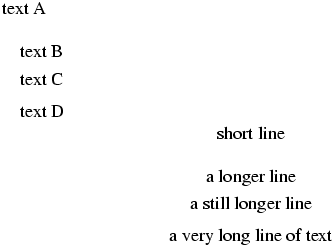 .
\smallskipamount (rubber length)
See `\smallskip <doc-s.html#cmd-small-skip>`__
\smash
The \smash command takes an argument, and modifies its height and
depth to be zero. It takes an optional argument: h, d or w, case where
the height, depth or width is set to zero. Example:
$\smash{x} \smash[t]{x} \smash[b]{x} \smash[w]{x}$
Translation
<formula type='inline'>
  <math xmlns='http://www.w3.org/1998/Math/MathML'>
    <mrow>
     <mpadded height='0pt' depth='0pt'><mi>x</mi></mpadded>
     <mpadded height='0pt'><mi>x</mi></mpadded>
     <mpadded depth='0pt'><mi>x</mi></mpadded>
     <mpadded width='0pt'><mi>x</mi></mpadded>
    </mrow>
  </math>
</formula.
\smile (math symbol)
The \smile command is valid only in math mode. It generates a
relation symbol: <mo>⌣</mo> (Unicode U+2323, ⌣). See
description of the `\le <doc-l.html#cmd-le>`__ command.
\so
Command from the soul package, that takes an argument and behaves like
\textit. For an example, see `\ul <doc-u.html#cmd-ul>`__.
\sp
The \sp command is a shorthand for a hat character of catcode 7. The
following two lines are equivalent
$a^c_b$
$a\sb b\sp c$
The XML result is
<formula type='inline'><math xmlns='http://www.w3.org/1998/Math/MathML'>
<msubsup><mi>a</mi> <mi>b</mi> <mi>c</mi> </msubsup></math></formula>
<formula type='inline'><math xmlns='http://www.w3.org/1998/Math/MathML'>
<msubsup><mi>a</mi> <mi>b</mi> <mi>c</mi> </msubsup></math></formula>
\space
The expansion of the \space command is a space. Note that
\space{ } \space produces four spaces. Note that spaces are ignored
in math mode (use command like `\mkern <doc-m.html#cmd-mkern>`__,
`\quad <doc-q.html#cmd-quad>`__, `~ <doc-symbols.html#tilde>`__,
`\, <doc-symbols.html#cmd-comma>`__, and so on).
\@spaces
Expansion of this command is \space\space\space\space.
\spacefactor (internal integer)
TeX uses the value of \spacefactor for computing spaces between
characters. In general, the spacefactor is obtained via the \sfcode
of the current character, using some complicated rules. You can change
the space factor, like any other integer, for instance
\spacefactor=1234, however the value must be between 1 and 32767.
In Tralics, you can say \spacefactor-12345, and nothing happens. As
a consequence, \showthe\spacefactor will always print 0.
\spaceskip (rubber length)
You can say \spaceskip=10pt plus 2pt minus 3pt. This explains to TeX
that it should put 10pt (maybe up to 2pt more, maybe up to 3pt less) of
glue between words. Unused by Tralics. (See
scanglue for details of argument
scanning). In fact, if the spacefactor f is at least 2000, and
\xspaceskip is not zero, then this quantity is used. Otherwise, if
\spaceskip is not zero, the \spaceskip glue is used, with
stretch and shrink components multiplied by f/1000 and 1000/f.
Otherwise, the parameters of the current font are used.
\spadesuit (math symbol)
The \spadesuit command is valid only in math mode. It generates a
miscellaneous symbol: <mo>♠</mo> (Unicode U+2660, ♠). See
description of the `\ldots <doc-l.html#cmd-ldots>`__ command.
\span
When \span appears in a preamble, it causes the next token to be
expanded. Otherwise, it marks the end of a cell in a table, and the
beginning of a new one. These two cells are merged.
This does not work in Tralics. You should use \multicolumn
instead.
\special
If you say \special{foo}, nothing special happens. If you want, you
can say \renewcommand\special{\xmlelt{special}} so that the
expression above translates to <special>foo</special>.
\sphericalangle (math symbol)
The \sphericalangle command is valid only in math mode. It generates
the symbol: <mo>∢</mo> (Unicode U+2222, ∢).
split (environment)
The split environment is used for splitting equations.
\begin{split} XX \end{split} is equivalent to
\begin{array}{rl} XX \end{array}. Example.
\begin{equation}
\begin{split}
(a+b)^4 &= (a+b)^ 2 (a+b)^2           \\
        &= (a^2+2ab+b^2)(a^2+2ab+b^2) \\
        &= a^4+4a^3b+6a^2b^2+4ab^3+b^4 \\
\end{split}
\end{equation}
Translation
<formula id-texrt='1' id='uid' type='display'>
 <math mode='display' xmlns='http://www.w3.org/1998/Math/MathML'>
  <mtable displaystyle='true'>
   <mtr>
    <mtd columnalign='right'>
     <mrow><mrow><mo>(</mo><mi>a</mi><mo>+</mo><mi>b</mi></mrow>
       <msup><mo>)</mo> <mn>4</mn> </msup></mrow>
    </mtd>
    <mtd columnalign='left'>
     <mrow><mrow><mo>=</mo><mo>(</mo><mi>a</mi><mo>+</mo><mi>b</mi></mrow>
       <msup><mo>)</mo> <mn>2</mn> </msup>
       <mrow><mo>(</mo><mi>a</mi><mo>+</mo><mi>b</mi></mrow><msup><mo>)</mo>
       <mn>2</mn> </msup></mrow>
    </mtd>
   </mtr>
   <mtr>
    <mtd></mtd>
    <mtd columnalign='left'>
     <mrow><mrow><mo>=</mo><mo>(</mo></mrow><msup><mi>a</mi> <mn>2</mn></msup>
        <mo>+</mo><mn>2</mn><mi>a</mi><mi>b</mi><mo>+</mo>
        <msup><mi>b</mi> <mn>2</mn> </msup><mrow><mo>)</mo><mo>(</mo></mrow>
        <msup><mi>a</mi> <mn>2</mn> </msup><mo>+</mo><mn>2</mn>
        <mi>a</mi><mi>b</mi><mo>+</mo><msup><mi>b</mi> <mn>2</mn> </msup>
        <mrow><mo>)</mo></mrow></mrow>
    </mtd>
   </mtr>
   <mtr>
    <mtd></mtd>
    <mtd columnalign='left'>
     <mrow><mo>=</mo><msup><mi>a</mi> <mn>4</mn> </msup>
      <mo>+</mo><mn>4</mn><msup><mi>a</mi> <mn>3</mn> </msup><mi>b</mi>
      <mo>+</mo><mn>6</mn><msup><mi>a</mi> <mn>2</mn> </msup><msup><mi>b</mi> <mn>2</mn> </msup>
      <mo>+</mo><mn>4</mn><mi>a</mi><msup><mi>b</mi> <mn>3</mn> </msup>
      <mo>+</mo><msup><mi>b</mi> <mn>4</mn> </msup>
     </mrow>
    </mtd>
   </mtr>
  </mtable>
 </math>
</formula>
Preview:  . (see also here).
\splitbotmark
The expansion of \splitbotmark is the mark text of the last mark
that appears in the vertical list that was split off by the most recent
\vsplit command. Since splitting is a no-op in Tralics, the
expansion of \splitbotmark is empty. One extension of ε-TeX is to
maintain a stack of marks. The six commands \marks, \firstmarks,
\topmarks, \botmarks, \splitfirstmarks, and
splitbotmarks generalise commands with the same name (without final
s), they read an integer N, and set a mark at position N, or get the
mark at position N. The value of the integer is ignored in Tralics.
\splitbotmarks
This is an extension introduced by ε-TeX; an integer is read, expansion
is empty. See `\splitbotmark <doc-s.html#cmd-splitbotmark>`__.
\splitdiscards
This is a no-op in Tralics. See
`\savingdiscards <#cmd-savingdiscards>`__ for explanations.
\splitfirstmark
Expansion is empty (it is the first mark on a split box), see
`\splitbotmark <doc-s.html#cmd-splitbotmark>`__.
\splitfirstmarks
This is an extension introduced by ε-TeX; an integer is read, expansion is empty.
\splitmaxdepth (rigid length)
\splitmaxdepth=1.5in, as a result TeX will make sure
that the last line (box) of a split box has a depth not exceeding
1.5in (by shifting it up if necessary). Ignored by Tralics, since
\vsplit is not implemented. (See scandimen for details of
argument scanning).\splittopskip (rubber length)
\splittopskip=10pt plus 2pt minus 3pt. This explains
to TeX that it should put 10pt (maybe up to 2pt more, maybe up to 3pt
less) of glue on the top of each split page. Unused by Tralics (you
should use environments like quote or center instead). (See scanglue for details of
argument scanning).\sqcap (math symbol)
The \sqcap command is valid only in math mode. It generates a binary
operator: <mo>⊓</mo> (Unicode U+2293, ⊓). See description of
the `\pm <doc-p.html#cmd-pm>`__ command.
\sqcup (math symbol)
The \sqcup command is valid only in math mode. It generates a binary
operator: <mo>⊔</mo> (Unicode U+2294, ⊔). See description of
the `\pm <doc-p.html#cmd-pm>`__ command.
\sqrt
\sqrt command puts a square root sign over its argument. It
can take an optional argument, and \sqrt[x]{y} is equivalent to
\root x \of{y}. It works only in math mode. See also the `\acute <doc-a.html#cmd-acute>`__ command.\sqsubset (math symbol)
The \sqsubset command is valid only in math mode. It generates a
relation symbol: <mo>⊏</mo> (Unicode U+228F, ⊏). See
description of the `\le <doc-l.html#cmd-le>`__ command.
\sqsubseteq (math symbol)
The \sqsubseteq command is valid only in math mode. It generates a
relation symbol: <mo>⊑</mo> (Unicode U+2291, ⊑). See
description of the `\le <doc-l.html#cmd-le>`__ command.
\sqsupset (math symbol)
The \sqsupset command is valid only in math mode. It generates a
relation symbol: <mo>⊐</mo> (Unicode U+2290, ⊐). See
description of the `\le <doc-l.html#cmd-le>`__ command.
\sqsupseteq (math symbol)
The \sqsupseteq command is valid only in math mode. It generates a
relation symbol: <mo>⊐</mo> (Unicode U+2292, ⊒). See
description of the `\le <doc-l.html#cmd-le>`__ command.
\square (math symbol)
The \square command is valid only in math mode. It generates a
miscellaneous symbol: <mo>□</mo> (Unicode U+25A1, □). See
description of the `\ldots <doc-l.html#cmd-ldots>`__ command.
\SS
The translation of \SS is SS. It is the uppercase version of
\ss.
\ss
The translation of \ss is ß or ß It is the lowercase
version of \SS.
\sslash (math symbol)
The \sslash command is valid only in math mode. It generates the
operator: <mo>⫽</mo>, Unicode U+2AFD, ⫽.
\st
Command from the soul package, that takes an argument and behaves like
\textit. For an example, see `\ul <doc-u.html#cmd-ul>`__.
\stackrel
\stackrel command takes two arguments A and B, it places A
(superscript size) over B (that is expected to be a relation). It
works only in math mode. See also the `\acute <doc-a.html#cmd-acute>`__ command.\star (math symbol)
The \star command is valid only in math mode. It generates a binary
operator: <mo>☆</mo> (Unicode U+2606, ☆). See description of
the `\pm <doc-p.html#cmd-pm>`__ command.
\stepcounter
The \stepcounter command increments a counter, and resets all
dependent ones. This is an example:
> \newcounter{foo}
> \toks0=\expandafter{\stepcounter{foo}}
> \showthe\toks0
\show: \global \advance \c@foo \@one \let \@elt \@stpelt \cl@foo
In LaTeX, you would see a different form:
\addtocounter {foo}\@ne \begingroup \let \@elt \@stpelt \csname cl@foo\endcsname \endgroup.
\stop
The \stop command is equivalent to \@@end. This closes all
files, forgets about all pending input, thus terminates the current job.
\@stpelt
This command takes one argument, a counter name and sets it to zero.
\stretch
You can say something like \hspace{\stretch{2.3}}. The effect is to
add an horizontal space of natural width zero, but stretches like
2.3fill. Note that \stretch{1} is the same as \fill. The
argument of \stretch should be (after expansion) a real number.
\string
The \string command is a primitive, that reads a token, and whose
expansion is a list of characters that represent that token. These
characters are of \catcode 12, except for space, which has its usual
catcode. For instance, \string{\string} is typeset in the same way
as \char`{char}`; the difference is that \char is
evaluated, hence illegal in \csname. In the following example, we
construct and use a command, whose name contains braces.
\expandafter\def\csname\string{\string}\endcsname#1#2{#2#1}
\expandafter\csname\string{\string}\endcsname XY
The expansion of \string\foo is a list of four tokens. The first
token is not always a backslash: if you say \escapechar=`A,
it would be the letter A, and if \escapechar is out of range, it is
omitted. After {\escapechar=-1 \xdef\foo{\string\}}}, the \foo
macro expands to a closing brace character.
\strip@prefix
The \strip@prefix strips the prefix produced by \meaning for a
macro; said otherwise, all tokens up a greater-than sign. See an example
at `\@expandtwoargs <doc-e.html#cmd-expandtwoargs>`__
\strip@pt
If you say \strip@pt\topmargin the expansion may be 18 or 18.3. The
LaTeX definition is given here. The important
point is that \the\topmargin is executed, and this should return a
dimension, as in 18.3pt, after that, the final pt and the dot are
removed. No error is signaled by Tralics if these characters are not
found.
\strut
This command is valid in math mode only; is translation is an invisible
object (a <mphantom>) that has the same height and depth of a
parenthesis (a <mpadded> element makes the width equal to zero).
subequations (environment)
This is an environment provided by the amsmath package, but, for
technical reasons, implemented directly in Tralics. You cannot nest
this environment, the error message being Illegal nesting of
subequations environment. The command \begin{subequations} finishes
the current paragraph, adds an anchor, and calls
\refstepcounter{equation}. Assume that the current equation counter
is 6, \theequation is y\arabic{equation}, and \p@equation is
X. This produces a <anchor id-text='Xy7' id='uid18'/> element,
where uid18 is a unique identifier. A \label in this environment
refers to this element. The counter parentequation is set to 7, and
\theparentequation to the current value of the equation (in the
example y7). Then the equation counter is set to zero, and
\theequation to \theparentequation\alph{equation}. This means
that the equation will be numbered (y7a) and the anchor will have a
id-text='Xy7a' attribute. If you say
\renewcommand\theequation{\theparentequation\roman{equation}} you
will get id-text='Xy7i' instead. The command \end{subequations}
sets the value of the equation counter to that of the parent equation
counter (the value of \theequation is automatically restored).
\subfigure
The subfigure command takes two arguments, an optional one, and a
required one; translation is of the form
<subfigure id='uid2'> <leg>optional</leg> <texte>mandatory</texte></subfigure>.
An anchor is added to the element since version 2.11.3, this means that
if you put a \label in the argument, a reference to the label will
refer to the subfigure, via the ID, uid2 in the example.
In what follows, we describe what happens when a subfigure is in a
figure. One of the main difficulties when using Tralics for the RA
(Inria’s Activity Report) is the conversion of XML figures into Pdf.
Consider an author that puts four images A, B, C, D in a figure. There
are various tricks that can be used to get a correct placement (normal
space, fill glue, or even negative space). Assume that the author wants
two rows of two images; this can be achieved via \\ or a \par;
in some cases there is no need to insert such a command because there is
a natural line break between A and B. Assume now that, when the XML
produced by Tralics is converted into Pdf, the alignement is
different; for instance if the text with is 13cm and each figure has a
width of 6.75cm, these will be vertically aligned. If the caption refers
to B as to the upper-right image, it is wrong. If images are square,
this gives a total height of 27cm, hence overflow, and the caption will
be below the bottom of the page, and invisible. For this reason, it is
better to use a table; the total width exceeds the textwidth by 1cm,
this is small enough that the whole table will be visible on the page.
One could argue that the author should use something like
.45\textwidth, this should leave enough space between the images,
but Tralics converts this to the value 6.75cm shown above.
There is a post-process for the figure environment, it modifies the
content, according to some complicated rules. The simple case is when
the figure has a single image; another case is when the figure contains
a table. If the figure has subfigures, a table is created for the
reasons explained above; some people disagree, so that there is an
alternative, but this assumes that the subfigure contains an image. In
each case, Tralics uses the relevant elements discarding everything
else. You may get a warning of the form Warning: junk in figure
detected on line 17 of file foo.tex. In such a case discarded elements
can be found in the XML file in a comment that starts with
ignored_fig_contents.
We consider here the case where the figure contains a subfigure. Each
paragraph is transformed into a table, each subfigure producing two
cells, the mandatory argument (in general the image) on the first row,
the optional argument (in general the caption) on the second row. When
LaTeX typesets the whole thing, it inserts a prefix before each caption,
for instance Figure 3 before the figure caption and (d) before
the subfigure caption. This is not done by Tralics (figure numbers are
added when the XML document is converted to HTML). A reference to the
subfigure may be typeset by LaTeX as (3.d). Very often, people say: see
part (d) of figure N, where N is obtained via a \ref to the figure.
In old Tralics you cannot use a reference to the subfigure, so that
(a), (b) and (c) are explicitly added.
Example. Here we have four \subfigures, containing as required
argument, an image, the same in each case, with different scaling. In
some cases the optional argument is given, in other cases it is not.
\begin{figure}
\def\IC#1{\includegraphics[width=#1pt]{Logo-INRIA-couleur}}
\subfigure[~one]{\IC{2}} \subfigure{\IC{3}} \par
\subfigure[~two]{\IC{4}} \subfigure{\IC{1.3}}
\caption{Caption of the figure}
\end{figure}
This is the XML output.
<figure rend='array' id-text='1.1' id='uid35'>
<head>Caption of the figure</head>
<p>
<table rend='inline'>
<row>
<cell id-text='1.1' id='uid36'>
<figure rend='inline' width='2.0pt' file='Logo-INRIA-couleur'/>
</cell>
<cell id-text='1.2' id='uid37'>
<figure rend='inline' width='3.0pt' file='Logo-INRIA-couleur'/>
</cell>
</row>
<row>
<cell>(a) one</cell>
<cell>(b)</cell>
</row>
</table>
</p>
<p>
<table rend='inline'>
<row>
<cell id-text='1.3' id='uid38'>
<figure rend='inline' width='4.0pt' file='Logo-INRIA-couleur'/>
</cell>
<cell id-text='1.4' id='uid39'>
<figure rend='inline' width='1.3pt' file='Logo-INRIA-couleur'/>
</cell>
</row>
<row>
<cell>(c) two</cell>
<cell>(d)</cell>
</row>
</table>
</p>
</figure>
Since version 2.11.3, you can change this behavior. It suffices to set
the internal counter \tralics@use@subfigure to a non-zero value.
This is done automatically when loading the subfigure package. No table
is produced any more: translation of \subfigure is a <subfigure>
element, that contains a single element <head> (containing the
optional argument). Translation of the mandatory argument should be an
inline figure (for instance \includegraphics{foo}), and all
attributes from this figure are moved to the subfigure. The subfigure
has two additional attributes; as mentioned above, it has an ID so that
labels are allowed; it has also parid, that is the number of the
paragraph (0 first the first paragraph, 1 for the second, etc). Example:
Reference to figure: \ref{fig:fig1}
Reference to first subfigure: \ref{fig:fig1a}
Reference to second subfigure: \ref{fig:fig1b}
\begin{figure}[htbp]
  \XMLaddatt{FOO}{BAR}
    \centering
    \subfigure[first subfigure caption]{
           \includegraphics{figure1a.eps}
       \label{fig:fig1a}
    }
    \hspace{2cm}
    \subfigure[second subfigure caption]{
           \includegraphics[width=3cm]{figure1b.eps}
       \label{fig:fig1b}
    }
    \par
    \subfigure{\includegraphics{figure1c}}
    \caption{main figure caption}
    \label{fig:fig1}
\end{figure}
Here is the translation. Note that the figure element has an attribute
rend that indicates its type; it is `inline’ for a non-float image,
case where the file attribute is present. It is `array’ if the
figure contains one or more arrays of (in general) images, it is
`subfigure’ if the figure contains subfigures. The example demonstrates
how attributes can be added to the figure (you could use this to
compensate the fact that Tralics ignores \centering).
<p noindent='true'>Reference to figure: <ref target='uid79'/>
Reference to first subfigure: <ref target='uid80'/>
Reference to second subfigure: <ref target='uid81'/></p>

<figure rend='subfigure' FOO='BAR' id-text='1' id='uid79' place='htbp'>
  <head>main figure caption</head>
  <subfigure file='figure1a' extension='eps' parid='0' id-text='1.2' id='uid80'>
     <head>first subfigure caption</head>
  </subfigure>
  <subfigure width='85.35826pt' file='figure1b' extension='eps'  parid='0'
       id-text='1.2' id='uid81'>
     <head>second subfigure caption</head>
  </subfigure>
  <subfigure file='figure1c' parid='1' id-text=1.3' id='uid82'> <head/></subfigure>
</figure>
\subitem
Implemented as a no-op in Tralics for historical reasons. This command is used for sub-items in an index.
\subparagraph
\subparagraph command is used to divide a text in smaller
parts. There is also a counter subparagraph. See the description of the
`\part <doc-p.html#cmd-part>`__ command.\subparagraphmark
\subparagraphmark command takes one argument and does nothing.
You can redefine it. It is used to mark subparagraphs. See `\chaptermark <doc-c.html#cmd-chaptermark>`__ for an
explanation of page marks.\subsection
\subsection command is used to divide a text in smaller parts.
There is also a counter subsection. See the description of the
`\part <doc-p.html#cmd-part>`__ command.\subsectionmark
\subsectionmark command takes one argument and does nothing.
You can redefine it. It is used to mark subsections. See `\chaptermark <doc-c.html#cmd-chaptermark>`__ for an
explanation of page marks.\subset (math symbol)
The \subset command is valid only in math mode. It generates a
relation symbol: <mo>⊂</mo> (Unicode U+2282, ⊂). See
description of the `\le <doc-l.html#cmd-le>`__ command.
\Subset (math symbol)
The \Subset command is valid only in math mode. It generates a
relation symbol: <mo>⋐</mo> (Unicode U+22D0, ⋐).
\subseteq (math symbol)
The \subseteq command is valid only in math mode. It generates a
relation symbol: <mo>⊆</mo> (Unicode U+2286, ⊆). See
description of the `\le <doc-l.html#cmd-le>`__ command.
\subseteqq (math symbol)
The \subseteqq command is valid only in math mode. It generates a
relation symbol: <mo>⫅</mo> (Unicode U+2AC5, ⫅).
\subsetneq (math symbol)
The \subsetneq command is valid only in math mode. It generates a
relation symbol: <mo>⊊</mo> (Unicode U+228A, ⊊).
\subsetneqq (math symbol)
The \subsetneqq command is valid only in math mode. It generates a
relation symbol: <mo>⫋</mo> (Unicode U+2ACB, ⫋).
\subsubsection
\subsubsection command is used to divide a text in smaller
parts. There is also a counter subsubsection. See the description of the
`\part <doc-p.html#cmd-part>`__ command.\subsubsectionmark
\subsubsectionmark command takes one argument and does
nothing. You can redefine it. It is used to mark subsubsections. See `\chaptermark <doc-c.html#cmd-chaptermark>`__ for an
explanation of page marks.\succ (math symbol)
The \succ command is valid only in math mode. It generates a
relation symbol: <mo>≻</mo> (Unicode U+227B, ≻). See
description of the `\le <doc-l.html#cmd-le>`__ command.
\succapprox (math symbol)
The \succapprox command is valid only in math mode. It generates a
relation symbol: <mo>⪸</mo> (Unicode U+2AB8, ⪸)
\succcurlyeq (math symbol)
The \succcurlyeq command is valid only in math mode. It generates a
relation symbol: <mo>≽</mo> (Unicode U+227D, ≽)
\succeq (math symbol)
The \succeq command is valid only in math mode. It generates a
relation symbol: <mo>⪰</mo> (Unicode U+2AB0, ⪰).
\succnapprox (math symbol)
The \succnapprox command is valid only in math mode. It generates a
relation symbol: <mo>⪺</mo> (Unicode U+2ABA, ⪺)
\succneqq (math symbol)
The \succneqq command is valid only in math mode. It generates a
relation symbol: <mo>⪶</mo> (Unicode U+2AB6, ⪶)
\succnsim (math symbol)
The \succnsim command is valid only in math mode. It generates a
relation symbol: <mo>⋩</mo> (Unicode U+22E9, ⋩).
\succsim (math symbol)
The \succsim command is valid only in math mode. It generates a
relation symbol: <mo>≿</mo> (Unicode U+227F, ≿).
\sum (math ssymbol)
The \sum command is valid only in math mode. Its translation is a
variable-sized symbol: <mo>∑</mo> (Unicode U+2211, ∑). Here is
the list of all these symbols:
$\coprod \bigvee \bigwedge \biguplus \bigcap \bigcup \int \sum
 \prod \bigotimes \bigoplus \oint \bigsqcup  \bigodot$
The XML translation is
<formula type='inline'><math xmlns='http://www.w3.org/1998/Math/MathML'>
<mrow><mo>∐</mo> <mo>⋁</mo> <mo>⋀</mo> <mo>⨄</mo>
<mo>⋂</mo> <mo>⋃</mo> <mo>∫</mo> <mo>∑</mo> <mo>∏</mo>
<mo>⨂</mo> <mo>⨁</mo> <mo>∮</mo> <mo>⨆</mo>
<mo>⨀</mo> </mrow></math></formula>
If you do not like entity names, you can use the -noentnames switch, and you get
<formula type='inline'>
<math xmlns='http://www.w3.org/1998/Math/MathML'>
<mrow><mo>∐</mo><mo>⋁</mo><mo>⋀</mo>
<mo>⨄</mo><mo>⋂</mo><mo>⋃</mo><mo>∫</mo>
<mo>∑</mo><mo>∏</mo><mo>⨂</mo><mo>⨁</mo>
<mo>∮</mo><mo>⨆</mo><mo>⨀</mo></mrow>
</math>
</formula>
All commands are listed in Table 8.8 of the Latex
Companion.  .
(see also here).
\sup (math symbol)
\sup command is valid only in math mode. Its translation is a
math operator of the same name
<mo form='prefix' movablelimits='true'>sup</mo>. For an example see the `\log <doc-l.html#cmd-log>`__
command.\supset (math symbol)
The \supset command is valid only in math mode. It generates a
relation symbol: <mo>⊃</mo> (Unicode U+2283, ⊃). See
description of the `\le <doc-l.html#cmd-le>`__ command.
\Supset (math symbol)
The \Supset command is valid only in math mode. It generates a
relation symbol: <mo>⋑</mo> (Unicode U+22D1, ⋑).
\supseteq (math symbol)
The \supseteq command is valid only in math mode. It generates a
relation symbol: <mo>⊇</mo> (Unicode U+2287, ⊇). See
description of the `\le <doc-l.html#cmd-le>`__ command.
\supseteqq (math symbol)
The \supseteqq command is valid only in math mode. It generates a
relation symbol: <mo>⫆</mo> (Unicode U+2AC6, ⫆).
\supsetneq (math symbol)
The \supsetneq command is valid only in math mode. It generates a
relation symbol: <mo>⊋</mo> (Unicode U+228B, ⊋).
\supsetneqq (math symbol)
The \supsetneqq command is valid only in math mode. It generates a
relation symbol: <mo>⫌</mo> (Unicode U+2ACC, ⫌).
\surd (constant)
\surd command is valid only in math mode. It generates a
miscellaneous symbol: <mi>√</mi> (Unicode U+221A, √) that
looks like  . See description of the
`\ldots <doc-l.html#cmd-ldots>`__
command.\swarrow (constant)
The \swarrow command is valid only in math mode. It generates an
arrow that points South-West: <mo>↙</mo> (Unicode U+2199,
↙). See description of the `\leftarrow <doc-l.html#cmd-leftarrow>`__
command.
\symbol
This command is a wrapper around `\char <doc-c.html#cmd-char>`__ in
that the expansion of \symbol{48} is \char 48\relax.
\syntaxonly
The effect of this command is to inhibit dumping the XML tree at the end of the job.