All commands, alphabetic order; letter E
\edef
You can say \edef\foo{bar}. The syntax is the same as
`\def <doc-d.html#cmd-def>`__, but the token list in the body is
fully expanded (tokens that come from \the are not expanded).
You can put the prefix \global before \edef, note that \xdef
is the same as \global\edef. In the example that follows, the
\ifx is true.
{\catcode`\A=12 \catcode`\B=12\catcode`\R=12\gdef\fooval{ABAR}}
{\escapechar=`\A \edef\foo{\string\BAR}\ifx\foo\fooval\else \uerror\fi}
Another example is the following. The \meaning command returns a
token list, of the form macro:#1#2->OK OK, and \strip@prefix
removes everything before the > sign. What we put in \Bar is a list
of five tokens, a space, and four letters of catcode 12.
\makeatletter
\def\strip@prefix#1>{}
\def\foo#1#2{OK OK}
\edef\Bar{\expandafter\strip@prefix\meaning\foo}
For a non-trivial example, see
`\aftergroup <doc-a.html#cmd-aftergroup>`__.
\egroup
The \egroup command is a closing brace of catcode 2. For an example
see here.
\eject
Behaves like \par, but no page is ejected.
\ell (math symbol)
The \ell command is valid only in math mode. It generates a
miscellaneous symbol (calligraphic ell): <mi>ℓ</mi> (Unicode
U+2113, ℓ). See description of the `\ldots <doc-l.html#cmd-ldots>`__
command.
\else
The command \else is used in a case like
\ifnum 0=0 \somethinguseful \else \whatever \fi. (See
`\if… <doc-i.html#cmd-ifxxx>`__ for details).
\em
The \em command changes the shape of the current font: if the shape
is upright, it is replaced by italics, otherwise by upright. Note that
this command is unaware of implicit font changes. Said otherwise, in the
title of a section, it is inefficient, since it has no way of knowing in
which font the title will be typeset.
\emergencystretch (rigid length)
You can say \emergencystretch=5pt, as a result TeX will try a third
pass in its hyphenation algorithm. Ignored by Tralics. (See
scandimen for details of argument
scanning).
\emph
The \emph command is like \em, except that it takes an argument.
\@empty, \empty
The \@empty command takes no argument, and does nothing. The
\empty command is similar. You should not redefine the \@empty
command.
\emptyset (math symbol)
The \emptyset command is valid only in math mode. It generates a
miscellaneous symbol (empty set): <mi>∅</mi> (Unicode
U+2205, ∅). See description of the `\ldots <doc-l.html#cmd-ldots>`__
command.
\end
This finishes an environment. See the
`\begin <doc-b.html#cmd-begin>`__ command. In principle
\end{foo}: (1) calls \endfoo, (2) checks that the current
environment is “foo”, (3) pops the save stack, and (4) executes
additional code (for instance, ignore space that follows). This last
step is not yet done by Tralics. The effect of (3) is to undo all
changes that were local in the environment; in particular, this changes
the name of the current environment. Let’s consider the following code:
\def\foo{\begin{it}}\def\endfoo{\end{it}}
\begin{foo} ok \end{foo}  % example1

\def\endbar{\def\@currenvir{bar}}
\begin{it} \end{bar} % example2

\def\endfoo{}
\begin{foo} ok \end{foo} \end{it} % example 3

\def\endfoo#1{}
\begin{foo} ok \end{foo} % exemple 4

\def\endfoo{\show\endfoo}
\begin{foo}
\def\endfoo{\undefined}
\end{foo} % example 5
In the first case, when \end{foo} is seen, the current environment
is “it”, and after execution of \endfoo it will be “foo”. This
explains why (2) must come after (1). Note that \endit is undefined;
it is set to \relax by the \end command, and reset to undefined
by (3). The second example shows how to cheat; this is invalid in
Tralics since the name of the current environment cannot be changed.
You get a message cannot close environment bar , and the current
environment is still “it”. Example 3 yields an error, of the form LaTeX
Error: \begin{it} on input line 8 ended by \end{foo} followed by
LaTeX Error: \begin{foo} on input line 8 ended by \end{it}. The
Tralics message are a bit different: Environment ‘it’ started at line
8 ended by \endfoo (this message is also printed for lines 11 and 14)
and Environment ‘foo’ started at line 8 ended by \endit. The next
example is incorrect, as command \endfoo reads some random arguments
used for (2) and (3). This is detected and provokes an error of the form
Illegal end of environment. In the last example, \endfoo is
locally redefined; but Tralics uses the definition that was active
when \begin{foo} was seen. This means that you will see:
\endfoo=macro: ->undefined . Note: the stack contains three open
environments: it, foo and foo. You can say “\end{…}”. If the argument
is “document” this signifies the end of the job, if the argument is
“foo”, then \endfoo is evaluated (this might provoke an error), if
the argument is “it”, the stack is popped and an error is signaled,
otherwise an error is signmed and the stack is not popped.
\encodingdefault
This variable contains the default font encoding; its value is T1 in
Tralics, but not used.
\endcitation (tralics command)
This command is used to finish a citation, see
`\citation <doc-c.html#cmd-citation>`__.
\endcsname
The \endcsname command is a TeX primitive that marks the end of a
\csname command (see `\csname <doc-c.html#cmd-csname>`__). Look
at this example:
\def\cmd{csname} \csname foo\csname end\cmd\endcsname
\begin{csname}foo\end{csname}
The first \csname sees `foo’, then ask for the expansion of the
second \csname. This one sees `end’, then the expansion of
\cmd, then the \endcsname. The result of the expansion is
\endcsname, and this stops the expansion of the first \csname.
Hence the first line is the same as \foo.
The second line is equivalant to
\begingroup\csname foo\endcsname\endgroup (whith some checks).
In LaTeX, this works without problem. In Tralics, this does not work.
because the \end token is not expanded, but evaluated. So
\csname complains with Invalid token \end found between \csname
and \endcsname, and evaluation of \end yields a Extra
\endcsname error.
\@@end
This command is not allowed in internal vertical mode. In regular
vertical mode it terminates TeX if the main vertical list is empty and
\deadcycles=0. Otherwise, TeX backs up the \end command so that
it can be read again; then it exercises the page builder, after
appending a box/glue/penalty combination that will force the output
routine to act.
In Tralics, things are much easier: all open files are closed, and
this should terminate everything. Note that \end is used to finish
an environment, so that the TeX primitive is renamed to \@@end.
\endgraf
The \endgraf command is a synonym for \par (note that LaTeX
redefines sometimes \par, hence leaves a copy in \@@par. Both
\@@par and \endgraf are equivalent to the original \par
command).
\endgroup
The \endgroup command is used to terminate a group opened by
\begingroup. See `\begingroup <doc-b.html#cmd-begingroup>`__. If
you say \def\foo{}\begin{foo}\endgroup, then LaTeX says nothing, but
Tralics complains that something is wrong, because it uses a special
token. If you try this
\def\foo{}\def\endfoo#1{\global\let\specialend#1#1}
\begin{foo}
\end{foo}
\show\specialend
you will see something like: \specialend=endgroup (for env). In the
current version of Tralics it is illegal to define \endfoo with an
argument,
\endinput
When Tralics evaluates the \endinput token, it closes the current
file (this terminates the job if there is no other open file). For an
example, see
`\InputIfFileExists <doc-i.html#cmd-inputiffileexists>`__.
\endL, \endR
These commands are ε-TeX extensions that indicate the end of a left-to-right or right-to-left region; they are ignored by Tralics.
\endline
This command is equivalent to \cr. The TeXbook justifies introducing
this command by saying that it is often useful to redefine the meaning
of \cr. In Tralics, outside a table, it may provoke the error bad
\cr.
\endlinechar (internal integer)
The \endlinechar command reads an integer (see
scanint for details) that says what
character Tralics should insert in the input stream for an
end-of-line. The default value is a carriage return (ASCII 13). If the
value if not between 0 and 255 (216-1 in the current version),
no character is added at the end of a line. In the example below, the
translation should give `xy’.
Note that, if a line finishes with \endlinechar=something, TeX has a
tendency to ignore one optional space after a number; this space is
looked at before the assignment takes place, and could be searched on
the line that follows the assignment. In the example below, there is a
space after the -1 (without the comment, this space would have been
removed.) In the case of `A, the situation is worse: TeX is
in state S, so that spaces after \A are ignored. We inserted a
\relax token as remedy.
%The command \testeq checks that its arguments are equal
{x\endlinechar=`\A \relax % this \relax is useful
\def\foo{a
b}\testeq\foo{aAb}%
\def\foo{a
b}\testeq\foo{aAb}%
\endlinechar=`\% %
\def\foo{a
b}\testeq\foo{ab}
\endlinechar=-1 % this comment is useful
\def\foo{a
b}\testeq\foo{ab}
y}
\endsec (tralics command)
If you say \endsec{\section}, the effect is to end the current
section. The argument can be one of:
\part \chapter \section \subsection \subsubsection \paragraph \subparagraph,
anything else (included an empty argument) is replaced by \part. No
new section is started.
\@endtheorem
Private Tralics command.
\endv
This is a special command that prints as \endtemplate.
\enspace
Same as \kern0.5em.
\ensuremath
The \ensuremath command takes one argument, and typesets it in math
mode. In the following example, the translation of \test is a
calligraphic X with an index y. In both cases, the whole math formula
uses the calligraphic font. Note that Tralics uses a normal y, while
TeX will use whatever glyph is in the font at the position of a
lower-case Y. The definition of \bad is wrong: the expansion of
\ensuremath is done outside math mode, hence produces
$\relax xx$, so that \bad is $$\relax xx$$.
\def\test{\ensuremath{\cal X_y}}
\test and $\test Z$
\edef\bad{$\ensuremath{xx}$}
Preview: 
enumerate (environment)
This is an environment in which you can puts items. Nesting such
environments is possible, ten counters are reserved for that. See
description of the `\item <doc-i.html#cmd-item>`__ command.
enumi, enumii, enumiii, enumiv (counter)
These counters are described in the Latex book. There are twenty such
counters in Tralics, enumi through enumx and Enumi through
Enumx. Lowercase counters are used by the enumerate environment,
the other counters by itemize or description. For each counter
CTR, LaTeX defines \labelCTR as (\theCTR). This is done (for
standard classes) by Tralics for lowercase counters. These quantities
are used by Tralics for the label attribute. In the case of counters
like Enumi, Enumii, etc, up to level 5, \theCTR is defined in such a
way as top obtain 1.2, or 1.5.3.4, etc. The case of the four counters
enumi, enumii, enumiii, enumiv is special: the standard classes use the
same method as the book class, namely to define \theCTR as
\@arabic\c@CTR, \@alph\c@CTR, \@roman\c@CTR and
\@Alph\c@CTR, and use a non trivial \p@CTR. In the example
below, the id-text of each item is obtained as \p@CTR\theCTR. The
string 1(a)iA in the fourth item is what LaTeX typesets for
\ref{d}.
\begin{enumerate}
 \item a \label{a}
\begin{enumerate}
 \item b \label{b}
\begin{enumerate}
 \item c \label{c}
\begin{enumerate}
 \item d \label{d}
\begin{itemize}
\item u
\begin{itemize}
\item u1
\item u2
\end{itemize}
\item v
\end{itemize}
\end{enumerate}
\end{enumerate}
\end{enumerate}
\end{enumerate}
Translation
<list type='ordered'>
 <item id-text='1' id='uid1' label='(1)'><p noindent='true'>a</p>
 <list type='ordered'>
  <item id-text='1a' id='uid2' label='(a)'><p noindent='true'>b</p>
  <list type='ordered'>
   <item id-text='1(a)i' id='uid3' label='(i)'><p noindent='true'>c</p>
   <list type='ordered'>
     <item id-text='1(a)iA' id='uid4' label='(A)'><p noindent='true'>d</p>
     <list type='simple'>
      <item id-text='1' id='uid5'><p noindent='true'>u</p>
        <list type='simple'>
         <item id-text='1.1' id='uid6'><p noindent='true'>u1</p></item>
         <item id-text='1.2' id='uid7'><p noindent='true'>u2</p></item>
        </list>
      </item>
      <item id-text='2' id='uid8'><p noindent='true'>v</p></item>
     </list>
   </item></list>
  </item></list>
 </item></list>
</item></list>
\epsfbox
If you say \epsfbox{foo}, the result is the same as if you had said
\includegraphics [options] {foo}, where options is formed of
width=xx and/or height=yy; here xx is the value of
\epsfxsize and yy is the value of \epsfysize. If some value
is zero, the corresponding slot is not added to the list. After
execution of the command, both values are set to zero (local
assignment). See the
`\includegraphics <doc-i.html#cmd-includegraphics>`__ command for
details on how images are processed. Example.
{
  \setlength\epsfxsize{50pt}
  \setlength\epsfysize{60pt}
  \epsfbox{x.ps}
  \setlength\epsfysize{70pt}
  \epsfbox{x.eps}
  \epsfbox{x.epsf}
}
Translation:
<figure height='60.0pt' width='50.0pt' rend='inline' file='x' extension='ps'/>
<figure height='70.0pt' rend='inline' file='x' extension='ps'/>
<figure rend='inline' file='x' extension='epsf'/>
\epsffile
The \epsffile command is an alternate name of the
`\epsfbox <doc-e.html#cmd-epsfox>`__ command.
\epsfig
Instead of saying \epsfig{file=x,width=1} you should say
\includegraphics [width=1] {x}. See
`\includegraphics <doc-i.html#cmd-includegraphics>`__ command. There
no difference between \psfig and \epsfig.
\epsfxsize
This is a reference to dimension register, used by the epsf package,
initially set to 0. It indicates the width of the next image. It is
reset to zero after usage. See
`\epsfbox <doc-e.html#cmd-epsfbox>`__.
\epsfysize
This is a reference to dimension register, used by the epsf package,
initially set to 0. It indicates the height of the next image. It is
reset to zero after usage. See
`\epsfbox <doc-e.html#cmd-epsfbox>`__.
\epsilon (math symbol)
The \epsilon command is valid only in math mode. It generates a
Greek letter: <mi>ε</mi> (Unicode U+3F5, ϵ). See description
of the `\alpha <doc-a.html#cmd-alpha>`__ command.
eqnarray, eqnarray* (environment)
If you say \begin{eqnarray} XX \end{eqnarray}, the result is more or
less the same as if you say $$\begin{array}{rcl} XX \end{array}$$.
Lamport says: “An equation number is put on every line unless that line
has a \nonumber command”. In Tralics, a label (hence an equation
number) is associated to the formula, and not the individual parts of
it, so that \nonumber is useless. [Using the -multi-math-label
option changes this behavior, see
\multi@math@label ]. Example
\begin{eqnarray}
x & = &17y \\
y & > & a + b + c+d+e+f+g+h+i+j+ \nonumber\\
  &   & k+l+m+n+o+p
\end{eqnarray}
This is the translation.
<formula id-text='mid1' id='uid1' type='display'>
<math mode='display' xmlns='http://www.w3.org/1998/Math/MathML'>
<mtable displaystyle='true'>
<mtr>
<mtd columnalign='right'><mi>x</mi></mtd>
<mtd><mo>=</mo></mtd>
<mtd columnalign='left'><mrow><mn>1</mn><mn>7</mn><mi>y</mi></mrow></mtd>
</mtr>
<mtr>
<mtd columnalign='right'><mi>y</mi></mtd>
<mtd><mo>></mo></mtd>
<mtd columnalign='left'>
<mrow><mi>a</mi><mo>+</mo><mi>b</mi><mo>+</mo><mi>c</mi><mo>+</mo>
<mi>d</mi><mo>+</mo><mi>e</mi><mo>+</mo><mi>f</mi><mo>+</mo><mi>g</mi>
<mo>+</mo><mi>h</mi><mo>+</mo><mi>i</mi><mo>+</mo><mi>j</mi>
<mo>+</mo></mrow>
</mtd>
</mtr>
<mtr>
<mtd></mtd>
<mtd></mtd>
<mtd columnalign='left'>
<mrow><mi>k</mi><mo>+</mo><mi>l</mi><mo>+</mo><mi>m</mi><mo>+</mo>
<mi>n</mi><mo>+</mo><mi>o</mi><mo>+</mo><mi>p</mi></mrow>
</mtd>
</mtr>
</mtable>
</math>
</formula>
Preview 
The eqnarray* is the same as eqnarray except it does not
generate equation numbers. For Tralics, this means that there is no
id. Example.
\begin{eqnarray*}
x & \ll & y_{1} + \cdots + y_{n} \\
  & \leq &z
\end{eqnarray*}
Translation
<formula type='display'>
<math mode='display' xmlns='http://www.w3.org/1998/Math/MathML'>
<mtable displaystyle='true'>
<mtr>
<mtd columnalign='right'><mi>x</mi></mtd>
<mtd><mo>≪</mo></mtd>
<mtd columnalign='left'>
<mrow><msub><mi>y</mi> <mn>1</mn> </msub><mo>+</mo><mo>⋯</mo>
<mo>+</mo><msub><mi>y</mi> <mi>n</mi> </msub></mrow>
</mtd>
</mtr>
<mtr>
<mtd></mtd>
<mtd><mo>≤</mo></mtd>
<mtd columnalign='left'><mi>z</mi></mtd>
</mtr>
</mtable>
</math>
</formula>
Preview 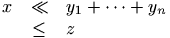 (see also here)
\eqcirc (math symbol)
The \eqcirc command is valid only in math mode. It generates
<mi>≖</mi> (Unicode U+2256, ≖).
\eqno
In TeX, the \eqno or \leqno commands are allowed only in display
math mode, and it enters non-display math mode for the equation number
(which is preceded by the tokens of \everymath, and typeset in a
group).
In Tralics, all tokens following \eqno or \leqno are read, and
put in a list; the \tag* command is then applied to these tokens.
See `\tag <doc-t.html#cmd-tag>`__.
\eqsim (math symbol)
The \eqsim command is valid only in math mode. It generates
<mi>≂</mi> (Unicode U+2242, ≂).
\eqslantgtr (math symbol)
The \eqslantgtr command is valid only in math mode. It generates
<mi>⪖</mi> (Unicode U+2A96, ⪖).
\eqslantless (math symbol)
The \eqslantless command is valid only in math mode. It generates
<mi>⪕</mi> (Unicode U+2A95, ⪕).
\eqref
The \eqref{text} command is the same as (\ref{text}) (this is a
very simplified form of the definition of amsmath).
\equal
You can use the \equal command inside \ifthenelse in order to
compare two token lists. See
`\ifthenelse <doc-i.html#cmd-ifthenelse>`__ for details. It is
otherwise undefined.
equation, equation* (environment)
In Tralics version 2.13.2, there is an equation number for
equation, and none for the four other constructs shown here (they
produce the same result):
\begin{equation} 0=0 \end{equation}
\begin{equation*} 0=0 \end{equation*}
\begin{displaymath} 0=0 \end{displaymath}
\[ 0=0 \]
$$ 0 = 0 $$
The translation of the first two lines is as follows (the value of the
id-text attribute is the translation of \theequation)
<formula id-text='2' id='uid2' type='display'>
 <math mode='display' xmlns='http://www.w3.org/1998/Math/MathML'>
  <mrow><mn>0</mn><mo>=</mo><mn>0</mn></mrow>
 </math>
</formula>
<formula type='display'>
 <math mode='display' xmlns='http://www.w3.org/1998/Math/MathML'>
  <mrow><mn>0</mn><mo>=</mo><mn>0</mn></mrow>
 </math>
</formula>
See also the split environment.
\equiv (math symbol)
The \equiv command is valid only in math mode. It generates a
relation symbol (triple bar equal).: <mo>≡</mo> (Unicode
U+2261, ≡). See description of the `\le <doc-l.html#cmd-le>`__
command.
\errhelp
This is a token list, used by TeX in case of an error signalled by
\errmessage when the user asks for help. Since Tralics works in
batch mode, it does nothing with the list. (See
scantoks for the syntax)
\errmessage
This command takes one argument, and uses it to signal an error.
\error
Command with one argument that signals an error.
\errorcontextlines (internal integer)
When you say \errorcontextlines=909, TeX will show only the 909
first error context lines when an error is signaled. This is set to -1
by LaTeX, ignored by Tralics (contexts are not memorized). (See
scanint for details of argument scanning).
\errorstopmode
You can prefix the command \errorstopmode with \global. Nothing
happens, since batch-mode is the only interaction mode.
\escapechar (internal integer)
When you say \espacechar=72, then TeX will use character 72 instead
of the backslash when printing commands. If the value is not between 1
and 255 (216-1 in the current version), no character will be
used. (See scanint for details of argument
scanning). Example: \def\foo{\bar}\show\foo. This will print
Hfoo=macro: ->Hbar .. If you say
\edef\gee{\string\bar}\escapechar=-1\show\gee, you will see
gee=macro: ->Hbar., because the \string command uses the current
\escapechar, and does not insert a space after command names.
\eta (math symbol)
The \eta command is valid only in math mode. It generates a Greek
letter: <mi>η</mi> (Unicode U+3B7, η). See description of the
`\alpha <doc-a.html#cmd-alpha>`__ command.
\eth (math symbol)
The \eth command is valid only in math mode. It generates a foreign
letter: <mi>ð</mi> (Unicode U+F0, ð)
\eTeXrevision
\eTeXversion (read-only variable)
The command \eTeXversion expands to a token list containing the
current ε-TeX revison. The counter \eTeXversion returns ε-TeX’s
major version number. Thus
\message{\number\eTeXversion\eTeXrevision} prints something like
`2.0’.
\evensidemargin (rigid length)
This is a dimension, defined by LaTeX, but unused by Tralics.
\everybibitem (Tralics command)
When you say \everybibitem{\foo\bar}, the token list \foo\bar is
inserted whenever Tralics produces a new bibliography item, namely
after \bibitem and \citation.
\everycr
You can say \everycr={foo}, but this has no effect. In TeX, this has
as effect to insert the token list after every \cr (or non redundant
\crcr). But \cr is not implemented. See
scantoks for the syntax.
\everydisplay
You can say \everydisplay={foo}, after that the token list foo
is added in front of every display math formula, introduced by $$,
or \[ or \begin{displaymath}. It has no effect on the
translation of environments of the form equation, align, etc.
(see \everyhbox for an example).
\everyeof
After \everyeof={foo}, (an extension introduced by ε-TeX), the token
list foo is inserted into the input channel when an end-of-file is
reached. We give here an example of use. If you say
\edef\foo{\scantokens{bar}}, a runaway error is signaled, because an
end-of-file is illegal inside \edef. In the code that follows, the
\noexpand neutralises the EOF token. Note also that TeX inserts an
and-of-line marker just before the EOF marker, this is neutralised by
the setting of \endlinechar.
\long\def\safescantokens#1#2{%
  \begingroup
    \everyeof{\noexpand}%
    \endlinechar=-1
    \xdef#1{\scantokens{#2}}%
  \endgroup
}
\safescantokens\demo{foo}
\everyhbox
You can say \everyhbox={\foo\bar}. After that, the token list
\foo\bar is inserted in the input stream whenever a \hbox is
created (just after the open brace has been read). Don’t try
\everyhbox={\hbox{x}}. See scantoks
for the syntax.
Here is an example of some \every... commands.
{\everyhbox={aa}\everyvbox={bb}\everyxbox={cc} \everymath{\alpha}
 \everydisplay{\beta}
\xbox{foo}{\hbox{A\vbox{B}}\hbox{}}
$$ A\hbox{B $C$} D$$
}\xbox{foo}{\hbox{A\vbox{B}}\hbox{}}
$$ A\hbox{B $C$} D$$
This is the translation.
<foo>ccaaAbbBaa</foo>
<formula type='display'>
<math xmlns='http://www.w3.org/1998/Math/MathML'>
<mrow><mi>β</mi><mi>A</mi>
<mrow><mtext>aaB</mtext><mspace width='4.pt'/>
<mrow><mi>α</mi><mi>C</mi></mrow></mrow><mi>D</mi></mrow>
</math>
</formula>
<p noindent='true'><foo>AB</foo></p>
<formula type='display'>
<math xmlns='http://www.w3.org/1998/Math/MathML'><mrow><mi>A</mi>
<mrow><mtext>B</mtext><mspace width='4.pt'/>
<mi>C</mi></mrow><mi>D</mi></mrow>
</math>
</formula>
Here is the content of the transcript file. Note: in a previous version, Tralics incorrectly inserted the value of everyvbox in the hbox of the math formula.
[420] \xbox{foo}{\hbox{A\vbox{B}}\hbox{}}
{\xbox}
{Push argument 3}
{Text:foo}
{Pop 3: document_v div0_v div3_v argument_v}
{Constructing a box named foo}
+stack: level + 3 for brace entered on line 420
{<everyxbox> cc}
{Push hbox 3}
{\hbox}
{Text:cc}
{Constructing an anonymous box}
+stack: level + 4 for brace entered on line 420
{<everyhbox> aa}
{Push hbox 4}
{\vbox}
{Text:aaA}
{Constructing an anonymous box}
+stack: level + 5 for brace entered on line 420
{<everyvbox> bb}
{Push hbox 5}
{end-group character}
+stack: finish a box of type 2049 % 2049 means: standard
{Text:bbB}
{Pop 5: document_v div0_v div3_v hbox_v hbox_t hbox_t}
+stack: level - 5 for brace from line 420
{end-group character}
+stack: finish a box of type 2049
{Pop 4: document_v div0_v div3_v hbox_v hbox_t}
+stack: level - 4 for brace from line 420
{\hbox}
{Constructing an anonymous box}
+stack: level + 4 for brace entered on line 420
{<everyhbox> aa}
{Push hbox 4}
{end-group character}
+stack: finish a box of type 2049
{Text:aa}
{Pop 4: document_v div0_v div3_v hbox_v hbox_t}
+stack: level - 4 for brace from line 420
{end-group character}
+stack: finish a box of type 2049
{Pop 3: document_v div0_v div3_v hbox_v}
+stack: level - 3 for brace from line 420
[421] $$ A\hbox{B $C$} D$$
{math shift character}
{<everydisplay> \beta }
{reassigning \@curmathfont=0}
+stack: level + 3 for math entered on line 421
{<everyhbox> aa}
+stack: level + 4 for math entered on line 421
{<everymath> \alpha }
Math: $$\beta  A\hbox {aaB $\alpha C$} D$$
\everyjob
There is a token list that TeX inserts at the start of the every job.
Answer to exercise 24.5 of the TexBook explains how to set this list
before the start of the job. This solution is not applicable to
Tralics, so that you have to a line like that shown below in the
configuration file. (each line overwrites the previous one). You can say
\everyjob={foo} (see scantoks for the
syntax), this modifies the list, but the new token list is ignored by
Tralics.
everyjob="\AtBeginDocument {foo}"
everyjob="\typeout{Hello Word!}"
\everymath
You can say \everymath={foo}, after that the token list foo is
added in front of every non-display math formula (introduced by $,
or \( or \begin{math}). (see
scantoks for the syntax) (see
\everyhbox for an example).
\everypar
Not implemented. You can say \everypar={foo}, but this has no
effect. (See scantoks for the syntax).
\everyvbox
You can say \everyvbox={\foo\bar}. After that, the token list
\foo\bar is inserted in the input stream whenever a \vbox is
created (just after the open brace has been read). See
`\everyhbox <doc-e.html#cmd-everyhbox>`__ for an example. See
scantoks for the syntax.
\everyxbox (tralics command)
You can say \everyxbox={\foo\bar}. After that, the token list
\foo\bar is inserted in the input stream whenever a \xbox is
created (just after the open brace has been read). See
`\everyhbox <doc-e.html#cmd-everyhbox>`__ for an example. See
scantoks for the syntax.
\ExecuteOptions, \ExecuteOptionsX
\DeclareOption{foo}{foo-code}. This remembers somewhere that foo
is an option, with value `foo-code’. Later on, you can say
\ExecuteOptions{foo,bar}, this will execute that code associated
to foo and bar; finally, you say \ProcessOptions. This will
execute the code associated to user options, and clean the option
table. See
`\ProcessOptions <doc-p.html#cmd-processoptions>`__
for details. The xkeyval package provides
\ExecuteOptionsX that takes key-value pairs as arguments.\exhyphenpenalty (internal integer)
When you say \hyphenpenalty=100, then TeX will use 100 as penalty
for a line break that occurs at discretionary break where the pre-break
text is empty (for instance at a dash). Unused by Tralics. (See
scanint for details of argument scanning).
\exists (math symbol)
The \exists command is valid only in math mode. It generates a
miscellaneous symbol: <mo>&exists;</mo> (Unicode U+2203, ∃). See
description of the `\ldots <doc-l.html#cmd-ldots>`__ command.
\exp (math symbol)
The \exp command is valid only in math mode. Its translation is a
math operator of the same name: <mo form='prefix'>exp</mo>. For an
example see the `\log <doc-l.html#cmd-log>`__ command.
\expandafter
The \expandafter command reads a token A, puts it somewhere, calls
expand, and inserts the token A. The expand routine reads a token B; if
it is a user-defined command, arguments are scanned, and the command B
is replaced by the body (with replacement of arguments); if B is a
command to be evaluated, (like \par, \hbox, etc) or a character
(letter, brace, dollar, etc), it is left unchanged. Finally, B can be
something like \string whose purpose is to be expanded. In this case
the desired action is performed.
The \expandafter command can be expanded; said otherwise,
\expandafter A \expandafter B C is the same as ABc, where c is
the expansion of C. Example:
\def\@onlypreamble#1{%
  \expandafter\gdef\expandafter\@preamblecmds\expandafter{%
       \@preamblecmds\do#1}}
The effect of \@onlypreamble#1 is the same as
\gdef\@preamblecmds{XX \do#1}, where XX is the expansion of
\@preamblecmds, namely the body of the command. This is an example
of how to insert tokens at the end of a command (adding the tokens to
the start of the macro is more complicated, because
\expandafter\do\expandafter#1 \etc will expand \etc only if
#1 is a single token; but it can be anything).
Other example.
\def\foo#1
    {\expandafter\let\csname#1\expandafter\endcsname
                         \csname end#1\endcsname}%
When you say \foo{bar}, the \let token is stored somewhere and
\csname is expanded. Since \csname expands its arguments, it
expands the \expandafter; this command puts the \endcsname
somewhere and expands the \csname. The result of this expansion is
\endbar. After that, \endcsname is considered again, and the
first \csname is complete, giving \bar. Hence the expansion is
\let\bar\endbar. (this piece of code is extracted from
\newenvironment; the purpose is to generate an error if \endbar
is defined).
Next example
This is the Plain TeX source of \newif.
\outer\def\newif#1{\count@\escapechar \escapechar\m@ne
  \expandafter\expandafter\expandafter
   \def\@if#1{true}{\let#1=\iftrue}%
  \expandafter\expandafter\expandafter
   \def\@if#1{false}{\let#1=\iffalse}%
  \@if#1{false}\escapechar\count@} % the condition starts out false
\def\@if#1#2{\csname\expandafter\if@\string#1#2\endcsname}
{\uccode`1=`i \uccode`2=`f \uppercase{\gdef\if@12{}}} % `if' is required
We show here the trace of \newif\ifBAR. The interesting point is
that there are three \expandafter in a row. If they are followed by
\def\foo and \foo expands to \bar, then we get
\expandafter\def\bar, so that \foo is expanded twice before
\def. But the code is much more subtle than that.
For the first expansion, the command is \@if, it takes two arguments
\ifBAR and true, and the expansion is
\csname \expandafter \if@ \string #1#2\endcsname. After that
\csname is expanded. Hence all the tokens shown above are expanded.
Since the second token is \expandafter, the \string token is
expanded first. Its results is the list of characters of \ifBAR,
with category code `other’, without leading backslash (because the
escape character is minus one).
The last line of the \newif definition contains \gdef\if@12{}.
The \gdef makes the definition global, hence visible outside the
group in which the \uccode of 1 and 2 are changed. Thus, we have a
command, named \if@, that reads two characters of category 12
(because \uppercase does not change the category code) , and these
characters are `if’. (The fact that the characters are 12, and the
category code is 12 is a mere coincidence; the fact that \uppercase
replaces these characters by `if’ and our command \ifBAR starts
with `if’ is required, unless you like messages like Use of if@
doesn’t match its definition. Note that, when the error message is
printed, the escape character is still minus one).
Hence, the tokens gathered by the \csname are : `BAR’, then
`true’. Thus, \newif constructs the command \BARtrue, the
\BARfalse. It calls \BARfalse.
[3702] \newif \ifBAR
\newif #1->\count@ \escapechar \escapechar \m@ne
  \expandafter \expandafter \expandafter \def \@if #1{true}{\let #1=\iftrue }
  \expandafter \expandafter \expandafter \def \@if #1{false}{\let #1=\iffalse }
  \@if #1{false}\escapechar \count@
#1<-\ifBAR
{\count255}
+scanint for \count@->92
{changing \count255=0 into \count255=92}
{\escapechar}
+scanint for \escapechar->-1
{changing \count255=0 into \count255=92}
{\expandafter expandafter expandafter}
{\expandafter def @if}
@if #1#2->csname expandafter if@ string #1#2endcsname
#1<-ifBAR
#2<-true
{\expandafter def csname}
{\csname}
{\expandafter if@ string}
if@ if->
{\csname->\BARtrue}
{\def}
{changing BARtrue=relax}
{into BARtrue=macro:->let ifBAR =iftrue }
...
{\let ifBAR iffalse}
{changing ifBAR=undefined}
{into ifBAR=iffalse}
{\escapechar}
+scanint for escapechar->92
Next example.
The problem is to implement accents. The Tralics code is easy: if the
combination accent/accentee exists in Unicode, the translation is that
Unicode character, otherwise an error is signalled. In LaTeX, the
problem is that the glyph (or sequence of glyphs) must exist in the
current font. Hence commands like \\T1\"-a will be used (this
command has a digit, a hyphen, a double quote, and two backslashes in
its name (the initial backslash is not part of the command name).
If the output font is ecrm1000, then the character é is at position
O351, and this is the same position than the character is in the
iso-8859-1 character set. It is possible to put the acute accent
(position 1 in the font) over the letter e. In the case of a font like
cmr10, this is the required method (but the acute accent is in a
different slot). For these reasons, the é character is a command,
equivalent to \'e. This expands to \T1\'e, or \OT1\'e,
depending on the current font encoding. Assume that the current font is
cmr, with the OT1 encoding. In this case, the \' command evaluates
the following code, with e as argument:
\@text@composite \OT1\' #1\@empty \@text@composite {\add@accent {19} {#1}}.
\def\@text@composite#1#2#3\@text@composite{%
   \expandafter\@text@composite@x
      \csname\string#1-\string#2\endcsname}
\def\@text@composite@x#1{%
   \ifx#1\relax
      \expandafter\@secondoftwo
   \else
      \expandafter\@firstoftwo
   \fi
   #1}
The \@text@composite is a delimited command that takes 3 arguments.
The first is \OT1\', the second is the letter, the third is unused
(the \@empty token is used in the case of \'{}). It is followed
by `generic code’ (in this case, code that puts the acute accent, found
in position 19, over the letter). The \@text@composite constructs a
command named \OT1\'-e. If this command exists, it is called instead
of the generic code.
If you call the following command with arguments: {\"}{T1}{a}{228},
you will tell TeX that, for that T1 encoding, the umlaut on the letter a
is the character at position 228.
\catcode\z@=11\relax
\def\DeclareTextComposite#1#2#3#4{%
   \def\reserved@a{\DeclareTextCompositeCommand#1{#2}{#3}}%
   \bgroup
      \lccode\z@#4%
      \lowercase{%
   \egroup
      \reserved@a ^^@}}
\catcode\z@=15\relax
The purpose of \lowercase is to convert the integer 228 into a
character. The code of \DeclareTextCompositeCommand is rather
obvious. Given arguments like {\"}{T1}{a}{ä} it defines \\T1\"-a
to be ä. However, we check if the expansion of \T1\" begins with
\@text@composite, and if it doesn’t, it is redefined. The code below
shows these two points. The effect of the four \expandafter tokens
is to expand \reserved@a first. This command holds \T1\".
Expansion of this command reads one (maybe two) \relax tokens, and
produces something. The \@car command is expanded next. It reads all
tokens, up to \@nil, returns the first token. The \ifx token is
expanded last. It compares the result of \@car and
\@text@composite, and takes the appropriate action.
\def\DeclareTextCompositeCommand#1#2#3#4{%
  ...
  \expandafter\expandafter\expandafter\ifx
  \expandafter\@car\reserved@a\relax\relax\@nil \@text@composite \else
  ...
  \expandafter\def\csname\expandafter\string\csname
      #2\endcsname\string#1-\string#3\endcsname{#4}}
\@expandtwoargs
The expansion of \@expandtwoargs\foo\bar\gee is
\foo{barval}{geeval} (last two arguments are fully expanded). The
result is the same if the input is \@expandtwoargs{\foo}{\bar}{\gee}
(for technical reasons, the macro is not expandable). In the example
that follows, \@removeelement takes 3 arguments, A, B, C, where A
and B are lists, it removes A from B and puts the result in C (the name
of a macro). The macro \RM takes two arguments A and C, and uses
\@expandtwoargs to get B from the expansion of C (i.e., it removes A
from the content of C).
\def\RM#1#2{\@expandtwoargs\@removeelement{#1}{#2}#2}
\def\testfoo#1{\def\xfoo{#1} \ifx\foo\xfoo\else bad \fi} %% test function

\def\foo{A,B C,D,E F}
\RM{D}\foo   \testfoo{A,B C,E F}
\RM{D}\foo   \testfoo{A,B C,E F}
\RM{B}\foo   \testfoo{A,B C,E F}
\RM{B C}\foo \testfoo{A,E F}
\RM{A}\foo   \testfoo{E F}
\RM{E F}\foo \testfoo{}
\edef\foo{\zap@space 1 2 345 \@empty 6 7\strip@prefix 1134>89}
             \testfoo{123456 789}
\ExponentialE (math symbol)
The \ExponentialE command is valid only in math mode. It generates
<mi>ⅇ</mi> (Unicode U+2147, ⅇ).
\externalcite (from html pk)
The expression \externalcite[x]{y} is handled as \nocite{y}.