All commands, alphabetic order; letter I
\i, \I (constant)
The \i command is valid in math mode and text mode. It generates an
i without dot (Unicode U+131, ı). The \I command expands to I,
but is converted to \i by \MakeLowercase.
See description of the \qquad command and
`\AA <doc-a.html#cmd-Caa>`__ command.
\@ident
The \@ident command is another name for \@firstofone, it takes
an argument and returns it.
\idotsint
The command \idotsint behaves \int...\int, except that it is
declared as single operators with limits (an index will be under the
whole expression).
\ier
The \ier command translates to &ier;, an entity defined by the
raweb. Behavior changed in version 2.8.2, see example below and
here.
\iere
The \iere command translates to &iere;, an entity defined by the
raweb. Behavior changed in version 2.8.2, see example below and
here.
\iers
The \iers command translates to &iers;, an entity defined by the
raweb. Behavior changed in version 2.8.2, see example below and
here.
\ieres
The \ieres command translates to &ieres;, an entity defined by
the raweb. Behavior changed in version 2.8.2, see example below and
here.
\ieme
The \ieme command translates to &ieme;, an entity defined by the
raweb. Behavior changed in version 2.8.2, see example below and
here.
\iemes
\iemes command translates to &iemes;, an entity defined by
the raweb. Behavior changed in version 2.8.2, see here.1\ier 1\iere 1\iers 1\ieres 2\ieme 2\iemes
Translation:
1&ier;1&iere;1&iers;1&ieres;2&ieme;2&iemes;
Part of the raweb dtd that defines the entities:
<!ENTITY  ier "<hi rend='sup'>er</hi>">
<!ENTITY  iers "<hi rend='sup'>ers</hi>">
<!ENTITY  iere "<hi rend='sup'>re</hi>">
<!ENTITY  ieres "<hi rend='sup'>res</hi>">
<!ENTITY  ieme "<hi rend='sup'>e</hi>">
<!ENTITY  iemes "<hi rend='sup'>es</hi>">
Preview: 
If a standalone XML document is required, it is not possible to insert
entities like those defined above; the first idea was then to insert the
replacement text, so that the translation of \ieme would be
<hi rend='sup'>e</hi>. However, it is better to translate this the
same way as \textsuperscript{e} (see `\rm <doc-r.html#cmd-rm>`__
for how to change the translation of font commands). Since version
2.8.2, this is the translation of \ier and friends, as well as
\numero and friends. Moreover, the \xspace is inserted, so that
a space after the command remains in most cases. Note that frenchb
defines these as \def\ier{\up{\lowercase{er}}\xspace} and
\DeclareRobustCommand*{\no}{n\up{\lowercase{o}}\kern+.2em}.
Translation:
1<hi rend='sup'>er</hi> 1<hi rend='sup'>re</hi> 1<hi rend='sup'>ers</hi> 1<hi
 rend='sup'>res</hi> 2<hi rend='sup'>e</hi> 2<hi rend='sup'>es</hi> n<hi
 rend='sup'>o</hi> N<hi rend='sup'>o</hi>
\if
The \if command is used to compare two tokens. For instance
\if AB evaluates to false, \if AA evaluates to true. See below
for what happens after the test is found true or false. The token after
\if is expanded, until an non-expandable token is found. This is
done twice, and these two tokens are compared. (if \else or \fi
is seen when scanning, then \relax is inserted, see last two
examples). If you say \def\foo{}\def\bar{OOK!}, then \if\foo\bar
will be true, because O is compared to O (and two characters are left to
be read-again). Two characters compare equal if the have the same
internal code (regardless of their \catcodes). Two commands compare
equal, and a command is never a character.
{%The command \BUG is not evaluated in this example
\if00 \else \BUG\fi
\if01 \BUG\fi
\if\par\relax \else \BUG\fi
\if0\par \BUG\fi
\count0=1000
\if\romannumeral\count0m \else \BUG\fi %Two M, different catcode
\if\romannumeral\count0n \BUG\fi
\if\number\count0  \BUG\fi%this compares 1 with 0
\count0=1100
\if\number\count0 \else \BUG\fi
\catcode `[=13 \catcode`]=13 \def[{*}
\if\noexpand[\noexpand] \BUG \fi %this compares [ and ]
\if[* \else \BUG \fi
\if\noexpand[* \BUG\fi
\def\foo{01}\def\xfoo{00}
\if\xfoo \else\BUG\fi
\if\foo\par \BUG\fi
\if\noexpand\foo\par \else\BUG\fi
\if\par\noexpand\foo \else\BUG\fi
\if0\noexpand\foo \BUG\fi
\if0\noexpand\foo \BUG\fi
\if\par\else \BUG\fi
\if\else \BUG\fi
}
\if…
There are several conditionals, that share the same structure. A
construction like\if AB X\else Y\fi evaluates to Y, because
comparing A and B gives false, so that everything up to the \else
token is discarded. On the other hand, \if AA X\else Y\fi evaluates
to X (there is a space before the X). In this case everything between
\else and \fi is discarded. In some cases (in a \edef or
after \expandafter) it is important to specify the exact meaning of
``evaluation’’. In fact, all conditional tokens (\if, \else,
\fi, etc.) can be expanded.
The first operation involved in an \if-like command is to determine
the truth value (in the case of \if ABCD the tokens A and B are
read, compared, found unequal; the test is false, characters CD are not
yet read; in the case of \unless\if ABCD, comparison yields false
and the test is true). If the test is true, this is remembered (a
special token is pushed on the conditional stack), expansion is
finished. If the test is false, tokens are read, up to \else or
\fi. If \fi is seen, expansion of the conditional is terminated.
Otherwise, expansion is also terminated, but the fact that the condition
is not yet finished is remembered (a token is pushed on the conditional
stack).
The case of \ifcase\foo c0\or c1\or c2 \or c3 \else c4\fi is
special. Here the quantity \foo should evaluate to an integer. The
expansion is c0 if the integer is 0, c1 if the integer is one, c2 if the
integer is 2, c3 if the integer is 3, and c4 otherwise. If the integer
is 0, expansion is complete, and an if-case conditional is pushed on the
stack. Otherwise, all tokens up to \or, \else or \fi are
discarded. If \fi is seen, the situation is the same as in the case
\iffalse without \else part. If \else is seen, the situation
is the same as in the case \iffalse with an \else part.
Otherwise, this scanning is repeated N times (when N is the value of
\foo). Expansion is then terminated (an if-case conditional is
pushed on the stack). (in the example above, if the integer is 2,
everything is read, but c2 \or c3 \else c4\fi).
When a command like \fi, \else, \or is seen, different
things can happen. If the conditional stack is empty, it is an error. An
\or token is valid only if the stack contains a if-case conditional;
all tokens up to the next \fi are discarded. An \else token is
valid everywhere (but not after \else); all tokens up to the next
\fi are discarded In each case, the conditional is terminated, and
the stack is popped. The `\loop <doc-l.html#cmd-loop>`__ command
uses \expandafter\iterate\fi. The idea is to pop the conditional
stack before calling \iterate, this avoids overflowing the stack.
In the discussion above, it is the value of the token that imports, not
its name. After \let\Else\else, you can use \Else instead of
\else. After \def\myelse{\else}, you can say
\if AA\X\myelse Y\fi: the \myelse command is expanded after \X
is evaluated (let’s assume that evaluating \X does not read the
token that follows, start another conditional, etc). In the case
\if AB \X\myelse Y\fi the test is false, and \X is not
evaluated, \myelse neither. Thus \myelse is not recognized as an
\else.
In a case like \if... \ifhph...\fi ... \else ... \fi you can say
\def\yes{\if00} and \let\ifhph\yes. If the test is true, then
\ifhph is expanded and considered as a conditional, otherwise it is
not; as a consequence, the first \fi terminates the inner or the
outer \if and the second \fi is sometimes spurious. The
\iftrue command has the same meaning as \yes, but it is always
recognized as a conditional.
You can say things like \count0=2\ifnum\count0=\count13\fi4. The
important point is that the scanint routine calls expand in order to get
the next digit, hence interprets conditionals. You would expect 24 to be
put in \count0. After \tracingall the following code
\count0=7
\count1=7
\count0=2\ifnum\count0=\count1 3\fi4
produces the following lines in the transcript file.
[2956] \count0=2\ifnum\count0=\count1 3\fi4
{\count}
+scanint for \count->0
+\ifnum1238
+scanint for \count->0
+scanint for \ifnum->7
+scanint for \count->1
+scanint for \ifnum->7
+iftest1238 true
+\fi1238
+scanint for \count->234
{changing \count0=7 into \count0=234}
You can see here that each conditional has a number (used only for
debugging purposes). In this example, the scanning of the number that is
put in \count0 is ended by the space induced by the end of line. The
\ifnum test uses the old value.
Same example, as above, without the space in \count13. We assume
that \count0=7 and \count13=0 The test is false, and 24 is put
in \count0.
[2961] \count0=2\ifnum\count0=\count13\fi4
{\count}
+scanint for \count->0
+\ifnum1239
+scanint for \count->0
+scanint for \ifnum->7
+\fi1239
+scanint for \count->13
+scanint for \ifnum->0
+iftest1239 false
+\fi1239
+scanint for \count->24
{changing \count0=7 into \count0=24}
If you wonder why \fi1239 appears twice, let’s consider this
\count0=7
\count13=7
\count0=2\ifnum\count0=\count13\fi4
Here, the test is true. The transcript file says:
[2967] \count0=2\ifnum\count0=\count13\fi4
{\count}
+scanint for \count->0
+\ifnum1240
+scanint for \count->0
+scanint for \ifnum->7
+\fi1240
+scanint for \count->13
+scanint for \ifnum->7
+iftest1240 true
+scanint for \count->2
{changing \count0=7 into \count0=2}
{\relax}
+\fi1240
Character sequence: 4 .
What happens is the following: when \fi1239 or \fi1240 is seen,
the truth value of the condition is not yet known, because the number in
\count13 is not evaluated. In such a case, TeX pushes back the
\fi and inserts \relax. Tralics does the same. Hence, the
expression that is effectively interpreted is
\count0= 2\ifnum \count0 =\count 13\relax \fi 4 (spaces added for
readability). Thus, the expansion of \if...\fi is empty if the test
is false, \relax otherwise. So the full expression is \count0=24
if the test is false \count0=2\relax4 otherwise.
What about {\def\relax{0}\xdef\foo{\ifnum0=0\fi}} ? This puts
\relax in \foo. There is a trick: this token is not the same
token as the one that follows the \def, since otherwise 0\fi
would expand to 0\relax\fi then 00\fi, then 00\relax\fi
without end (and without overflow).
\ifcase
The \ifcase command reads a number, and expands according to some
clauses. See \if… for details. We give as
an example of how to convert a character into a letter. Here, if the
argument is not a number, an error is signaled. If the value if zero,
the expansion is empty. If the number is negative or greater then 26,
the expansion is \@ctrerr. There is also the macro used by the babel
system for typesetting German months; no error is signaled for invalid
month values.
\def\@alph#1{%
  \ifcase#1\or a\or b\or c\or d\or e\or f\or g\or h\or i\or j\or
   k\or l\or m\or n\or o\or p\or q\or r\or s\or t\or u\or v\or w\or x\or
    y\or z\else\@ctrerr\fi}
\def\month@german{\ifcase\month\or
  Januar\or Februar\or M\"arz\or April\or Mai\or Juni\or
  Juli\or August\or September\or Oktober\or November\or Dezember\fi}
\ifcat
The \ifcat command is used to compare two tokens. For instance
\ifcat a0 evaluates to false, \ifcat AB evaluates to true. See
\if… for what happens in the case where
the test is true or false. Tokens after \ifcat are evaluated, until
unexpandable tokens remain, they are compared via catcodes
(non-character tokens have \catcode16 in this test).
{%The command \BUG is not evaluated in this example
\ifcat a0 \BUG\fi
\ifcat $^ \BUG\fi %$
\ifcat 01 \else \BUG\fi
\ifcat AB \else \BUG\fi
\count0=1000
\ifcat\romannumeral\count0m \BUG\fi %First m is not letter
\count0=1100
\ifcat\romannumeral\count0m \else \BUG\fi %Compares m and c
\ifcat\number\count0 3\else \BUG\fi
\ifcat\par\relax \else \BUG\fi
\ifcat0\par \BUG\fi
\catcode `[=13 \catcode`]=13 \def[{*}
\ifcat\noexpand[\noexpand] \else \BUG \fi
\ifcat[* \else \BUG \fi
\ifcat\noexpand[* \BUG\fi
}
\@ifclasslater, \@ifpackagelater
The commands \@ifclasslater or \@ifpackagelater take four
arguments, P, D, A and B; they evaluate the token list A in case the
class or package P is loaded with a date more recent than D, the token
list B otherwise.
\@ifclassloaded, \@ifpackageloaded
The commands \@ifclassloaded and \@ifpackageloaded take three
arguments, P, A and B; they evaluate the token list A in case the class
or package P is loaded, the token list B otherwise.
\@ifclasswith, \@ifpackagewith
The commands \@ifclasswith or \@ifpackagewith take four
arguments, P, L, A and B; they evaluate the token list A in case the
class or package P is loaded with options L, the token list B otherwise.
The order of elements in L is irrelevant, the test is true if the
package has been loaded with additional options.
\ifcsname (eTeX extension)
The command \ifcsname is a conditional, defined by ε-TeX. It reads
and expands all tokens as \csname, until finding \endcsname. The
condition is true if the token exists and is defined. If the token does
not exists, it will not be created. In LaTeX, \@ifundefined call
\csname, but has as side effect that the resulting token is never
undefined. See \if… for what happens in
the case where the test is true or false.
\ifdefined (eTeX extension)
The command \ifdefined is a conditional, defined by ε-TeX. It reads
a token and its truth value is true if this token is defined. See
\if… for what happens in the case where
the test is true or false.
\ifdim
The \ifdim command is used to compare two dimensions. For instance
\ifdim 0pt<1pt evaluates to true, \ifdim 0cm=1cm
\ifdim 0ex>1ex evaluates to false. See
\if… for what happens in the case where
the test is true or false. The dimensions are read by
scandimen (scanning a dimension may
involve macro-expansion, hence evaluation of conditionals). The first
dimension must be followed by optional spaces and a character (of
\catcode 12) chosen among <, =, >. Examples.
\ifdim 0pt<1pt \else\BUG\fi
\ifdim 0pt=1pt \BUG\fi
\ifdim 0pt>1pt \BUG\fi
\ifdim -3pt<-2pt \else \BUG\fi
\ifdim -3pt=-2pt \BUG\fi
\ifdim -3pt>-2pt  \BUG\fi
\def\equalsign{=}
\ifdim 1\ifnum2<3 4\else6\fi pt\equalsign 14pt \else \BUG \fi
\ifdim 1\ifnum2>3 4\else6\fi pt\equalsign 14pt \BUG \fi
\@ifbempty \@iftempty (Tralics commands)
These two commands take 3 arguments, L, A, B they evaluate A if L is
empty, and B otherwise. The command \@ifbempty removes blank spaces
in its first argument; the command \@iftempty does nothing special,
it could be defined as
\long \def \@iftempty#1{%
  \ifx @#1@%
  \expandafter \@firstoftwo \else
  \expandafter \@secondoftwo \fi
}
The two commands \@firstoftwo and \@secondoftwo are implemented
in Tralics version v2.7 (the code is trivial, see below); thanks to the
\expandafter they are evaluated after the \fi, this allows
arguments A and B to be commands that read some arguments. The
definition that follows comes from amsart, it matches the semantics of
the Tralics command \@ifbempty (which is more efficient, since it
uses a C++ command for testing that the token list contains only
spaces).
\let\@xp=\expandafter
\def\@firstoftwo#1#2{#1}
\def\@secondoftwo#1#2{#2}

\long\def\@ifempty#1{\@xifempty#1@@..\@nil}
\long\def\@xifempty#1#2@#3#4#5\@nil{%
  \ifx#3#4\@xp\@firstoftwo\else\@xp\@secondoftwo\fi}
The behavior of this code is the following. We take the first argument,
append two at-sign characters, two dots, and a special token, then read
everything up to the special token. You lose if the special token
appears in the argument. Otherwise, the first token is discarded, the
test is: are the two tokens after the first at-sign the same. Case one,
the argument is empty: we discard the first at-sign, compare the two
dots, and the test is true. Case two: there is no at-sign in the first
argument, the test compares the at-sign and the dot, the test is false.
Case three: there is an at-sign in the argument, and the result may be
unexpected. Notice that category codes have to match; the at-sign in
\@xifempty has category letter (otherwise the command name is
illegal), so the macro has the correct behavior if it contains normal
(non-letter) at-sign characters.
Note that when the outer macro calls the inner one, a pair of braces can
be removed, so that, if the argument is { }, only the space is
transmitted, and then ignored when the inner macro looks for the first
argument (since this is an undelimited argument).
\ifeof
You can say \ifeof N ... \else ...\fi. Here N must be a valid input
channel number (between 0 and 15, see
scanint for details). The test is true,
unless channel N is opened and not yet closed. See
`\openin <doc-o.html#cmd-openin>`__ for an example. See
\if… for what happens in case the test is
true.
\iff (constant)
The \iff command (if and only if) is an other name for
\Longleftrightarrow. The translation is
<mo>⟺</mo> (Unicode U+21D4, ⇔). See also
description of the `\smallint <doc-s.html#cmd-smallint>`__ command.
\iffalse
The command \iffalse is a conditional whose truth value is always
false. See \if… for what happens in the
case where the test is true or false. See the TeXbook chapter 20 for
usefulness of such a command.
\IfFileExists
If you say \IfFileExists{name}{true-code}{false-code}, then
Tralics converts name into a character string, and tries to open a
file of this name. In the case of success, true-code is executed,
otherwise false-code is executed. The command can be followed by an
optional plus sign. If this case Tralics checks for the name in the
current directory only. Otherwise, the file is searched in the input
path; moreover, if the name is not terminated by `.tex’, then the
extension is added and the file is searched again.
In the example that follows, no error message should be printed
\IfFileExists{nohope}{\errmessage{bad1}}{}
\IfFileExists{\jobname}{}{\errmessage{bad2}}
\iffontchar
The command \iffontchar is a conditional; it reads a font
identifier, and a character position, and evaluates to true in the case
where this character is defined in the font. For instance
\iffontcharfont`a 1else 2fi evaluates to 1, unless the
current font does not contain the letter a (this is not a very useful
font). Since Tralics does not read font metric files, nothing special
happens, we pretend that the character exists, unless the font is the
null font. See \if… for what happens in
the case where the test is true or false.
\ifhbox
The command \ifhbox is a conditional; it reads a box number N, the
test is true if the box contains a hbox. In Tralics, N should be a
number between 0 and 1023. The test is always false (because box
registers contain XML elements, that are neither hbox nor vbox). See
\if… for what happens in the case where
the test is true or false.
\ifhmode
This tests if the current mode is horizontal mode. See
`\ifvmode <doc-i.html#cmd-ifvmode>`__ for details.
\ifinner
This tests if the current mode is inner (restricted) mode. See
`\ifvmode <doc-i.html#cmd-ifvmode>`__ for details.
\ifmmode
This tests if the current mode is math mode. See
`\ifvmode <doc-i.html#cmd-ifvmode>`__ for details.
\@ifnextchar, \@ifnextcharacter
You can say \@ifnextchar{char}{yes-code}{no-code}. The result
depends on the token that follows. If this token is the same as the
first argument, then yes-code is executed, otherwise no-code is
executed. The first argument should be a single token (for instance a
character). Spaces are ignored. There is a variant \@ifnextcharacter
where the test is true if the two tokens are character tokens with same
value and possibly different category code; In LaTeX, \futurelet is
used to grab the next character. Example.
\def\normal#1#2{=#1=#2=}
\def\withbrackets[#1]#2{\normal{#1}{#2}}
\def\withoutbrackets#1{\normal{}{#1}}
\def\foo{\@ifnextchar[\withbrackets\withoutbrackets}
\foo[1]{2}\foo34
This is the content of the transcript file that shows the expansion of
the two occurrences of \foo.
\foo->\@ifnextchar [\withbrackets \withoutbrackets
{\@ifnextchar}
{\@ifnextchar true}
\withbrackets[#1]#2->\normal {#1}{#2}
#1<-1
#2<-2
...

\foo->\@ifnextchar [\withbrackets \withoutbrackets
{\@ifnextchar}
{\@ifnextchar false}
\withoutbrackets#1->\normal {}{#1}
#1<-3
...
Example continued. We show here the use of \@testopt, a LaTeX
command that can give a default value to an optional argument. It makes
the \withoutbrackets command useless.
\def\@testopt#1#2{%
  \@ifnextchar[{#1}{#1[{#2}]}}
\def\foo{\@testopt{\withbrackets}{25}}
\foo[1]{2}\foo34
\foo->\@testopt {\withbrackets }{25}
\@testopt#1#2->\@ifnextchar [{#1}{#1[{#2}]}
#1<-\withbrackets
#2<-25
{\@ifnextchar}
{\@ifnextchar true}
\withbrackets[#1]#2->\normal {#1}{#2}
#1<-1
#2<-2
...

foo->\@testopt {\withbrackets }{25}
\@testopt#1#2->\@ifnextchar [{#1}{#1[{#2}]}
#1<-\withbrackets
#2<-25
{\@ifnextchar}
{\@ifnextchar false}
\withbrackets[#1]#2->\normal {#1}{#2}
#1<-25
#2<-3
...
This example demonstrates \@ifnextcharacter. The command \testa
shown here is a copy of \XKV@testopta from the xkeyval package. It
takes a token list as argument, reads two optional flags (star and
plus), sets boolean values accordingly, then executes the code (that may
read some arguments).
\def\@ifstar#1{\@ifnextcharacter*{\@firstoftwo{#1}}}
\def\@ifplus#1{\@ifnextcharacter+{\@firstoftwo{#1}}}
\newif\ifseenplus\newif\ifseenstar
\def\testa#1{\@ifstar{\seenstartrue\testb{#1}}{\seenstarfalse\testb{#1}}}
\def\testb#1{\@ifplus{\seenplustrue#1}{\seenplusfalse#1}}
\def\test{\testa{\testaux}}
\def\testaux#1{\edef\foo{\ifseenstar*\fi\ifseenplus+\fi#1}}
\def\resA{12}
\def\resB{*+12}
\test{12}  \ifx\foo\resA\else \bad\fi
\test*+{12} \ifx\foo\resB\else \bad\fi
\catcode`*=3 \catcode`+=3 %Try with different category code
\test *+{12} \ifx\foo\resB\else \bad\fi
\catcode`*=13 \catcode`+=13  %Try with active characters
\test *+{12} \ifx\foo\resB\else \bad\fi
\ifnum
The \ifnum command is used to compare two integers. For instance
\ifnum 0<1 evaluates to true, \ifnum 0=1 \ifnum 0>1
evaluates to false. See \if… for what
happens in the case where the test is true or false. The numbers are
read by scanint (scanning a number may
involve macro-expansion, hence evaluation of conditionals). The first
number must be followed by optional spaces and a character (of
\catcode 12) chosen among <, =, >. Examples.
\ifnum 0<1 \else\BUG\fi
\ifnum 0=1 \BUG\fi
\ifnum 0>1 \BUG\fi
\ifnum -3<-2 \else \BUG\fi
\ifnum -3=-2 \BUG\fi
\ifnum -3>-2  \BUG\fi
\def\equalsign{=}% nested conditionals
\ifnum 1\ifnum2<3 4\else6\fi\equalsign 14 \else \BUG \fi
\ifnum 1\ifnum2>3 4\else6 \fi\equalsign 14 \BUG \fi
\ifnum 1\ifnum2>3 4\else6\fi\equalsign 14 \BUG \fi
This is the transcript file for the last line. The difference between
the case \else6 \fi and \else6\fi is that the value of the first
number is known because of the space (first case) and equals sign
(second case).
[3563] \ifnum 1\ifnum2>3 4\else6\fi\equalsign 14 \BUG \fi
+\ifnum3570
+\ifnum3571
+scanint for \ifnum->2
+scanint for \ifnum->3
+iftest3571 false
+\else3571
+\fi3571
\equalsign->=
+scanint for \ifnum->16
+scanint for \ifnum->14
+iftest3570 false
+\fi3570
\ifodd
The \ifodd command is used to check whether a number is odd or even.
For instance \ifodd12345 evaluates to true. See
\if… for what happens in the case where
the test is true or false. The number is read by
scanint (scanning a number may involve
macro-expansion, hence evaluation of conditionals). Examples.
\ifodd 1 \else \BUG\fi
\ifodd -1 \else \BUG\fi
\ifodd 0 \BUG\fi
\ifodd 2 \BUG\fi
\ifodd -2 \BUG\fi
\ifodd 1\ifnum2<3 5 \else6 \fi \else \BUG \fi
\ifodd 1\ifnum2>3 5 \else6 \fi \BUG\fi
\ifnum 4\ifodd1 2 \else 3\fi=42\else \BUG\fi
\@ifstar
You can say \@ifstar{yes-code}{no-code}. The result depends on the
character that follows (spaces are ignored). If the character is a star,
it is read, and yes-code is executed. Otherwise the next character
(or token) is left unchanged, and no-code is executed. This command
is defined in LaTeX as
\def\@ifstar#1{\@ifnextchar *{\@firstoftwo{#1}}}; it is builtin in
Tralics.
In the example that follows, we use the
`\newif <doc-n.html#cmd-newif>`__ command for setting a boolean. The
code should not signal an error. The token that follows \test is not
expanded. In the second case, this token is \ifok, hence not a star.
In the last two lines, the \expandafter has as effect to replace the
\space by a space character, so that this shows that spaces are
effectively ignored by \@ifstar.
\newif\ifok
\def\test{\@ifstar\oktrue\okfalse}
\test*\ifok\else\typeout{bug in ifstar1}\error\fi
\test\ifok\typeout{bug in ifstar2}\error\fi
\expandafter\test\space*\ifok\else\typeout{bug in ifstar3}\error\fi
\expandafter\test\space\ifok\typeout{bug in ifstar4}\error\fi
\if@tempswa
Scratch condition. This is often set by LaTeX to check if some element
is in a list (note however that the \in@ command that checks if a
list is a sublist of another one uses a different conditional, namely
ifin@).
ifthen (package)
This defines essentially the \ifthenelse command.
\ifthenelse
If you say \ifthenelse{1<2}{right}{wrong}, the result should be
`right’. More generally, the command takes an argument, evaluates it as
a boolean, and then reads two arguments and ignores one of them: if the
test is true, the third argument is ignored, if the test is false, the
second argument is ignored. (said otherwise, evaluating the test might
change catcodes, and arguments 2 and 3 are read only after the test is
complete).
Evaluation of the boolean value is similar to that of LaTeX. But some details differ, for efficiency reasons.
In the test, tokens are considered, one after the other, without expansion. However, expansion takes place when
\ifnumor\ifdimis called (equivalently, scanint, and scandimen).In the case where the first token is
\notor\NOT, the test is evaluated, and the value negated. In a case like the following,\ifthenelse{\not 1<2 \or \NOT 3<4}{\bad}{ok}, negation is applied before the\ortoken is evaluated. The result is the same as\ifthenelse{1>2 \or 3>4}{\bad}{ok}. It is the same asok.After the value of the test is found, the next token is considered (spaces are ignored). If this is
\and,\AND,\or,\ORthe following logic is applied. The expressionA \and Bis true if and only if both A and B are true. In the case where A is false, the result is false, no matter what B is, and B is not evaluated. Otherwise B is evaluated as a boolean. In the same fashion, in the case ofA \or B, if A is true, the result is true, otherwise B is evaluated. Note that\oris a special command used by\ifcase, this explains why\OR,\ANDand\NOTare introduced.The test can be
\( A \and B \) \or \( C \and D \). In this case, when\(is seen, the test is evaluated, everything up to the matching\)is ignored. After that, evaluation continues as above.Superfluous tokens are silently ignored, after the truth value of the test is found.
The test can be
\boolean{foo}. The value will be true or false, depending on whether\iffoois\iftrueor not (you should use\setboolean {foo} {...}for changing the boolean value of foo). See`\newboolean<doc-n.html#cmd-newboolean>`__ for an example. If the argument is randomly chosen, the result will be false. For instance\boolean{odd}will be false (unless you redefine\ifodd), and\boolean{true}will be true.The test can be
\isundefined{\foo}. The value is true if\foois undefined. If the argument consists of more than one token, the first token is looked at. If the list is empty, the test is false. If the first token is not a command the test is false. (But you should use a single token).The test can be
\isodd{...}. A number is read via scanint, and the test is true if the number is odd. Lamport says that\isodd{\value{page}}is syntactically correct, but provides the wrong answer (Tralics never modifies the page counter, so the test will always be true). In LaTeX, the\valuecommand is redefined, so that it yields a list of tokens, these are put somewhere, read into\count@, and the value of\count@is checked via\ifodd. Strange.The test can be
\equal{\foo}{bar}Both arguments are put in a command and fully expanded. The resulting token lists are compared. Quoting Lamport: “If you’re not sure exactly what equals what, try some experiments”.The test can be
\lengthtest{1pt < 2pt}it is the same as\ifdim, two dimensions are read via scandimen and compared. The test can be: less than, greater than, or equal to.If the test does not start with one of the tokens listed above, it is the same as
\ifnum, said otherwise, a number is read via scanint, then a relation (less-than, greater-than or equal-to), then a second number. Both numbers are compared.
The command \whiledo uses \ifthenelse for its end test. Some
examples are given here
We show here some use of \boolean, \or and \and.
\newboolean{cA}\newboolean{cB}\newboolean{cC}\newboolean{cD}
\def\Test{ %
\ifthenelse{\( \boolean{cA} \and \boolean{cB} \) \or \( \boolean{cC} \and
\boolean{cD} \)}{0}{1}}
\def\testa{\setboolean{cA}{true}\Test \setboolean{cA}{false}\Test}
\def\testb{\setboolean{cB}{true}\testa \setboolean{cB}{false}\testa}
\def\testc{\setboolean{cC}{true}\testb \setboolean{cC}{false}\testb}
\def\testd{\setboolean{cD}{true}\testc \setboolean{cD}{false}\testc}
\testd}
Translation
0 0 0 0 0 1 1 1 0 1 1 1 0 1 1 1
Extract of the transcript file indicating the first and last call to
\Test
\testa->\setboolean {cA}{true}\Test \setboolean {cA}{false}\Test
{\setboolean}
{setboolean}
{setboolean->\cAtrue}
\cAtrue->\let \ifcA \iftrue
{\let}
{\let \ifcA \iftrue}
\Test-> \ifthenelse {\( \boolean {cA} \and \boolean {cB} \) \or \( \boolean {cC} \and \boolean {cD} \)}{0}{1}
{\ifthenelse}
{ifthenelse \(}
{ifthenelse \boolean}
{boolean}
{boolean->\ifcA}
{ifthenelse \and continuing}
{ifthenelse \boolean}
{boolean}
{boolean->\ifcB}
{ifthenelse -> true}
{ifthenelse \or skipping}
{ifthenelse -> true}
...
\Test-> \ifthenelse {\( \boolean {cA} \and \boolean {cB} \) \or \( \boolean {cC} \and \boolean {cD} \)}{0}{1}
{\ifthenelse}
{ifthenelse \(}
{ifthenelse \boolean}
{boolean}
{boolean->\ifcA}
{ifthenelse \and skipping}
{ifthenelse \or continuing}
{ifthenelse \(}
{ifthenelse \boolean}
{boolean}
{boolean->\ifcC}
{ifthenelse \and skipping}
{ifthenelse -> false}
We give here some examples of \isundefined. The last two lines may
fail in standard LaTeX.
\ifthenelse{\isundefined{\or}}{\bad}{ok}
\ifthenelse{\isundefined{\xor}}{ok}{\bad}
\ifthenelse{\isundefined{}}{\bad}{ok}
\ifthenelse{\isundefined{\relax \and \undef}}{\bad}{ok}
Example with \isodd and \equal. In standard LaTeX, the
\value command is temporarily redefined so that \cmdB expands to
a constant (it is a reference to a counter, so that you can say
\the\cmdB or \cmdB=14; in Tralics the last test is false).
\newcounter{FOO} \setcounter{FOO}{1}
\def\cmdA{1}\def\cmdB{\value{FOO}}
\ifthenelse{\isodd{\value{FOO}}}{aa}{bb}
\ifthenelse{\equal{\cmdA}{\cmdB}}{aa}{bb}
\iftrue
The \iftrue command is a test that is always true. See
\if… for what happens in the case where
the test is true or false. See the TeXbook chapter 20 for usefulness of
such a command.
\@ifundefined
You can say \@ifundefined{some-cmd-name}{undef-code}{def-code}. In
this case, the character string `some-cmd-name’ (the first argument of
the command) is converted to a command name, using \csname; all
commands in this string are expanded; if the resulting command is
undefined, \relax will be used instead; see
`\csname <doc-c.html#cmd-csname>`__ for details. If the result is
undefined (in reality \relax) then the second argument is executed,
otherwise the third one is executed.
In the example that follows, we show how the \setcounter command is
implemented in LaTeX. Note that \csname is called twice: once to
check if the command is defined, and, in that case, again to executed
it.
\newcounter{foo}
\def\OO{oo}
\setcounter{f\OO}{17}
\def\setcounter#1#2{%
  \@ifundefined{c@#1}%
    {\@nocounterr{#1}}%
    {\global\csname c@#1\endcsname#2\relax}}
\setcounter{f\OO}{18}
This is the trace of Tralics. You can see that, by default, Tralics
does not call \@ifundefined, it checks however that the command is
associated to a counter register: in the case of
\newdimen\c@foo\setcounter{foo}3, Tralics generates the right
error message.
[1618] \setcounter{f\OO}{17}
\OO->oo
\setcounter->\global \c@foo 17\relax
{\global}
{\global\c@foo}
+scanint for \c@foo->17
{\relax}
...
\setcounter#1#2->\@ifundefined {c@#1}{\@nocounterr {#1}}{\global \csname c@#1\endcsname #2\relax }
#1<-f\OO
#2<-18
{\csname}
\OO->oo
{\csname->\c@foo}
{\@ifundefinedfalse}
{\global}
{\csname}
\OO->oo
{\csname->\c@foo}
{\global\c@foo}
+scanint for \c@foo->18
{\relax}
\ifvbox
The command \ifvbox is a conditional; it reads a box number N, the
test is true if the box contains a vbox. In Tralics, N should be a
number between 0 and 1023. The test is always false (because box
registers contain XML elements, that are neither hbox nor vbox). See
\if… for what happens in the case where
the test is true or false.
\ifvmode
This tests if the current mode is vertical mode. See
\if… for what happens in the case where
the test is true or false. The internal state of TeX is given by an
integer between -3 and +3, they represent horizontal mode, (restricted
horizontal mode), vertical mode (internal vertical mode) or display math
mode (nondisplay math mode). There are three tests \ifvmode,
\ihhmode and \ifmmode. Internal vertical mode, restricted
horizontal mode and nondisplay math mode are called `inner’, you can
test then with \ifinner. When you say \write\chan{\foo}, the
token list \foo is evaluated when the current pages is shipped out,
and TeX is in no-mode. Example.
\ifvmode 1 \else 2 \fi \ifinner 3\fi
\vbox{\ifvmode 1 \else 2 \fi \ifinner 3\fi}
\ifhmode 1 \else 2 \fi \ifinner 3\fi
\hbox{\ifhmode 1 \else 2 \fi \ifinner 3\fi}
\ifmmode 1 \else 2 \fi $\ifmmode 1 \else 2 \fi$
$$\ifmmode 1 \else 2 \fi\ifinner 3\fi$$
In the current implementation of Tralics, there is no difference
between \hbox, \vbox and \xbox{}. As a result, conditionals
like \ifvmode may give random results. The test \ifinner is
always false outside math mode (it should give the correct answer
otherwise). The test \ifmmode gives mostly the right answer.
\ifvoid
The command \ifvoid is a conditional; it reads a box number N, the
test is true if the box is void. In Tralics, N should be a number
between 0 and 1023. In the case \setbox0=\xbox{foo}{}, the box
contains an empty element but is not void. The constructions
\xbox{}{} and \hbox{} produce a void box. After an assignment of
the form \setbox1\box0, the box0 is empty. See
\if… for what happens in the case where
the test is true or false.
\ifx
The \ifx command is used to compare two tokens. In a case like
\ifx\foo\bar, tokens \foo and \bar are not expanded, the
result is true if either the two tokens are not macros, and they both
represent the same sequence (character code, category code) pair, or the
same \font or \chardef or \countdef\ etc, or the same
primitive. In the case where the tokens are macros (user defined), they
compare equal if they have the same status with respect to \long and
\outer (this was ignored by earlier versions of Tralics) and have
the same code (argument list and body). See
\if… for what happens in the case where
the test is true or false.
\chardef\xx=48 \chardef\yy=`0
\ifx 01 \BUG \fi
\ifx aa \else \BUG \fi
\ifx {} \BUG \fi
\ifx\xx\yy \else \BUG \fi
\countdef\xx17 \countdef\yy 17
\ifx\xx\yy \else \BUG \fi
% \if and \ifx give different results
\ifx\par\relax \BUG\fi \if\par\relax \else \BUG\fi
\let\endgraf\par
\ifx\endgraf\relax \BUG\fi
\ifx\endgraf\par \else \BUG\fi

% The example of the texbook
\def\Xa{\Xc}\def\Xb{\Xd} \def\Xc{\Xe}\def\Xd{\Xe}
\def\Xe{a}
\ifx\Xa\Xb \BUG \fi \ifx\Xb\Xa \BUG \fi
\ifx\Xa\Xc \BUG \fi \ifx\Xc\Xa \BUG \fi
\ifx\Xa\Xd \BUG \fi \ifx\Xd\Xa \BUG \fi
\ifx\Xa\Xe \BUG \fi \ifx\Xe\Xa \BUG \fi
\ifx\Xb\Xc \BUG \fi \ifx\Xc\Xb \BUG \fi
\ifx\Xb\Xd \BUG \fi \ifx\Xd\Xb \BUG \fi
\ifx\Xb\Xe \BUG \fi \ifx\Xe\Xb \BUG \fi
\ifx\Xc\Xd \else\BUG \fi \ifx\Xd\Xc \else \BUG \fi
\ifx\Xc\Xe \BUG \fi \ifx\Xe\Xc \BUG \fi
\ifx\Xd\Xe \BUG \fi \ifx\Xe\Xd \BUG \fi
\ifx\Xa\Xa \else \BUG \fi
\ifx\Xb\Xb \else \BUG \fi
\ifx\Xc\Xc \else \BUG \fi
\ifx\Xd\Xd \else \BUG \fi
\ifx\Xe\Xe \else \BUG \fi
% the expansion of \csname is never undefined
\expandafter\ifx\csname undefined \endcsname\relax \else \BUG \fi
% undefined command do not cause errors
\ifx \undeffined\Undefined \else \BUG \fi
If you say \edef\fooA{\ifnum0=0\fi} and \def\fooB{\relax}, these
two commands contain two different tokens that print the same and have
the same meaning. Example:
\edef\fooA{\ifnum0=0\fi}
\show\fooA
\fooA=macro: ->\relax .
\def\fooB{\relax}
\show\fooB
\fooB=macro: ->\relax .
\ifx\fooA\fooB \else\typeout{different}\fi
different
\edef\test{\noexpand\ifx\fooA\fooB \typeout{same}\noexpand\fi}
\show\test
\test=macro: ->\ifx \relax \relax \typeout {same}\fi .
\test
same
\ignorespaces
The \ignorespaces command expands the next token, and removes it, as
long as it is a space token. For instance, in
a\ignorespaces\space \space b, there are two spaces after the
\space command, these are ignored by the reader. On the other hand,
the \space command expands to a space, and this one is ignored.
Thus, the translation is the same as that of ab.
In the case of a\ignorespaces{ } \space b, there are two spaces not
removed by the reader: the spaces after the opening and closing braces.
Since the token that follows the \ignorespaces is the brace
(unexpandable), nothing happens, and the translation will contain three
spaces between the two letters a and b. Note: in general, three spaces
in the XML result cannot be distinguished from a single one.
\iint, \iiint, \iiiint (math symbol)
These are mathonly commands, producing double, triple and quadruple
integerals. See `\xiint <doc-x.html#cmd-xiint>`__ for an alternate
command. Translation is a sequence of integral signs, with some negative
space between them.
\ij (constant)
The \ij command produces the ij ligature (Unicode U+133, ij). For
details see the extended latin
characters.
\IJ (constant)
The \IJ command produces the capital IJ ligature (Unicode U+132, IJ).
For details see the extended latin
characters.
\Im (math symbol)
The \Im command is valid only in math mode. It generates a
miscellaneous symbol: <mi>ℑ</mi> (Unicode U+2111, ℑ). See
description of the `\ldots <doc-l.html#cmd-ldots>`__ command.
imagesonly (environment from the html pk)
The content of the environment is ignored.
\ImaginaryI (math symbol)
The \ImaginaryI command is valid only in math mode. It generates a
miscellaneous symbol: <mi>ⅈ</mi> (Unicode U+2148, ⅈ).
\imath (math symbol)
The \imath command is valid only in math mode. It generates a
miscellaneous symbol: <mo>ı</mo> (Unicode U+131, ı). See
description of the `\ldots <doc-l.html#cmd-ldots>`__ command.
\implies (math symbol)
The \implies command is valid only in math mode. It generates
<mo>⇒</mo> (Unicode U+21D2, ⇒).
\immediate
The \immediate command is a prefix for \openout, \write, or
\closeout; it is ignored otherwise. Without the prefix, the command
is executed when the box containing the command is shipped out. Since
\shipout is not implemented in Tralics, the three commands are
always executed immediately, so that \immediate does nothing.
\in (math symbol)
The \in command is valid only in math mode. It generates a relation
symbol: <mo>∈</mo> (Unicode U+2208, ∈). See description of
the `\le <doc-l.html#cmd-le>`__ command.
\in@
After evaluation of \in@{L1}{L2}, the conditional \ifin@ is true
if the first argument L1 is a subsequence of the second argument L2.,
false otherwise. The command could be defined as follows, except that
\FOO and \BAR are replaced by special tokens that cannot appear
in normal text.
\newif\ifin@
\def\in@#1#2{%
 \def\in@@##1#1##2##3\BAR{%
  \ifx\FOO##2\in@false\else\in@true\fi}%
 \in@@#2#1\FOO\BAR}
\include
Currently, there is no difference between \include{file} and
\Input{file}. See `\input <doc-i.html#cmd-input>`__ for details.
\includeonly
Since \include inputs its argument unconditionally, a call of the
form \includeonly{file1,file2} is ignored.
\includegraphics
The \includegraphics command takes an optional argument and a
required argument. The result is a <figure> element. There are some
commands or environments that behave differently if the argument or
content is a graphic file. Instead of \includegraphics[xx]{yy}, you
can say \psfig{xx,file=yy}.
Before version 2.13, Tralics made no difference between an image named
foo.ps and one named foo.pdf, the idea being that, if the XML is
to be converted to HTML, the images have to be converted also; hence the
extension has to be removed in any case. An error is signaled if the
file is named foo.bar.gee or something like that. Since version
2.13.3 you will see Error: Wrong dots in graphic file foo.bar.gee.
This is because Tralics calls the macro \@filedoterr with the file
name as argument. If such files are legal, it suffices to redefine to
macro as \@gobble. Example.
\framebox{\includegraphics{x.ps}}
\fbox{\includegraphics{x.pdf}}
\includegraphics[scale=0.3]{x.gif}
\scalebox{0.3}{\includegraphics[scale=0.6]{x.png}}
\scalebox{0.3}{\includegraphics{./x.ps}}
\includegraphics[angle=90]{x}
\rotatebox{30}{\includegraphics{x}}
The translation is:
<figure framed='true' file='x' extension='ps'/>
<figure framed='true' file='x' extension='pdf'/>
<figure scale='0.3' file='x' extension='gif'/>
<figure scale='0.3' file='x' extension='png'/>
<figure scale='0.3' file='./x' extension='ps'/>
<figure angle='90' file='x'/>
<pic-rotatebox angle='30'><figure file='x'/></pic-rotatebox>
The optional argument is a list of assignments. Since version 2.13.4,
all options defined by the standard graphicx package are recognized.
Moreover, keys can be preset via the \setkeys construct. The name
can be clip, keepaspectratio, draft, hiresbb; this is a
boolean value, anything but false means true (in particular if no value
is given). The name can be type, read, angle, command,
origin, ext, scale, case where any value is accepted. The
name can be angle. In this case, nothing is done if the value is
zero.
The name can be natwidth, natheight, bbllx, bblly,
bburx, bbury, bbury, case where the value should a number
with an optional dimension (default is bp), it can be bb,
viewport, trim, case where the value should a list of four
number with an optional dimension (default is bp), separated by space.
The name can by width, height, totalheight, case where a
dimension is read (as the example shows, if the calc package is loaded,
you can use features of this package).
The name can be file or figure (but you give only one file name,
this is the required argument of \includegraphics, so that this
applies only to \psfig). As the example below shows, you can add
special characters like an underscore in the file name.
Example.
\def\myscale{.3}
\includegraphics[height=15cm,width=\columnwidth]{A}
\includegraphics[totalheight=18cm,width=\textheight-2cm]{AA}
\includegraphics[height=\textwidth,width=.1\linewidth]{../../a_b:c}
\includegraphics[bb=10 20 30  40,clip=true,keepaspectratio=true,%
  draft=true,hiresbb=true,origin=c]{D}
\includegraphics[bb=10pt 20pt 30pt  40pt,clip=true,keepaspectratio=true,%
  draft=true]{D}
\includegraphics[bbllx= 9.9626,bblly= 20pt,bburx= 30,bbury=40,clip=false,%
   keepaspectratio=false,draft=false,type=aa,ext=bb,read=cc,command=dd,%
  hiresbb=false]{E}
\includegraphics[natwidth= 3,natheight=40,clip=,hiresbb,keepaspectratio=,%
   scale=\myscale,draft=]{F.ps}
{\setkeys{Gin}{width=20pt}\includegraphics{G}}
The translation is
<figure rend='inline' width='427.0pt' height='426.79134pt' file='A'/>
<figure rend='inline' width='513.0945pt' totalwidth='512.1496pt' file='AA'/>
<figure rend='inline' width='42.7026pt' height='427.0pt' file='../../a_b:c'/>
<figure rend='inline' origin='c' hiresbb='true' draft='true'
   keepaspectratio='true' clip='true'
   bb='10.03749pt 20.075pt 30.11249pt 40.15pt' file='D'/>
<figure rend='inline' draft='true' keepaspectratio='true' clip='true'
   bb='10.0pt 20.0pt 30.0pt 40.0pt' file='D'/>
<figure rend='inline' hiresbb='false' command='dd' read='cc' ext='bb'
   type='aa' draft='false' keepaspectratio='false' clip='false'
   bbury='40.15pt' bburx='30.11249pt' bblly='20.0pt' bbllx='9.99995pt'
   file='E'/>
<figure rend='inline' draft='true' scale='.3' keepaspectratio='true'
   hiresbb='true' clip='true' natheight='40.15pt' natwidth='3.01125pt'
   file='F' extension='ps'/>
<figure rend='inline' width='20.0pt' file='G'/></p>
The names are not hard-coded. If the configuration file contains
att_scale = "Scale"
att_file = "File"
att_file_extension = "Extension"
att_angle = "Angle"
att_width = "Width"
att_height = "Height"
att_clip = "Clip"
xml_figure_name = "Figure"
then the translation may be
<Figure Height='6.cm' Width='7.5cm' Angle='20' Clip='true' Scale='2'
   File='Logo' Extension='ps'/>
If you compile the file foo, then Tralics will generate a file named foo.img that contains the following.
# images info, 1=ps, 2=eps, 4=epsi, 8=epsf, 16=pdf, 32=png, 64=gif
see_image("Logo",1+16,3);
see_image("../../a_b:c",0,1);
see_image("x_",0,1);
see_image("x",0,6);
This has to be interpreted as follows: the logo was included 3 times, it
exists with extension `ps’ and `pdf’, the other images were not found
(extensions ps, eps, epsi, epsf, pdf, png and gif were tried). Image x
was included six times. Note the following trick: if the image is
./x.ps, you will see x in the img file; since version 2.13.2,
you will see file='./x' extension='ps' in the XML file.
\indent
The \indent command creates an indented paragraph. See description
of the `\noindent <doc-n.html#cmd-noindent>`__ command.
\index, \glossary
You can say \index{A!B!C}, this produces a subsub item in a subitem
of an item in the index. Each of A, B, C can be of the form foo,
foo@bar, foo|gee, or foo@bar|gee. There are four special
characters (exclamation point, at-sign, vertical bar, and double quote;
there meaning is normal when preceded by a double quote. Tralics fully
expands everything (if you use LaTeX and makeindex, there is a
possibility to delay expansion after processing by makeindex; the
situation is simpler in Tralics. A non-obvious point is to put a hat
in the index at the right position.
In the case of foo@bar|gee, the index will contain ‘bar’, and
makeindex will apply the command \gee to the page of the reference.
The Tralics translation is a <index> element, with a target
attribute, whose value is the list of the IDs of the anchors. We could
add an attribute encap, with as value the list of all these ‘gee’;
this is not yet done, and the page encapsulation is silently discarded.
The string ‘foo’ will be used as sort key. In the case of xfoo@bar
and yfoo@bar, we consider this as the same entry, with different
keys; makeindex may disagree. Example
OK
\index{verb}a
\index{vérb}b
\index{verb@verb}c
\index{vérb@verb}d
\index{vérb@vérb}e
\index{vérb@vérb|bf}f
\index{vérb!vèrb}g
\index{vérb!vèrb}h
OK
The translation may be the following, some further explanations will be given below.
<p>OK
<anchor id='uid1'/>a
<anchor id='uid2'/>b
<anchor id='uid3'/>c
<anchor id='uid4'/>d
<anchor id='uid5'/>e
<anchor id='uid6'/>f
<anchor id='uid7'/>g
<anchor id='uid8'/>h
OK</p>
<theindex><index target='uid1 uid3 uid4' level='1'>verb</index>
<index target='uid2 uid5 uid6' level='1'>vérb</index>
<index target='uid7 uid8' level='2'>vèrb</index>
</theindex>
Tralics implements some features of the index package. The command
\newindex takes an optional argument A, an optional star, a unique
tag B, two arguments C, D and a last argument E. You should refer to the
documentation of the package for explanations of A, C, D, and the star.
It calls \@newindex with arguments B and E. The main index has tag
default, the glossary has tag glossary, with titles Index
and Glossary. Nothing happens if you try to redefine an existing
index; the main index will be used if you try to use an undeclared
index. In the example below, we define two indexes, A and B, but use
only A.
The \index command takes an optional star (ignored) and an optional
argument, which is the tag of an index. There is no difference between
\glossary{foo} and \index[glossary]{foo}; In the same fashion
\index{foo} is the same as \index[default]{foo}. The command
\addattributetoindex takes three arguments (the first one being
optional, and specifying an index). It adds an attribute pair to the
index. The title attribute of an index is the title described above
(Index for the main index), but you can overwrite it using this
command. For instance, we redefine the title of the glossary an the main
index.
The commands \makeindex and \makeglossary have no effect. The
commands \printindex and \printglossary can be used to say where
the index is to be put. By default the end of the document is
considered, and the glossary is put after all other indexes. Example.
\newindex{A}{}{}{Second Index}
\newindex{B}{}{}{Third index}
\addattributetoindex{title}{First Index}
\addattributetoindex[A]{head}{Second Index}
\addattributetoindex[glossary]{title}{A Glossary}
These words are in the glossary
\glossary{G1}1\glossary{G2}2
\glossary{G1}3\index[glossary]{G2}4
These are in the second index
\index[A]{G1}1\index[A]{G2}2
\index[A]{G1}3\index[A]{G2!G3}4
Translation
<theindex head='Second Index' title='Second Index'>
<index target='uid24 uid26' level='1'>G1</index>
<index target='uid25' level='1'>G2</index>
<index target='uid27' level='2'>G3</index>
</theindex>
<theglossary title='A glossary'>
<index target='uid20 uid22' level='1'>G1</index>
<index target='uid21 uid23' level='1'>G2</index>
</theglossary>
\interfootnotelinepenalty (count register)
Penalty used used a linebreak occurs between two footnotes; unused by Tralics.
\interdisplaylinepenalty (count register)
Penalty used used a linebreak occurs between two lines in an equation; unused by Tralics.
\inf (math symbol)
The \inf command is valid only in math mode. Its translation is a
math operator of the same name:
<mo form='prefix' movablelimits='true'>inf</mo>. For an example see
the `\log <doc-l.html#cmd-log>`__ command.
\infty (constant)
The \infty command is valid only in math mode. It generates a
miscellaneous symbol: <mi>&infty;</mi> (Unicode U+221E, ∞). See
description of the `\ldots <doc-l.html#cmd-ldots>`__ command.
\injlim (constant)
The \injlim command is valid only in math mode. Its translation is a
math operator of the same name
<mo form='prefix' movablelimits='true>inj lim</mo>. For an example
see the `\log <doc-l.html#cmd-log>`__ command.
\inplus (math symbol)
The \inplus command is valid only in math mode. It generates
<mo>⨭</mo> (Unicode U+2A2D, ⨭).
\input, \Input
The \input command takes one argument, a file name, and opens the
file, exactly like \InputIfFileExists described below. An error is
signaled if the file does not exists.
There is an alternate syntax, without braces. The name of the file is
obtained by expanding tokens, and looking for characters. Letters and
underscore characters (of catcode 8) are allowed. A space terminates
parsing. Other characters terminate also, but they are pushed back, to
be read again. You can say for instance:
\input taux1.tex\input taux2.tex
You can say \Input{foo} or \include{foo}, the behavior is the
same, but the braces are required. You can put a star after the command
name, as a side effect, the at-sign @ character becomes a letter while
reading the file (and its category code is restored at the end). The
same holds for \InputIfFileExists.
\input@encoding, \input@encoding@default, \input@encoding@val
Variables that holds input encoding method. There are 34 (maybe more)
input methods. Method 0 is UTF8, method 1 is latin1, these cannot be
changed. All other methods define a translation table. If you say
\input@encoding@val 4 5 6, this changes the value for encoding 4
of the character 5 to be 6. The first number must be between 2 and the
size of the table; the second number must be a integer between 0 and
255, the last number should be between 0 and maxchar (less than 2^16).
If you say \the\input@encoding@val 4 5 this gives the value of
encoding 4, character 5. The two commands \input@encoding and
input@encoding@default are reference to the current or default
encoding. Thus \input@encoding=3 is a declaration to use encoding 3,
and \theinput@encoding=3 typesets the current encoding. Each file
has its own encoding. The default encoding is used when the file is
opened. A command line parameter lets you select between encoding 0 and
1. If the file contains, on the first line “iso-8859-1” or
“utf8-encoded” (without the quotes), and somewhere near the beginning
“%&TEX encoding = UTF-8”, then utf8 or latin1 is selected. [Note:
recommended syntax is “coding: utf-8”]. If your document is encoded in
latin9, then you should use the inputenc package, that defines an
encoding number (for instance 3), defines the encoding, changes the
default encoding, and that of the calling file.
\InputClass (Tralics extension)
You can use commands like \DeclareOption, this adds an option to the
current class or package, and the command has no effect outside a class
or package. If you say \InputClass{foo}, Tralics will input the
file foo.clt, and the content is considered to be part of the current
class file.
\InputIfFileExists
The \InputIfFileExists command takes three arguments, say A, B, C.
The behavior is like \IfFileExists{A}{B\Input{A}}{C}, see
`\IfFileExists <doc-i.html#cmd-iffileexists>`__, for how existence
of the file A with possible extension is checked. If you put a star
after the command, it will be transmitted to \Input. This will have
as a consequence that the character ‘@’ is a letter while reading the
content of the file. You can also put a plus sign after the optional
star, this means that the file is not searched in the input directory
stack.
The procedure is a bit optimized: first all arguments are read; then the existence of the file is checked. If the file does exist, it is opened; this has as consequence that all unread characters on the current line are saved on a special stack, they will be read again at the end of the current file. Then one of the token lists B or C is inserted into the list of unread tokens. If the star form is used, the category code of the at-sign character is changed, its old value is saved on the special stack mentioned above.
Let’s assume that no file named nohope exists, but the file taux2.tex contains the following lines.
% aux file  for testing tralics
% this file contains nothing useful
\mytypeout{in file taux2.tex}
\endinput
The file should finish with a \endinput, but not on the last line.
It is possible to generate this file using the following code
\begin{filecontents}{taux2.tex}
% aux file  for testing tralics
% this file contains nothing useful
\mytypeout{in file taux2.tex}
\endinput
The file should finish with a \endinput, but not on the last line.
\end{filecontents}
The following piece of code defines macros \foo, \bad, etc, in
such a way that \bad provokes an error, unless \mytypeout is
called twice, with a \foo between the two calls. Thus, the piece of
code checks that the file is loaded twice.
\def\bad{\errmessage{BAD}}\let\ybad\bad
\def\mytypeout#1{\def\bad{\xbad}}
\def\foo{\ifx\bad\ybad\else\let\xbad\relax\fi\let\bad\ybad}
\def\IIFE#1{\InputIfFileExists{#1}{}{}}
\IIFE{taux2}\IIFE{nohope}\foo\IIFE{taux2}
\bad
\inputlineno (restricted integer)
You can say \inputlineno=37, this attempts to put the integer 37 in
a read-only variable. (See scanint for
details of argument scanning). The variable contains the current input
line number.
\insert
You can say something like \insert200 \relax{\bf a}. What happens is
explained at the end of Chapter 15 of the
TeXbook, see here
for details). Essentially, this is used to implement footnotes, hence
depends on how TeX makes pages from lines of input. Thus, this command
is not implemented in Tralics. However, if you say
\insert2000 \bf, you will get three errors: a first that says that
\insert is unimplemented, a second that says that the number is out
of range and a third that says that an opening brace was missing (but no
brace is inserted).
\insertbibliohere (Tralics command)
This command defines a location in the XML tree where Tralics will insert the bibliography. For details see section 2.8 Bibliography of the raweb documentation.
\insertpenalties
When TeX computes the cost of a pagebreak, it takes the sum of the
penalty of the current breakpoint and \insertpenalties. This is the
accumulated penalty for split insertions.
The number of insertions not handled is in \insertpenalties while an
\output routine is active.
In Tralics, you can assign any value to \insertpenalties, nothing
happens. You can consult the value, you will always see zero.
\int (math symbol)
The \int command is valid only in math mode. Its translation is a
variable-sized symbol: <mo>∫</mo> (Unicode U+222B, ∫). For an
example see the `\sum <doc-s.html#cmd-sum>`__ command.
\interactionmode (restricted integer)
You can say \interactionmode=37, this is an extension defined by
ε-TeX. (See scanint for details of argument
scanning). The \interactionmode command allows you to get or set the
current interaction mode, an integer between 0 and 3. Setting it is
no-op in Tralics (no error signaled), the value is always zero (this
is batchmode in TeX, which is more or less the only mode of interaction
of Tralics).
\intercal (math symbol)
The \intercal command is valid only in math mode. Its translation is
<mo>⊺</mo> (Unicode U+22BA, ⊺).
\interleave (math symbol)
The \interleave command is valid only in math mode. Its translation
is <mo>⫴</mo> (Unicode U+2AF4, ⫴).
\interlinepenalties (internal integer)
This is an extension defined by ε-TeX. See
`\widowpenalties <doc-w.html#cmd-widowpenalties>`__ for syntax and
usage.
\interlinepenalty (internal integer)
When you say \interlinepenalty=95, then TeX will use 95 as penalty
for a page break between two lines of text. Unused by Tralics. (See
scanint for details of argument scanning).
\intertext
The expression \intertext{foo} is the same as
\multicolumn{2}{l}{\mbox{foo}}\\. This must be used inside a table
or array, for instance the align environment. Typical use is LaTeX
companion example 8-2-21.
\intextsep (rubber length)
There are a great number of parameters used by LaTeX to control float
placement; they are all unused by Tralics. There are five rubber
length parameters, \intextsep controls the space between a float and
the texts in the non-floating case, \floatsep controls the space
between two floats, \textfloatsep controls the space between a float
and surrounding text, \dblfloatsep and \dbltextfloatsep are
analogous quantities for floats that span more than one column. There
are four counters, topnumber (maximal number of floats on top of a
page), bottomnumber (maximal number of floats on bottom of a page),
dbltopnumber (maximal number of multicolumn floats on top of a
page), and totalnumber (maximal number of floats on a page). There
are six real numbers, \topfraction, \bottomfraction,
\textfraction, \floatpagefraction, \dbltopfraction and
\dblfloatpagefraction. If \topfraction is 0.75, this means that
a page formed of floats (on the top) followed by text cannot contain
more than 75% of floats. Same for \bottomfraction and
\dblfloatpagefraction. Other parameters define the minimum quantity
of text or float that can appear on a page.
\InvisibleComma (math symbol)
The \InvisibleComma command is valid only in math mode. It generates
the invisible operator <mo>⁣</mo> (Unicode U+2063,
).
\InvisibleTimes (math symbol)
The \InvisibleTimes command is valid only in math mode. It generates
the invisible operator <mo>⁢</mo> (Unicode U+2062,
).
\iota (math symbol)
The \iota command is valid only in math mode. It generates a Greek
letter: <mi>ι</mi> (Unicode U+3B9, ι). See description of the
`\alpha <doc-a.html#cmd-alpha>`__ command.
\isodd
You can say \isodd{25} in order to check that 25 is an odd number
inside \ifthenelse. You could also use \ifodd 25 ...\fi. See
`\ifthenelse <doc-i.html#cmd-ifthenelse>`__ for details.
\isundefined
The standard way to check that a command is undefined is to compare it
(with \ifx) to an undefined command (and hope that nobody has
defined it). Inside \ifthenelse, you can say \isundefined{\foo},
and the effect is the same, see
`\ifthenelse <doc-i.html#cmd-ifthenelse>`__ for details. You can
also say \@ifundefind{foo}{...}{...} (see
`\@ifundefined <doc-i.html#cmd-ifundefined>`__)
\it
The \it command is equivalent to \normalfont\itshape. In other
words, it selects a font of roman family, medium series and italic
shape. For an example of fonts, see `\rm <doc-r.html#cmd-rm>`__.
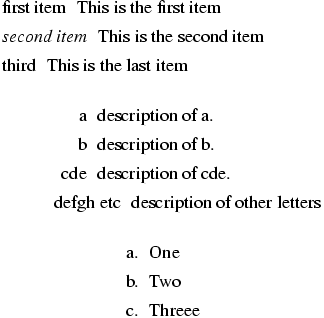
\item
The \item command creates an item in a list. It takes an optional
argument, that is the label of the item, which is evaluated inside a
group. See also `\@item <#cmd-at-item>`__ and
`\@itemlabel <#cmd-at-itemlabel>`__. Here is an example of three
types of lists.
\begin{itemize}
 \item[first item] This is the first item
 \item[\it second item] This is the second item
 \item[third] This is the last item
 \begin{description}
  \item[a] description of a.
  \item[b] description of b.
  \item[cde] description of cde.
  \item[defgh etc] description of other letters
  \begin{enumerate}
    \item One
    \item Two
    \item Threee
  \end{enumerate}
 \end{description}
\end{itemize}
This is the translation of the example above. Note that each item
contains one or more paragraphs, and that each item has a unique id, and
a id-text. If the local list counter is enumi, the id-text is the
value of \theenumi after incrementing the counter. See
enumi for additional explanations (in the
example above, three counters are used, Enumi, Enumii and
enumi). In the case of a description, the macro \labelenumi (the
name depends on the enumeration level) is used to produce the label
attribute. Each item with an optional argument has a label. How it is
typeset depends on the style sheet (in the preview below, labels in an
enumeration are flushed right, except if too big).
<list type='simple'>
  <label>first item</label>
  <item id-text='1' id='uid1'><p noindent='true'>This is the first item</p></item>
  <label><hi rend='it'>second item</hi></label>
  <item id-text='2' id='uid2'><p noindent='true'>This is the second item</p></item>
  <label>third</label>
  <item id-text='3' id='uid3'><p noindent='true'>This is the last item</p>
    <list type='description'>
      <label>a</label>
      <item id-text='3.1' id='uid4'><p noindent='true'>description of a.</p></item>
      <label>b</label>
      <item id-text='3.2' id='uid5'><p noindent='true'>description of b.</p></item>
      <label>cde</label>
      <item id-text='3.3' id='uid6'><p noindent='true'>description of cde.</p></item>
      <label>defgh etc</label>
      <item id-text='3.4' id='uid7'><p noindent='true'>description of other letters</p>
        <list type='ordered'>
          <item id-text='1' id='uid8' label='(1)'><p noindent='true'>One</p></item>
          <item id-text='2' id='uid9' label='(2)'><p noindent='true'>Two</p></item>
          <item id-text='3' id='uid10' label='(3)'><p noindent='true'>Threee</p></item>
        </list>
      </item>
    </list>
  </item>
</list>
\@item, \@@item (Tralics command)
The \item command is normally bound to \@@item but can be
changed to \@item, either by using \let in the tex file or
alternate_item=”true” in the configuration file. The difference lies in
the translation of the optional argument
The default rule is: an optional argument to the \item command
produces a <label> element, and in a list, you should either use no
optional argument, or provide an optional argument for every item. If
you change \item to \@item, this gives the following behavior:
an optional argument produces a label attribute, and translation of
\item is always a single element. This forbids using math formulas
in the optional argument (for instance \item[$\bullet$] won’t work).
A rule of thumb is: optional arguments are useless for itemize,
mandatory for description, and automatic for enumerate. Here
automatic means: the labels a, b, c may be computed by Tralics, the
XML to HTML converter, or the web browser, or whatever. These labels
were not computed by early versions of Tralics. In the current
version, in the case of description, the label is computed (unless
explicitly given), and produces an attribute (this means that using
\fnsymbol for producing the label will produce an error, since it
generates math expressions). The command \enumi@hook (its name
depends on the enumeration level) is executed (if defined) at the start
of the environment. In the example that follows it adds an attribute to
the current element (the list). Note that the hook is executed after
\@itemlabel has been redefined to \theenumi, it can locally
redefine this variable.
\makeatletter
\let\item\@item
\newcounter{Ctr}
\def\enumii@hook{\AddAttToCurrent{list-counter}{Roman}}
\begin{list}{(\theCtr)}{HEY!\usecounter{Ctr}}

\item[a] bla bla
\item ble ble
\item blu blu
\begin{enumerate}
\item e1
\item e2
\def\@itemlabel{[\theenumi]}
\item e3
\item
\begin{enumerate}\def\@itemlabel{[\theenumi,\theenumii]}
\item i1
\item i2
\item[foo] i3
\item i4
\end{enumerate}
\item e5
\end{enumerate}
\item bli bli
\end{list}
Translation
<list type='description'><p>HEY!</p>
  <item id-text='1' id='uid11' label='a'><p noindent='true'>bla bla</p>
  </item>
  <item id-text='2' id='uid12' label='(2)'><p noindent='true'>ble ble</p>
  </item>
  <item id-text='3' id='uid13' label='(3)'>
  <p noindent='true'>blu blu</p>
  <list type='ordered'>
    <item id-text='1' id='uid14' label='(1)'><p noindent='true'>e1</p>
    </item>
    <item id-text='2' id='uid15' label='(2)'><p noindent='true'>e2</p>
    </item>
    <item id-text='3' id='uid16' label='[3]'><p noindent='true'>e3</p>
    </item>
    <item id-text='4' id='uid17' label='[4]'>
      <list list-counter='Roman' type='ordered'>
        <item id-text='4a' id='uid18' label='[4,a]'><p noindent='true'>i1</p>
        </item>
        <item id-text='4b' id='uid19' label='[4,b]'><p noindent='true'>i2</p>
        </item>
        <item id-text='4c' id='uid20' label='foo'><p noindent='true'>i3</p>
        </item>
        <item id-text='4d' id='uid21' label='[4,d]'><p noindent='true'>i4</p>
        </item>
      </list>
      </item>
      <item id-text='5' id='uid22' label='[5]'><p noindent='true'>e5</p>
      </item>
  </list>
  </item>
  <item id-text='4' id='uid23' label='(4)'><p noindent='true'>bli bli</p>
  </item>
</list>
\@itemlabel
The value of this command is set by list environments. In the case of
enumeration it is \labelenumXXX (where XXX is the lowercase roman
letter value of the list depth). In the case of other standard lists,
the value is \relax. In the case of list, it is a macro without
arguments that contains the value of the first argument of the
environment. The \item command takes an optional argument; if
omitted, the value of \@itemlabel is used, provided this is not
\relax.
\itemindent (rigid length)
This holds a dimension (indentation of the first line of an item). Not used by Tralics.
itemize (environment)
This is an environment in which you can put items. See description of
`\item <doc-i.html#cmd-item>`__ above.
\itemsep (rubber length)
This holds a length (amount of extra vertical space, in addition to
\parsep, inserted between successive list items. Not used by
Tralics.
\itshape
The \itshape command changes the shape of the current font to an
italic shape. For an example of fonts, see
`\rm <doc-r.html#cmd-rm>`__.
\@iwhiledim \@iwhilenum \@iwhilesw
Private commands used by `\@whiledim <doc-w.html#cmd-whiledim>`__,
`\@whilenum <doc-w.html#cmd-whilenum>`__, and
`\@whilesw <doc-w.html#cmd-whilesw>`__ respectively.
\@ixpt
The expansion of the \@ixpt is 9.