All commands, alphabetic order; letter B
\b
The \b command generates a bar-under accent. The translation of
\b B \b b \b D \b d \b h \b K \b k \b L \b l
\b N \b n \b R \b r \b T \b t \b Z \b z
is
Ḇ ḇ Ḏ ḏ ẖ Ḵ ḵ Ḻ ḻ
Ṉ ṉ Ṟ ṟ Ṯ ṯ Ẕ ẕ
Preview:  HTML characters Ḇ ḇ Ḏ ḏ ẖ Ḵ ḵ Ḻ ḻ Ṉ ṉ Ṟ ṟ Ṯ
ṯ Ẕ ẕ
\backepsilon (math symbol)
The \backepsilon command is valid only in math mode. It generates
the reversed epsilon character <mo>϶</mo> (Unicode 3F6,
϶).
\backmatter
A command to be used after the main matter in a book. See description of
the `\mainmatter <doc-m.html#cmd-mainmatter>`__ command.
\backprime (math symbol)
The \backprime command is valid only in math mode. It generates the
reversed prime character <mo>‵</mo> (Unicode 2035, ‵).
\backsim (math symbol)
The \backsim command is valid only in math mode. It generates the
reversed tilde character <mo>∽</mo> (Unicode 223D, ∽).
\backsimeq (math symbol)
The \backsimeq command is valid only in math mode. It generates the
reversed tilde with equals character <mo>⋍</mo> (Unicode
22CD, ⋍).
\backslash (math symbol)
The \backslash command gives a backslash. It is valid only in math
mode. Use \textbackslash for a backslash in text mode. Translation
is <mo>∖</mo> (Unicode 2216, ∖). See also description of
the `\smallint <doc-s.html#cmd-smallint>`__ command.
\badness
In TeX, the variable \badness contains the badness of the last box.
In Tralics, you can say \count25=\badness if you want to put zero
into count register 25, or you can say \the\badness if you want a
zero digit.
\bar
The \bar command puts a bar accent over a kernel. It works only in
math mode; use the `\= <doc-symbols.html>`__ command outside math
mode. See also the `\acute <doc-a.html#cmd-acute>`__ command.
\baro (math symbol)
The \baro command is valid in math mode only, it translates to
<mo>⌽</mo> (Unicode 233D, ⌽), it is a vertical bar in a
circle.
\barwedge (math symbol)
The \barwedge command is valid in math mode only, it translates to
<mo>⊼</mo> (Unicode 22BC, ⊼).
\barnodeconnect
The command \barnodeconnect[d]{F}{T} connects nodes F and T using a
bar of depth d. See
`\abarnodeconnect <doc-a.html#cmd-abarnodeconnect>`__ command for
syntax and usage.
\baselineskip (rubber length)
You can say \baselineskip=10pt plus 2pt minus 3pt. This explains to
TeX that it should put 10pt (maybe up to 2pt more, maybe up to 3pt less)
of glue between the baselines of two consecutive lines in a paragraph
(this may depend on \lineskiplimit). Unused by Tralics. (See
scanglue for details of argument
scanning).
\baselinestretch
This commands expands to 1. (See TLC2, section 3.1.13).
\batchmode
You can prefix the command \batchmode with \global. Nothing
happens, since batch-mode is the only interaction mode.
\Bbbk
The \Bbbk command produces a blackboard k, it is the same as
\mathbb{k}.
\because (math symbol)
The \because command is valid in math mode only, it translates to
<mo>∵</mo> (Unicode U+2235, ∵).
\begin
You can say something like
\begin{something} some code \end{thesame}. The result of this is to
translate the code inside a group. Moreover, some specific action is
done at the beginning and the end of the environment. For instance
\something is called first, and \endthesame is called at the
end.
The documentation says that \begin{em} some code \end{em} is the
same as {\em some code}. Practically, this means that
\end{thesame} produces nothing (in particular no error), if
\endthesame is not defined.
The argument to \begin and \end is converted to a command name
via \csname, hence macros are expanded. If you say
\def\xx#1{}\begin{\xx}, you get the following LateX error: !
Missing \endcsname inserted. <to be read again> \relax. This is
because the command \xx reads the \endcsname marker, and
checking whether the environment is defined inserts a \relax. For
the same example Tralics says End of data reached while expecting
\endcsname, and in the case of \begin{abc\par cde}, the error
reads Invalid token \par found while scanning \begin. No error is
signaled in the case \begin{abc\endcsname cde}. In both these cases,
the environment is named “abc” and the superfluous tokens cde are
ignored.
If you say: \begin{\em} ... \end{\em}, LaTeX complains with !
Missing \endcsname inserted. This is because \em is a robust
command (one for which expansion can be delayed); it expands to
\protect which cannot be expanded (the meaning of \protect
depends on the context).
If you say \def\FOO{foo} \begin{\FOO}\end{foo} you get the following
error: ! LaTeX Error: \begin{foo} on input line 22 ended by
\end{foo}. This is because the names are different \FOO versus
foo, and the error message is printed via \errmessage that
expands everything. No error is signaled by Tralics in this case. Note
the funny error for \begin{a}\end{a}, because \a tries to fetch
an accent: ! LaTeX Error: Command \end unavailable in encoding T1.
Note that \begin{}\end{} gives infinite recursion in LaTeX, this is
a special case in Tralics. The commands \begin{group} \end{group}
give two errors: first Undefined environment group then Extra
\endgroup found in unclosed environment group.
Historical note. Before 2.13.3, only characters were allowed in an environment name (nothing is expanded). Since version 2.10, spaces are allowed in an environment name. Since version 2.14, environment names can have less than two letters.
Environments should nest properly. What this means is unclear to me. You
may say \newenvironment{foo} {\begin{bar}} {\end{bar}} followed by
\begin{foo} ... \end{foo}. When the \end command is seen, the
current environment is `bar’ and the argument is `foo’: these names
are not the same. However \endfoo will call \end{bar} and close
the other environment. As a consequence, only a posteriori tests can be
made. This makes error recovery unclear.
\@begintheorem
Private Tralics command.
\beginL, \beginR
These commands are ε-TeX extensions that indicate the start of a left-to-right or right-to-left region; they are ignored by Tralics.
\begingroup
The \begingroup command defines a semi-simple group, that must be
terminated by \endgroup. In some cases a construct like
\begingroup\it x\endgroup is exactly the same as {\it x}, or as
\bgroup\it x\egroup.
\belowdisplayshortskip (rubber length)
You can say \belowdisplayshortskip=10pt plus 2pt minus 3pt. The
\belowdisplayshortskip register contains a skip value that TeX puts
after a short display. The value is unused by Tralics. (See
scanglue for details of argument
scanning). (See `\predisplaysize <doc-p.html#cmd-predisplaysize>`__
for further details).
\belowdisplayskip (rubber length)
You can say \belowdisplayskip=10pt plus 2pt minus 3pt. The
\belowdisplayskip register contains a skip value that TeX puts after
a display. The value is unused by Tralics. (See
scanglue for details of argument
scanning). (See `\predisplaysize <doc-p.html#cmd-predisplaysize>`__
for further details).
Beqnarray, Beqnarray* (environments)
The fancybox package provides a variant of the eqnarray environment
that can be used inside a box; the documentation provides this example:
\fbox{%
  \begin{Beqnarray*}
    x &=&y\\
    y& >& x\\
    \int_4^5 f(x)dx &=&\sum_{i\in F} x_i
  \end{Beqnarray*}
}
Here is the translation. The math formula consists in a table with three rows, omitted here.
<fbox rend='boxed'>
  <formula textype='Beqnarray*' type='display'>
    <math mode='display' xmlns='http://www.w3.org/1998/Math/MathML'>
     <mtable displaystyle='true'>
       <mtr>...</mtr><mtr>...</mtr><mtr>...</mtr>
     </mtable>
    </math>
  </formula>
</fbox>
\beta (math character)
The \beta command is valid only in math mode. It generates a Greek
letter: <mi>β</mi> (Unicode U+3B2, β) that renders like
 . See description of the
`\alpha <doc-a.html#cmd-alpha>`__
command.
\beth (math character)
The \beth command is valid only in math mode. It generates a Hebrew
letter: <mi>ℶ</mi> (Unicode U+2136, ℶ).
\between (math symbol)
The \between command is valid only in math mode. It generates a
symbol: <mi>≬</mi> (Unicode U+226C, ≬).
\bezier
This is like \qbezier but it has a first required argument instead
of optional. See the `\qbezier <doc-q.html#cmd-qbezier>`__ command.
\bf
The \bf command is equivalent to \normalfont\bfseries. In other
words, it selects a font of roman family, bold series and upright shape.
For an example of fonts, see `\rm <doc-r.html#cmd-rm>`__.
\bfseries
The \bfseries command changes the series of the current font to a
bold face series. For an example of fonts, see
`\rm <doc-r.html#cmd-rm>`__.
\bgroup
The \bgroup command is an open brace of catcode 1. For an example
see catcode1.
\bibitem
This command takes two arguments, the first being optional. Translation
of \bibitem [toto] {titi} is
<bibitem id='bid17' bib-key='toto'/>. The element will have an id
and a bib-key attribute that comes from the optional argument. If you
say \cite{titi}, this will create a reference to this bibitem
element. (See `\XMLsolvecite <doc-x.html#cmd-XMLsolvecite>`__ for
more details). Note that the equivalent of \noindent is executed;
this implies that a new paragraph is started. [Translation changed in
version 2.12.1]
\bibitem@empty (Tralics command)
You can say \bibitem@empty{foo}, this will signal an error because
the command has been withdrawn.
\bibliography
The \bibliography command takes as argument a list of file-names
from which bibtex takes the bibliographical entries. In Tralics, this
command has as side-effect to load the bibliography, i.e. the bbl file.
In the current version, this file is created by Tralics and not by an
external program.
\bibliographystyle
When you say \bibliographystyle{alpha}, this tells bibtex to use the
alpha.bst file. In the current version, Tralics does not call bibtex,
and the bibliography is handled, independently of the argument of this
command. In a future version, something will be done.
\big, \Big, \bigg, \Bigg
The \big declaration is valid only in math mode. It is ignored
unless what follows is a character that can become bigger in the
vertical dimension. In some cases, \big is replaced by a \left
or \right command. Hence all four commands \big \Big \bigg \Bigg
produce the same result. If you say \big(, the result is an opening
delimiter, that can be converted into \left(; if you say \bigl),
the result is also an opening delimiter, because the command says so. If
you say \bigm), you get a middle delimiter, that can produce a
\middle( (the \middle command is not yet implemented). For an
example, see `\mathord <doc-m.html#cmd-mathord>`__.
\bigl, \Bigl, \biggl, \Biggl
See \big above. This is a left (opening) delimiter.
\bigr, \Bigr, \biggr, \Biggr
See \big above. This is a right (closing) delimiter.
\bigm, \Bigm, \biggm, \Biggm
See \big above. This is a middle (neither opening nor closing)
delimiter.
\bigbox (math symbol)
The \bigbox command is valid only in math mode. It is an alias for
`\square <doc-s.html#cmd-square>`__. Translation is
<mo>□</mo> (Unicode U+25A1, □)
\bigbreak
In Tralics, the \bigbreak command is the same as \par. In
LaTeX, it makes also sure that the space between the two paragraphs is
at least \bigskipamount, by calling \bigskip if necessary; not
implemented in Tralics.
\bigcap (math symbol)
The \bigcap command is valid only in math mode. Its translation is a
variable-sized symbol (used for set intersection): <mo>⋂</mo>
(Unicode U+22C2, ⋂) that renders like  . For an example see
the
`\sum <doc-s.html#cmd-sum>`__ command.
\bigcirc (math symbol)
The \bigcirc command is valid only in math mode. It generates a
binary operator (big circle): <mo>◯</mo> (Unicode U+25EF, ◯)
that renders like  . See description of the
`\pm <doc-p.html#cmd-pm>`__ command.
\bigcircle
The \bigcircle command is defined by the curves package. See
`\arc <doc-a.html#cmd-arc>`__.
\bigcup (math symbol)
The \bigcup command is valid only in math mode. Its translation is a
variable-sized symbol (used for set union): <mo>⋃</mo>
(Unicode U+22C3, ⋃) that renders like  . For an example see
the
`\sum <doc-s.html#cmd-sum>`__ command.
\bigcurlyvee (math symbol)
The \bigcurlywedge command is valid only in math mode. It is an
alias to `\curlyvee <doc-c.html#cmd-curlyvee>`__.
\bigcurlywedge (math symbol)
The \bigcurlywedge command is valid only in math mode. It is an
alias to `\curlywedge <doc-c.html#cmd-curlywedge>`__.
\bignplus (math symbol)
The \bignplus command is valid only in math mode. It is an alias to
\nplus. Note these two commands are described but not
implemented.
\biginterleave (math symbol)
The \biginterleave command is valid only in math mode. It is an
alias to `\interleave <doc-i.html#cmd-interleave>`__.
\bigodot (math symbol)
The \bigodot command is valid only in math mode. Its translation is
a variable-sized symbol (dot in a circle): <mo>⨀</mo>
(Unicode U+2A00, ⨀) that renders like  . For an example see
the
`\sum <doc-s.html#cmd-sum>`__ command.
\bigoplus (math symbol)
The \bigoplus command is valid only in math mode. Its translation is
a variable-sized symbol (plus in a circle): <mo>⨁</mo>
(Unicode U+2A01, ⨁) that renders like  . For an example see
the
`\sum <doc-s.html#cmd-sum>`__ command.
\bigotimes (math symbol)
The \bigotimes command is valid only in math mode. Its translation
is a variable-sized symbol (times in a circle): <mo>⨂</mo>
(Unicode U+2A02, ⨂) that renders like  . For an example see
the
`\sum <doc-s.html#cmd-sum>`__ command.
\bigparallel (math symbol)
The \bigparallel command is valid only in math mode. It is an alias
to `\parallel <doc-p.html#cmd-parallel>`__.
\bigskip
The \bigskip command is like the
`\smallskip <doc-s.html#cmd-smallskip>`__ command. (see also the
`\vskip <doc-v.html#cmd-vskip>`__ command).
\bigskipamount (rubber length)
This is defined by Tralics in the same way as in LaTeX, but is unused,
see `\smallskip <doc-s.html#cmd-small-skip>`__
\bigsqcap (math symbol)
The \bigsqcap command is valid only in math mode. Its translation is
a variable-sized symbol (square cap): <mo>⊓</mo> (Unicode
U+2293, ⊓). For an example see the `\sum <doc-s.html#cmd-sum>`__
command.
\bigsqcup (math symbol)
The \bigsqcup command is valid only in math mode. Its translation is
a variable-sized symbol (square cup): <mo>⨆</mo> (Unicode
U+2A06, ⨆). For an example see the `\sum <doc-s.html#cmd-sum>`__
command.
\bigstar (math symbol)
The \bigstar command is valid only in math mode. Its translation is
<mo>★</mo> (Unicode U+2605, ★).
\bigtriangledown (math symbol)
The \bigtriangledown command is valid only in math mode. It
generates a binary operator. Looks like a reversed \Delta:
<mo>▽</mo> (Unicode U+25BD, ▽) that renders like
 . See description of the
`\pm <doc-p.html#cmd-pm>`__ command.
\bigtriangleup (math symbol)
The \bigtriangleup command is valid only in math mode. It generates
a binary operator. Looks like a \Delta: <mo>△</mo>
(Unicode U+25B3, △) that renders like  . See
description of the
`\pm <doc-p.html#cmd-pm>`__ command.
\biguplus (math symbol)
The \biguplus command is valid only in math mode. Its translation is
a variable-sized symbol. It is like a plus in a cup:
<mo>⨄</mo> (Unicode U+228E, ⊎) that renders like
 . For an example see the
`\sum <doc-s.html#cmd-sum>`__
command.
\bigvee (math symbol)
The \bigvee command is valid only in math mode. Its translation is a
variable-sized symbol. It looks like a big V: <mo>⋁</mo>
(Unicode U+22C1, ⋁) that renders like  . For an example see
the
`\sum <doc-s.html#cmd-sum>`__ command.
\bigwedge (math symbol)
The \bigwedge command is valid only in math mode. Its translation is
a variable-sized symbol. It looks like a big reversed V:
<mo>⋀</mo> (Unicode U+22C0, ⋀) that renders like
 . For an example see the
`\sum <doc-s.html#cmd-sum>`__
command.
\binampersand (math symbol)
The \binampersand command is valid only in math mode. Its
translation is <mo>&</mo>.
\bindnasrepma (math symbol)
The \bindnasrepma command is valid only in math mode. Its
translation is <mo>⅋</mo> ⅋
\binom
The \binom command is valid in math mode only. It could be defined
as \def\binom{\genfrac()\z@{}}. The translation is a <mfence>
element, containing a <mfrac> element. The two arguments of the
\binom command are typeset one above the other, with parentheses
around. There are two variants \dbinom \tbinom that control the
size of the arguments. Note that \left(\right) produces bigger
parentheses than \genfrac. Example.
\def\n{\mathchoice{a}{b}{c}{d}}
$$\binom{\frac{\n+m}{2}} \n \quad
\tbinom{\frac{\n+m}{2}} \n \quad
\dbinom{\frac{\n+m}{2}} \n\qquad
{}^{\binom{\frac{\n+m}{2}} \n \quad
\tbinom{\frac{\n+m}{2}} \n \quad
\dbinom{\frac{\n+m}{2}} \n}$$
This is the translation. Comments were not generated by Tralics
<formula type='display'>
 <math xmlns='http://www.w3.org/1998/Math/MathML'>
  <mrow><mfenced open='(' close=')'>
   <!--\binom{\frac{\n+m}{2}} \n -->
   <mfrac linethickness='0.0pt'>
    <mfrac>
     <mrow><mi>c</mi><mo>+</mo><mi>m</mi></mrow> <mn>2</mn></mfrac>
     <mi>b</mi>
    </mfrac>
   </mfenced>
   <mspace width='1.em'/>
   <!--\tbinom{\frac{\n+m}{2}} \n -->
   <mfenced open='(' close=')'>
    <mstyle scriptlevel='0' displaystyle='false'>
     <mfrac linethickness='0.0pt'>
      <mfrac><mrow><mi>d</mi><mo>+</mo><mi>m</mi></mrow> <mn>2</mn></mfrac>
      <mi>c</mi>
     </mfrac>
    </mstyle>
   </mfenced>
   <mspace width='1.em'/>
   <!--\dbinom{\frac{\n+m}{2}} \n -->
   <mfenced open='(' close=')'>
    <mstyle scriptlevel='0' displaystyle='true'>
     <mfrac linethickness='0.0pt'>
      <mfrac><mrow><mi>c</mi><mo>+</mo><mi>m</mi></mrow> <mn>2</mn></mfrac>
      <mi>b</mi>
     </mfrac>
    </mstyle>
   </mfenced>
   <mspace width='2.em'/>
   <msup>
    <mrow></mrow>
    <mrow>
     <!-- {}^\binom{\frac{\n+m}{2}} \n -->
     <mfenced open='(' close=')'>
      <mfrac linethickness='0.0pt'>
       <mfrac><mrow><mi>d</mi><mo>+</mo><mi>m</mi></mrow> <mn>2</mn></mfrac>
       <mi>d</mi>
      </mfrac>
     </mfenced>
     <mspace width='1.em'/>
     <!-- {}^\tbinom{\frac{\n+m}{2}} \n -->
     <mfenced open='(' close=')'>
      <mstyle scriptlevel='0' displaystyle='false'>
       <mfrac linethickness='0.0pt'>
        <mfrac><mrow><mi>d</mi><mo>+</mo><mi>m</mi></mrow> <mn>2</mn></mfrac>
        <mi>c</mi>
       </mfrac>
      </mstyle>
     </mfenced>
     <mspace width='1.em'/>
     <!--{}^\dbinom{\frac{\n+m}{2}} \n -->
     <mfenced open='(' close=')'>
      <mstyle scriptlevel='0' displaystyle='true'>
       <mfrac linethickness='0.0pt'>
        <mfrac><mrow><mi>c</mi><mo>+</mo><mi>m</mi></mrow> <mn>2</mn></mfrac>
        <mi>b</mi>
       </mfrac>
      </mstyle>
     </mfenced>
    </mrow>
   </msup>
  </mrow>
 </math>
</formula>
Preview:  (See also
here).
\binoppenalty (integer parameter)
If you say \binoppenalty=26, then TeX will use 26 as penalty for
line break in a math formula after a binary operator (like +). This
parameter is ignored by Tralics (note that, in the current
implementation, $a+b$ and $a\mathrel+b$ are identically
translated; it is hence impossible to decide whether the plus is binary
or not). (See scanint for details of
argument scanning).
\blacklozenge (math symbol)
The \blacklozenge command is valid only in math mode. Its
translation is <mo>&blacklozenge</mo> (Unicode U+29EB, ⧫).
\blacksquare (math symbol)
The \blacksquare command is valid only in math mode. Its translation
is <mo>▪</mo> (Unicode U+25AA, ▪).
\blacktriangle (math symbol)
The \blacktriangle command is valid only in math mode. Its
translation is <mo>▴</mo> (Unicode U+25B4, ▴)
\blacktriangledown (math symbol)
The \blacktriangledown command is valid only in math mode. Its
translation is <mo>▾</mo> (Unicode U+25BE, ▾).
\blacktriangleleft (math symbol)
The \blacktriangleleft command is valid only in math mode. Its
translation is <mo>◂</mo> (Unicode +U25C2, ◂).
\blacktriangleright (math symbol)
The \blacktriangleright command is valid only in math mode. Its
translation is <mo>▸</mo> (Unicode U+25B8, ▸).
\bmod
This command is one the 4 modulo commands. Here is an example (TLC2, 8-4-7, first half).
\begin{align*}
u& \equiv v+1 \mod{n^2} \\
u& \equiv v+1 \bmod{n^2} \\
u&   =    v+1 \pmod{n^2} \\
u&   =    v+1 \pod{n^2} \\
\end{align*}
This is the translation
<formula id-text='mid1' id='uid1' type='display'>
<math mode='display' xmlns='http://www.w3.org/1998/Math/MathML'>
<mtable displaystyle='true'>
<mtr>
<mtd columnalign='right'><mi>u</mi></mtd>
<mtd columnalign='left'><mrow><mo>≡</mo><mi>v</mi><mo>+</mo><mn>1</mn>
<mspace width='3.33333pt'/><mo form='prefix'>mod</mo><mspace width='0.277778em'/>
<msup><mi>n</mi> <mn>2</mn> </msup></mrow></mtd>
</mtr>
<mtr>
<mtd columnalign='right'><mi>u</mi></mtd>
<mtd columnalign='left'><mrow><mo>≡</mo><mi>v</mi><mo>+</mo><mn>1</mn>
<mspace width='0.277778em'/><mo form='prefix'>mod</mo><mspace width='0.277778em'/>
<msup><mi>n</mi> <mn>2</mn> </msup></mrow></mtd>
</mtr>
<mtr>
<mtd columnalign='right'><mi>u</mi></mtd>
<mtd columnalign='left'><mrow><mo>=</mo><mi>v</mi><mo>+</mo><mn>1</mn>
<mspace width='10.0pt'/><mo>(</mo><mo form='prefix'>mod</mo><mspace width='0.277778em'/></mrow>
<msup><mi>n</mi> <mn>2</mn> </msup><mo>)</mo></mrow></mtd>
</mtr>
<mtr>
<mtd columnalign='right'><mi>u</mi></mtd>
<mtd columnalign='left'><mrow><mo>=</mo><mi>v</mi><mo>+</mo><mn>1</mn>
<mspace width='10.0pt'/><mo>(</mo><msup><mi>n</mi> <mn>2</mn> </msup><mo>)</mo></mrow>
</mtd>
</mtr>
</mtable>
</math>
</formula>
Preview 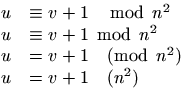 . (See also here).
body (Tralics environment)
The body environment is defined as \newenvironment{body}{}{} in
versions up to 2.3 for compatibility reasons. It is now a user-defined
environment for the raweb only. It is undefined otherwise.
\boolean
See `\newboolean <doc-n.html#cmd-newboolean>`__ for how to create a
boolean and `\ifthenelse <doc-i.html#cmd-ifthenelse>`__ for how to
use it with the \boolean{some-name} command.
\bot (math symbol)
The \bot command is valid only in math mode. It generates a
miscellaneous symbol. It is like \perp: <mo>⊥</mo>
(Unicode U+22A5, ⊥) that renders like  . See description of the
`\ldots <doc-l.html#cmd-ldots>`__ command.
\botfigrule
The command \botfigrule behaves like \relax, in LaTeX it can be
redefined to produce a rule between a float and text that precedes.
\botmark
In \botmark is the mark text most recently encountered on the page
that was just boxed. Since Tralics does not box pages, the expansion
of \botmark is always empty.
\botmarks
This is an extension introduced by ε-TeX; an integer is read, expansion
is empty. See `\splitbotmark <doc-s.html#cmd-splitbotmark>`__.
\bottom (math symbol)
The \bottom command is an alias for \bot .
\bottomfraction
Maximum fraction of a page that can be occupied by floats at the bottom.
Unused by Tralics. See `\intextsep <doc-i.html#cmd-intextsep>`__.
bottomnumber (counter)
Maximum number of floats at the bottom of a page. Unused by Tralics.
See `\intextsep <doc-i.html#cmd-intextsep>`__.
\bowtie (math symbol)
The \bowtie command is valid only in math mode. It generates a
relation symbol: <mo>⋈</mo> (Unicode U+22C8,⋈) that renders
like See description of the `\le <doc-l.html#cmd-le>`__ command.

\Box (math symbol)
The \Box command is valid only in math mode. It generates a square
box <mo>&25A1;</mo>. There is the image of x\Box  .
\box
The \box command reads an integer N (a small number between 0 and
255, see scanint for details), and returns
the content of the box number N. After that, the box is emptied (the
\copy command behaves in the same fashion, but leaves the box
unchanged). Example
\setbox12=\xbox{foo}{ok}
\count3=12
\copy12 , and \copy 12 , and \box \count3 , and \box 12!
Translation
<foo>ok</foo>, and <foo>ok</foo>, and <foo>ok</foo>, and !
\boxast (math symbol)
The \boxast command is valid only in math mode. It generates a box
with asterisk <mo>⧆</mo> (Unicode U+29C6, ⧆).
\boxbox (math symbol)
The \boxbox command is valid only in math mode. It generates a box
with a box <mo>&29C8;</mo> (Unicode U+29C8, ⧈).
\boxbslash (math symbol)
The \boxbslash command is valid only in math mode. It generates a
box with a backslash <mo>⧅</mo> (Unicode U+29C5, ⧅).
\boxcircle (math symbol)
The \boxcircle command is valid only in math mode. It generates a
box with <mo>⧇</mo> (Unicode U+29C7, ⧇).
\boxdot (math symbol)
The \boxdot command is valid only in math mode. It generates a box
with a dot <mo>⊡</mo> (Unicode U+22A1, ⊡).
\boxed
The \boxed command is valid only in math mode. It takes an argument,
and puts a frame around it (like fbox in text mode); as the example
below shows, the argument is put in a cell of a table, and the table has
a frame attribute. (See also here).
<mtable frame='solid'><mtr><mtd><mi>x</mi></mtd></mtr></mtable>
\boxempty (math symbol)
The \boxempty command is valid only in math mode. It generates an
empty box. It is an alias for `\square <doc-s.html#cmd-square>`__.
Translation is <mo>□</mo> (Unicode U+25A1, □).
\boxmaxdepth (rigid length)
You can say \boxmaxdepth=1.5in, as a result TeX will make sure that
each vbox on a page has a depth not exceeding 1.5in (by shifting it up
if necessary). Ignored by Tralics. (See
scandimen for details of argument
scanning).
\boxminus (math symbol)
The \boxminus command is valid only in math mode. It generates a box
with a minus sign <mo>⊟</mo> (Unicode U+229F, ⊟).
\boxplus (math symbol)
The \boxplus command is valid only in math mode. It generates a box
with a plus sign <mo>⊞</mo> (Unicode U+229E, ⊞).
boxslash\ (math symbol)
The \boxslash command is valid only in math mode. It generates a box
with slash <mo>⧄</mo> (Unicode U+29C4, ⧄).
\boxtimes (math symbol)
The \boxtimes command is valid only in math mode. It generates a box
with product sign <mo>⊠</mo> (Unicode U+22A0, ⊠).
\bpers (Tralics command)
This command is used for an author or editor in a bibliography. It takes
one optional and four required arguments (first name, initials,
particle, last name, junior name). For an example, see
`\citation <doc-c.html#cmd-citation>`__. Here the arguments of the
command are \bpers[David]{D.}{}{Carlisle}{}, from the database value
‘David Carlisle’. The translation is a <bpers> element, with five
attributes (in the case of particle and junior, no attribute is created
if the field is empty, so that the effective number of attributes is
between three and five). An example is
<bpers prenom='D.' nom='Carlisle' prenomcomplet='David'/>.
\bprime (math symbol)
The \bprime command is valid only in math mode. It generates
<mo>‵</mo> (Unicode U+2035).
\brace, \brack (math construction)
Instead of {a\brace b} or {a\brack b} you should use
\genfrac\{\}{0pt}{}{a}{b} and \genfrac[]{0pt}{}{a}{b}.
\bracevert (math symbol)
The \bracevert command is valid only in math mode. It is an alias
for `\vert <doc-v.html#cmd-vert>`__.
\break
The \break command is ignored. It is \penalty-10000 in LaTeX.
\breve
The \breve command puts a breve accent over a kernel. It works only
in math mode. See also the `\acute <doc-a.html#cmd-acute>`__
command.
\brokenpenalty (internal integer)
When you say \brokenpenalty=98, then TeX will use 98 as penalty for
a page break at a discretionary break (case where a word is broken, the
two parts being on two different pages). Unused by Tralics. (See
scanint for details of argument scanning).
\Bumpeq (math character)
The \Bumpeq command is valid only in math mode. It generates
<mo>≎</mo> (Unicode U+224E, ≎).
\bullet (math character)
The \bullet command is valid only in math mode. It generates a
binary operator: <mo>•</mo> (Unicde U+2022, •) See
description of the `\pm <doc-p.html#cmd-pm>`__ command.
\bye
This is defined in PlainTeX as : \par \vfill \supereject \end. In
Tralics, we make it equivalent to \endinput.