All commands, alphabetic order; letter R
\r
The \r command generates a ring accent. The translation of
\r A \r a \r U \r u \r w \r y
is Å å Ů ů ẘ ẙ or Å å Ů ů ẘ ẙ
\radical
The \radical command is valid only in math mode. It is followed by
27-bit number followed by a math field. TeX splits the number into a,
f, b and g as it does with any \delimiter. Then it processes
the math field and appends a new Rad atom to the current list. The
nucleus of this atom contains the specified field; the delimiter field
in this atom contains (a, f) and (b, g).
 (see scanint for how the
argument is read)
\raggedbottom
The \raggedbottom command tells LaTeX to use fixed interline space
(and variable space at the end of the page), rather than adjust the
interline space in order to align the last line of each page (which is
the effect of \flushbottom). Both these commands set \@texttop
to \relax and \@textbottom to some well chosen value. Unused in
Tralics.
\raggedleft, \raggedright
\raggedleft command starts typesetting in flush-right mode.
The \raggedright command starts typesetting in flush-left (non
justified) mode. For more information, see description of the command
`\centering <doc-c.html#cmd-centering>`__.\raise
See `\moveleft <doc-m.html#cmd-moveleft>`__.\raisebox
Translation of \raisebox{x}[y][z]{\it t} is
<raisebox depth='z' height='y' val='x'><hi rend='it'>t</hi></raisebox>.
Required argument x, optional arguments y and z are handled in a special
way (translation should consist in characters only; it is not possible
to fetch the size of the box that contains the last argument). The last
argument is evaluated in a group (for instance, font changes are local
to the box).
\ra@jobname (Tralics command)
This is like \jobname, but in a case like foo/bar/gee13, the
final digits are removed, as well as the directory part. Hence, the
result is gee (all characters are of category code 12).
\RAlabel (Tralics command)
The obsolete command \RAlabel reads one argument and does nothing
with it.
\rangle (math symbol)
\rangle command is valid only in math mode. It generates a
delimiter (right angle): <mo>⟩</mo> (Unicode U+232A, 〉)
that renders like  . See description of the
`\vert <doc-v.html#cmd-vert>`__
command.\RAstartprojet (Tralics command)
This command is not implemented anymore.
RAsection (Tralics environment)
Not a user command. Not implemented anymore. However the commands that
start and end a section for the Raweb are still present; they are called
\tralics@push@section and \tralics@pop@section.
rawhtml (environment from the html package)
rawhtml environment is ignored. This
environment behaves like the comment environment. For an example, see the description of the
`latexonly <doc-l.html#env-latexonly>`__ environment.rawxml (Tralics environment)
\begin{rawxml}, all lines that follow are inserted
verbatim in the XML tree as text (be careful with special characters),
until a final line that should contain only \end{rawxml}. For an example, see the description of the
`latexonly <doc-l.html#env-latexonly>`__ environment or the
`verbatim <doc-v.html#env-verbatim>`__ environment.\ratio
\ratio{1in}{1cm} if you want a real number as second
argument of product and quotient in a calc expression. Both arguments
are dimensions. For an example, see `\calc <doc-c.html#cmd-calc>`__.\ra@year (Tralics command)
The expansion of the command \ra@year is the value of the RA year.
This is 2001 if you invoke Tralics with the option year=2001. This is
also 2001 if no option is given and current date is between May 2001 and
April 2002. This is also 2000 if you translate the activity report of
year 2000, case where the file name must be of the form foo2000.tex, and
the document class must be ra2000. It is an error if the year option
is given and does not match the raweb extension; in non-raweb mode, the
year option is ignored if not a number.
\rbrace (math symbol)
The \rbrace command is valid in math mode only; it is then
equivalent to a brace \}. Translation is <mo>}</mo>
(Unicode U+7D).
\rbrack
\rbrack command is equivalent to (expands to) a bracket ]. See also description of the
`\vert <doc-v.html#cmd-vert>`__ command.\rceil (math symbol)
The \rceil (right ceiling) command is valid only in math mode. It
generates a delimiter: <mo>⌉</mo> (Unicode U+2309, ⌉). See
also description of the `\vert <doc-v.html#cmd-vert>`__ command.
\Re (math symbol)
The \Re command is valid only in math mode. It generates a
miscellaneous symbol: <mi>ℜ</mi> (Unicode U+211C, ℜ). See
description of the `\ldots <doc-l.html#cmd-ldots>`__ command.
\read
\read command is followed by a number, the keyword to,
optional spaces and a control sequence (see
scanint for details of argument
scanning). The command reads a token list and puts it in the control
sequence. If the number is valid channel (between 0 and 15), to which
a file is associated, the token list will be read from the file;
otherwise the token list will be read from the terminal. See `\openin <doc-o.html#cmd-openin>`__ for an example.You can put the prefix \global before \read. In this case the
command is globally defined.
\readline
The command \readline is an eTeX extension, it has the same syntax
as \read, it is followed by a channel number, a to keyword, and a
definable command. It reads a line from a file, and puts it in the
command. The difference is that all characters are assumed of category
code 12, except space that has its standard category code; only one line
is read, since the result is always properly nested.
\readxml
This command takes as argument the name of an XML file, and reads it; the result is put in some special variable. See section manipulating the XML tree for an example.
\real
\real{2.54} or \ratio{1in}{1cm} if you want a real
number as second argument of product and quotient in a calc
expression. The argument should be such that it produces a dimension
when followed by a unit (in the case of \calc{.../\real{1.5}}
Tralics reads 1.5pt). For an example, see `\calc <doc-c.html#cmd-calc>`__.\@reevaluate (Tralics command)
When you say \@reevaluate\foo\bar{gee}, then commands \foo and
\bar are called with gee as argument, as in
\def\@reevaluate#1#2#3{#1{#3}#2{#3}}. The trick is that you can
change category code in the arguments. For details see the
titlepage documentation.
\ref
\ref command takes an argument, which is the name of an anchor
(defined by the \label command somewhere in the text), it creates
an internal reference to it. See the `\label <doc-l.html#cmd-label>`__ command for
example.The argument is handled in some restricted mode, and the resulting XML
converted to a string. As a result, you can say \label{AAAA} and
\def\AAA{AAA}\ref{\char65 \AAA}. Contrarily to LaTeX, you get no
error about missing \endcsname, even if you say
\ref{\part}
But you get this:
Error signaled at line 5:
End of data reached while scanning argument.
Translating section command div0: <error/>.
Error signaled at line 5:
Error in pop; stack holds div0; trying to pop argument.
Error signaled at line 5:
unexpected element div0.
(the argument of the \part command is missing, the command cannot be
the argument of something else, and a division cannot be converted into
a string)
\refercite (Tralics command)
This is an extension of the \cite command, explained in in section
2.8 Bibliography of the raweb. The commands
\refercite{foo} and \refercite[bar]{foo} are equivalent to
\cite[refer][]{foo} and \cite[refer][bar]{foo}.
\refname
This command expands to Bibliography. Its value is used by the
thebibliography environment.
\refstepcounter
Expansion of \refstepcounter*{equation} is
\stepcounter{equation} plus \tralics@makelabel*{equation}. The
optional star is a Tralics feature. See
\tralics@makelabel for additional
details.
\relax
The translation of \relax is empty. However, in a construct like
{\let\foo\relax \xdef\bar{\foo\gee}}, the command \foo is not
expanded (since \relax is unexpandable), so that the body of
\bar will consists of \foo and the expansion of \gee. In the
case of \skip0=2pt\relax plus 5tp, the \relax indicates the end
of the glue value (without the \relax, Tralics complains that
`tp’ is not a valid unit). On the other hand, you can say
\uppercase \relax{foo}, and the argument to \uppercase is the
list {foo}.
\relpenalty (internal integer)
\relpenalty=27, then TeX will use 27 as penalty for
line break in a math formula after a relation (like =). This parameter
is ignored by Tralics (note that, in the current implementation,
$a=b$ and $a\mathbin=b$ are identically translated; it is
hence impossible to decide whether the equals sign is a relation or
not). (See scanint for details of
argument scanning).\@removeelement
This command takes three arguments A, B and C. Last argument must be a
command name or an active character. The second argument is a comma
separated list of items, A is removed from B, the result is put in C. If
the list B is x, y, z, you must take into account that the second
item in the list is not y, but space+y; this means that spaces around
commas should be removed first, for instance using
`zap@space <doc-z.html#cmd-zapspace>`__. See an example at
`\@expandtwoargs <doc-e.html#cmd-expandtwoargs>`__
\removelastskip
This command is currently ignored.
\renewcommand
The \renewcommand is like
`\newcommand <doc-n.html#cmd-newcommand>`__. It has the same syntax,
but is it used to define commands that are already defined. Here are
some examples (note that \relax is not undefined, but you cannot
define it).
> \renewcommand{25}{}
Error signaled at line 1:
Attempt to define: 25.
Error signaled at line 1:
Only one token allowed in argument list.
> \renewcommand{$}{}
Error signaled at line 2:
Cannot define {Character $ of catcode 3}.
> \renewcommand{\Foo}{}
Error signaled at line 3:
\renewcommand: cannot define \Foo; token is undefined.
> \renewcommand{\relax}{}
Error signaled at line 4:
\renewcommand: cannot define \relax; token is undefined.
\renewenvironment
The \renewenvironment is like
`\newenvironment <doc-n.html#cmd-newenvironment>`__. It has the same
syntax. It is used to modify (redefine) already existing environments.
Here are some little examples
> \renewenvironment{xxx}{before}{after}
Error signaled at line 1:
\renewenvironment: cannot define \xxx; token is undefined.
Error signaled at line 1:
\renewenvironment: cannot define \endxxx; token is undefined.
> \let\xx\renewenvironment
> \xx{xxx}{before}{after}
Error signaled at line 3:
\xx: cannot define \xxx; token is undefined.
Error signaled at line 3:
\xx: cannot define \endxxx; token is undefined.
> \newenvironment{xxx}{before}{after}
> \newenvironment{xxx}{before}{after}
Error signaled at line 5:
\newenvironment: cannot define \xxx; token is already defined.
Error signaled at line 5:
\newenvironment: cannot define \endxxx; token is already defined.
> \xx{xxx}{before}{after}
\repeat
\repeat command is equivalent to \fi, but you should use
it to terminate a conditional only in the case of a
\loop ...\if ...\repeat construct. See description of `\loop <doc-l.html#cmd-loop>`__.\RequirePackage
The \RequirePackage command is a synonym of
`\usepackage <doc-u.html#cmd-use-package>`__. The command takes an
optional argument A (options), a required argument B (package name), and
an optional argument C (identification). It loads package B (not older
than C) with options A.
\RequirePackageWithOptions
The \RequirePackageWithOptions command is like \RequirePackage
(see above), it loads package B (not older than C) with options A. The
command has only two arguments (B and C), and must be used in a package,
from which the option list is inherited.
\restriction (math symbol)
The \restriction command is valid only in math mode. It is an alias
for `\upharpoonright <doc-u.html#cmd-upharpoonright>`__, translation
is <mo>↾</mo> (Unicode U+21BE, ↾).
\resizebox
You can say \resizebox{A}{B}{C}. The result is <resizebox>
element containing the translation of the third argument, with
attributes height and width that correspond to the translation of the
first two arguments. If the argument is an exclamation point, it will be
ignored. Otherwise, a dimension is required. Quantities like \width
can be used: it refers to the natural width of the box, this is not
known to Tralics, and replaced by zero. Example
\resizebox{1in}{2in}{Some text}
\resizebox{1in}{!}{Some text}
\resizebox{1in}{\height}{Some text}
Translation
<resizebox height='144.54pt' width='72.26999pt'>Some text</resizebox>
<resizebox width='72.26999pt'>Some text</resizebox>
<resizebox height='0.0pt' width='72.26999pt'>Some text</resizebox>
\rfloor (math symbol)
The \rfloor (right floor) command is valid only in math mode. It
generates a symbol that can be used as a delimiter:
<mo>⌋</mo> (Unicode U+230B, ⌋). See also description of the
`\vert <doc-v.html#cmd-vert>`__ command.
\rfoot
\rfoot command is valid only if the fancyhdr package is
loaded. It takes an optional argument A, and a required argument B
(the default value of A is B). The effect is to define the right part
of the page footer to A for even pages, to B for odd pages. For more information, see documentation of
`\fancyhf <doc-f.html#cmd-fancyhf>`__.\rgroup (math symbol)
The \rgroup (right group) command is valid only in math mode. It can
be used as a delimiter <mo>〕</mo>, (Unicode U+3015, 〕).
\rhead
\rhead command is valid only if the fancyhdr package is
loaded. It takes an optional argument A, and a required argument B
(the default value of A is B). The effect is to define the right part
of the page header to A for even pages, to B for odd pages. For more information, see documentation of
`\fancyhf <doc-f.html#cmd-fancyhf>`__.\rhd (math symbol)
Math symbol, associated to Unicode Character U+22B3, ⊳.
\rho (math symbol)
The \rho command is valid only in math mode. It generates a Greek
letter: <mi>ρ</mi> (Unicode U+3C1, ρ). See description of the
`\alpha <doc-a.html#cmd-alpha>`__ command.
\right
This command is only allowed in a math formula. It has to be followed by
a delimiter; moreover you must say \left before \right. For more
explanations see `\left <doc-l.html#cmd-left>`__.
\rightarrow (math symbol)
The \rightarrow command is valid only in math mode. It generates an
arrow pointing to the right: <mo>→</mo> (Unicode U+2192,
→). See description of the `\leftarrow <doc-l.html#cmd-leftarrow>`__
command.
\Rightarrow (math symbol)
The \Rightarrow command is valid only in math mode. It generates an
double stroke arrow pointing to the right: <mo>⇒</mo>
(Unicode U+21D2, ⇒). See description of the
`\leftarrow <doc-l.html#cmd-leftarrow>`__ command.
\rightarrowtail (math symbol)
The \rightarrowtail command is valid only in math mode. It generates
an arrow with tail pointing to the right: <mo>↣</mo>
(Unicode U+21A3, ↣).
\rightarrowtriangle (math symbol)
The \rightarrowtriangle command is valid only in math mode. It
generates an arrow: <mo>⇾</mo> (Unicode U+21FE, ⇾).
\rightharpoondown (math symbol)
The \rightharpoondown command is valid only in math mode. It
generates an arrow pointing to the right, with only the lower part of
the arrow-point: <mo>⇁</mo> (Unicode U+21C1, ⇁).
\rightharpoonup (math symbol)
The \rightharpoonup command is valid only in math mode. It generates
an arrow pointing to the right, with only the upper part of the
arrow-point: <mo>⇀</mo> (Unicode U+21C0, ⇀).
\righthyphenmin (internal integer)
\righthyphenmin=76, then TeX accepts to hyphenate a
word only if there are at least 76 characters to the right of the
hyphen. Tralics hyphenates nothing. (See scanint for details of
argument scanning).\rightleftarrows (math symbol)
The \rightleftarrows command is valid only in math mode. It
generates a pair of arrows pointing to the left and right:
<mo>⇄</mo> (Unicode U+21C4, ⇄).
\rightleftharpoons (math symbol)
The \rightleftharpoons command is valid only in math mode. It
generates a pair of harpoons pointing to the left and right:
<mo>⇌</mo> (Unicode U+21CC, ⇌).
\rightline
\rightline{foo} is
<line rend='right'>foo</line> See also description of the
`\centerline <doc-c.html#cmd-centerline>`__ command.\rightmargin (rigid length)
This is the horizontal distance between the right margin of the enclosing environment and the right margin in a list environment. Unused by Tralics.
\rightrightarrows (math symbol)
The \rightrightarrows command is valid only in math mode. It
generates a pair of arrows pointing to the right:
<mo>⇉</mo> (Unicode U+21C9), ⇉.
\rightskip (rubber length)
\rightskip=10pt plus 2pt minus 3pt. This explains to
TeX that it should put 10pt (maybe up to 2pt more, maybe up to 3pt
less) of glue on the end (right hand side) of each line. Unused by
Tralics (you should use environments like quote or center
instead). (See scanglue for details of
argument scanning).\rightslice (math symbol)
The \rightslice command is valid only in math mode. It generates:
<mo>⪧</mo>, ⪧.
\rightsquigarrow (math symbol)
The \rightsquigarrow command is valid only in math mode. It
generates: <mo>↝</mo> (Unicode U+21DD, ⇝).
\rightthreetimes (math symbol)
The \rightthreetimes command is valid only in math mode. It
generates: <mo>⋌</mo> (Unicode U+22CC, ⋌).
\risingdotseq (math symbol)
The \risingdotseq command is valid only in math mode. It generates:
<mo>≓</mo> (Unicode U+2253, ≓).
\rlap
\rlap{foo} is <line rend='rlap'>foo</line> See also description of the
`\centerline <doc-c.html#cmd-centerline>`__ command.\rm
The \rm command is equivalent to \normalfont\rmfamily.
In Tralics, a font is defined by a size, a family, a shape, and a
series. A command like \rm does not change the size. Available sizes
are, in increasing order, tiny, scriptsize, footnotesize, small,
normalsize, large, Large, LARGE, huge and Huge. (since v2.13.1, there is
also Tiny, SMALL, Small see
`\@xfontsize <doc-x.html#cmd-xsetfontsize>`__). Here is an example
{Aa\tiny Bb %  \smaller Xx \smaller Yy
\scriptsize Cc \footnotesize Dd \small Ee \normalsize Ff
\large Gg \Large Hh \LARGE Ii  \huge Jj  \Huge Kk %\larger Zz
}
The default behavior of Tralics is to use three sizes, small, large and medium, so that the XML result will be:
Aa<hi rend='small'>\>Bb Cc Dd Ee </hi>Ff
<hi rend='large'>Gg Hh Ii Jj Kk</hi>
Preview 
But, if the documentclass says `useallsizes’, or if the
configuration file has use_all_sizes = “true”, then all ten font sizes
are used and the result is the following
Aa<hi rend='small4'>Bb </hi><hi rend='small3'>Cc </hi><hi rend='small2'>Dd </hi>
<hi rend='small1'>Ee </hi>Ff
<hi rend='large1'>Gg </hi><hi rend='large2'>Hh </hi>
<hi rend='large3'>Ii </hi><hi rend='large4'>Jj </hi><hi rend='large5'>Kk</hi>
Preview 
If the configuration file contains
use_font_elt = "true"
use_all_sizes = "true"
xml_font_small = "Small"
xml_font_small1 = "Small1"
xml_font_small2 = "Small2"
xml_font_small3 = "Small3"
xml_font_small4 = "Small4"
xml_font_small5 = "Small5"
xml_font_small6 = "Small6"
xml_font_large = "Large"
xml_font_large1 = "Large1"
xml_font_large2 = "Large2"
xml_font_large3 = "Large3"
xml_font_large4 = "Large4"
xml_font_large5 = "Large5"
xml_font_large6 = "Large6"
If we remove the comment before \smaller and \larger and define
these adequately (for instance using the amsart document class), we
obtain a text with the 13 following sizes
<p>Aa<Small4>Bb </Small4><Small5>Xx </Small5><Small6>Yy </Small6>
<Small3>Cc </Small3><Small2>Dd </Small2><Small1>Ee </Small1>Ff
<Large1>Gg </Large1><Large2>Hh </Large2><Large3>Ii </Large3><Large4>Jj
</Large4><Large5>Kk </Large5><Large6>Zz</Large6></p>
There are some commands that take no argument, reset all font parameters, and change only one of them. Example
{\rm Some text} {\sf Some text} {\tt Some text}
{\bf Some text} {\it Some text} {\sc Some text} {\sl Some text}
This is the resulting XML
Some text <hi rend='sansserif'>Some text</hi> <hi rend='tt'>Some text</hi>
<hi rend='bold'>Some text</hi> <hi rend='it'>Some text</hi> <hi rend='sc'>Some text</hi> <hi rend='it'>Some text</hi>
Preview 
There are commands that change only one parameter. For instance
\rmfamily and \textrm. The first command is a declaration, the
second takes an argument. The family can be one of rm, sf or
tt (roman, sans-serif and typewriter). The series can be md or
bf (medium or bold face), and the shape can be up, it,
sl, or sc (upright, italic, slanted or small-caps). This makes
24 possibilities (the product). In the example below, we show these 24
lines. On each cases there are 11 commands (3 family selections, 2
series selection, 4 shape selections, plus the \textnormal and
\emph). This gives a total of 264 cases.
\def\Test{
\textrm{Textrm} \textsf{Textsf} \texttt{Texttt}
\textbf{Testbf} \textit{Textit} \textsc{Textsc} \textsl{Textsl}
\textnormal{Textnormal} \textmd{Textmd} \emph{Emph} \textup{Textup}
\par}

{\rmfamily \mdseries \upshape rmmdup \Test}
{\sffamily \mdseries \upshape sfmdup \Test}
{\ttfamily \mdseries \upshape ttmdup \Test}
{\rmfamily \bfseries \upshape rmbfup \Test}
{\sffamily \bfseries \upshape sfbfup \Test}
{\ttfamily \bfseries \upshape ttbfup \Test}

{\rmfamily \mdseries \itshape rmmdit \Test}
{\sffamily \mdseries \itshape sfmdit \Test}
{\ttfamily \mdseries \itshape ttmdit \Test}
{\rmfamily \bfseries \itshape rmbfit \Test}
{\sffamily \bfseries \itshape sfbfit \Test}
{\ttfamily \bfseries \itshape ttbfit \Test}

{\rmfamily \mdseries \scshape rmmdsc \Test}
{\sffamily \mdseries \scshape sfmdsc \Test}
{\ttfamily \mdseries \scshape ttmdsc \Test}
{\rmfamily \bfseries \scshape rmbfsc \Test}
{\sffamily \bfseries \scshape sfbfsc \Test}
{\ttfamily \bfseries \scshape ttbfsc \Test}

{\rmfamily \mdseries \slshape rmmdsl \Test}
{\sffamily \mdseries \slshape sfmdsl \Test}
{\ttfamily \mdseries \slshape ttmdsl \Test}
{\rmfamily \bfseries \slshape rmbfsl \Test}
{\sffamily \bfseries \slshape sfbfsl \Test}
{\ttfamily \bfseries \slshape ttbfsl \Test}
The result is a bit longish. You can see it
here. Preview 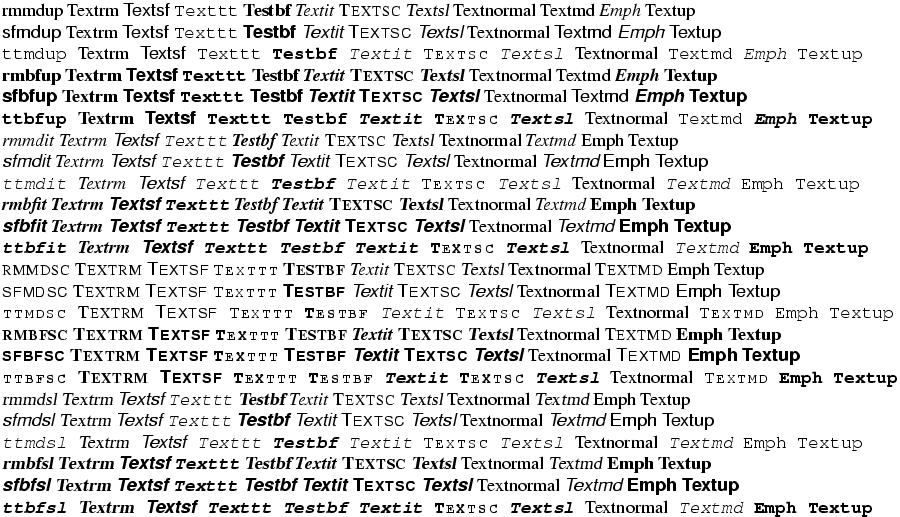
The next example shows that you can use some math constructs in text mode.
1\textsuperscript{st} x\textsuperscript{ième} y\textsubscript{some text}.
$1^e$ \overline{foo}\underline{bar}
The translation is
1<sup>st</sup> x<sup>ième</sup> y<sub>some text</sub>
1<sup>e</sup><overline>foo</overline><underline>bar</underline>.
Preview 
\rmfamily
\rmfamily command changes the family of the current font to
roman family. For an example of fonts, see `\rm <doc-r.html#cmd-rm>`__.\rmoustache (math symbol)
The \rmoustache command is valid only in math mode. It generates a
closing delimiter: <mo>⎱</mo> (Unicode U+23B1, ⎱).
\roman, \@roman
\roman command takes as argument a counter (see counters in
latex), and typesets its value using lower
case roman characters. For an example see the `\alph <doc-a.html#cmd-alph>`__
command.\roman{foo} is \romannumeral\c@foo. The
expansion is empty if the number is zero or negative.\@roman is the same as \romannumeral.\Roman, \@Roman
Like \roman above, result is uppercase. \@Roman is the same as
\Romannumeral.
\romannumeral
The \romannumeral command converts a number using Roman lower case
digits. It calls scanint in order to get a
number. The expansion is a sequence of letters (of catcode 12). The
expansion is empty if the number is zero or negative. The expansion of
\romannumeral 1984 is mcmlxxxiv. The following piece of code
verifies this. We use the \catletter command in order to change
catcodes, and another auxiliary command (replacing \somecats by its
body does not work).
\def\catletter#1{\catcode`#1=12 }
\def\somecats{\catletter\m\catletter\c\catletter\x\catletter\i
  \catletter\v\catletter\l}
{\somecats \gdef\Testmcmlxxxiv{}}
\expandafter\Test\romannumeral 1984
See the `\csname <doc-c.html#cmd-csname>`__ command for a funny use
of \romannumeral. The idea being that it expand N thousands to a
list of N character tokens. It is hence possible to repeat something N
times (with pure expansion).
\Romannumeral
Like \romannumeral above, result is uppercase. Similar example.
\def\catletter#1{\catcode`#1=12 }
\def\somecats{\catletter\M\catletter\C\catletter\X\catletter\I
  \catletter\V\catletter\L}
{\somecats \gdef\TestMCMLXXXIV{}}
\expandafter\Test\Romannumeral 1984
Note that LaTeX implements \Roman via \romannumeral and a
recursive function that converts lowercase to uppercase. In the
following piece of code, \Testa holds `mcmlxxxiv’ (because the page
counter is \count0) and \Testb shows x, because these characters
are of \catcode 12. In LaTeX, \TestA holds `MCMLXXXIV’ (catcode
letter) and \TestB shows C (whereas Tralics shows X).
\count0=1984
\edef\Testa{\roman{page}}
\edef\TestA{\Roman{page}}
\def \Testb #1m#2{\show #2}
\def \TestB #1M#2{\show #2}
\expandafter\Testb\Testa mx
\expandafter\TestB\TestA MX
\root
\sqrt command puts a square root sign over its argument. It
can take an optional argument, and \sqrt[x]{y} is equivalent to
\root x \of{y}. It works only in math mode. See also the `\acute <doc-a.html#cmd-acute>`__ command.\rotatebox
The \rotatebox command takes two arguments, the first is an
attribute value (it should be an angle), and the second is a box content
(a priori paragraphs are not allowed). For an example, see
`\fbox <doc-f.html#cmd-fbox>`__. If the graphicx package is loaded,
you can say
\rotatebox[x=1pt,y=2pt,origin=c,units= -360] {30} {Text}. In this
case the translation is
<pic-rotatebox units='-360' origin='c' y='2.0pt' x='1.0pt' angle='30'>Text</pic-rotatebox>
\rowattribute (Tralics commmand)
If you say \rowattribute{mathvariant}{bold}, this adds the attribute
mathvariant='bold' to the current row. The command can be used only
in math mode; you should not use this command outside a table (or a
construction like the align environment that produces a table). For an
example of use, see
`\mathattribute <doc-m.html#cmd-mathattribute>`__.
\rq
The \rq command expands to a right quote (single-quote). You can say
{\lq\foo\rq} or {`\foo'} the result is the same.
\rrbracket (constant)
The \rrbracket command is valid only in math mode. It generates
double stroke bracket <mo>⟧</mo> (Unicode U+301B,
〛).
\rrparenthesis (constant)
The \rrparenthesis command is valid only in math mode. It generates
a duble stroke parenthesis: <mo>⦈</mo>, ⦈.
\Rrightarrow (constant)
The \Rrightarrow command is valid only in math mode. It generates a
triple stroke arrow pointing to the right: <mo>⇛</mo>
(Unicode U+21DB, ⇛).
\rrrt (Tralics command)
The command \rrrt{foo} is a short-hand for
\href{http://www.inria.fr/rrrt/foo.html}.
\Rsh (math symbol)
The \Rsh command is valid in math mode only; it produces the symbol
<mo>↱</mo> (Unicode U+21B1, ↱).
\rtimes (math symbol)
The \Rsh command is valid in math mode only; it produces the symbol
<mo>⋊</mo> (Unicode U+22CA, ⋊).
\rule
The command \rule[A]{B}{C} takes three arguments, the default value
of the first argument is zero. It leaves vertical mode and produces a
rule of width B and height C; the rule is shifted by A. Example,
assuming the calc package loaded.
\rule{2pt}{3pt}
\rule[1pt]{3pt+5pt}{17PT}
Translation
<rule width='2.0pt' depth='0.0pt' height='3.0pt'/>
<rule width='8.0pt' depth='-1.0pt' height='18.0pt'/>
\rvert (math symbol)
The \rvert command is valid in math mode only; it is a right
delimiter associated to `\vert <doc-v.html#cmd-vert>`__. it produces
the symbol <mo>|</mo> (Unicode U+7C, |).
\rVert (math symbol)
The \rVert command is valid in math mode only; it is a right
delimiter associated to `\Vert <doc-v.html#cmd-Vert>`__. it produces
the symbol <mo>∥</mo> (Unicode U+2225, ∥).