All commands, alphabetic order; letter C
\c
The \c command generates a cedilla accent. The translation of
\c C \c c \c{\'C} \c{\'c} \c D \c d \c E \c e \c{\u E} \c{\u e} \\
\c H \c h \c G \c g \c K \c k \c L \c l \c N \c n \c R \c r
\c S \c s \c T \c t
is
Ç ç Ḉ ḉ Ḑ ḑ Ȩ ȩ Ḝ ḝ
Ḩ ḩ Ģ ģ Ķ ķ Ļ ļ Ņ ņ
Ŗ ŗ Ş ş Ţ ţ
Preview 
HTML characters Ç ç Ḉ ḉ Ḑ ḑ Ȩ ȩ Ḝ ḝ Ḩ ḩ Ģ ģ Ķ ķ Ļ ļ Ņ ņ Ŗ ŗ Ş ş Ţ ţ
\C
The \C command generates a double grave accent. Example
\C A \C a \C E \C e \C I \C i \C O \C o \C R \C r \C U \C u
The translation is
Ȁ ȁ Ȅ ȅ Ȉ ȉ
Ȍ ȍ Ȑ ȑ Ȕ ȕ
Preview 
HTML characters Ȁ ȁ Ȅ ȅ Ȉ ȉ Ȍ ȍ Ȑ ȑ Ȕ ȕ
\cal
This is a math font command (declaration). Upper case letters are
converted to calligraphic style. Example
${\cal ABCDE FGHIJ KLMNO PQRST UVWXYZ}$. This translates into
<formula type='inline'>
<math xmlns='http://www.w3.org/1998/Math/MathML'>
<mrow>
<mi>𝒜</mi><mi>ℬ</mi><mi>𝒞</mi><mi>𝒟</mi><mi>ℰ</mi>
<mi>ℱ</mi><mi>𝒢</mi><mi>ℋ</mi><mi>ℐ</mi><mi>𝒥</mi>
<mi>𝒦</mi><mi>ℒ</mi><mi>ℳ</mi><mi>𝒩</mi><mi>𝒪</mi>
<mi>𝒫</mi><mi>𝒬</mi><mi>ℛ</mi><mi>𝒮</mi><mi>𝒯</mi>
<mi>𝒰</mi><mi>𝒱</mi><mi>𝒲</mi><mi>𝒳</mi><mi>𝒴</mi><mi>𝒵</mi>
</mrow>
</math>
</formula>
Preview  . (See also here)
\calc
You should not use the \calc command. On the other hand, if you load
the calc package, then commands like \setcounter, \addtocounter,
\setlength and \addtolength add a \calc token in front. This
allows infix calculations. Example:
\newcounter{Ac}
\setcounter{Ac}{(1+2)*(3+4)-20}\theAc=1
\addtocounter{Ac}{(1*2)+(3*-4)+(34/7)}\theAc=-5
Here is an extract of the log file for the code above. It shows the
expansion of \setcounter. The calc function computes the quantity
indicated in the line calc argument XX, the result is indicated in
the line calc res YY. This result is put in the value, or added to
it.
[334] \newcounter{Ac}
{\newcounter}
{\countdef \c@Ac=1552}
[335] \setcounter{Ac}{(1+2)*(3+4)-20}\theAc=1
\setcounter->\calc  {\global \c@Ac }
{\calc }
{calc modifying integer at position 1552}
{calc argument: (1+2)*(3+4)-20}
+scanint for \calc ->1
{calc primitive =1}
{calc +-}
+scanint for \calc ->2
{calc primitive =2}
{calc primitive =3}
{calc */}
+scanint for \calc ->3
{calc primitive =3}
{calc +-}
+scanint for \calc ->4
{calc primitive =4}
{calc primitive =7}
{calc +-}
+scanint for \calc ->20
{calc primitive =20}
{calc res 1}
...
[336] \addtocounter{Ac}{(1*2)+(3*-4)+(34/7)}\theAc=-5
\addtocounter->\calc  {\global \advance \c@Ac }
{\calc }
{calc modifying integer at position 1552}
{calc argument: (1*2)+(3*-4)+(34/7)}
...
{calc res -6}
It is possible to multiply or divide a dimension by an integer. In order
to multiply by a real number, you must use the \real{...} construct,
where you give the digits, or the \ratio{num}{den} construct, where
you give the ratios of two dimensions. Example
\newlength{\Bc}
\setlength{\Bc}{(1cm+2cm)*(3+4)-200mm} \the\Bc=28.4526pt
\setlength\Bc{\the\Bc*\ratio{25.4pt}{722.7pt}} \the\Bc=0.99985pt
\Bc=1in \setlength\Bc{\the\Bc * 100 / 7227} \the\Bc=0.99998pt
\Bc=1in \setlength\Bc{\the\Bc * \real{ 0.01383700013837}} \the\Bc=1.00018pt
\Bc=1cm \setlength\Bc{\the\Bc / \real{28.452755}} \the\Bc=0.99985pt
\Bc=1cm \setlength\Bc{\the\Bc * \ratio{254pt}{7227pt}} \the\Bc=0.99985pt
\Bc=1in \setlength\Bc{\the\Bc / \ratio{7227pt}{100pt}} \the\Bc=1.00018pt
\Bc=1IN \setlength\Bc{\the\Bc / \ratio{7227PT}{100pT}} \the\Bc=1.00018pt
This example shows how to compute the quotient and remainder of two numbers.
\newcounter{hours}\newcounter{minutes}
\newcommand{\printtime}{%
   \setcounter{hours}{\time/60}%
   \setcounter{minutes}{\time-(\value{hours}*60)}
   \thehours h \theminutes min}
The time is \printtime.
\cap (math symbol)
The \cap command is valid only in math mode. It generates a binary
operator (looks like a cap, used for set intersection):
<mo>∩</mo> (Unicode U+2229, ∩) that renders like  . See
description of the
`\pm <doc-p.html#cmd-pm>`__ command.
\Cap (math symbol)
The \Cap command is valid only in math mode. It generates a binary
operator <mo>⋒</mo>. (Unicode U+22D2, ⋒).
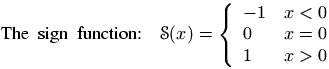
cases (environment)
The cases environment produces an array, with two left aligned
columns, and a brace on the right. Example
\[\text{The sign function: \ }
\mathcal{S}(x) = \begin{cases}
-1&x<0 \\
0&x=0 \\
1&x>0
\end{cases}
\]
The translation is
<formula type='display'>
<math mode='display' xmlns='http://www.w3.org/1998/Math/MathML'>
<mrow>
<mrow>
<mtext>The</mtext>
<mspace width='4.pt'/>
<mtext>sign</mtext>
<mspace width='4.pt'/>
<mtext>function:</mtext>
<mspace width='4.pt'/>
<mspace width='4.pt'/>
</mrow>
<mi>𝒮</mi><mo>(</mo><mi>x</mi><mo>)</mo><mo>=</mo>
<mfenced separators='' open='{' close='.'>
<mtable>
<mtr>
<mtd columnalign='left'><mrow><mo>-</mo><mn>1</mn></mrow></mtd>
<mtd columnalign='left'><mrow><mi>x</mi><mo><</mo><mn>0</mn></mrow></mtd>
</mtr>
<mtr>
<mtd columnalign='left'><mn>0</mn></mtd>
<mtd columnalign='left'><mrow><mi>x</mi><mo>=</mo><mn>0</mn></mrow></mtd>
</mtr>
<mtr>
<mtd columnalign='left'><mn>1</mn></mtd>
<mtd columnalign='left'><mrow><mi>x</mi><mo>></mo><mn>0</mn></mrow></mtd>
</mtr>
</mtable>
</mfenced>
</mrow>
</math>
</formula>
\caption
Inside a `figure <doc-f.html#env-figure>`__ or
`table <doc-t.html#env-table>`__ environment you can use
\caption for a caption. Only one caption is allowed. See these
environments for examples.
\caps
Command from the soul package, that takes an argument and behaves like
\textit. For an example, see `\ul <doc-u.html#cmd-ul>`__.
\@car, \@carcube, \@cdr, \@cons, \@nil, \@nnil
There are different ways to manipulate lists of tokens; some of them use
Lisp names, like those described here. The \@nil command is
undefined, it is used as end-of-list marker. The \@nnil command is a
macro without argument whose expansion is \@nil; it is in general
used in comparisons. Both commands \@car and \@cdr read a token
list terminated by \@nil, they return the first token, or the
remaining ones.
In Lisp, cons(A,B) produces a list whose car is A and whose cdr is B; in
other words, it adds a list element A in front of a list B. In TeX most
functions add material at the end of the list, for instance
\addto@hook; this is a command that takes as first argument a
reference to a token list register, it appends the second argument to
the end of the list. The command \g@addto@macro behaves the same,
but the first argument is the name of a command without argument. The g
in the command name means that the command is globally modified. The
command \@cons behaves in a similar fashion, but the result is fully
expanded, moreover, the \@elt token is added at the end of the
initial list. For instance \@addtoreset{foo}{bar} constructs the
token \cl@bar and calls \@cons with {foo} (with the braces)
as second argument. In some cases (for instance when you say
\stepcounter) the command \cl@bar is evaluated, with some value
of \@elt (for instance, as a macro that takes one argument, a
counter name and resets it).
\def\test#1{\def\res{#1}\ifx\foo\res\else \ERROR\fi}

\edef\foo{\@car 123\@nil} \test{1}
\edef\foo{\@car {1}23\@nil} \test{1}
\edef\foo{\@car {123}{456}{7}\@nil} \test{123}
\edef\foo{\@carcube1234567\@nil}\test{123}
\edef\foo{\@cdr 123\@nil} \test{23}
\edef\foo{\@cdr {134}{x}\@nil}   \test{x}
\edef\foo{\@cdr {134}{{x}}\@nil} \test{{x}}
\let\foo\@nnil \test{\@nil}
\toks@={abc\foo}\addto@hook\toks@{x\bar}
\expandafter\def\expandafter\foo\expandafter{\the\toks@} \test{abc\foo x\bar}
\g@addto@macro\foo{y\gee} \test{abc\foo x\bar y\gee}
\def\xx{456}
\def\foo{123}\@cons\foo{\xx78}\test{123\@elt45678}
\catcode
When you say \catcode13 12, you change the category code of the
character number 13 to the value 12. See
scanint for details of how numbers are
read. The first integer must be a valid character code (between 0 and
255 in TeX, up to 65535 in Tralics), and the second a valid category
code (between 0 and 15). See documentation on
catcodes for how to use them. In a construction
like \catcodeA=catcode`a`, the first number is
`A, it is followed by an optional equals sign, and the
second number is \catcodea`: this is the value of the
category code of the letter a.
catperso (obsolete Raweb environment)
The catperso environment takes one argument (a title), and the
content is put in a <catperso> element. This content should be a
list of \pers commands. See `\pers <doc-p.html#cmd-pers>`__ for
an example.
\@cclv, \@cclvi
If you say \count\@cclv=\@cclvi, this puts 256 into the count
register number 255. Do not use these constants in any other context.
\cdot (math symbol)
The \cdot command is valid only in math mode. It generates a binary
operator (centered dot): <mo>·</mo>. (Unicode U+B7, ·) See
description of the `\pm <doc-p.html#cmd-pm>`__ command.
\cdots (math symbol)
The \cdots command is valid only in math mode. It generates a
miscellaneous symbol (three centered dots in a row):
<mo>⋯</mo>. (Unicode U+22EF, ⋯) See description of the
`\ldots <doc-l.html#cmd-ldots>`__ command.
\cellattribute (Tralics command)
If you say \cellattribute{columnalign}{left}, this adds the
attribute pair columnalign='left' to the current cell. The command
can be used only in math mode; you should not use this command outside a
table (or a construction like the align environment that produces a
table). For an example of use, see
`\mathattribute <doc-m.html#cmd-mathattribute>`__.
center (environment)
The effect of \begin{center} ... \end{center} is more or less the
same as {\centering ...}. See below.
\centerdot (math symbol)
The \cdot command is valid only in math mode. It generates a
centered dot: <mo>⋅</mo>. (Unicode U+22C5, ⋅) See description
of the `\pm <doc-p.html#cmd-pm>`__ command.
\centering
The \centering command has two effects. It defines locally some
variable to a non-zero value (one, in fact). If this variable is set,
every paragraph will have a rend attribute (here rend='center').
The commands \par, \indent and \noindent will behave in the
same fashion (indentation is incompatible with centering). The variable
is also set by the \raggedleft or \raggedright commands (in
these cases, indentation makes sense). Moreover, if the current
paragraph has no rend attribute, one will be added.
Instead of using the \centering, \raggedleft or \raggedright
commands, you can use the center, flushright or flushleft
environments. You can also use two environments quote and
quotation, that are not associated to a command. These environments
start a new paragraph. Note that “flushright” is the equivalent of
“raggedleft”. Example.
{\centering a \indent a1 \noindent a2 \\ a3\par a4} \par
{\raggedleft b \indent b1 \noindent b2 \\ b3\par b4} \par
{\raggedright c \indent c1 \noindent c2 \\ c3\par c4} \par
{\centering\raggedright d \indent d1 \noindent d2 \\ d3\par d4} \par
{f\centering\raggedright e \indent e1 \noindent e2 \\ e3\par e4} \par
\begin{center}A \indent A1 \noindent A2 \\ A3 \par A4\end{center}
\begin{flushright}B \indent B1 \noindent B2 \\ B3 \par B4\end{flushright}
\begin{flushleft}C \indent C1 \noindent C2 \\ C3\par C4\end{flushleft}
\begin{center}\begin{flushleft}D \indent D1 \noindent D2 \\ D3\par D4\end{flushleft}\end{center}
F\begin{center}\begin{flushleft} E \indent E1 \noindent E2 \\ E3 \par E4\end{flushleft}\end{center}
\begin{quote}I \indent I1 \noindent I2 \\ I3 \par I4\end{quote}
\begin{quotation}J \indent J1 \noindent J2 \\ J3 \par J4\end{quotation}
The translation is the following. There are two lines with
\centering\raggedright. In the first case, the command is seen in
vertical mode (outside paragraph), so that the letter d will be in a new
paragraph, a flushed-left one. In the second case, the command appears
in vertical mode, so that f\centering will center the f (and the e
that follows). The e1 is flushed-left since \\ start a new
paragraph. On the other hand, D and E are flushed left, because the
environment insert an implicit \par (both letters are seen in
vertical mode).
The XML result is shown here.
The names in the example above are not hard coded. If the configuration file contains the following lines,
att_rend = "Rend"
att_centering = "Center"
att_flush_left = "FlushLeft"
att_flush_right = "FlushRight"
att_quote = "Quote"
att_quotation = "Quotation"
att_noindent = "Noindent"
then the translation will be as shown here.
\centerline
Implemented as a no-op in Tralics for compatibility reasons before
version 2.11.3. After that, the three commands \centerline,
\leftline and \rightline are ignored inside a table or figure,
they start a new paragraph otherwise. These three commands, as well as
\llap and \rlap produce a line element, with an attribute
depending on the command. Example:
\centerline{A\it B}\leftline{C\it D}\rightline{E\it F}\rlap{G\it H}\llap{I\it J}
Translation
<p>
<line rend='center'>A<font-italic-shape>B</font-italic-shape></line>
<line rend='left'>C<font-italic-shape>D</font-italic-shape></line>
<line rend='right'>E<font-italic-shape>F</font-italic-shape></line>
<line rend='rlap'>G<font-italic-shape>H</font-italic-shape></line>
<line rend='llap'>I<font-italic-shape>J</font-italic-shape></line></p>
\cfoot
The \cfoot command is valid only if the fancyvrb package is loaded.
It takes an optional argument A, and a required argument B (the default
value of A is B). The effect is to define the middle part of the page
footer to A for even pages, to B for odd pages. For more information,
see documentation of `\fancyhf <doc-f.html#cmd-fancyhf>`__.
\cgloss@gll, \cgloss@glll
These are the internal commands used by the cgloss4e package.
\ChangeElementName (Tralics command)
The default translation of \pagereref{here} has the form
<ref target='uid2' rend='page'/> You can change it to
<Ref target='uid2' rend='Page'/> by either adding a declaration in
the configuration file (the first three lines shown here produce the
same effect):
xml_ref_name="Ref"
xml_ref="Ref"
elt_ref="Ref"
att_page="Page"
or by adding a declaration in the source file, as shown here. There is no prefix such as ‘elt or ‘att’. The starred version changes the attribute name, the unstarred one changes the element name.
\ChangeElementName{ref}{Ref}
\ChangeElementName*{page}{Page}
There are are items in the configuration file that do not start with one of those prefixes; the value cannot be changed in the TeX file. In some cases, setting a value in the configuration file is equivalent to specifying an argument to the Tralics program, in this case the behavior is explained in Options of the tralics command, otherwise follow links.
The values lang_fr and lang_en can be used to change the value of the language attribute of the main element, in case it is used.
The value distinguish_refer_in_rabib must be true, false, yes or no; it is specific to the raweb, you can use an option (with the same name) to the program instead.
The effect of entity_names=”foo” is the same as calling the program with option entnames=foo
The effect of alternate_item=true/false is to change the
\itemcommand, see \@item.The effect of url_font is to provide a default value for
`\urlfont<doc-u.html#cmd-url-font>`__.The effect of everyjob is to set
`\everyjob<doc-e.html#cmd-everyjob>`__.The effect no_footnote_hack=true/false is to modify the behavior of
`\footnote<doc-f.html#cmd-footnote>`__.The effect use_font_elt=true/false use_all_sizes=true/false pack_font_att=true/false is to modify the translation of font changing commands like
`\rm<doc-r.html#cmd-rm>`__, see also`\fontencoding<doc-f.html#cmd-ltfont>`__.The effect of bibtex_fields=L and bibtex_extensions=L is to extend the list of bibliography fields or entry types with values from the space-separated list L.
The effect mfenced_separator_val=”value” is to add
separators='value'as attribute pair in a<mfenced/>element. Special case: if value is NONE, no attribute is added, if value is mrow, then a<mrow/>element is added to the math formula so that separators become useless.Setting theme_vals, ur_vals, section_vals, fullsection_vals, affiliation_vals, profession_vals is meaningful only in Raweb mode, and modifying the values is only allowed for the Raweb Team. See Configuration file for the raweb for details.
The effect of mml_font_normal =”foo” is to change the name of the normal math font in no-MathMl mode; there are 15 such fonts, see math fonts for details.
Setting makefo, makehtml, checkxml, makepdf, makedvi, dvitops, generatedvi, generateps is obsolete.
\chapter
The \chapter command is used to divide a text in smaller parts. It
increments the chapter counter and resets the dependent counters.
See the description of the `\part <doc-p.html#cmd-part>`__ command.
\chaptermark
The \chaptermark command takes one argument, and does nothing. It is
called in LaTeX, by the \chapter command, with as argument the name
of the chapter. (In Tralics, the sectioning commands like \chapter
do not call \xxxmark). Its purpose is to define page marks. See
`\markright <doc-m.html#cmd-markright>`__ for explanations on
\markmark and \markboth and the mark system.
In the report class, page headings use either \leftmark and
\rightmark (for even and odd numbered pages) or \rightmark
(single-side case). The \ps@headings command redefines the mark
command as follows.
% two-sided code
\renewcommand\chaptermark[1]{%
  \markright {\MakeUppercase{%
     \ifnum \c@secnumdepth >\m@ne
         \@chapapp\ \thechapter. \ %
     \fi
     #1}}}
% single-sided case
\renewcommand\chaptermark[1]{%
  \markboth {\MakeUppercase{%
    \ifnum \c@secnumdepth >\m@ne
        \@chapapp\ \thechapter. \ %
    \fi
    #1}}{}}%
\char
The \char command is a TeX primitive that reads an integer that
should be a valid letter. In TeX, numbers should be in the range 0-255.
See scanint for details. In Tralics, a
27bit integer is allowed. Characters less than 32 or greater than 255
are printed using a &# notation; the three characters < > and & are
printed symbolically, the null character is not printed; otherwise the
character is printed as-is.
In the following example, the current language is French, and the last line shows what Tralics does with normal characters. There is also a line indicating the result in verbatim mode.
{\language=1
\char60\ \char0\ \char 10\ \char233\ \char 300\
\char126\ \char45- \char39' \char96` \char60< \char62>
\char59\char58\char33\char63\char171\char 187\char38
\verb@~--''``<<>>;:!?«»&@
~--''``<<>>;:!?«»\&}
The XML result is the following:
< 
 é Ĭ ~ -- '' `` << >>
;:!?«»&
<hi rend='it'>~-​-​'​'​
`​`​<​<​>​
>​;:!?«»&</hi>
– »« « » ; : ! ?« »&
Note the following. Using the \char command disable ligatures
(double and triple dash into en-dash or em-dash, quotes into guillemets
in French). The same is done in verbatim mode. However, in verbatim mode
a special ​ character entity is added (depending on
the command line options), to make sure that the ligatures will not
appear later (for instance, if TeX rereads the XML).
\chardef
If you say \chardef\foo124, then you can use \foo instead of
\char124. See scanint for how numbers
are read. For instance, after the declaration
\chardef#=#`, you can use \# when you want to typeset
a sharp sign. In TeX, characters have 8bits, Tralics allows 27bit
characters. (The translation of \char67108864 is �,
whether or not this is valid XML.)
After \chardef\active=13, you can say
\catcodeA=active` when you want the letter A to become
active. (the \active command is defined in this way in LaTeX and
Tralics). But outside this context, \active is a character (German
opening comma in the T1 font encoding).
Finally, the `\newbox <doc-n.html#cmd-newbox>`__ command uses
\chardef for defining the reference.
\chead
The \chead command is valid only if the fancyvrb package is loaded.
It takes an optional argument A, and a required argument B (the default
value of A is B). The effect is to define the middle part of the page
header to A for even pages, to B for odd pages. For more information,
see documentation of `\fancyhf <doc-f.html#cmd-fancyhf>`__.
\check
The \check command puts a check accent over a kernel. It works only
in math mode (in text mode, you should use the
\v command). See also the
`\acute <doc-a.html#cmd-acute>`__ command.
\chi (math symbol)
The \chi command is valid only in math mode. It generates a Greek
letter: <mi>χ</mi> (Unicode U+3C7, χ) that renders like
 . See description of the
`\alpha <doc-a.html#cmd-alpha>`__
command.
\choose
This is a Plain TeX command, defined as \atopwithdelims(). Instead
of a\choose b, you should use the LaTeX construction
\binom{a}{b}. See description of the
`\atopwithdelims <doc-a.html#cmd-atopwithdelims>`__ and
`\binom <doc-b.html#cmd-binom>`__ commands.
\circ (math symbol)
The \circ command is valid only in math mode. It generates a binary
operator (small circle): <mo>∘</mo> (Unicode U+2218, ∘)
that renders like  . See description of the
`\pm <doc-p.html#cmd-pm>`__ command.
\circeq (math symbol)
The \circeq command is valid only in math mode. It generates
<mo>≗</mo> (Unicode U+2257, ≗).
\circle
You can say \circle{diam} or \circle*{diam} in a
picture environment. The result is a
(hollow) circle or a disk (filled circle), whose center is the reference
point, and whose diameter is the argument. Examples are given elsewhere.
\circlearrowleft (math symbol)
The \circlearrowleft command is valid only in math mode. It
generates <mo>⥀</mo> (Unicode U+2940, ⥀).
\circlearrowright (math symbol)
The \circlearrowright command is valid only in math mode. It
generates <mo>⥁</mo> (Unicode U+2941, ⥁).
\circledS (math symbol)
The \circledS command is valid only in math mode. It generates
<mo>Ⓢ</mo> (Unicode U+24C8, Ⓢ).
\circledast (math symbol)
The \circledast command is valid only in math mode. It generates
<mo>⊛</mo> (Unicode U+229B, ⊛).
\circledcirc (math symbol)
The \circeq command is valid only in math mode. It generates
<mo>⊚</mo> (Unicode U+229A, ⊚).
\circleddash (math symbol)
The \circleddash command is valid only in math mode. It generates
<mo>⊝</mo> (Unicode U+229D, ⊝).
\citation (Tralics command)
The \citation command is used by Tralics to start a bibliographic
reference. In general, the command is created by Tralics from a bib
file. Let’s consider this reference to the MathML Web page.
@Misc{mathml2,
  author =  {David Carlisle and
             Patrick Ion and
             Robert Miner and
             Nico Poppelier},
  title =    {Mathematical Markup Language (MathML) Version 2.0},
  howpublished = {http://www.w3.org/TR/MathML2/},
  year =     {2001},
}
It will be translated by Tralics into this piece of LaTeX code.
\citation{CIMP01}{cite:mathml2}{bid4}{year}{misc}
\bauthors{\bpers[David]{D.}{}{Carlisle}{}
  \bpers[Patrick]{P.}{}{Ion}{}\bpers[Robert]{R.}{}{Miner}{}
   \bpers[Nico]{N.}{}{Poppelier}{}}
\cititem{btitle}{Mathematical Markup Language (MathML) Version 2.0}
\cititem{bhowpublished}{http://www.w3.org/TR/MathML2/}
\cititem{byear}{2001}
\endcitation
The \citation command takes 5 parameters. The first argument is the
printed key. This is computed by Tralics as the initials of the
authors, plus two digits of the year (in some cases, it can be a number,
from one to N). The next argument is the cite key (note that
\cite{foo} wants a citation with cite:foo). The next argument is
a unique ID (Tralics uses bid plus an integer). Then comes a
string that is used for the Raweb (year’ is the default, but it can be
`foot’ or `refer’). The last argument is a string (*Tralics* uses the
bibtex type of the entry). After this fifth argument, there can be an
optional argument that is ignored. The translation of `citation`` is a
<citation> element with all the arguments as attributes. Here is the
translation of the previous entry.
<citation from='year' key='CIMP01' id='bid4' userid='cite:mathml2' type='misc'>
<bauteurs><bpers prenom='D.'  nom='Carlisle' prenomcomplet='David'/>
  <bpers prenom='P.' nom='Ion'  prenomcomplet='Patrick'/>
  <bpers prenom='R.' nom='Miner' prenomcomplet='Robert'/>
  <bpers prenom='N.' nom='Poppelier'  prenomcomplet='Nico'/>
  </bauteurs>
<btitle>Mathematical Markup Language (MathML) Version 2.0</btitle>
<bhowpublished>http://www.w3.org/TR/MathML2/</bhowpublished>
<byear>2001</byear>
</citation>
\cite, \natcite
The \cite command takes as argument a list of bibliographic
references and generates a <cit> element for each reference. The
value of the element is a <ref> element, whose target attribute
is computed when Tralics translates the \citation command
associated to it (see `\citation <doc-c.html#cmd-citation>`__); this
mechanism has been generalised in version 2.5, see
`\cite@one <doc-c.html#cmd-citeone>`__.
The \natcite command produces a single <Cit> element, containing
one <ref> per citation. For instance
\natcite[foo][bar][gee]{ref1,ref2} translates to
<Cit type='foo'>(bar <ref target='bid0'/>;<ref target='bid1'/>, gee)</Cit>
The parentheses, commas, semi-colons etc are customized via the natbib package.
The \cite command can take an optional argument, which is added to
the first <cit> element. No \cite command can appear in the
bibliography. Example:
\cite{toto,titi} \cite[text]{toto,titi}
\cite{mathml2}\cite[foo]{mathml2}
This is the resulting XML.
<cit><ref target='bid0'/></cit><cit><ref target='bid1'/></cit>
<cit><ref target='bid0'>text</ref></cit><cit><ref target='bid1'/></cit>
<cit><ref target='bid2'/></cit><cit><ref target='bid2'>foo</ref></cit>
The resulting preview could be:  . Here the value of the
optional argument has disappeared, the red color means that you can
click on it (of course, you cannot click on the image).
The exact mechanism is the following. The \cite command has two
optional arguments, type and text, if only one argument is given, it is
the text. If the type is `year’ or `refer’, it is replaced by an empty
value. The \footcite command is equivalent to \cite, but the
type is `foot’, there is one optional argument, the text. The required
argument of both the commands is a list of references. A token list is
constructed as follows: \footcitepre is inserted in the case of
\footcite. For each X in the reference list,
\cite@one{type}{X}{text} is added to the result; the `text’ is
reset to empty after the first use. A separator is added between two
references; it is \footcitesep for \footcite, and \citepunct
otherwise. In the example shown above, we assume that the expansion of
this separator is empty. Once the list is constructed, it will be
expanded.
\citepunct (Tralics command)
This command is used as separator for citations. Its default value is comma-space.
\cite@one (Tralics command)
The \cite@one{X}{Y}{Z} command is an internal command for citations.
There are three arguments: type, ref and text. The translation is a
single <cit> element. The value of the element is a <ref>
element, whose target attribute points to an element created by the
\citation command, according to the type and ref arguments (see also
2.8.3 Bibliography and the raweb). Its value is
the translation of the text argument. In the case where the type is
“foot”, then rend='foot' is added to the attribute list of the
<cit> element.
\cite@simple (Tralics command)
Translation of \cite@simple{Knuth} is <ref target='xx'/>.
\cite@type, \cite@@type (Tralics command)
If \cite@@type is defined, it should be a command without arguments,
whose translation is only text; this text is added by \cite@one to
the attribute list of the current element, with name ‘type’. [What
follows applies to version before 2.12.1] In the file natbib.plt v1.0,
we defined \def\cite@type#1#2{{\def \cite@@type {#1} \cite{#2}}},
and \def\citeyear{\cite@type{year}}. Thus, \citeyear is like
\cite, but it takes no optional argument. Each <cit> element has
the attribute type='year'.
\cititem (Tralics command)
The \cititem command takes two arguments, the first is a character
string, that should be a valid XML element name, the second argument is
the content of this element; for usage, see
`\citation <doc-c.html#cmd-citation>`__. The translation of
\cititem{foo}{bar} is <foo>bar</foo>. The command is allowed
only in bibtex mode (say, inside a citation environment). However,
if \cititem-foo is defined (and not \relax), this command is
called with argument bar, and can be used, whatever the context.
\cleaders
The \cleaders commands reads a box and names it `cleaders’. See
\xleaders for details.
\cleardoublepage
The \cleardoublepage command did nothing in Tralics until version
2.11.3. It translates now to <cleardoublepage/>, since there is no
page (neither single nor double) to clear.
\clearpage
The \clearpage command did nothing in Tralics until version
2.11.3. It translates now to <clearpage/>.
\cline
The \cline command takes one argument that is formed of two integers
A and B separated by a dash, with 0< A<=B for instance,
\cline{6-6}, but you can also say
\count0=1 \count1=3 \cline{\count0 -\count1}. The effect is to put
an horizontal rule between rows A and B in a table. The idea is to
add, to some cells of the current current row, a
bottom-border='true' attribute; the spans of each being taken into
account. If this fails, then a new row is added; it contains an empty
cells that spans over A-1 columns, followed by a cell that spans over
B+1 columns, with a bottom-border='true' attribute. See
description of the \\ command
for an example. See also the page on arrays.
\closecurve
The \closecurve command is defined by the curves package. See
`\arc <doc-a.html#cmd-arc>`__.
\closein
You say \closein N, where N is a valid input channel number (between
0 and 15, see scanint for details). This
closes input channel number N. See
`\openin <doc-o.html#cmd-openin>`__ for an example.
\closeout
You say \closeout N, where N is a valid output channel number
(between 0 and 15, see scanint for
details). This closes output channel number N. See
`\openout <doc-o.html#cmd-openout>`__ for details.
\clubpenalties (internal integer)
This is an extension defined by ε-TeX. See
`\widowpenalties <doc-w.html#cmd-widowpenalties>`__ for syntax and
usage.
\clubpenalty (internal integer)
When you say \clubpenalty=100, then TeX will use 100 as penalty for
a lonely line at the bottom of a page, when it computes optimal page
breaks. Unused by Tralics. (See scanint
for details of argument scanning).
\clubsuit (math symbol)
The \clubsuit command is valid only in math mode. It generates a
miscellaneous symbol (looks like a club suit): <mo>♣</mo>
(Unicode U+2663, ♣) that renders like  . See description of
the
`\ldots <doc-l.html#cmd-ldots>`__ command.
\colon (math symbol)
The \colon command is valid only in math mode. It generates
<mo lspace='0pt'>:</mo>. This is a colon that has no space on the
left.
\color, \textcolor
Colors are implemented in Tralics since version 2.13.4. The idea is to
define a color pool, and use references to it. The set of used colors
will be included at the start of the XML document, see example below.
The color package predefines basic colors (black, white, red,
green, blue, cyan, magenta, yellow), and if the option
dvipsnames is given, more colors (like Red, WildStrawberry) are
defined in the named model. In the example that follows, colors 77,
79, and 80 are anonymous, while color 78 is user defined. We show here
the pool used in the example that follows.
<colorpool><color id='colid3' value='1,0,0' model='rgb' name='red'/>
<color id='colid4' value='0,1,0' model='rgb' name='green'/>
<color id='colid10' value='0,0,1,0' model='cmyk' name='Yellow'/>
<color id='colid24' value='0,1,1,0' model='cmyk' name='Red'/>
<color id='colid27' value='0,0.96,0.39,0' model='cmyk' name='WildStrawberry'/>
<color id='colid51' value='1,1,0,0' model='cmyk' name='Blue'/>
<color id='colid77' value='.1,.2,.3' model='rgb'/>
<color id='colid78' value='.1,.2,.3' model='rgb' name='mygreen'/>
<color id='colid79' value='0,1,1,1' model='cmyk'/>
<color id='colid80' value='.1,.2,.3,.4' model='cmyk'/>
</colorpool>
The interpretation of \textcolor{red}{text} is the same as
{\color{red}text}. These two commands accept either a declared color
(like red, Yellow or mygreen) or a color model and a value as in
\color[rgb]{.1,.2,.3}. For simplicity \color[named]{Yellow} is
the same as \color{Yellow} (in LaTeX, this equivalence is provided
only if the package option usenames is given). The effect of
\color{red} is to select the color `colid3’ as current color. The
\normalcolor command selects the normal color. Tralics implements
colors like fonts: whenever a new paragraph is started, it may contain
one or more <hi> elements with the current color or font. Example.
{\color{red} textA \par textB {\it textC} textD}out
{\color{Red} textD \color {Blue} textE \color[rgb]{.1,.2,.3} textF}out
{\color[named]{Yellow} textG {\normalcolor this} and that}
\colorbox{red}{textH etc\textcolor{myred}{redtext}etc\textcolor{mygreen}{greentext}}
Translation
<p><hi color='colid3'>textA</hi></p>
<p><hi color='colid3'>textB </hi><hi rend='it'><hi
    color='colid3'>textC</hi></hi><hi color='colid3'> textD</hi>out
<hi color='colid24'> textD </hi><hi color='colid51'> textE </hi><hi
    color='colid77'> textF</hi>out
<hi color='colid10'> textG </hi>this<hi color='colid10'> and that</hi>
<mbox color='colid3'>textH etc<hi color='colid27'>redtext</hi>etc<hi
  color='colid78'>greentext</hi></mbox>
The command \definecolor takes 3 arguments, a color name, a model
and a value. If the model is named, the value should be the name of
a color declared in the named model like Yellow. In fact, in the
example below, myred is a synonym for WildStrawberry, and Tralics
does not check that the color exists (an error will be signaled later,
when the color is used). The \pagecolor takes the same arguments as
\color, translation is a <pagecolor> element with a color
attribute.
\definecolor{myred}{named}{WildStrawberry}
\definecolor{mygreen}{rgb}{.1,.2,.3}
\pagecolor{green}\pagecolor[rgb]{0,1,0}
\colorbox{red}{textH etc\textcolor{myred}{redtext}etc%
 \textcolor{mygreen}{greentext}}
\colorbox[cmyk]{0,1,1,1}{textI}
\fcolorbox{red}{green}{textJ}
\fcolorbox[cmyk]{0,1,1,1}{.1,.2,.3,.4}{textK}
Translation
<pagecolor color='colid4'/><pagecolor color='colid4'/>
<mbox color='colid3'>textH etc<hi color='colid27'>redtext</hi>etc
     <hi color='colid78'>greentext</hi></mbox>
<mbox color='colid79'>textI</mbox>
<mbox color2='colid4' color='colid3'>textJ</mbox>
<mbox color2='colid80' color='colid79'>textK</mbox>
\colorbox, \fcolorbox
These two commands behave like \mbox, they produce a <mbox>
element, but take an additional argument (the color) or two arguments
(in the case of \fcolorbox, it is the color and the frame color). An
additional optional argument specifies the color model, see example
above.
\columnwidth, \columnsep, \columnseprule (rigid length)
These three dimensions are used by LaTeX in two column mode; they give
respectively the width of each column, the distance between these
columns, and the width of the rule between them (if zero, there is no
rule between columns). Setting these values has currently no effect in
Tralics. Before version 2.13.4, the width of the image in
\includegraphics[width=.1\columnwidth]{xx} was 15mm, regardless of
the columnwidth.
\complement (math symbol)
The \complement command is valid only in math mode. It generates
<mo>∁</mo>. (Unicode U+2201, ∁).
\cong (math symbol)
The \cong command is valid only in math mode. It generates a
relation symbol (\sim over =): <mo>≅</mo> (Unicode
U+2245, ≅) that renders like  . See description of the
`\le <doc-l.html#cmd-le>`__ command.
\coprod (math symbol)
The \coprod command is valid only in math mode. Its translation is a
variable-sized symbol (is an inverted \prod): <mo>∐</mo>
(Unicode U+2210, ∐) that renders like  . For an example see
the
`\sum <doc-s.html#cmd-sum>`__ command.
\copy
The \copy command reads an integer N (a small number between 0 and
255, or 1023 in current Tralics , see
scanint for details), and returns a copy of
the content of the box number N. See `\box <doc-b.html#cmd-box>`__.
\copyright (constant)
The \copyright command translates into a copyright character ©,
(Unicode U+A9). This command is equivalent to \textcopyright. It can
be used in math mode (translation is a <mi> element. For more info
see the latin supplement characters.
\cos (math symbol)
The \cos command is valid only in math mode. Its translation is a
math operator of the same name: <mo form='prefix'>cos</mo>. For an
example see the `\log <doc-l.html#cmd-log>`__ command.
\cosh (math symbol)
The \cosh command is valid only in math mode. Its translation is a
math operator of the same name: <mo form='prefix'>cosh</mo>. For an
example see the `\log <doc-l.html#cmd-log>`__ command.
\cot (math symbol)
The \cot command is valid only in math mode. Its translation is a
math operator of the same name: <mo form='prefix'>cot</mo>. For an
example see the `\log <doc-l.html#cmd-log>`__ command.
\coth (math symbol)
The \coth command is valid only in math mode. Its translation is a
math operator of the same name: <mo form='prefix'>coth</mo> For an
example see the `\log <doc-l.html#cmd-log>`__ command.
\count
When you say \count13 12, you change the value of the count register
number 13 to the value 12. See scanint for
details of how numbers are read. The first integer must be a valid
register number (between 0 and 255, or 1023 in Tralics), and the
second a 32bit signed integer. The previous example can also be written
as \count^^M=catcode’53`. Note that ^^M is newline
character, `^^M is 13, and '53 is the ASCII code of the
+ character.
\count@
The \count@ command is an alias for the counter number 255 (see
\countdef below). It can be used as a scratch counter. (note that
\newcount never allocates this register).
\countdef
When you say \countdef\foo=13, you make \foo an alias for
\count13. See scanint for details of
how the number 13 is read; it has to be a valid register number (between
0 and 255, or 1023 in Tralics). The two commands
`\newcount <doc-n.html#cmd-newcount>`__ and
`\newcounter <doc-n.html#cmd-newcounter>`__ use \countdef for
defining the command associated to the counter.
You can put the prefix \global before \countdef.
counter (concept)
To a counter named foo is attached a command that references one of
the 256 (1024 in Tralics) count registers, it is \c@foo. This name
is constructed via `\csname <doc-c.html#cmd-csname>`__. In the
example that follows, a counter named foo is allocated by
\newcounter, modified by \setcounter, and referenced by
\the\value. Note how the counter is named here!
\def\letterF{f}\def\letterO{o}
\def\double#1{#1#1}
\newcounter{foo}
\setcounter{foo}{10}
\the\value{\letterF\double\letterO}
If you say \value{\BAR}, you will get an error of the form Invalid
command in counter name. The following token is invalid \BAR. In the
current version, error signaling has changed a little bit: an error
(Undefined command \BAR) will be signaled; since the expansion of the
argument is empty, there will be a second error Unknown counter `’.
If you replace \BAR by \bar, you will see Invalid token \bar
found in counter name. This error aborts evaluation of the \value
command, so that an Extra \endcsname error will be signaled later on.
If you say \makeatletter\def\c@foo{12}, then foo is an invalid
counter, and Tralics refuses any operations on it (in LaTeX, saying
\the\value{foo} results in an error message of the form: You can’t
use `the character 1’ after \the., in Tralics, the expansion of
\value{foo} is empty, and the argument of \the is what remains
on the current line, it could be the end-of-line character).
\cr, \crcr
You should not use \cr, neither \crcr, but rather \\. This
token marks the end of a row in a table.
In Tralics, if you say \\ in a table, a special marker is inserted
in the current token list, it represents the \\, after that, the
\endtemplate token is added, and then the v-part of the current
template. In general the v-part of the template is empty; if it is is
not, after evaluation, Tralics sees the \endtemplate that
terminates the current cell, then the token that terminates the row.
This special token is called \cr. If you say \\[1mm], as in the
example below, then the glue is read and converted into a character
string (for instance 2.84526pt), it will become an attribute of the row;
in this case, the special token is \cr withargs and its argument
is a pointer into the hash table. (note: if you really want to
understand this, read the TeXbook first; it describes the \cr,
\crcr and \endtemplate commands, as well as the u-part and
v-part of a template)
Example
\begin{tabular}{cc}
a&b\\[1mm]
a&b
\end{tabular}
This is the commented content of the transcript file.
[34] \begin{tabular}{cc} % first line of input
{\begin}
{\begin tabular}
+stack: level + 2 for environment entered on line 34
{\tabular}
{\let \par \@empty} % locally redefine \par to do nothing
{changing \par=\par}
{into \par=macro:->}
{Push tabular 1}
% this shows interpretation of the preamble
array preamble at start: cc
array preamble parse: c c 12
[35] a&b\\[1mm]% another line of input
{Push row 2}
{Push cell 3}
+stack: level + 3 for cell entered on line 35
Character sequence: a.
% next line is printed because of the &
{alignment tab character}
{Text:a}
% evaluate special token
{\endtemplate}
{Pop 3: document_v tabular_v row_a cell_a}
+stack: level - 3 for cell from line 35
{Push cell 3}
+stack: level + 3 for celll entered on line 35
Character sequence: b.
{\\}% this is a row delimiter
{Text:b}
+scanint for \\->1
+scandimen for \\->2.84526pt
{scanglue 2.84526pt\relax }
{\cr withargs}% this is \\[?]
+scanint for \cr withargs->25743 % hash table  location of the string
{Pop 3: document_v tabular_v row_a cell_a}
+stack: level - 3 for celll from line 35
{Pop 2: document_v tabular_v row_a}
[37] a&b% another line of input
{Push row 2}
{Push cell 3}
+stack: level + 3 for celll entered on line 36
Character sequence: a.
% next line is printed because of the &
{alignment tab character}
{Text:a}
% evaluate special token
{\endtemplate}
{Pop 3: document_v tabular_v row_a cell_a}
+stack: level - 3 for cell from line 36
{Push cell 3}
+stack: level + 3 for cell entered on line 36
Character sequence: b .
[37] \end{tabular}% another line of input
{\end}
{Text:b
}
{\end tabular}
{\cr}% implicit \\
{Pop 3: document_v tabular_v row_a cell_a}
+stack: level - 3 for cell from line 36
{Pop 2: document_v tabular_v row_a}
{\end}% \end{tabular} is read again
{\end tabular}
{\endtabular}
{Pop 1: document_v tabular_v}
{Push p 1} % feature:
{\endenv}
+stack: restoring \par=\par. % restor \par
+stack: ending environment tabular; resuming document.
+stack: level - 2 for environment from line 34
\csc (math symbol)
The \csc command is valid only in math mode. Its translation is a
math operator of the same name <mo form='prefix'>csc</mo>. For an
example see the `\log <doc-l.html#cmd-log>`__ command.
\csname
The \csname primitive is a command that can create dynamically
another command. For instance \csname foo\endcsname is the same as
\foo. Note however, that, if the command created by \csname does
not exists, it will be defined as equivalent to \relax. Note that
\end{csname} can be used to finish an environment named csname,
but this is a bad idea: the \end command uses \csname in order
to create the \endcsname token. See also
`\endcsname <doc-e.html#cmd-endcsname>`__ command. In order to find
the \endcsname token, everything is expanded (but not evaluated). As
a result, you cannot use \char but you can use 16 bits character
like ^^^^1234, or expansible commands like \string or even
\csname.
\def\test#1{\csname f#1#1\endcsname}
\def\foo{bar}
\def\foobar{\def\result{ok}}
\csname foo\test o\endcsname
\testeq\result{ok}%This checks that \result contains `ok'
In the above example, you can see that commands inside \csname are
expanded. In fact, the \test command takes one argument, the letter
o, and calls recursively \csname. This yields \foo, that is
expanded to bar, so that the outer \csname sees foobar. This
command is executed, and defines \result.
Similar example
\def\double#1{#1#1}
\let\startmacro\csname
\let\endmacro\endcsname
\def\foo{bar}
\def\foobar{ok}
\startmacro foo\startmacro f\double o\endmacro\endmacro
We show here the trace printed on the transcript file
{\csname}
{\csname}
\double #1->#1#1
#1<-o
{\csname->\foo}
\foo ->bar
{\csname->\foobar}
\foobar ->ok
Next example. You cannot use a command named \foo1, because the
character 1 has the wrong catcode, so that \def\foo1{} defines a
command named \foo that has to be followed by the character 1. On
the other hand, catcodes are irrelevant in \csname. Hence the
example shows how to define and use commands named “foo1” and “foo2”.
{\makeatletter
%\def\@namedef#1{\expandafter\def\csname #1\endcsname}% defined in kernel
%\def\@nameuse#1{\csname #1\endcsname}% defined in kernel
\@namedef{foo1}{2}
\@namedef{foo2}{3}
\@nameuse{foo1}\@nameuse{foo2}}
This is just an example that shows that \csname can be used while
scanning a number, and numbers have to be scanned in order to expand the
\csname.
{\makeatletter \@namedef{1.0pt}{2}
\dimen0=1pt
\ifnum123=1\csname\the\dimen0\endcsname3\relax \else\errmessage{bad}\fi}
In Tralics, \begin{foo} calls a variant of \csname, as well as
the following commands (error recovery may differ): \setboolean,
\newboolean, \provideboolean, \newcounter, \setcounter,
\addtocounter.
We now give an example that contains a double \number and a double
\endcsname (code written by David Kastrup)
\def\recur#1{\csname rn#1\recur}
\def\rn#1{}
\def\rnm#1{\endcsname{#1}#1}
\def\replicate#1{\csname rn\expandafter\recur
  \romannumeral\number\number#1 000\endcsname\endcsname}
Assume that \dimen0 holds 4sp, and you say
\replicate{\dimen0}{\P}. The expansion of \romanumeral is
mmmm. Thus, it is as if you has said
\csname rn\recur mmmm\endcsname \endcsname{\P}. As long as there is
an m, the \recur command expands, calls \csname, and evaluates
to itself. After some expansions, we get something like
\csname rn\csname rnm\csname rnm\csname rnm\csname rnm\csname rn\endcsname \recur \endcsname {\P};
in reality, all six \csname tokens are under evaluation, the three
tokens \endcsname \recur \endcsname are to be read again, the
characters {\P} are still in the input stream.
The token under consideration is now \endcsname, the last
\csname expands to \rn that reads the \recur, and this
terminates the recursion. The next token to be expanded is
\endcsname. Its effect is to finish a \csname, generating a
\rnm, that duplicates the \P and inserts a \endcsname token,
etc. After a while, we will get \endcsname followed by five \P.
The csname to be ended is \nm, it reads the first \P. Thus: the
result is \P\P\P\P.
Note: if {\P} were replaced by {{\Q}}, the argument of \rn
or \rnm is {\Q}, replication produces {{\Q}}{\Q}, and we get
{{\Q}}{\Q}{\Q}{\Q}{\Q} before removing the first token list. Here is
the log file for this example.
\replicate#1->\csname rn\expandafter \recur \romannumeral
    \number \number #1 000\endcsname \endcsname
#1<-\dimen 0
{\csname}
{\expandafter \recur \romannumeral}
+scanint for \dimen->0
+scanint for \number->4
+scanint for \number->4000
+scanint for \romannumeral->4000
\recur#1->\csname rn#1\recur
#1<-m
{\csname}
\recur#1->\csname rn#1\recur
#1<-m
{\csname}
\recur#1->\csname rn#1\recur
#1<-m
{\csname}
\recur#1->\csname rn#1\recur
#1<-m
{\csname}
\recur#1->\csname rn#1\recur
#1<-\endcsname
{\csname}
{\csname->\rn}
\rn#1->
#1<-\recur
{\csname->\rnm}
\rnm#1->\endcsname {#1}#1
#1<-\P
{\csname->\rnm}
\rnm#1->\endcsname {#1}#1
#1<-\P
{\csname->\rnm}
\rnm#1->\endcsname {#1}#1
#1<-\P
{\csname->\rnm}
\rnm#1->\endcsname {#1}#1
#1<-\P
{\csname->\rn}
\rn#1->
#1<-\P
{\textparagraph}
{\textparagraph}
{\textparagraph}
{\textparagraph}
\cup (math symbol)
The \cup command is valid only in math mode. It generates a binary
operator (used for set union) <mo>∪</mo> (Unicode U+222A, ∪).
that renders like  . See description of the
`\pm <doc-p.html#cmd-pm>`__ command.
\Cup (math symbol)
The \Cup command is valid only in math mode. It generates
<mo>⋓</mo>. (Unicode U+22D3, ⋓).
\curlyeqprec (math symbol)
The \curlyeqprec command is valid only in math mode. It generates
<mo>⋞</mo>. (Unicode U+22DE, ⋞).
\curlyeqsucc (math symbol)
The \curlyeqsucc command is valid only in math mode. It generates
<mo>⋟</mo>. (Unicode U+22DF, ⋟).
\curlyvee (math symbol)
The \curlyvee command is valid only in math mode. It generates
<mo>⋎</mo>. (Unicode U+22CE, ⋎).
\curlywedge (math symbol)
The \curlywedge command is valid only in math mode. It generates
<mo>⋏</mo>. (Unicode U+22CF, ⋏).
\currentgrouplevel (read-only integer)
The variable \currentgrouplevel holds the current group level
(number of unclosed braces). See
`\showgroups <doc-s.html#cmd-showgroups>`__ for details.
\currentgrouptype (read-only integer)
The variable \currentgrouptype holds a number representing the type
of the current group. See
`\showgroups <doc-s.html#cmd-showgroups>`__ for how to interpret
this number.
\currentifbranch, \currentiflevel, \currentiftype (Read-only integers)
In order to debug conditionals, the variables \currentiflevel,
\currentifbranch and also \currentiftype can be consulted. The
level is the number of currently active conditionals, the branch is 1 if
the `then branch’ is taken, -1 if the `else branch’ is taken, 0
otherwise (condition not yet evaluated, or out of condition). The type
is given in the following table (in the case of \unless, the
opposite of this number is returned).
1 |
|
8 |
|
15 |
|
2 |
|
9 |
|
16 |
|
3 |
|
10 |
|
17 |
|
4 |
|
11 |
|
18 |
|
5 |
|
12 |
|
19 |
|
6 |
|
13 |
|
20 |
|
7 |
|
14 |
|
Example.
\def\showif{%
\typeout{type \the\currentiftype,
level \the\currentiflevel,
branch \the\currentifbranch.}}
\count3=0

\unless\iffalse
\showif
\iffalse\showif\else\showif
\ifnum\count3=\currentifbranch
\showif \fi\fi\fi
The following is printed on the terminal.
type -16, level 1, branch 1.
type 16, level 2, branch -1.
type 3, level 3, branch 1.
\curve
The \curve command is defined by the curves package. See
`\arc <doc-a.html#cmd-arc>`__.
\curvearrowleft (math symbol)
The \curvearrowleft command is valid only in math mode. It generates
<mo>⤺</mo>. (Unicode U+293A, ⤺).
\curvearrowright (math symbol)
The \curvearrowright command is valid only in math mode. It
generates <mo>⤻</mo>. (Unicode U+293B, ⤻).
comment (environment)
Every line between
\begin{comment}and\end{comment}is ignored, the content can be anything, but the final line should contain only\end{comment}. For an example, see the description of the latexonly environment.