All commands, alphabetic order; letter F
\f (tralics command)
The command \f produces an inverted breve accent. Example.
\f A \f a \f E \f e \f I \f i \f O \f o \f R \f r \f U \f u
The translation is
Ȃ ȃ Ȇ ȇ Ȋ ȋ
Ȏ ȏ Ȓ ȓ Ȗ ȗ
Preview  , HTML characters: Ȃ ȃ Ȇ ȇ Ȋ ȋ Ȏ ȏ Ȓ ȓ Ȗ ȗ.
\fallingdotseq (math symbol)
The \fallingdotseq command is valid only in math mode. It generates
<mo>≒</mo> (Unicode U+2252, ≒).
\fam
After the assignment \fam=69, TeX will use this value as default
family for class 7 math characters (since valid families are between 0
and 15, this assignment is equivalent to \fam=-1, the default).
Tralics ignores families. (See scanint
for details of argument scanning).
\familydefault
This variable contains the default font family; its value is cmr in
Tralics, but not used.
\fancyfoot
The \fancyfoot command is valid only if the fancyvrb package is
loaded. It takes an optional argument A, and a required argument B (the
default value of A is B). It is used to define page footers. For more
information, see documentation of
`\fancyhf <doc-f.html#cmd-fancyhf>`__.
\fancyhead
The \fancyhead command is valid only if the fancyvrb package is
loaded. It takes an optional argument A, and a required argument B (the
default value of A is B). It is used to define page headers. For more
information, see documentation of
`\fancyhf <doc-f.html#cmd-fancyhf>`__.
\fancyhf
The \fancyhf command is valid only if the fancyvrb package is
loaded. It takes an optional argument A, and a required argument B (the
default value of A is B). It is used to define page headers and footers.
A page header or footer is defined by a string of three letters. The first letter can be e or o. This means that it applies to even or odd pages. The second letter can be l, c or r. This means that this is is the piece of the header (or footer) that is placed on the left, the middle, or the right of the page. The last letter can be h or f. This means that it concerns the header or the footer.
All three commands \fancyhead, \fancyfoot and \fancyhf take
an optional argument A, and a required argument B. The argument A is a
list of comma-separated strings. For each string in A (and if A is
empty, it is assumed to contain the empty string), the letters are
analyzed. If neither e no o is given, both are added; if neither l, c, r
are given all three are added; if neither h not f is given, both are
added. In the case of \fancyfoot, there is an implicit f (so that h
is not added); in the case of \fancyhead, there is an implicit h (so
that f is not added). Now, for every substring C that contains a o/e and
a l/c/r and a h/f that can be formed of this substring, the
\fancyinternal command is called, with arguments this string C and
the argument B.
The six commands \lhead, \lfoot, \rhead, \rfoot,
\chead, and \cfoot take an optional argument, and a required
argument. In the case no optional argument is given, the required
argument applies to even and odd pages; the flags are formed with the
two first letters of the command: \lhead{x} is the same as
\fancyhf[lh]{x}. If an optional argument is given, the optional
argument applies to even pages, otherwise to odd pages. \chead[y]{x}
is the same as \fancyhf[ech]{y}\fancyhf[och]{x}.
The translation of \fancyinternal{elh}{code} is
<headings type='elh'>code</headings>. It is called by the
fancyheadings commands in an environment in which \thepage is
locally redefined to \inert@thepage which is a command that
translates to <thepage/>. Both these two functions can be redefined
at leisure. Example:
\makeatletter
% make a copy of these commands
\let\XF\fancyinternal
\let\IP\inert@thepage
\fancyhf{} % clear all
% use uppercase version of flags
\def\fancyinternal#1#2{\XF{\uppercase{#1}}{#2}}
% add a attribute to the page number
\def\inert@thepage{\IP\AddAttToLast{style}{arabic}}

\fancyhead[el,or]{righmark}
\fancyhead[er,ol]{leftmark}
\lhead[\thepage]{}
\rhead[\emph{OK}]{\thepage}

% add another attribute to the page number
\def\inert@thepage{\IP\AddAttToLast{style}{roman}}
\lfoot{\thepage}
\rfoot[\emph{OK}]{\thepage}
\makeatother
This is the translation.
<headings type='orf'></headings>
<headings type='ocf'></headings>
<headings type='olf'></headings>
<headings type='erf'></headings>
<headings type='ecf'></headings>
<headings type='elf'></headings>
<headings type='orh'></headings>
<headings type='och'></headings>
<headings type='olh'></headings>
<headings type='erh'></headings>
<headings type='ech'></headings>
<headings type='elh'></headings>

<headings type='ORH'>righmark</headings>
<headings type='ELH'>righmark</headings>
<headings type='OLH'>leftmark</headings>
<headings type='ERH'>leftmark</headings>
<headings type='OLH'></headings>
<headings type='ELH'><thepage style='arabic'/></headings>
<headings type='ORH'><thepage style='arabic'/></headings>
<headings type='ERH'><hi rend='it'>OK</hi></headings>

<headings type='OLF'><thepage style='roman'/></headings>
<headings type='ELF'><thepage style='roman'/></headings>
<headings type='ORF'><thepage style='roman'/></headings>
<headings type='ERF'><hi rend='it'>OK</hi></headings>
\fancyinternal
The \fancyinternal command is defined only if the fancyvrb package
is loaded. It takes two arguments A and B. It constructs an element
<headings> with B as content, that has an attribute named type
with value A. For more information, see documentation of
`\fancyhf <doc-f.html#cmd-fancyhf>`__.
FancyVerbLine (counter)
This is the counter that holds the current line number, in verbatim
mode. After the assignment \setcounter{FancyVerbLine}{500}, the next
verbatim line will be numbered 501.
\fatsemi (math symbol)
The \fatsemi command is valid only in math mode. It generates
<mo>↯</mo> (Unicode U+2A1F, ⨟).
\fbox
The \fbox command produces a framed box. The translation of
\fbox{ab} is <fbox rend='boxed'>ab</fbox>. If the argument is an
image, then framed='true' is added to the image, and no box is
created.
Here are some examples of boxes. As you can see, paragraphs are
forbidden, but using the xmlelement+ environment, with an empty name
can be used for that (in LaTeX, everything is typeset in a \hbox, so
that \par commands are silently discarded). You can also see that
the content of a box is translated inside a group. Example:
\def\pararg#1#2{\begin{xmlelement+}{}#1\par #2\end{xmlelement+}}
\includegraphics[angle=90]{x}
\rotatebox{30}{\includegraphics{x}}
\rotatebox{45}{\it x}
\rotatebox{-10}{\pararg{xx}{yy}}
\fbox{\includegraphics{x}}
\fbox{\tt abc}
\fbox{\pararg{abc}{def}}
\fbox{ab}
\framebox{\includegraphics{x}}
\framebox{\tt abc}
\framebox{\pararg{abc}{def}}
\dimen0=20pt
\framebox[2\dimen0]{\includegraphics{x}}
\framebox[3\dimen0]{\tt abc}
\framebox[4\dimen0]{\pararg{abc}{def}}
\framebox[5\dimen0][l]{\includegraphics{x}}
\framebox[6\dimen0][r]{\tt abc}
\framebox[7\dimen0][s]{\pararg{abc}{def}}
\scalebox{xx}{\includegraphics{x}}
\scalebox{yy}{\tt abc}
\scalebox{zz}[0.4]{\pararg{abc}{def}}
This is now the translation.
<figure angle='90' file='x'/>
<pic-rotatebox angle='30'><figure file='x'/></pic-rotatebox>
<pic-rotatebox angle='45'><hi rend='it'>x</hi></pic-rotatebox>
<pic-rotatebox angle='-10'><p>xx</p><p>yy</p></pic-rotatebox>

<figure framed='true' file='x'/>
<fbox rend='boxed'><hi rend='tt'>abc</hi></fbox>
<fbox rend='boxed'>
  <p><hi rend='tt'>abc</hi></p>
  <p><hi rend='tt'>def</hi></p>
</fbox>
<fbox rend='boxed'>ab</fbox>

<figure framed='true' file='x'/>
<fbox rend='boxed'><hi rend='tt'>abc</hi></fbox>
<fbox rend='boxed'>
  <p><hi rend='tt'>abc</hi></p>
  <p><hi rend='tt'>def</hi></p>
</fbox>
<figure framed='true' file='x'/>
<fbox width='60.0pt' rend='boxed'><hi rend='tt'>abc</hi></fbox>
<fbox width='80.0pt' rend='boxed'>
  <p><hi rend='tt'>abc</hi></p>
  <p><hi rend='tt'>def</hi></p>
</fbox>
<figure framed='true' file='x'/>
<fbox width='120.0pt' pos='r' rend='boxed'><hi rend='tt'>abc</hi></fbox>
<fbox width='140.0pt' pos='s' rend='boxed'>
   <p><hi rend='tt'>abc</hi></p>
   <p><hi rend='tt'>def</hi></p>
</fbox>

<figure scale='xx' file='x'/>
<scalebox scale='yy'><hi rend='tt'>abc</hi></scalebox>
<scalebox  vscale='0.4' scale='zz'>
  <p><hi rend='tt'>abc</hi></p>
  <p><hi rend='tt'>def</hi></p>
</scalebox>
The names used above are not hard-coded. If the configuration file contains the following lines,
att_rend = "Rend"
att_framed = "Framed"
att_file = "File"
xml_figure_name = "Figure"
xml_figure_env_name = "FloatFigure"
att_angle = "Angle"
att_rotate_angle = "Rangle"
xml_rotatebox_name = "Rotatebox"
xml_fbox_name = "Framebox"
att_fbox_rend = "Rendering"
att_boxed = "Boxed"
att_box_width= "BoxWidth"
att_box_pos = "Pos";
xml_scalebox_name= "Scalebox";
att_scale = "Scale"
att_box_scale = "BoxScale"
att_file_extension = "Extension"
xml_caption_name = "Caption"
xml_scaption_name = "SCaption"
xml_alt_caption_name ="Acaption"
you will get
<Figure Angle='90' File='x'/>
<Rotatebox Rangle='30'><Figure File='x'/></Rotatebox>
<Rotatebox Rangle='45'><hi Rend='it'>x</hi></Rotatebox>
<Rotatebox Rangle='-10'><p>xx</p> <p>yy</p></Rotatebox>

<Figure Framed='true' File='x'/>
<Framebox Rendering='Boxed'><hi Rend='tt'>abc</hi></Framebox>
<Framebox Rendering='Boxed'>
  <p><hi Rend='tt'>abc</hi></p>
  <p><hi Rend='tt'>def</hi></p>
</Framebox>
<Framebox Rendering='Boxed'>ab</Framebox>

<Figure Framed='true' File='x'/>
<Framebox Rendering='Boxed'><hi Rend='tt'>abc</hi></Framebox>
<Framebox Rendering='Boxed'>
  <p><hi Rend='tt'>abc</hi></p>
  <p><hi Rend='tt'>def</hi></p>
</Framebox>
<Figure Framed='true' File='x'/>
<Framebox BoxWidth='60.0pt' Rendering='Boxed'><hi Rend='tt'>abc</hi></Framebox>
<Framebox BoxWidth='80.0pt' Rendering='Boxed'>
  <p><hi Rend='tt'>abc</hi></p>
  <p><hi Rend='tt'>def</hi></p>
</Framebox>
<Figure Framed='true' File='x'/>
<Framebox BoxWidth='120.0pt' Pos='r' Rendering='Boxed'><hi Rend='tt'>abc</hi></Framebox>
<Framebox BoxWidth='140.0pt' Pos='s' Rendering='Boxed'>
  <p><hi Rend='tt'>abc</hi></p>
  <p><hi Rend='tt'>def</hi></p>
</Framebox>

<Figure Scale='xx' File='x'/>
<Scalebox BoxScale='yy'><hi Rend='tt'>abc</hi></Scalebox>
<Scalebox  vscale='0.4' BoxScale='zz'>
  <p><hi Rend='tt'>abc</hi></p>
  <p><hi Rend='tt'>def</hi></p>
</Scalebox>
\fboxrule (rigid length)
The \fboxrule contains a dimension. It is not used by Tralics.
\fboxsep (rigid length)
The \fboxsep contains a dimension. It is not used by Tralics.
figure (environment)
LaTeX defines floating environments, for instance figure and
table. The content of the environment is translated as a block, and
this block will be placed on the current page, the next page, the end of
the chapter, depending on placement parameters and the status of the
float queue. Floating placement declarations can be local (I want this
float to be placed on the top of the page) or global (a page containing
floats and text must contain at least 10% of text).
Global declarations are stored in dimensions like \topfraction or
counters like topnumber that are declared in the kernel, and filled
by the document class, and the author can modify these quantities at
leisure; these values are declared but ignored by Tralics. There are
two local declarations, an optional star (that says that the float
should span the whole page, rather than the column in multi-column mode)
and an optional argument that should contain the letters htpb. These are
stored in the float since version 2.13.3.
Each float can contain one or more captions. The \caption command
works only in a float environment. Translation of \caption{test} may
be “Table 17 : test”; a side effect could be a line in the
list-of-something associated to the current float. The code of
\caption is distributed in the LaTeX kernel, and the document class;
the name “Table” shown above depends on the float type and the language.
If you want a space before the semi-colon (as shown above), you must
redefine part of the command (this is done automatically by babel in
French mode, provided that the document class defines \caption in
the same way as standard classes.
This mechanism is very complex, and much simpler in Tralics. First,
two float types are defined in the kernel (figure and table), and class
files do not need to worry about floats. We simplified the whole
mechanism by deciding that the number of the float is defined by the
float, and not the caption in it. Thus the translation of
\caption{test} is just a caption element containing the word “test”.
The word “Table” can be found by an XML processor from the enclosing
element. No list of floats is created (it is easy for an XML processor
the find such a list).
Very often, people want to insert a F or a T in their document, here F
stands for figure, and T for table. For instance a PostScript figure can
be included via \psfig. There were many such commands, and are
nowadays unified as \includegraphics. Figures can be defined by
environments like picture, or the pgf/tikz bundle; these are not very
well handled by Tralics. Tables can be produced via the tabular
environment, but there are alternatives (not yet handled by Tralics).
Thus we assume that a F is a reference to a graphic file, and T is a
tabular environment. Let C denote the caption.
Translation of a figure with an F is a figure element. Translation
of an F is also a figure element. Translation of a figure with an F
and a C is also a figure element. The same idea is used for tables
and T elements. By default, the F in the figure is flushed left, and
people want it centered. The centering code is ignored. In some cases,
people want more that one F. For instance, two lines containing each two
F’s. If a T is used, this is well understood. If you use \hfil,
\hspace etc, for centering and separating the items, this may
produce a T.
In some cases, the postprocessor gets lost. If you call Tralics with
the option -nofloathack the postprocessor is not called. The translator
adds the attribute pair rend='table' to the translation of the
environment table, rend='figure' to figure, and
rend='inline' in all other cases (tabular, \includegraphics,
etc). The postprocess may change this attribute when merging elements.
Description of `\subfigure <doc-s.html#cmd-subfigure>`__ explains
how to inserts a sequence of F’s with a caption in a figure.
In the example that follows, we consider an image, and the same image in
a figure. In both cases, the translation is a figure element. If the
image is not in a figure, the value of its rend attribute is
inline. In the other case, the figure counter is incremented, via
\refstepcounter{figure} and the result (numbers 1, 2, etc) is stored
in the value of the attribute id-text that matches the id
attribute; in LaTeX, this action is done by \caption
\section[Foo]{bar}
\let\IC\includegraphics
\ref{xpd} and \ref{ypd}
\IC{x}
\begin{figure}\IC{x} \end{figure}
\begin{figure}\IC{y.ps}\label{xpd} \caption{A\par B}\end{figure}
\begin{figure*}[ht]\caption[AB]{A\par B}\IC{y.ps}\label{ypd} \end{figure*}
Translation
<div2 id-text='0.1' id='uid1'><head>bar</head><alt_head>Foo</alt_head>
<p>
  <ref target='uid3'/> and <ref target='uid3'/>
  <figure rend='inline' file='x'/>
</p>
<figure file='x' id-text='1' id='uid2' rend='figure'/>
<figure file='y' extension='ps' id-text='2' id='uid3' starred='true' place='ht' rend='figure'>
  <head><p>A</p><p>B</p> </head>
</figure>
<figure file='y' extension='ps' id-text='3' id='uid4' starred='true' place='ht'  rend='figure'>
  <head><p>A</p><p>B</p></head>
  <alt_head>AB</alt_head>
</figure>
If you call Tralics with the option -no_float_hack, you will get
<figure rend='inline' file='x'/></p>
<figure id-text='1' id='uid1' rend='figure'><p rend='center'><figure rend='inline' file='x'/></p>
</figure>
<figure id-text='2' id='uid2' rend='figure'><p rend='center'><figure rend='inline' file='y' extension='ps'/> <caption><p>A</p>
<p>B</p>
</caption></p>
</figure>
<figure id-text='3' id='uid3' starred='true' place='ht' rend='figure'><p rend='center'><caption><p>A</p>
<p>B</p>
</caption><alt_head>AB</alt_head><figure rend='inline' file='y' extension='ps'/></p>
</figure>
The names of the elements can be changed. If the configuration file contains the values shown above (see fbox), we get the the following result. As you can see, you can distinguish between a figure and a float, or the head (mandatory argument) of a section or the head of a caption, and the alt_head (optional argument) of a section, a caption, a theorem. Note: Before version 2.13.3, the optional argument was ignored. It is now placed after the mandatory argument.
<Xdiv0 id-text='1' id='cid1'><Head>bar</Head><Atitle>Foo</Atitle>
<p><Ref target='uid2'/> and <Ref target='uid3'/>
<Figure Rend='inline' File='x'/></p>
<FloatFigure File='x' id-text='1' id='uid1' Rend='Figure'/>
<FloatFigure File='y' Extension='ps' id-text='2' id='uid2' Rend='Figure'><Caption><p>A</p>
<p>B</p>
</Caption>
</FloatFigure>
<FloatFigure File='y' Extension='ps' id-text='3' id='uid3' starred='true' Place='ht' Rend='Figure'><Caption><p>A</p>
<p>B</p>
</Caption>
<Acaption>AB</Acaption>
</FloatFigure>
</Xdiv0>
Other example. Here the figure contains a table, either implicitly produced by the subfigure environment, or explicit.
\begin{figure}
\def\IC#1{\includegraphics[width=#1pt]{Logo}}
\subfigure[~one]{\IC{2}} \subfigure{\IC{3}} \par
\subfigure[~two]{\IC{4}} \subfigure{\IC{1.3}}
\caption[Cotf]{Caption of the figure}
\end{figure}

\begin{figure}
\def\IC#1{\includegraphics[width=#1cm]{x}}
\begin{tabular}{cc}
\IC{1}&\IC{2}\\
\IC{3}&\IC{4}\\
\end{tabular}
\end{figure}
Translation
<figure rend='array' id-text='4' id='uid5'>
  <head>Caption of the figure</head>
  <alt_head>Cotf</alt_head>
  <p>
   <table rend='inline'>
    <row>
     <cell id-text='4.1' id='uid6'><figure rend='inline' width='2.0pt' file='Logo'/></cell>
     <cell id-text='4.2' id='uid7'><figure rend='inline' width='3.0pt' file='Logo'/></cell>
    </row>
   <row>
     <cell>(a)  one</cell>
     <cell>(b) </cell>
   </row>
  </table>
  </p>
  <p>
  <table rend='inline'>
    <row>
     <cell id-text='4.3' id='uid8'><figure rend='inline' width='4.0pt' file='Logo'/></cell>
     <cell id-text='4.4' id='uid9'><figure rend='inline' width='1.3pt' file='Logo'/></cell>
   </row>
   <row>
     <cell>(c)  two</cell>
     <cell>(d) </cell>
   </row>
  </table>
  </p>
</figure>
<figure rend='array' id-text='5' id='uid10'>
  <p>
    <table rend='inline'>
      <row>
       <cell halign='center'><figure rend='inline' width='1cm' file='x'/></cell>
       <cell halign='center'>amp;<figure rend='inline' width='2cm' file='x'/></cell>
     </row>
     <row>
       <cell halign='center'><figure rend='inline' width='3cm' file='x'/></cell>
       <cell halign='center'>amp;<figure rend='inline' width='4cm' file='x'/></cell>
     </row>
   </table>
  </p>
</figure>
\fg (constant)
The \fg command stands for “fermez-les-guillemet”. It is more or
less the same as ». Exact translation is » or
 ». For more info see the latin supplement
characters.
\fi
The command \fi is used to terminate a conditional like
\ifnum 0=0 \somethinguseful \else \whatever \fi. (See
\if… for details).
filecontents (environment)
This environment takes as argument a file name F and copies its contents
verbatim to the file F. An example of use is given in the description of
\InputIfFileExists. This means
that you can send your TeX file to you friend, with all needed packages
added. The assumption is that, if your friend has already the package F,
its version is up-to-date. This means that if the file F can be found,
it will not be overwritten. You can say \begin{filecontents*} {foo};
this has as effect to omit the header (see example below), in case you
want the file to be read by some other software.
You can say \begin{filecontents+} {foo.plt}. This is a Tralics
extension. No header is added; no file is searched on disk; no file is
written on disk. If you use this command at the start of your file, then
say \usepackage{foo}, the environment above will be used, regardless
of the existence of a file foo.plt on your disk. Example of header
created by the environment:
%% LaTeX2e file `taux2.tex' utf8-encoded
%% generated by the `filecontents' environment
%% from source `../Test/torture' on 2008/02/10.
Consider the following example.
\begin{filecontents+}{F4}
\def\foo#1{A=#1=}\foo{x
\end{filecontents+}
...
x\input{F4}y}
Let’s assume that the first three lines of the example are numbered 51,
52, 53 and the last 81. The brace at the end of the last line does not
delimit thge argument of \foo; so you get two errors: Error signaled
at line 52 of file F4, indicating a runaway argument, followed by an
error at line 82 of the current file indicating an extra brace. Note
that file F4 has only one line, so “line 52 of file F4” is line 52 of
the file containing the filecontents environment.
\fill (rubber length)
The \fill command refers to a skip register that contains
0pt plus 1fill. You should not change the value. You may use it like
\hspace*{\fill}.
\filbreak
Behaves like \par.
\finalhyphendemerits (internal integer)
After the assignment \finalhyphendemerits=91, TeX will use 91 as
additional demerits for a line that ends with a discretionary break and
is the last full line of the paragraph. Unused by Tralics. (See
scanint for details of argument scanning).
\Finv (math symbol)
The \Finv command is valid only in math mode. It generates
<mo>Ⅎ</mo> (Unicode U+2132, Ⅎ).
\firstmark
The \firstmark command expands to the mark text that was first
encountered on the page that was just boxed. Since Tralics does not
box pages, the expansion of \firstmark is always empty.
\firstmarks
This is an extension introduced by ε-TeX; an integer is read, expansion
is empty. See `\splitbotmark <doc-s.html#cmd-splitbotmark>`__.
\@firstofone
The \@firstofone command takes one argument. The expansion is the
first argument. Hence, the expansion of \@firstofone{{\it foo}} is
{\it foo} (one level of braces removed).
\@firstoftwo
The \@firstoftwo command takes two arguments. The expansion is the
first argument. Hence, the expansion of
\@firstoftwo{{\it foo}} {{\it bar}} is {\it foo} (one level of
braces removed).
\flat (constant)
The \flat command is valid in text and math mode. It generates a
miscellaneous symbol: <mo>♭</mo> (Unicode U+266D, ♭). See
description of the `\ldots <doc-l.html#cmd-ldots>`__ or
`\qquad <doc-q.html#cmd-qquad>`__ commands.
\@flushglue (rubber length)
The \@flushglue length is set to 0pt plus 1fil, it is used by LaTeX
to define the flushleft, flushright and center environment, by changing
the \leftskip or \rightskip parameters. On the other hand
Tralics implements the environments by changing some attributes.
\flushbottom
This is the opposite of
`\raggedbottom <doc-r.html#cmd-raggedbottom>`__.
flushleft (environment)
If you say \begin{flushleft}text\end{flushleft} then you text will
be flushed left. For more information see description of the command
`\centering <doc-c.html#cmd-centering>`__.
flushright (environment)
If you say \begin{flushright}text\end{flushright} then you text will
be flushed right. For more information see description of the command
`\centering <doc-c.html#cmd-centering>`__.
\floatpagefraction
Minimum fraction of a page (containing floats only) that can be occupied
by floats. Unused by Tralics. See
`\intextsep <doc-i.html#cmd-intextsep>`__.
\floatingpenalty (internal integer)
After the assignment \floatingpenalty=94 TeX will use 94 as penalty
for a page break inside an insertion that is split. Unused by Tralics.
(See scanint for details of argument
scanning).
\floatsep (rubber length)
Parameter defined by Tralics but not used, see
`\intextsep <doc-i.html#cmd-intextsep>`__.
\fmtname (constant)
The expansion of \fmtname is the current format name. It could be
something like plain or LaTeX2e. The command
`\NeedsTeXFormat <doc-n.html#needsformat>`__ signals an error if its
argument is not the same as the format name. In Tralics, the format
name is Tralics.
\fnsymbol, \@fnsymbol
The \fnsymbol command takes as argument a counter (see counters in
latex), and typesets its value using funny
symbols. For an example see the `\alph <doc-a.html#cmd-alph>`__
command.
The expansion of \fnsymbol{foo} is \@fnsymbol\c@foo. This
command calls scanint in order to get a
number, complains if the value is not between 1 and 9, and the expansion
is something that can be used in math mode, and outside math mode.
\font
You can say \font\tenrm=cmr10. This defines \tenrm as a font
reference to the font cmr10. Tralics uses the same syntax as TeX, see
scantoks. In the current version,
Tralics does nothing with the font (but you can compute lots of digits
of π (3.1416…), using the \fontdimen table associated to the
font). See also \setmathchar.
\fontdimen
In the current version of Tralics, font dimension tables are initially
empty, and can always be resized. However, there can be a limit (for
instance 100000). In TeX, each font has at least seven parameters
(between 1 and 7, \fontdimen6\foo is the quad width of font
\foo), and math fonts have 22 or 13 parameters.
In the example that follows, the two arguments of \Add are font
identifiers, like \xa or \xb. An instruction of the form
\fontdimen\I#2=\x put the value of \x (a dimension) into slot
number \I (an integer) of the font #1. An instruction like
\x=\fontdimen\I#2 stores the value of \x in the table.
This is an extract of the file comp_pi.tex, that shows how bignums can
be added in TeX. A bignum is a sequence of digits (a digit is an integer
between 0 and 9999), stored in \fontdimen \I\Name where \I is an
index, and \Name is a font name. The code is as if these quantities
were integers (but they are dimensions, as well as \carry, which is
initialized to 0pt).
% Compute Pi in TeX!
% D. Roegel (roegel@loria.fr), 21 July 1996
\newdimen\x        % a scratch variable
\newcount\I        % scratch register for loops
\newdimen\carry    % for carry (in additions)
\newif\ifcont      % flag used to find when an operation on bignums is not done
\font\xa=cmr10 at 11truept %
\font\xb=cmr10 at 13truept %
\def\Add#1to#2{%
  \carry0sp \I\index
  {\loop
    \x=\fontdimen\I#2
    \advance\x by \fontdimen\I#1
    \advance\x by \carry
    \fontdimen\I#2=\x
    \carry\x
    \divide\carry10000
    \multiply\carry10000
    \x=\fontdimen\I#2
    \advance\x-\carry
    \fontdimen\I#2=\x
    \divide\carry10000
    \advance\I-1
    {\ifnum\I<\firstpos \ifnum\carry=0 \global\contfalse
                       \else \global\conttrue \fi
    \else \global\conttrue \fi }
    \ifcont \repeat }}
\fontchardp, \fontcharht, \fontcharic, \fontcharwd
The commands \fontcharwd, \fontcharht, \fontchardp,
\fontcharic can be used to get some information about characters; do
not use them to set a value. The command reads a font identifier, and a
character position; if the character does not exists, the value is zero,
otherwise the width, height, depth or italic correction. In the
following example, Tralics shows 0 for the interaction mode, and 0.0pt
for the other values; in ε-TeX, only the italics correction is zero.
{
 \showthe\interactionmode
 \interactionmode=2
 \showthe\fontcharwd\font`q
 \showthe\fontcharht\font`q
 \showthe\fontchardp\font`q
 \showthe\fontcharic\font`q
}
Un-implemented font commands
There are a number of commands provided by LaTeX that implement the NFSS
(New Font Selection Scheme). They are all implemented as provoking an
error. We give here an example of each command. Note the last two ones.
They read two arguments, and construct a macro name, say \foo, and
then behave like \newcommand\foo, this means that they are followed
by an optional argument specification and a macro body. In Tralics, a
dummy macro is constructed.
\TextSymbolUnavailable\texteuro
\DeclareMathVersion{normal}
\DeclareMathDelimiter{\bracevert}
\DeclareTextCommandDefault{\textasciitilde}{\~{}}
\ProvideTextCommandDefault{\textflorin}{\textit{f}}
\DeclareTextSymbolDefault{\textmu}{TS1}
\UseTextSymbol{TS1}\tc@fake@euro
\UndeclareTextCommand{\textsterling}{OT1}
\DeclareFontEncodingDefaults{\relax}{\def\accentclass@{7}}
\DeclareSizeFunction{sgenb}{\genb@sfcnt\@font@info}
\DeclareSymbolFontAlphabet{\mathrm}{operators}
\DeclareTextFontCommand{\textrm}{\rmfamily}
\DeclareTextAccent{\capitalcircumflex}{TS1}{2}
\DeclareTextSymbol{\textflorin}{TS1}{140}
\DeclareFontFamily{T1}{lcmtt}{\hyphenchar\font\m@ne}
\DeclareFontEncoding{U}{}{\noaccents@}
\DeclareOldFontCommand{\bf}{\normalfont\bfseries}{\mathbf}
\DeclareTextCompositeCommand{\^}{OT1}{i}{\^\i}
\DeclareTextComposite{\^}{T1}{i}{238}
\DeclareFontSubstitution{OML}{cmm}{m}{it}
\DeclareMathAccent{\breve}{\mathalpha}{operators}{"15}
\DeclareMathSymbol\Join{\mathrel}{lasy}{"31}
\DeclarePreloadSizes{OT1}{cmr}{m}{n}{5,7,10}
\DeclareMathSizes{34.4}{34.4}{28.66}{23.89}
\DeclareErrorFont{OT1}{cmr}{m}{n}{10}
\DeclareSymbolFont{lasy}{U}{lasy}{m}{n}
\DeclareMathAlphabet{\mathbf}{OT1}{cmr}{bx}{n}
\DeclareMathRadical{\sqrtsign}{symbols}{"70}{largesymbols}{"70}
\DeclareFontShape{OT1}{cmr}{bx}{n}
   {%
      <5><6><7><8><9>gen*cmbx%
      <10><10.95>cmbx10%
      <12><14.4><17.28><20.74><24.88>cmbx12%
      }{}
\DeclareFixedFont{\svtnsy}{OMS}{cmsy}{m}{n}{\@xviipt}
\SetSymbolFont{lasy}{bold}{U}{lasy}{b}{n}
\SetMathAlphabet\mathsf{bold}{OT1}{cmss}{bx}{n}
\UseTextAccent{OT1}{\^}{i}

% special
\ProvideTextCommand{\Dbar}{T1}{\DJ}
\DeclareTextCommand{\^}{LY}[1]{\UseTextAccent{OT1}{\^}{#1}}
\@setfontsize\footnotesize\@xpt{12.3}%
\@setsize\footnotesize{11pt}\ixpt\@ixpt
\fontencoding, \fontfamily, \fontseries, \fontshape, \fontsize
In LaTeX, a font is characterized by 5 parameters, encoding, family,
series, shape and size. A call of the form \fontsize \@xpt \@xiipt
says to use a ten point font with 12pt as baselineskip. The command
\fontsize is implemented in Tralics to ignore its two arguments;
you should use commands of the type \large if you want to change the
font size. The four other commands described here take one argument that
evaluate to character string. The encoding could be T1, OT1, etc., it is
ignored by Tralics. The font families recognized are cmr, ptm, cmss,
phv, cmtt, and pcr (cm stands for computer modern, p for Adobe
Postscript); they correspond to \rmfamily, \sffamily and
\ttfamily. Recognized shapes are n, it, sl, and sc (normal, italic,
slanted and small caps). Recognized series are m, b, bx, sb and c, they
correspond to medium, bold, bold extended, semi bold, and condensed. The
commands described here store the values somewhere. They will be used if
you call \selectfont, either directly, or indirectly via commands
like \itshape. The command \usefont takes four arguments,
encoding, family, series, shape, and selects the font. Example
{\fontsize{10pt}{12pt}
 \usefont{T1}{phv}{bx}{it} B
 \fontseries{sb} C \selectfont D
 \fontshape{sc}\selectfont E
 \fontfamily{cmtt}\fontencoding{OT1}\selectfont F }
Translation, using a configuration file where font attributes are packed, via xml_pack_font_att = “true”.
<p><hi rend='it,sansserif,boldextended'>B
 C </hi><hi rend='it,sansserif,semibold'>D
</hi><hi rend='sc,sansserif,semibold'>E
</hi><hi rend='sc,tt,semibold'>F </hi></p>
\fontname
The expansion of \fontname\foo is the name of the font \foo
(which has to be a valid font name). This can be nullfont or
cmr10 at 11.0pt, or something like that. The following lines are
printed by TeX.
*\font\AA=cmr10 scaled 1024
*\edef\foo{\fontname \AA}
*\show\AA
> \AA=select font cmr10 at 10.23999pt.
*\show\foo
> \foo=macro:
->cmr10 at 10.23999pt.
The Tralics result would be cmr10 scaled 1024, because Tralics
does not read the font metrics, thus cannot know the size of cmr10. In
the expansion, all characters are of \catcode 12, except space.
\formulaattribute (Tralics commmand)
If you say \formulaattribute{tag}{foo}, this adds the attribute pair
tag='foo' to the current formula. The command can be used only in
math mode. For an example of use, see
`\mathattribute <doc-m.html#cmd-mathattribute>`__.
\footcite (Tralics command)
The \footcite command is like \cite except that the <cit>
elements have a rend='foot' attribute. Moreover, Tralics adds the
footcite prefix instead of the cite prefix before the citation
key (it is designed for use with a second bibliography data base, as is
the case in the RaWeb). See `\cite <doc-c.html#cmd-cite>`__.
The argument of \footcite is a sequence of citations. Each one is
handled by the \cite@one command; If more than one citation are
given, they are separated by the evaluation of \footcitesep; the
first one is preceded by the evaluation \footcitepre.
\footcitepre (Tralics command)
People generally say Text\footcite{blah}, like
Text\footnote{blah}, without any space, because \footcite is
assume to produce a footnote; but this is not always the case; for this
reason, the command \footcitepre is evaluated before insertion of
the XML element associated to the citation. The default behavior is the
following: if the last object on the XML tree is a normal or
non-breaking space, nothing happens; otherwise, if the object is not an
opening parenthesis, a space will be added.
\footcitesep (Tralics command)
The \footcitesep is added between two citations in a \footcote.
The expansion is comma-space.
\footnote
The \footnote command produces a footnote. Example.
\footnote{anote\label{from-one}}
\footnote{par1\par par2}
\footnote[ign]{last\ref{from-one}}
The footnote counter is incremented, after the \thefootnote is
used to produce the value of the id-tex attribute of the note. In LaTeX,
the mpfootnote counter is incremented in a minipage. On the other
hand you can use a label. The commands \footnotemark and
\footnotetext are not implemented in Tralics (one of these
commands typesets the mark, the other command typesets the note. Since
Tralics does not typeset a rule, the commands \footnotesep and
\footnoterule are not implemented.
The argument of the footnote is translated in vertical mode (so that
\par commands are allowed), but the <p> is removed, unless,
either there is more that one paragraph, or the configuration file says
no_footnote_hack=”true”. This is the standard translation.
<note id-text='1' id='uid44' place='foot'>anote</note>
<note id-text='2' id='uid45' place='foot'>
  <p>par1</p>
  <p>par2</p>
</note>
<note  id-text='3' id='uid46' place='foot'>last<ref target='uid44'/></note>
If your configuration file contains
xml_footnote_name = "Note"
att_place = "Place"
att_foot_position = "Inline"
no_footnote_hack="true"
then the translation of the same example is
<Note id-text='1' id='uid44' Place='Inline'><p>anote</p>
</Note>
<Note id-text='2' id='uid45' Place='Inline'><p>par1</p>
<p>par2</p>
</Note>
<Note id-text='3' id='uid46' Place='Inline'><p>last<ref target='uid44'/></p>
</Note>
\footnotemark
Not implemented.
\footnoterule
No implemented.
\footnotesep (rigid length)
Unused.
\footnotesize
The \footnotesize command is a command that selects a small font.
For an example of fonts, see `\rm <doc-r.html#cmd-rm>`__.
\footskip (rigid length)
This parameter contains the distance between the baselines of the last line of text and the footer. Unused by Tralics.
\@for, \@tfor, \@break@tfor
The two commands \@for and \@tfor can be used to apply some
commands to elements of a list. The syntax is: a command name that will
hold the current element, the := separator, the list, the \do
separator, and action. In the case of \@for, the name of the list
can be given instead of the value of the list, moreover list elements
are separated by commas. Example
\let\Tfor\@tfor\let\BreakTfor\@break@tfor\let\Lfor\@for

\def\List{}%% list not expanded here
\Tfor\foo:=12345\do{\edef\List{\List\foo}\if\foo4\BreakTfor\fi}
\Tfor\foo:=12345\do{\edef\List{\List\foo}}
\Tfor\foo:=6\do{\edef\List{\List\foo}}
\Tfor\foo:=78\do{\edef\List{\List\foo}}
\Tfor\foo:=\do{\edef\List{\List\foo}}

% \List is 123412345678

\def\List{}\def\thelist{12,3,4,5,6} % list is expanded here
\Lfor\foo:=\thelist\do{\edef\List{\List\foo}\if\foo4\BreakTfor\fi}
\Lfor\foo:=1,23,45\do{\edef\List{\List\foo}}
\Lfor\foo:=6\do{\edef\List{\List\foo}}
\Lfor\foo:=7,8\do{\edef\List{\List\foo}}
\Lfor\foo:=\do{\edef\List{\List\foo}}

% \List is 123412345678
The commands \tralics@for@n, \tralics@for@o,
\tralics@for@eo, \tralics@for@en and \tralics@for@break are
variants, defined by the xkeyval package. Letter e means that the code
is executed once (with an empty element) if the list is empty; letter n
means no expansion, letter o means expansion.
\let\Xforn\tralics@for@n
\let\Xforo\tralics@for@o
\let\Xforeo\tralics@for@eo
\let\Xforen\tralics@for@en
\let\Xbreak\tralics@for@break

\def\List{}\def\thelist{12,13,14,15,16}
\Xforn{1,2,3,4}\foo{\if4\foo\Xbreak\else\edef\List{\List+\foo}\fi}
\Xforn{1,2,3,4}\foo{\if1\foo\Xbreak\else\edef\List{\List+\foo}\fi}
\Xforn{}\foo{\edef\List{\List?\foo}}
\Xforen{}\foo{\edef\List{\List-\foo}}
\Xforo\thelist\foo{\edef\List{\List+\foo}}
\Xforo\empty\foo{\edef\List{\List?\foo}}
\Xforeo\empty\foo{\edef\List{\List=\foo}}
\Xforeo\empty\foo{\edef\List{\List=\foo}}
% \List is +1+2+3-+12+13+14+15+16==
\forall (math symbol)
The \forall command is valid only in math mode. It generates a
miscellaneous symbol: <mo>∀</mo> (Unicode U+2200, ∀). See
description of the `\ldots <doc-l.html#cmd-ldots>`__ command.
\FPabs (fp command)
The \FPabs command is defined only if the fp package is loaded. It
takes two arguments: a command name, and a number. The absolute value of
the number is put in the command. Example
% The command \testeq checks that its arguments are equal
\FPabs\foo{1.2}  \testeq\foo{1.2}
\FPabs\foo{-1.2} \testeq\foo{1.2}
\FPabs\foo{0}    \testeq\foo{0.}
\def\foo{-0.25}\FPabs\foo\foo \testeq\foo{0.25}
\FPadd (fp command)
The \FPadd command is defined only if the fp package is loaded. It
takes three arguments: a command name, and two numbers. The numbers are
added and the result is then put in the command. Example
% The command \testeq checks that its arguments are equal
\FPadd{\foo}{12.3}{5.8} \testeq\foo{18.1}
\FPadd{\foo}{-12.3}{-5.8} \testeq\foo{-18.1}
\FPadd{\foo}{13}{-4.1} \testeq\foo{8.9}
\FPadd{\foo}{-13}{4.1} \testeq\foo{-8.9}
\FPadd{\foo}{-4.1}{13} \testeq\foo{8.9}
\FPadd{\foo}{4.1}{-13} \testeq\foo{-8.9}
\FPadd{\foo}\foo{8.9}  \testeq\foo{0.}
\FParccos (fp command)
The \FParccos command is defined only if the fp package is loaded.
It takes two arguments: a command name, and a number, and puts the
inverse cosine of the number in the command. See
`\FParcsincos <doc-fp.html#arcsincos>`__ for examples.
\FParccot (fp command)
The \FParccot command is defined only if the fp package is loaded.
It takes two arguments: a command name, and a number, and puts the
inverse cotangent of the number in the command. See
`\FParctancot <doc-fp.html#arctancot>`__ for examples.
\FParcsin (fp command)
The \FParcsin command is defined only if the fp package is loaded.
It takes two arguments: a command name, and a number, and puts the
inverse sine of the number in the command. See arc
sin/cos for examples.
\FParcsincos (fp command)
The \FParcsincos command is defined only if the fp package is
loaded. It takes three arguments: two command names, and a number, and
puts the inverse sine of the number in the first command, the inverse
cosine of the number in the second. See
`\FParcsincos <doc-fp.html#arcsincos>`__ for examples.
\FParctan (fp command)
The \FParctan command is defined only if the fp package is loaded.
It takes two arguments: a command name, and a number, and puts the
inverse tangent of the number in the command. See
`\FParctancot <doc-fp.html#arctancot>`__ for examples.
\FParctancot (fp command)
The \FParctancot command is defined only if the fp package is
loaded. It takes three arguments: two command names, and a number, and
puts the inverse tangent of the number in the first command, the inverse
cotangent of the number in the second. See
`\FParctancot <doc-fp.html#arctancot>`__ for examples.
\FPclip (fp command)
The \FPclip command is defined only if the fp package is loaded. It
takes two argument: a command name, and a number. It puts the number in
the command, without trailing zeroes. Hence \FPclip\foo{001.200}
will put 1.2 in \foo.
\FPcos (fp command)
The \FPcos command is defined only if the fp package is loaded. It
takes two argument: a command name, and a number. It puts the cosine of
the number in the command. See sin for examples.
\FPcot (fp command)
The \FPcot command is defined only if the fp package is loaded. It
takes two argument: a command name, and a number. It puts the cotangent
of the number in the command. See sin for
examples.
\FPcsolve (fp command)
The \FPcsolve command is defined only if the fp package is loaded.
It computes the real roots of polynomials of degree three. See
solve for examples.
\FPdiv (fp command)
The \FPdiv command is defined only if the fp package is loaded. It
takes three arguments: a command name, and two numbers. The numbers are
divided and the result is then put in the command. Example
% The command \testeq checks that its arguments are equal
\FPdiv\foo{1}{3} \testeq\foo{0.333333333333333333}
\FPdiv\foo{10}{3} \testeq\foo{3.333333333333333333}
\FPdiv\foo{100}{3} \testeq\foo{33.333333333333333333}
\def\foo{1}
\count0=0 % computes n!/10^n for n=54
\loop \advance\count0by1 \edef\xx{\the\count0 }\FPdiv\bar\xx{10}
\FPmul\foo\foo\bar \ifnum\count0<54 \repeat
\testeq\foo{230843697339241379.940758270072753499}
%should be  230843697339241380.47209274268302758108...

\FPdiv\foo{123456789123456789.123456789123456789}{2}
  \testeq\foo{61728394561728394.561728394561728394}
\FPdiv\foo{100000000000000000}{3}\testeq\foo{33333333333333333.333333333333333333}
\FPdiv\foo\foo3 \testeq\foo{11111111111111111.111111111111111111}
\FPdiv\foo\foo{10000}\testeq\foo{1111111111111.111111111111111111}
\FPdiv\foo{100000000000000000}\foo \testeq\foo{90000.}
\FPeval (fp command)
The \FPeval command is defined only if the fp package is loaded. It
takes two arguments, a command and a value. The value is evaluated and
the result is put in the command. See example below.
%The command \testeq checks that its arguments are equal
\FPeval\foo{1000-100-10-1}\testeq\foo{889.}
\FPeval\foo{1000+100+10+1}\testeq\foo{1111.}
\FPeval\foo{1000-100+10+1}\testeq\foo{911.}
\FPeval\foo{1000+100-10+1}\testeq\foo{1091.}
\FPeval\xfoo{(20 - 2) + (2000-100) + 7} \testeq\xfoo{1925.}
\FPeval\xfoo{(20/2 + 2000/100)*3*2}\testeq\xfoo{180.}
\FPeval\foo{210/2/3/5}\testeq\foo{7.}
\FPeval\foo{210*2/3/5}\testeq\foo{28.}
\FPeval\foo{210/2*3/5}\testeq\foo{63.}
\FPeval\foo{210/2/3*5}\testeq\foo{175.}
\FPeval\foo{210*2*3/5}\testeq\foo{252.}
\FPeval\foo{210*2/3*5}\testeq\foo{700.}
\FPeval\foo{210/2*3*5}\testeq\foo{1575.}
\FPeval\xfoo{abs(3) + abs(-3) + (sgn(3)* 10) + (sgn(-3) * 100)}\testeq\xfoo{-84.}
\FPeval\xfoo{min(2:3) + max(400,500)}\testeq\xfoo{502.}
\FPeval\xfoo{round(12.43745678,2) -  trunc(12.35745678, 2)} \testeq\xfoo{0.09}
\FPeval\xfoo{e + exp(1.2)  + ln(2.3) + pow(3, 4) + root(5, 6)}\testeq\xfoo{72.302276955235951659}
\FPeval\xfooa{sin(cos(sin(0.7 - pi))) - cos(cos(sin(0.7 - pi)))}
\FPeval\xfoo{tan (cot(tan(xfooa))) + cot(cot(tan(xfooa)))}
\testeq\xfoo{-2.894412996263821897}
\FPeval\xfooa{arcsin (arccos (arcsin(0.3)*0.1)*0.1) - arccos (arccos (arcsin(0.3)*0.1)*0.1)}
\FPeval\xfoo{arctan(arccot(arctan(xfooa))) - arccot(arccot(arctan(xfooa)))}
\testeq\xfoo{0.751779218345560029}
\FPeval\foo{2+3*4+5*3^2} \testeq\foo{58.999999999999998665}
\FPeval\foo{3^2*5+4*3+2+1} \testeq\foo{59.999999999999998665}
\FPeval\foo{(+3+4)*(-5-6)} \testeq\foo{-77.}
\FPexp (fp command)
The \FPexp command is defined only if the fp package is loaded. It
takes two arguments: a command name, and a number. It puts the
exponential of the number in the command. See doc of
exp for examples.
\FPifeq (fp command)
The \FPifeq command is defined only if the fp package is loaded. If
takes two arguments, that are fp numbers. It compares them. If the
numbers are equal, then \ifFPtest is made equivalent to \iftrue,
otherwise to \iffalse, and this token is evaluated. The following
code runs without error, and generates no XML.
% The command \uerror is undefined, it should not be called here
\FPifeq21\uerror\fi
\FPifeq{0.21}{0.20} \uerror\fi
\FPifeq{-0.21}{-0.20} \uerror\fi
\FPifeq{-1}{1} \uerror\fi
\FPifeq{1}{-1}\uerror\fi
\FPifeq{.1}{-.1}\uerror\fi
\FPifeq{12}{12}\else\uerror\fi
\FPifeq{-12}{-12}\else\uerror\fi
\FPifeq{0}{0}\else\uerror\fi
\FPifeq0{1}\uerror\fi
\FPifeq0{0.1}\uerror\fi
\FPifeq0{-0.1}\uerror\fi
\FPifeq{1.2}{1.2}\else\uerror\fi
\FPifeq{-1.2}{-1.2}\else\uerror\fi
\ifFPtest\else\uerror\fi
\FPifeq0{-0.1}\uerror\fi\ifFPtest\uerror\fi
\FPifgt (fp command)
The \FPifgt command is defined only if the fp package is loaded. If
takes two arguments, that are fp numbers. It compares them. If the first
number is greater than the second, then \ifFPtest is made equivalent
to \iftrue, otherwise to \iffalse, and this token is evaluated.
The following code runs without error, and generates no XML.
% The command \uerror is undefined, it should not be called here
\FPifgt21\else \uerror\fi
\FPifgt{0.21}{0.20} \else\uerror\fi
\FPifgt{-0.21}{-0.20} \uerror\fi
\FPifgt{-1}{1} \uerror\fi
\FPifgt{1}{-1}\else\uerror\fi
\FPifgt{.1}{-.1}\else\uerror\fi
\FPifgt{12}{12}\uerror\fi
\FPifgt{-12}{-12}\uerror\fi
\FPifgt{0}{0}\uerror\fi
\FPifgt0{1}\uerror\fi
\FPifgt0{0.1}\uerror\fi
\FPifgt0{-0.1}\else\uerror\fi
\FPifgt{1.2}{1.2}\uerror\fi
\FPifgt{-1.2}{-1.2}\uerror\fi
\ifFPtest\uerror\fi
\FPifgt0{-0.1}\else\uerror\fi\ifFPtest\else\uerror\fi
\FPifint (fp command)
The \FPifint command is defined only if the fp package is loaded. If
takes one argument, that is a fp number. If the number is an integer,
then \ifFPtest is made equivalent to \iftrue, otherwise to
\iffalse, and this token is evaluated.
% The command \uerror is undefined, it should not be called here
\FPifint{1}\else\uerror\fi\ifFPtest\else\uerror\fi
\FPifint{0.1}\uerror\fi\ifFPtest\uerror\fi
\FPifint{0}\else\uerror\fi
\FPifint{-1}\else\uerror\fi
\FPifint{-0.1}\uerror\fi
\FPiflt (fp command)
The \FPiflt command is defined only if the fp package is loaded. If
takes two arguments, that are fp numbers. It compares them. If the first
number is less than the second, then \ifFPtest is made equivalent to
\iftrue, otherwise to \iffalse, and this token is evaluated. The
following code runs without error, and generates no XML.
% The command \uerror is undefined, it should not be called here
\FPiflt12\else \uerror\fi
\FPiflt21 \uerror\fi
\FPiflt{0.21}{0.20} \uerror\fi
\FPiflt{-0.21}{-0.20} \else\uerror\fi
\FPiflt{-1}{1} \else\uerror\fi
\FPiflt{1}{-1}\uerror\fi
\FPiflt{.1}{-.1}\uerror\fi
\FPiflt12\else \uerror\fi
\FPiflt{12}{12}\uerror\fi
\FPiflt{1.2}{1.2}\uerror\fi
\FPiflt{-1.2}{-1.2}\uerror\fi
\FPiflt{-12}{-12}\uerror\fi
\FPiflt{0}{0}\uerror\fi
\FPiflt0{1}\else \uerror\fi
\FPiflt0{0.1}\else \uerror\fi
\FPiflt0{-0.1}\uerror\fi
\ifFPtest\uerror\fi
\FPiflt0{1}\else\uerror\fi\ifFPtest\else\uerror\fi
\FPifneg (fp command)
The \FPifneg command is defined only if the fp package is loaded. If
takes one argument, that is a fp number. If the number is negative, then
\ifFPtest is made equivalent to \iftrue, otherwise to
\iffalse, and this token is evaluated.
% The command \uerror is undefined, it should not be called here
\FPifneg{-1}\else \uerror\fi\ifFPtest\else\uerror\fi
\FPifneg{-0.1}\else \uerror\fi
\FPifneg{0}\uerror\fi
\FPifneg{1}\uerror\fi
\FPifneg{0.1}\uerror\fi\ifFPtest\uerror\fi
\FPifpos (fp command)
The \FPifpos command is defined only if the fp package is loaded. If
takes one argument, that is a fp number. If the number is positive or
zero, then \ifFPtest is made equivalent to \iftrue, otherwise to
\iffalse, and this token is evaluated.
% The command \uerror is undefined, it should not be called here
\FPifpos{1}\else \uerror\fi\ifFPtest\else\uerror\fi
\FPifpos{0.1}\else \uerror\fi
\FPifpos{0}\else\uerror\fi
\FPifpos{-1}\uerror\fi
\FPifpos{-0.1}\uerror\fi\ifFPtest\uerror\fi
\FPifzero (fp command)
The \FPifzero command is defined only if the fp package is loaded.
If takes one argument, that is a fp number. If the number is zero, then
\ifFPtest is made equivalent to \iftrue, otherwise to
\iffalse, and this token is evaluated.
% The command \uerror is undefined, it should not be called here
\FPifzero{1}\uerror\fi\ifFPtest\uerror\fi
\FPifzero{0.1}\uerror\fi
\FPifzero{0}\else\uerror\fi\ifFPtest\else\uerror\fi
\FPifzero{-1}\uerror\fi
\FPifzero{-0.1}\uerror\fi
\FPln (fp command)
The \FPln command is defined only if the fp package is loaded. It
takes two arguments: a command name, and a number. It puts the logarithm
of the number in the command. See example of ln for
examples.
\FPlsolve (fp command)
The \FPlsolve command is defined only if the fp package is loaded.
It computes the real roots of polynomials of degree one. See
solve for examples.
\FPmax (fp command)
The \FPmax command is defined only if the fp package is loaded. It
takes three arguments: a command name, and two numbers. The largest of
the two numbers is put in the command.
% The command \testeq checks that its arguments are equal
\FPmax\foo{1.2}{3.5}  \testeq\foo{3.5}
\FPmax\foo{1.2}{-3.5} \testeq\foo{1.2}
\FPmax\foo{-1.2}{3.5} \testeq\foo{3.5}
\FPmax\foo{-1.2}{-3.5} \testeq\foo{-1.2}
\FPmax\foo{0.001}{0.002} \testeq\foo{0.002}
\FPmax\foo{0.002}{0.001} \testeq\foo{0.002}
\FPmin (fp command)
The \FPmin command is defined only if the fp package is loaded. It
takes three arguments: a command name, and two numbers. The smallest of
the two numbers is put is the command.
% The command \testeq checks that its arguments are equal
\FPmin\foo{1.2}{3.5}  \testeq\foo{1.2}
\FPmin\foo{-1.2}{3.5}  \testeq\foo{-1.2}
\FPmin\foo{1.2}{-3.5}  \testeq\foo{-3.5}
\FPmin\foo{-1.2}{-3.5}  \testeq\foo{-3.5}
\FPmin\foo{0.001}{0.002} \testeq\foo{0.001}
\FPmin\foo{0.002}{0.001} \testeq\foo{0.001}
\FPmul (fp command)
The \FPmul command is defined only if the fp package is loaded. It
takes three arguments: a command name, and two numbers. The numbers are
multiplied and the result is then put in the command. In the example, we
compute the factorial of 19, then the product of all x/10 for x between
1 and 5. A special hack is used for the division by ten, see the
description of `\FPdiv <doc-f.html#cmd-FPdiv>`__ for an alternate
way of dividing.
% The command \testeq checks that its arguments are equal
\FPmul{\foo}{2}{2} \testeq\foo{4.}
\FPmul{\foo}{0.4}{-4} \testeq\foo{-1.6}
\def\foo{1}
\def\bar#1 #2{\FPmul\foo{\foo}{#1}\let\next\bar\ifx#2\relax\let\next\relax\fi\next#2}
\bar 2 3 4 5 6 7 8 9 10 11 12 13 14 15 16 17 18 19 \relax
\testeq\foo{121645100408832000.}

\def\foo{1}
\count0=0
\def\bar#1#2{\FPmul{\foo}{\foo}{#1.#2}}
\loop \advance\count0by1 \edef\xx{\ifnum\count0<10 0\fi\the\count0 }
\expandafter\bar\xx \ifnum\count0<54 \repeat
\testeq\foo{230843697339241379.940758270072753499}
%exact val  230843697339241380.47209274268302758108...

\def\foo{4.55} \FPmul\foo\foo\foo \FPmul\foo\foo\foo \FPmul\foo\foo\foo
\FPmul\foo\foo\foo
\testeq\foo{33742895466.3756391002083597}
%exact val  33742895466.3756391002083597006851196
\FPneg (fp command)
The \FPneg command is defined only if the fp package is loaded. It
takes two arguments: a command name, and a number. The opposite of the
number is put in the command. Example
% The command \testeq checks that its arguments are equal
\FPneg\foo{1.2} \testeq\foo{-1.2}
\FPneg\foo{-1.2} \testeq\foo{1.2}
\FPneg\foo{0} \testeq\foo{0.}
\def\foo{-0.25}\FPneg\foo\foo\testeq\foo{0.25}
\FPpascal (fp command)
The \FPpascal command is defined only if the fp package is loaded.
It takes two arguments, a command name and an integer N. It puts in the
command the value of the N-th row of the Pascal Triangle. Numbers are
separated by commas, and there are brackets around everything. It
assumes 0< N< 64;
In the example that follows, \skipNfoo is a command that removes the
k first elements of the list, and puts the result in \foo. We take
k=31, the result is the largest element in the Triangle.
\def\skipfirst[#1,#2]{\def\foo{[#2]}}
\def\getfirst[#1,#2]{\def\foo{#1}}
\def\skipNfoo#1{\count0=#1
\loop \expandafter\skipfirst\foo
\advance\count0by-1 \ifnum \count0>0 \repeat}
\FPpascal\foo{5} \testeq\foo{[1.,5.,10.,10.,5.,1.]}
\FPpascal\foo{63}
\skipNfoo{31} \expandafter\getfirst\foo
\testeq\foo {916312070471295267.}
\FPpow (fp command)
The \FPpow command is defined only if the fp package is loaded. It
takes three arguments: a command name, and two numbers A and B. It
computes A power B, and puts the result in the command. As the
example shows, \FPpow and \FProot compute the log of B via
\FPlog, this is multiplied or divided by A, and the exponential of
this is computed by \FPexp.
\def\tst#1#2#3#4{
\FPpow\fpp{#1}{#2} \testeq\fpp{#3} %% check that \FPpow#1#2 is #3
\FProot\fpr{#1}{#2} \testeq\fpr{#4} %% check that \FProot#1#2 is #4
\FPln\fplog{#1}\FPmul\resa\fplog{#2} \FPexp\fpp\resa
\testeq\fpp{#3} %% compare with exp(#1log#2)
\FPdiv\resb\fplog{#2}\FPexp\fpp\resa
\testeq\fpr{#4} %% compare with exp(log#2/#1)
}

\tst{1.}{2}{1.}{1.}
\tst{1.}{-2}{1.}{1.}
\tst{10.}{2}{99.999999999999999433}{3.162277660168379312}
\tst{10.}{-2}{0.009999999999999999}{0.316227766016837933}
\tst{100.}{2}{9999.999999999999943469}{9.999999999999999941}
\tst{100.}{-2}{0.0001}{0.1}
\tst{1000.}{3}{999999999.999999994679707393}{9.999999999999999941}
\tst{1000.}{1.2}{3981.071705534972486094}{316.227766016837931788}
\tst{1000.}{1.3}{7943.282347242814984313}{203.09176209047357093}
\tst{1000.}{-1.3}{0.000125892541179416}{0.004923882631706739}
\tst{1000.}{0.7}{125.892541179416720499}{19306.977288832501560758}
\tst{1000.}{-0.7}{0.007943282347242814}{0.000051794746792312}
\FPprint (fp command)
The \FPprint command is defined only if the fp package is loaded. It
takes one argument A. If the argument is a list of token, and the first
one is a letter, then the behavior is like the \@nameuse command.
Otherwise A is executed.
\FPqqsolve (fp command)
The \FPqqsolve command is defined only if the fp package is loaded.
It computes the real roots of polynomials of degree four. The commands
\FPlsolve, \FPqsolve, \FPcsolve, \FPqqsolve take 2n+1
arguments, where n is respectively 1, 2, 3 and 4. The first n
arguments are command names that will get the roots, and the n+1 last
commands hold the coefficients of the polynomial. The number of roots
found will be in \count0. See solve for
examples.
\FPqsolve (fp command)
The \FPqsolve command is defined only if the fp package is loaded.
It computes the real roots of polynomials of degree two. See
solve for examples.
\FPrandom (fp command)
The \FPrandom command is defined only if the fp package is loaded.
It takes one argument, and puts a random number in it (using the Lewis,
Goodman, Miller algorithm). Example
\FPseed 4321\def\bb{}
%\bb is sum of 100 random numbers
\count0=0 \loop \FPrandom\aa \FPadd\bb\bb\aa
\advance\count0 by 1 \ifnum \count0<100\repeat
\testeq\aa{0.920133901257130271}
\testeq\bb{48.309392875204511347}
\FProot (fp command)
The \FProot command is defined only if the fp package is loaded. It
takes three arguments: a command name, and two numbers A and B. It
computes the B-root of A (via exponential and log) and puts the
result in the command. See `\FPpow <doc-f.html#cmd-FPpow>`__.
\FPround (fp command)
The \FPround command is defined only if the fp package is loaded. It
takes three arguments, a command, a value A and an integer B. The fp
value A is rounded to B digits and the result is put in the command.
See round for examples.
\FPseed (fp command)
The \FPseed command is defined only if the fp package is loaded. In
LaTeX, it is a counter; in Tralics it was a command that sets an
internal value. This has changed in version 2.5. This value is used by
the random number generator. The value should not be zero.
\FPset (fp command)
The \FPset command is defined only if the fp package is loaded. It
takes two arguments A and B, and puts the value of B into A. In the case
where A or B are a sequence of letters, an implicit backslash is added.
Example.
%The command \testeq checks that its arguments are equal
\FPset{\foo}{1/2} \testeq\foo{1/2}
\FPset{bar}{\foo} \testeq\bar{1/2}
\FPset{foo}{2/3} \testeq\foo{2/3}
\FPset{bar}{foo} \testeq\bar{2/3}
\FPsgn (fp command)
The \FPsgn command is defined only if the fp package is loaded. It
takes two arguments: a command name, and a number. The sign of the
number is put in the command. Example
%The command \testeq checks that its arguments are equal
\FPsgn\foo{11.2} \testeq\foo{1.}
\FPsgn\foo{-11.2} \testeq\foo{-1.}
\FPsgn\foo{0} \testeq\foo{0.}
\def\foo{-0.25}\FPsgn\foo\foo\testeq\foo{-1.}
\FPsin (fp command)
The \FPsin command is defined only if the fp package is loaded. It
takes two argument: a command name, and a number. It puts the sine of
the number in the command. The argument is first converted modulo 2pi,
and then in in the range 0, pi/4. This explains why the sine of minus X
is not always minus the sine of X. See sin for
examples.
\FPsincos (fp command)
The \FPsincos command is defined only if the fp package is loaded.
It takes three arguments: two command names, and a number. It puts the
sine of the number in the first command, the cosine in the second. See
sin for examples.
\FPsub (fp command)
The \FPsub command is defined only if the fp package is loaded. It
takes three arguments: a command name, and two numbers. The numbers are
subtracted and the result is then put in the command. Example
%The command \testeq checks that its arguments are equal
\FPsub{\foo}{12.3}{-5.8} \testeq\foo{18.1}
\FPsub{\foo}{-12.3}{5.8} \testeq\foo{-18.1}
\FPsub{\foo}{13}{4.1} \testeq\foo{8.9}
\FPsub{\foo}{-13}{-4.1} \testeq\foo{-8.9}
\FPsub{\foo}{-4.1}{-13} \testeq\foo{8.9}
\FPsub{\foo}{4.1}{13} \testeq\foo{-8.9}
\FPtan (fp command)
The \FPtan command is defined only if the fp package is loaded. It
takes two arguments: a command name, and a number. It puts the tangent
of the number in the command. See sin for
examples.
\FPtancot (fp command)
The \FPtancot command is defined only if the fp package is loaded.
It takes three arguments: two command names, and a number. It puts the
tangent of the number in the first command, the cotangent in the second.
See sin for examples.
\FPtrunc (fp command)
The \FPtrunc command is defined only if the fp package is loaded. It
takes three arguments, a command, a value A and an integer B. The fp
value A is rounded to B digits and the result is put in the command.
See trunc for examples.
\FPupn (fp command)
The \FPupn command is defined only if the fp package is loaded. It
takes two arguments, a command and a value. The value is evaluated and
the result is put in the command. Evaluation uses a stack and a postfix
language. See example below.
%The command \testeq checks that its arguments are equal
\FPupn\foo{7 20 2 sub 100 2000 - add +} \testeq\foo{1925.}
\FPupn\foo{20 2 div 100 2000 / add 3 mul 2 *} \testeq\foo{180.}
\def\mthree{-3}%there is no unary minus in this language
\FPupn\foo{ 3 abs mthree abs 3 sgn 10 * mthree sgn 100 * + + +}\testeq\foo{-84.}
\FPupn\foo{2 3 min 400 500 max +}\testeq\foo{502.}
\FPupn\foo{12.43745678 2 round 12.35745678 2 trunc -} \testeq\foo{-0.09}
\FPupn\foo{e 1.2  exp + 2.3 ln + 3 4 pow + 5 6 root +}\testeq\foo{72.302276955235951659}
\FPupn\foo{pi 0.7 - sin cos sincos - tan cot tancot +}
\testeq\foo{-2.894412996263821897}
\FPupn\foo{0.3 arcsin 0.1 * arccos 0.1 * arcsincos - arctan arccot arctancot -}
\testeq\foo{0.751779218345560029}
\FPupn\foo{1.1 2.3 3.4 pop swap copy add sub} \testeq\foo{0.1}
\FPupn\foo{3.4 seed random}\testeq\foo{0.000023479107778276}
\frac
The \frac command creates a fraction with its two arguments. It
works only in math mode. See also the
`\acute <doc-a.html#cmd-acute>`__ command. There are two variants
\dfrac and \tfrac for which the numerator and denominators are
typeset in textstyle or scriptstyle, while the style used by \frac
depends on the context. In the example, the second \frac is in an
exponent, so that the numerator and denominator are typeset in
scriptscript style.
$$\frac12 \dfrac 12 \tfrac12 \qquad
{}^{\frac12 \dfrac 12 \tfrac12}$$
<formula type='display'>
 <math xmlns='http://www.w3.org/1998/Math/MathML'>
  <mrow>
   <mfrac><mn>1</mn> <mn>2</mn></mfrac>
   <mstyle scriptlevel='0' displaystyle='true'>
      <mfrac><mn>1</mn> <mn>2</mn></mfrac></mstyle>
   <mstyle scriptlevel='0' displaystyle='false'>
      <mfrac><mn>1</mn> <mn>2</mn></mfrac></mstyle>
   <mspace width='2.em'/>
   <msup><mrow></mrow>
    <mrow>
     <mfrac><mn>1</mn> <mn>2</mn></mfrac>
     <mstyle scriptlevel='0' displaystyle='true'>
        <mfrac><mn>1</mn> <mn>2</mn></mfrac></mstyle>
     <mstyle scriptlevel='0' displaystyle='false'>
        <mfrac><mn>1</mn> <mn>2</mn></mfrac></mstyle>
    </mrow>
   </msup>
  </mrow>
 </math>
</formula>
preview 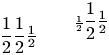
The following works in Tralics 2.0:
\def\N{\mathchoice{a}{b}{c}{d}}
$$\frac{\N\frac{\N+m}{2}} \N \quad
\tfrac{\N\frac{\N+m}{2}} \N \quad
\dfrac{\N\frac{\N+m}{2}} \N
$$
Translation is
<formula type='display'>
 <math xmlns='http://www.w3.org/1998/Math/MathML'>
  <mrow>
   <mfrac>
    <mrow>
     <mi>b</mi>
     <mfrac>
      <mrow><mi>c</mi><mo>+</mo><mi>m</mi></mrow>
      <mn>2</mn>
     </mfrac>
    </mrow>
    <mi>b</mi>
   </mfrac>
   <mspace width='1.em'/>
   <mstyle scriptlevel='0' displaystyle='false'>
    <mfrac>
     <mrow>
      <mi>c</mi>
      <mfrac><mrow><mi>d</mi><mo>+</mo><mi>m</mi></mrow> <mn>2</mn></mfrac>
     </mrow>
     <mi>c</mi>
    </mfrac>
   </mstyle>
   <mspace width='1.em'/>
   <mstyle scriptlevel='0' displaystyle='true'>
    <mfrac>
     <mrow>
      <mi>b</mi>
      <mfrac><mrow><mi>c</mi><mo>+</mo><mi>m</mi></mrow> <mn>2</mn></mfrac>
     </mrow>
     <mi>b</mi>
    </mfrac>
   </mstyle>
  </mrow>
 </math>
</formula>
Preview 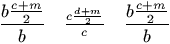 (See also
here)
\frame
Inside a picture environment, you can use \frame{text}, it is like
\framebox below, but there are no additional arguments: the size of
the frame is the smallest one that accepts the object. For an example,
see picture and the
`\qbezier <doc-q.html#cmd-qbezier>`__ command.
\framebox
The \framebox command takes two optional arguments, and a required
argument. The first optional argument is the width of the box, and the
second is l, r or s (it describes the positioning of the text inside the
box). The last argument is the thing to put in the box-to-be-framed. For
an example, see `\fbox <doc-f.html#cmd-fbox>`__. Note:
\framebox[xx][yy]{\includegraphics{zz}} adds a frame around the
image and produces no box; the optional arguments are ignored. If no
optional argument is given then \framebox is the same as \fbox.
Inside a picture environment you can say
\framebox(xd,yd)[pos]{text}. Here the position can be l or r, t or b
(respectively left, right, top, bottom), and two letters can be given.
There are also two dimensions xd and yd. For an example, see
`\qbezier <doc-q.html#cmd-qbezier>`__ command.
\frenchspacing
The \frenchspacing command is ignored. In LaTeX, this modifies the
\sfcode value of some punctuation characters to 1000.
\frontmatter
A command to be used before the main matter in a book. See description
of the `\mainmatter <doc-m.html#cmd-mainmatter>`__ command.
\frown (math symbol)
The \frown command is valid only in math mode. It generates a
relation symbol: <mo>⌢</mo> (Unicode U+2322, ⌢). See
description of the `\le <doc-l.html#cmd-le>`__ command.
\fsc
This command is defined by compatibility with the french package. The
translation of \fsc{Abc} is <hi rend='sc'>Abc</hi>.
\futurelet
If you say \futurelet\foo\bar\gee, then the result is the same as in
\let\foo\gee\bar\gee. The token after \futurelet must be
definable. In general, the next token is a command, like \bar, that
can consult the value of the \foo in order to take a decision. This
mechanism is used for `\@ifnextchar <doc-i.html#cmd-ifnextchar>`__,
and scanning optional arguments (in Tralics, testing for an optional
argument is done by a C++ procedure, but the principle is the same). See
also `\afterassignment <doc-a.html#cmd-afterassignment>`__.
You can put the prefix \global before \futurelet. An example
like
{\futurelet\bar\relax\relax \global\futurelet\foo\relax2}
leaves \bar unchanged, makes \foo the character 2.
\fussy
Ignored by Tralics.
\fvset
The \fvset command is defined by the fancyvrb package. Its
implementation in Tralics is incomplete. The argument is a list of
comma-separated assignments, of the form variable=value, that are used
by verbatim-like environments. In the current version, only showspaces
is recognized. If true, spaces are visible in verbatim mode (the does
not affect the behavior of the \verb command).
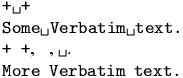
\DefineShortVerb{\|}
\fvset{showspaces=true}|+ +|
\begin{verbatim}
Some Verbatim text.
\end{verbatim}
\fvset{showspaces=false}|+ +|, \verb+ +, \verb*+ +.
\begin{verbatim}
More Verbatim text.
\end{verbatim}
\UndefineShortVerb{\|}