All commands, alphabetic order; letter N
This page contains the description of \@ne, \nabla, \@namedef, \@nameuse, \natcite, \natural, \ncong, \nearrow, \ne, \NeedsTeXFormat, \neg, \neq, \newblock, \newboolean, \newbox, \newcolumntype, \newcommand, \newcount, \newcounter, \newdimen, \newenvironment, \newfont, \newif, \newindex, \@newindex, \newlength, \newlanguage, \newline, \newlinechar, \newsmukip, \newpage, \newread, \newsavebox, \newskip, \newtoks, \newtheorem, \newwrite, \nexists, \ng, \ngeq, \ngtr, \NG, \ni, \@nil, \niplus, \@nnil, \nleftarrow, \nLeftarrow, \nLeftrightarrow, \nleftrightarrow, \nleq, \nless, \nmid, \no, \No, \noalign, \noboundary, \nobreak, \nobreakspace, \nocentering, \nocite, \node, \nodebox, \nodecircle, \nodeconnect, \nodecurve, \nodeoval, \nodepoint, \nodetriangle, \noexpand, \nonfrenchspacing, \noindent, \nointerlineskip, \nolimits, \nolinebreak, \@nomathml, \@nomathswi, \@nomathswii, \nonscript, \nonstopmode, \nonumber, \noopsort, \nopagebreak, \normalbaselines, \normalbaselineskip, \normalcolor, \normalfont, \normallineskip, \normallineskiplimit, \normalmarginpar, \normalsize, \not, \NOT, \notag, \notin, \@notprerr, \notrivialmath, \nparallel, \nprec, \nRightarrow, \nrightarrow, \nsim, \nsubseteq, \nsucc, \nsupseteq, \ntriangleleft, \ntrianglelefteq, \ntrianglelefteqslant, \ntriangleright, \ntrianglerighteq, \ntrianglerighteqslant, \nu, \null, \nulldelimiterspace, \nullfont, \number, \numberedverbatim, \numberwithin, \numero, \Numero, \numexpr, \nvdash, \nvDash, \nVdash, \nVDash, \nwarrow.
\nabla (math symbol)
The \nabla command is valid only in math mode. It generates a
miscellaneous symbol: <mi>∇</mi> (Unicode U+2207, ∇). See
description of the `\ldots <doc-l.html#cmd-ldots>`__ command.
\@namedef
Instead of \expandafter\def\csname xxx\endcsname ... you can say
\@namedef{xxx}.... The result is the same.
\@nameuse
Instead of \csname xxx\endcsname you can say \@nameuse{xxx}. For
instance, if you have two counters A and B, and you want that A prints
in the same way as B, more precisely, you want \theA to call
\theB, you say \Test{A}{B}, after the following definition:
\def\Test#1#2{\global \@namedef {the#1}{\@nameuse {the#2}}}.
\natural (math symbol)
The \natural command is valid in math mode and text mode. It
generates a miscellaneous symbol: <mo>♮</mo> (Unicode U+266E,
♮). See description of the `\qquad <doc-q.html#cmd-qquad>`__ and
`\ldots <doc-l.html#cmd-ldots>`__ commands.
\ncong (math symbol)
The \ncong command is valid only in math mode. It generates:
<mo>&2247;</mo>, ≇.
\ne (math symbol)
The \ne command is valid only in math mode. It generates a relation
symbol: <mo>≠</mo> (Unicode U+2260, ≠). See description of the
`\le <doc-l.html#cmd-le>`__ command.
\nearrow (math symbol)
The \nearrow command is valid only in math mode. It generates an
arrow that points North-East: <mo>↗</mo> (Unicode U+2197,
↗). See description of the `\leftarrow <doc-l.html#cmd-leftarrow>`__
command.
\NeedsTeXFormat
A typical class file contains a declaration like
\NeedsTeXFormat{LaTeX2e}[1995/12/01]. This is ignored by Tralics.
\neg (math symbol)
\neg command is valid only in math mode. It generates a
miscellaneous symbol (character ¬). See description of the
`\ldots <doc-l.html#cmd-ldots>`__
command.\neq (math symbol)
The \neq command is valid only in math mode. It is the same as
\ne. It generates a relation symbol: <mo>≠</mo> (Unicode
U+2260, ≠). See description of the `\le <doc-l.html#cmd-le>`__
command.
\newblock
This command expands to \hskip .11em plus.33em minus.07em.
\newboolean
\newboolean{foo}, this is the same as
\newif\iffoo. However, an error is signaled if \iffoo already
exists. The control sequence \iffoo is created by
`\csname <doc-c.html#cmd-csname>`__, nasty errors may occur. The
boolean value of foo can be changed by setboolean{foo} (rather
than by \footrue or \foofalse). It can be tested via
\boolean. (see description of \ifthenelse) (also see
`\newif <doc-n.html#cmd-newif>`__) for some details).Example (translation is oka okb)
{ %The command \bad is not executed here
\def\double#1{#1#1}
\newboolean{f\double o}
\def\swap{\setboolean{f\double o}{\iffoo fals \else TRU\fi e}}
\ifthenelse{\boolean{foo}}{\bad}{oka}
\swap
\ifthenelse{\boolean{foo}}{okb}{\bad}
}
\newbox
The \newbox command is similar in principle to
`\newcount <doc-n.html#cmd-newcount>`__. After \newbox\foo, the
\foo commands refers to some box, and each call to \newbox
produces a reference to a different box. You say
\setbox\foo = \hbox{...} if you want to put something in the box,
\box\foo or \copy\foo if you want to use the box or its copy.
Note: \foo is, in reality, a reference to a character. (Lamport
calls it a “bin”).
\newcolumntype
\newcolumntype command can be used to define a new column type
(in addition to flush left, flush right and center). See documentation on arrays.\newcommand
The LaTeX way of defining commands is via \newcommand. Here are some
examples
\newcommand*\NCA{nca}
\newcommand{\NCB}[0]{ncb}
\newcommand{\NCC}[2]{ncc#1#2}
\newcommand{\NCD}[2][x]{ncd#1#2}
\NCA and \NCB and \NCC{arg1}{arg2} and
\NCD[arg1]{arg2} and \NCD{arg2}
The argument of \newcommand should be a single token (\cmd25 is
wrong), a command name (or an active character) that is undefined. It is
followed by the number of arguments (in brackets, default is zero, only
explicit digits are allowed), followed by an optional argument in
brackets, followed by a command body. In the body, #1 refers to the
first argument, #2 to the second, etc (you cannot use #7 if the
command does not take at least seven arguments).
In the case of a command like \NCD, the number of arguments should
be at least one. When you say \NCC{y}, then y is the second
argument (and the first argument takes its default value, here x).
When you say \NCD[1]{2}, the first argument is 1, the second
argument is 2. The commands are \long (they accept \par in
their arguments), unless \newcommand* is used ( You can put an
optional * after \newcommand, (it means non-\long in LaTeX).
\newcount
This command allocates a new counter register and defines a macro that references it.
There are N=256 count registers, indexed by a number between 0 and N-1,
for instance \count0, or \count23. (In current versions of
Tralics, N is 1024). It is sometimes wise to give a symbolic name to a
counter. For instance, \countdef\foo 25 makes \foo a reference
to \count25. On the other hand, it is more efficient to say \foo
than \count25, (because it avoids a call to
scanint) and \foo3 is not the same as
\count253.
\newcount command uses a different number each
time, first 20, then 21, then 22, etc. Numbers less than 10 are not
allocated. Numbers between 10 and 19 are used by the new-something
mechanism. When you say \newcount\foo, a counter is allocated, and
\foo is made a reference to it. Then \foo=3 puts 3 in the
counter, \advance\foo by 1 increments the counter, and
\the\foo typesets the counter. Allocation is always global. See `\loop <doc-loop.html>`__ for an example.\newcounter
The \newcounter command is similar in principle to
`\newcount <doc-n.html#cmd-newcount>`__. However, LaTeX adds
additional features. When you say \newcounter\foo, a number is
allocated, say 25, and the command \c@foo is made equivalent to
\count25. See for instance description of
counters. The expression \value{foo} expands
to \c@foo, hence to \count25. This means that \value{foo}=12
is one way to set the value to 12, but you should say
\setcounter{foo}{12}. This sets the value to 12, globally. You can
also say \addtocounter{foo}{25}, if you want to add (globally) 25 to
the value of the counter.
You can say \number\value{foo} if you want to typeset the number,
and even \the\value{foo}. If fact, you say \arabic{foo} if you
want an arabic version (you can use \roman, \alph etc). You say
\thefoo when you want to typeset the counter foo and what is related
(default value is arabic, but you can say
\renewcommand \thefoo {\roman{foo}}). You can say:
\renewcommand \thesection {\thechapter .\arabic{section}}. Then
\thesection typesets \thechapter, a dot, and the section counter
as an arabic number.
When you say \newcounter {section}[chapter], this modifies a
property of the chapter counter (in fact the \cl@chapter command),
so that, whenever it is incremented by \stepcounter, the section
counter is reset to zero. Example
{
  \newcounter{toto}
  \newcounter{titi}[toto]
  \newcounter{tata}[titi]
  \newcounter{tutu}[toto]

  \setcounter{toto}{10}
  \setcounter{titi}{20}
  \setcounter{tata}{30}
  \setcounter{tutu}{40}
\expandafter\show\value{toto}\expandafter\showthe\value{toto}
\expandafter\show\value{titi}\expandafter\showthe\value{titi}
\expandafter\show\value{tata}\expandafter\showthe\value{tata}
\expandafter\show\value{tutu}\expandafter\showthe\value{tutu}
  \stepcounter{toto} %  kills titi, tutu
  \stepcounter{tata}\thetata=31,
  \stepcounter{titi}\thetata=0 % titi=1
  \stepcounter{tutu}
  \thetoto\thetiti\thetata\thetutu=11101

\makeatletter
\show\cl@toto
\show\cl@titi
\show\cl@tata
\show\cl@tutu
}%
Translation is: 31=31, 0=0 11101=11101. Tralics prints the following.
Note that \c@toto is a pointer into an internal table that contains
catcodes, lccodes, etc. [In old version of Tralics, \show\c@toto
gave \countref1536, because the counter is at position 1536 if the
integer part of eqtb table].
\c@toto=\count26.
\show: 10
\c@titi=\count27.
\show: 20
\c@tata=\count28.
\show: 30
\c@tutu=\count29.
\show: 40
\cl@toto=macro: ->\@elt {titi}\@elt {tutu}.
\cl@titi=macro: ->\@elt {tata}.
\cl@tata=macro: ->.
\cl@tutu=macro: ->.
\newdimen
\newdimen command is similar in principle to
`\newcount <doc-n.html#cmd-newcount>`__. When you say
\newdimen\foo, then \foo is a reference to one of the N
dimension registers. You can use \foo in the same way as
\dimen0. For instance \foo=25pt will set the dimension to
25pt. It is the same as \setlength{\foo}{25pt}. You can say
\advance\foo by 3pt if you want to increase the value, or you can
say \addtolength{\foo}{3pt}.\newenvironment
An environment, like foo is defined by two commands \foo and
\endfoo. It is defined by the \newenvironment command, that
takes as argument a name (Tralics accepts only characters); the
command associated to this name should not be already defined.
For instance, \newenvironment{foo} {xxx} {yyy} is like
\newcommand{\foo}{xxx}, \def\endfoo{yyy}. Said otherwise, the
\foo command can take some arguments, it can take an optional
argument, but \endfoo takes no argument (in the case of DDD, we
put the argument in an auxiliary command, that will be used at the end
of the environment). Example
\newenvironment{AAA}{1\begin{BBB}5}{8\end{BBB}c}
\newenvironment{BBB}{2\begin{CCC}4}{9\end{CCC}b}
\newenvironment{CCC}{3}{a}
\newenvironment{DDD}[2]{#2#1\def\foo{#1}}{\foo}
\newenvironment{EEE}[2][e]{#2#1\def\foo{#1}}{\foo}
%latex code               translation
\begin{AAA}67\end{AAA}    123456789abc
\begin{DDD}678\end{DDD}   7686
\begin{EEE}[6]78\end{EEE} 7686
\begin{EEE}78\end{EEE}    7e8e
\newfont
This command is a wrapper around `\font <doc-f.html#cmd-font>`__ in
that the expansion of \newfont\foo{cmt at 12pt} is
\font\foo=cmt at 12pt\relax.
\newif
\newif\iffoo, the two commands \footrue and
\foofalse are defined: the result of these commands is to change
the meaning of \iffoo to \iftrue and \iffalse
respectively. Moreover, \iffoo is let equal to \iffalse
initially. See `\loop <doc-loop.html>`__ for an example. Note that
Tralics wants a name with at least 3 characters.This is how the macro is defined in plain TeX (why does the TeXbook mention `edef’ ?)
\outer\def\newif#1{\count@\escapechar \escapechar\m@ne
  \expandafter\expandafter\expandafter
   \def\@if#1{true}{\let#1=\iftrue}%
  \expandafter\expandafter\expandafter
   \def\@if#1{false}{\let#1=\iffalse}%
  \@if#1{false}\escapechar\count@} % the condition starts out false
\def\@if#1#2{\csname\expandafter\if@\string#1#2\endcsname}
{\uccode`1=`i \uccode`2=`f \uppercase{\gdef\if@12{}}} % `if' is required
This is how the macro is defined in LaTeX:
\def\newif#1{%
  \count@\escapechar \escapechar\m@ne
    \let#1\iffalse
    \@if#1\iftrue
    \@if#1\iffalse
  \escapechar\count@}
\def\@if#1#2{%
  \expandafter\def\csname\expandafter\@gobbletwo\string#1%
                    \expandafter\@gobbletwo\string#2\endcsname
                       {\let#1#2}}
\newindex, \@newindex
These commands allow you to use more than one index, see \index.
\newlanguage
The \newlanguage command is similar in principle to
`\newcount <doc-n.html#cmd-newcount>`__, but it allocates a language
number (starting with 11). This is currently unused by Tralics that
knows only English, French and German with numbers 0, 1 and 2.
\newlength
The \newlength command (and its synonym \newskip) is similar in
principle to `\newcount <doc-n.html#cmd-newcount>`__, but it
allocates a skip register.
\newlength\foo, then \foo is a reference to one
of the N skip registers. You can use \foo in the same way as
\skip0. For instance \foo=25pt plus 2pt will set the dimension
to 25pt plus 2pt. It is the same as
\setlength{\foo}{25pt plus 2pt}. You can say
\advance\foo by 3pt plus 4pt if you want to increase the value, or
you can say \addtolength{\foo}{3pt plus 4pt}. Note: the commands
\setlength and \addtolength use as first argument a dimen
register or a skip register (more generally, anything that can be
preceded by \advance\, for instance \parindent), the second
argument will be automatically converted (by adding zero shrink and
stretch, or by ignoring the shrink and stretch components). (see also `\newcount <doc-n.html#cmd-newcount>`__)\newline
The \newline command is like \\, without optional argument. It
does not work inside an array. See
\\.
\newlinechar (internal integer)
\newlinechar command can be used to change the value of the
character that TeX uses for a new line (for instabce in \write)
Not implemented in Tralics. (See scanint for details of
argument scanning).\newmuskip
The \newmuskip command is similar in principle to
`\newcount <doc-n.html#cmd-newcount>`__, but it allocates a muskip
register.
\newpage
Translation of \newpage is <newpage/>.
\newread
The \newread command is similar in principle to
`\newcount <doc-n.html#cmd-newcount>`__, but it allocates an input
stream (first number allocated is 1, last one is 15).
\newsavebox
The \newsavebox command is similar to
`\newbox <doc-n.html#cmd-newbox>`__ (in the current version,
Tralics does not check that the command is undefined).
\newskip
The \newskip command is similar in principle to
`\newcount <doc-n.html#cmd-newcount>`__, but it allocates a skip
register. It is the same as
`\newlength <doc-n.html#cmd-newlength>`__.
\newtheorem
You can say \newtheorem {X}{Y} or \newtheorem {X}[Z}{Y} or
\newtheorem {X}{Y}[T}. This defines an environment X, labeled Y. In
the second case, it uses the counter Z, otherwise it uses X as counter.
In the last case, the counter is reset whenever T changes and the value
of T is prepended to the value of X.
There is a command \theoremstyle that takes an argument, and
remembers it; each theorem can see the value that was active at the
definition. In the first case shown below, and in the preview, this
value is ignored.
There is a command \theorembodyfont that takes an argument, and
remembers it; each theorem uses this value as font for the body.
There is a command \theoremheaderfont that takes an argument, and
remembers it; each theorem uses this value as font for the body. For
some strange reason, this quantity is global (should be used only once).
Example.
\theorembodyfont{\sl}
\theoremstyle{break}
\newtheorem{Cor}{Corollary}
\theoremstyle{plain}
\setcounter{section}{17}
\newtheorem{Exa}{Example}[section]
{\theorembodyfont{\rmfamily}\newtheorem{Rem}{Remark}}
\theoremstyle{marginbreak}
\newtheorem{Lem}[Cor]{lemma}
\theoremstyle{change}
\theorembodyfont{\small\itshape} \newtheorem{Def}[Cor]{Definition}
\theoremheaderfont{\scshape}
\def\Lenv#1{\texttt{#1}}

\begin{Cor}
 This is a sentence typeset in the theorem environment \Lenv{Cor}.
\end{Cor}
\begin{Exa}
 This is a sentence typeset in the theorem environment \Lenv{Exa}.
\end{Exa}
\begin{Rem}
 This is a sentence typeset in the theorem environment \Lenv{Rem}.
\end{Rem}
\begin{Lem}[Ben User]
 This is a sentence typeset in the theorem environment \Lenv{Lem}.
\end{Lem}
\begin{Def}[Very Impressive definition]
 This is a sentence typeset in the theorem environment \Lenv{Def}.
\end{Def}
The translation is the following.
<p id-text='1' id='uid1'>
 <hi rend='sc'>Corollary 1 </hi>
 <hi rend='slanted'>This is a sentence typeset in the theorem environment </hi>
 <hi rend='slanted'><hi rend='tt'>Cor</hi></hi><hi rend='slanted'>.</hi>
</p>

<p id-text='17.1' id='uid2'>
 <hi rend='sc'>Example 17.1 </hi>
 <hi rend='slanted'>This is a sentence typeset in the theorem environment </hi>
 <hi rend='slanted'><hi rend='tt'>Exa</hi></hi>
 <hi rend='slanted'>.</hi>
</p>

<p id-text='1' id='uid3'>
 <hi rend='sc'>Remark 1 </hi>
 This is a sentence typeset in the theorem environment
 <hi rend='tt'>Rem</hi>.
</p>

<p id-text='2' id='uid4'>
 <hi rend='sc'>lemma 2 (Ben User) </hi>
 <hi rend='slanted'>
  This is a sentence typeset in the theorem environment </hi>
 <hi rend='slanted'><hi rend='tt'>Lem</hi></hi>
 <hi rend='slanted'>.</hi>
</p>

<p id-text='3' id='uid5'>
 <hi rend='sc'>Definition 3 (Very Impressive definition) </hi>
 <hi rend='small1'></hi>
 <hi rend='small1'>
   <hi rend='it'>
theorem}     This is a sentence typeset in the theorem environment
   </hi>
 </hi>
 <hi rend='small1'><hi rend='it'><hi rend='tt'>Def</hi></hi></hi>
 <hi rend='small1'><hi rend='it'>.</hi></hi>
</p>

Note that the theorem counter is incremented via a call to
\refstepcounter, in fact to \stepcounter plus the internal code
that defines a label. In this case, the label is put on an anonymous XML
element, then copied to the <p> element. If the configuration file
contains xml_xtheorem_name = “dummy”, then the name will be dummy,
and the result of the translation will be
<dummy id-text='1' id='uid3'>
 <p>
  <hi Rend='sc'>Remark 1 </hi>
  This is a sentence typeset in the theorem environment
  <hi Rend='tt'>Rem</hi>.
 </p>
</dummy>
If the configuration file contains xml_theorem_name = “theorem”, then
the name will be theorem, and the translation is a bit different, as
you can see.
<theorem style='break' type='Cor' id-text='1'  id='uid1'>
<head>Corollary</head>
<p>This is a sentence typeset in the theorem environment <hi Rend='tt'>Cor</hi>.
</p>
</theorem>

<theorem style='plain'  type='Exa'  id-text='17.1' id='uid2'>
<head>Example</head>
<p>This is a sentence typeset in the theorem environment <hi Rend='tt'>Exa</hi>.
</p>
</theorem>

<theorem style='plain' type='Rem'  id-text='1' id='uid3'>
<head>Remark</head>
<p>This is a sentence typeset in the theorem environment <hi Rend='tt'>Rem</hi>.
</p>
</theorem>

<theorem style='marginbreak'  type='Lem'  id-text='2' id='uid4'>
<head>lemma</head>
<alt_head>Ben User</alt_head>
<p>This is a sentence typeset in the theorem environment <hi Rend='tt'>Lem</hi>.
</p>
</theorem>

<theorem style='change' type='Def'  id-text='3' id='uid5'>
<head>Definition</head>
<alt_head>Very Impressive definition</alt_head>
<p>This is a sentence typeset in the theorem environment <hi Rend='tt'>Def</hi>.
</p>
</theorem>
\newtoks
The \newtoks command is similar in principle to
`\newcount <doc-n.html#cmd-newcount>`__, but it allocates a token
register. Assuming that the first allocated register is 11, the
following code makes \foo equivalent to \Bar. The translation is
`123 456’.
\toksdef\foo 11
\newtoks\Bar
\foo={123 456} \the\Bar
\newwrite
The \newread command is similar in principle to
`\newcount <doc-n.html#cmd-newcount>`__, but it allocates a output
stream (first number allocated is 1, last one is 15).
\nexists (math symbol)
The \nexists command is valid only in math mode. It generates:
<mo>∄</mo> (Unicode U+2204, ∄).
\ng (constant)
This translates to ŋ or (Unicode U+14B, ŋ). For more info see
the extended latin characters.
\NG (constant)
This translates to Ŋ (Unicode U+14A, Ŋ). For more info see the
extended latin characters.
\ngeq (math symbol)
The \ngeq command is valid only in math mode. It generates:
<mo>≱</mo> (Unicode U+2271, ≱).
\ngtr (math symbol)
The \ngtr command is valid only in math mode. It generates:
<mo>≯</mo> (Unicode U+226F, ≯).
\ni (math symbol)
The \ni command is valid only in math mode. It generates:
<mo>∋</mo> (Unicode U+220B, ∋).
\niplus (math symbol)
The \niplus command is valid only in math mode. It generates:
<mo>&niplus;</mo> (Unicode U+2A2E, ⨮).
\nleftarrow (math symbol)
The \nleftarrow command is valid only in math mode. It generates:
<mo>↚</mo> (Unicode U+219A, ↚).
\nLeftarrow (math symbol)
The \nLeftarrow command is valid only in math mode. It generates
<mo>⇍</mo> (Unicode U+21CD, ⇍).
\nleftrightarrow (math symbol)
The \nleftrightarrow command is valid only in math mode. It
generates: <mo>↮</mo> (Unicode U+21AE, ↮).
\nLeftrightarrow (math symbol)
The \nLeftrightarrow command is valid only in math mode. It
generates <mo>⇎</mo> (Unicode U+21CE, ⇎).
\nleq (math symbol)
The \nleq command is valid only in math mode. It generates:
<mo>≰</mo> (Unicode U+2270, ≰).
\nless (math symbol)
The \nless command is valid only in math mode. It generates:
<mo>≮</mo> (Unicode U+226E, ≮).
\nmid (math symbol)
The \nmid command is valid only in math mode. It generates:
<mo>∤</mo> (Unicode U+2224, ∤).
\noalign
The \noalign command can be used to insert material between rows in
a table. For instance, in LaTeX, the \hline command is defined to be
\noalign{\hrule height \arrayrulewidth}, with a special hack that
allows double rules.
In Tralics, the only inter-row material allowed is a single
\hline. The \noalign command is not yet implemented.
\noboundary
The \noboundary command inhibits adding an invisible boundary
character. This is used by TeX when computing ligatures and kerns. These
quantities depend on the current font. Since Tralics does not read
font information, the \noboundary is useless. It fact, the command
provokes an error.
\nobreak
This commands is currently ignored.
\nobreakspace
The \nobreakspace command is identical to ~ (tilde), but cannot
be used in math mode. It generates a non-break space or
 . For more info see the latin supplement
characters.
\nocentering (Tralics command)
Switches to the default mode, that is not centering, nor flush left, not
flush right, nor quotation. (see also
`\centering <doc-c.html#cmd-centering>`__)
\nocite
This commands behaves like \cite, but translation is empty (see also
`\cite <doc-c.html#cmd-cite>`__).
\node
You say \node{x}{y} for creating a node named x with value y in a
tree. See `\abarnodeconnect <doc-a.html#cmd-abarnodeconnect>`__ for
syntax and example.
\nodebox
You say \nodebox{x} if you want to put a box around node x. See
`\abarnodeconnect <doc-a.html#cmd-abarnodeconnect>`__ for syntax and
example.
\nodecircle
You say \nodebox[3pt]{x} if you want to put a circle around node x.
See `\abarnodeconnect <doc-a.html#cmd-abarnodeconnect>`__ for syntax
and example.
\nodeconnect
You say \nodeconnect[t]{x}[b]{y} if you want to connect top of node
x to bottom of node y. See
`\abarnodeconnect <doc-a.html#cmd-abarnodeconnect>`__ for syntax and
example.
\nodecurve
You say \nodeconnect[t]{x}[b]{y}{2pt}[3pt] if you want to connect
top of node x to bottom of node y, with a curve specified by 2pt and
3pt. See `\abarnodeconnect <doc-a.html#cmd-abarnodeconnect>`__ for
syntax and example.
\nodeoval
You say \nodeoval{x} if you want to put an oval around node x. See
`\abarnodeconnect <doc-a.html#cmd-abarnodeconnect>`__ for syntax and
example.
\nodepoint
You say \nodepoint{x}[4pt][5pt] if you want to create a node named x
at the current position, with size 4pt and 5pt. See
`\abarnodeconnect <doc-a.html#cmd-abarnodeconnect>`__ for syntax and
example.
\nodetriangle
You say \nodetriangle{x}{y} if you want to connect nodes x and y by
a triangle. See
`\abarnodeconnect <doc-a.html#cmd-abarnodeconnect>`__ for syntax and
example.
\noexpand
The \noexpand command inhibits expansion of the token that follows.
In the example that follows, you will see “\jobname =texput”, but the
translation is texput=texput. In the test that follows, the tidle
character is not expanded, so category code 13 is compared to what
follows; this is the first token in the expansion of \jn (since this
is the first character of \jobname, the category code is 12, unless
the file starts with a space). In the test that follows, we compare an
unexpanded active character W; it has the same category code as
unexpanded tilde, it has the same value as \foo. The token that
follows \noexpand is considered to be \relax when it is
expandable (in particular, when it is undefined). The line marked “bad”
gives three errors: since unexpanded \foo is illegal in a control
sequence name, this aborts the construction of the name, so you get an
undefined error followed by an extra \endcsname. The syntax rules
for \hbox and \uppercase allow \relax before the open brace,
so that last line is valid. The resulting box is empty.
\edef \jn {\noexpand \jobname=\jobname} \show\jn \jn
\ifcat\noexpand~\jn \bad \fi  \ifcat=\jn \else \bad \fi
{\let\foo=W \catcode`W=13
  \ifcat\noexpandW\noexpand~\else \bad \fi
  \if\noexpandW\foo\else \bad \fi
  \if\noexpandW\noexpand\foo\else \bad \fi
}
\let\foo\undefined
\csname\noexpand\foo\endcsname %bad
\hbox to 2cm \noexpand\foo {\noexpand\foo \uppercase\noexpand\foo{}}
In the example that follows, the non-expanded \foo finishes parsing
of the integer; it is expanded again. In the line that follows,
expansion is inhibited while scanning the to keyword. Hence \foo
is expanded again and is considered as an opening brace. In the line
that follows, the second \noexpand is eaten by scanning the
spread keyword. So it requires three \noexpand in order to
discard \foo. In the two lines that follow, the non-expanded
\foo terminates scanning of the number, and becomes part of the unit
of measure. Consider the last line: how many \noexpand tokens are
needed to effectively suppress expansion (and provoke an error)?. Quite
a lot: mote than five in Tralics and 15 in TeX. The syntax of a
dimension is quite complicated (see
scandimen) and each time an optional
thing is tried, one \noexpand is eaten. For instance, one could have
em, ex or true. After that Tralics read two characters and
compares them with pt, pc, etc, while TeX scan eleven keywords,
one after the other.
\def\foo{0} \count0=1\noexpand\foo
\def\foo{\bgroup}\hbox\noexpand\foo x\egroup
\hbox\noexpand\noexpand\foo y\egroup
\hbox\noexpand\noexpand\noexpand\foo{z}

\def\foo{pt} \dimen0=2\noexpand\foo
\def\foo{.5pt} \dimen0=2\noexpand\foo  % error
%\def\foo{sp} \dimen0=2\noexpand\noexpand...\foo
\nofiles
This command is ignored by Tralics; in LaTeX it inhibits writing on auxiliary output files.
\nonfrenchspacing
The \nonfrenchspacing command is ignored. In LaTeX, this modifies
the \sfcode value of some punctuation characters to values greater
than 1000.
\noindent
The \noindent command starts a new paragraph.
According to TeX, the only difference between \indent and
\noindent is that the first command inserts an empty hbox whose
width is \parindent. A new paragraph is started only if TeX is in
vertical mode, and the \everypar tokens are inserted in TeX’s input.
If TeX is in vertical mode and sees a character or something like that
(including the first token of the expansion of \leavevmode) it adds
an implicit \indent.
In Tralics, the value of \parindent is ignored, as well as the
\everypar tokens. Paragraphs are indented by default, so that
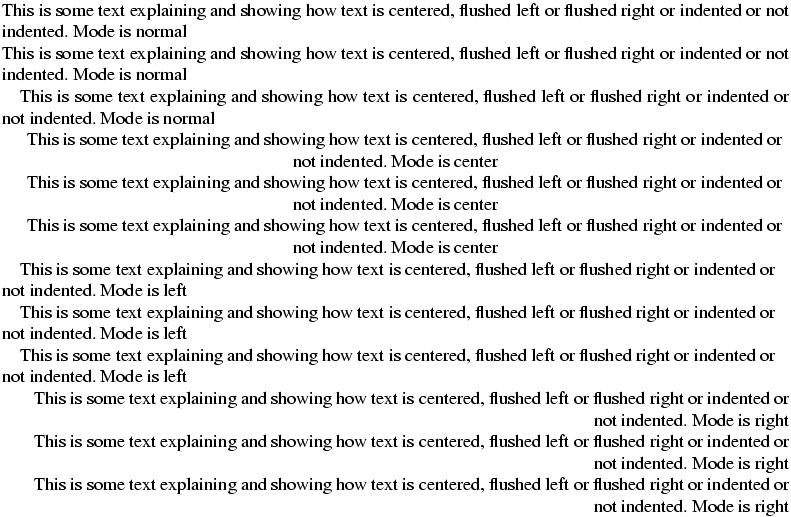
\noindent adds an attribute, the other command does nothing. If the
current text is centered, flushed left or flushed right, no attribute is
added. Example
\def\sample{This is some text explaining and showing how text is centered,
flushed left or flushed right or indented or not indented. \Env}
\def\line{\sample\noindent\sample\indent\sample}
\def\Env{Mode is normal}\line
\begin{center}\def\Env{Mode is center}\line\end{center}
\begin{flushleft}\def\Env{Mode is left}\line\end{flushleft}
\begin{flushright}\def\Env{Mode is right}\line\end{flushright}
<p>
This is some text explaining and showing how text is centered,
flushed left or flushed right or indented or not indented. Mode is normal</p>
<p noindent='true'>This is some text explaining and showing how text is centered,
flushed left or flushed right or indented or not indented. Mode is normal</p>
<p>This is some text explaining and showing how text is centered,
flushed left or flushed right or indented or not indented. Mode is normal</p>

<p rend='center'>This is some text explaining and showing how text is centered,
flushed left or flushed right or indented or not indented. Mode is center</p>
<p rend='center'>This is some text explaining and showing how text is centered,
flushed left or flushed right or indented or not indented. Mode is center</p>
<p rend='center'>This is some text explaining and showing how text is centered,
flushed left or flushed right or indented or not indented. Mode is center</p>

<p rend='flushed-left'>This is some text explaining and showing how text is centered,
flushed left or flushed right or indented or not indented. Mode is left</p>
<p rend='flushed-left'>This is some text explaining and showing how text is centered,
flushed left or flushed right or indented or not indented. Mode is left</p>
<p rend='flushed-left'>This is some text explaining and showing how text is centered,
flushed left or flushed right or indented or not indented. Mode is left</p>

<p rend='flushed-right'>This is some text explaining and showing how text is centered,
flushed left or flushed right or indented or not indented. Mode is right</p>
<p rend='flushed-right'>This is some text explaining and showing how text is centered,
flushed left or flushed right or indented or not indented. Mode is right</p>
<p rend='flushed-right'>This is some text explaining and showing how text is centered,
flushed left or flushed right or indented or not indented. Mode is right</p>
\nointerlineskip
The \nointerlineskip command is ignored. In TeX, it sets
\prevdepth dimension to a magic value.
\nolimits
\nolimits command is valid only in math mode. It describes how
indices should be positioned. In the case of \mathop a\limits ^b,
the translation is a <mover> element containing a and b, rather
than a <msup>. If you forget the \mathop, an error will be
signaled by TeX, but Tralics simply ignores the command. There are
three flags, \limits, \nolimits and \displaylimits whose
meaning is: use always over, use never over, use over in display mode
only. More than one prefix can be given, the last one has precedence.
A command like \lim has \mathop and \displaylimits flags,
while \sin has \mathop and \nolimits flags. It happens
that the kernel in <mover> can have a `movablelimits’ attribute,
case where the effect is the same as \displaylimits; this may
confuse Tralics, in the case where the attribute is implicit.\def\A#1{\mathop a #1_b, \mathop a#1^c, \mathop a#1_b^c}
$\A{} \A\limits \A\nolimits \A\displaylimits $
\[\A{} \A\limits \A\nolimits \A\displaylimits \]
<formula type='inline'>
  <math xmlns='http://www.w3.org/1998/Math/MathML'>
    <mrow>
      <msub><mi>a</mi> <mi>b</mi> </msub>          <mo>,</mo>
      <msup><mi>a</mi> <mi>c</mi> </msup>          <mo>,</mo>
      <msubsup><mi>a</mi> <mi>b</mi> <mi>c</mi></msubsup>
      <munder><mi>a</mi> <mi>b</mi> </munder>      <mo>,</mo>
      <mover><mi>a</mi> <mi>c</mi> </mover>        <mo>,</mo>
      <munderover><mi>a</mi> <mi>b</mi> <mi>c</mi></munderover>
      <msub><mi>a</mi> <mi>b</mi> </msub>          <mo>,</mo>
      <msup><mi>a</mi> <mi>c</mi> </msup>          <mo>,</mo>
      <msubsup><mi>a</mi> <mi>b</mi> <mi>c</mi> </msubsup>
      <msub><mi>a</mi> <mi>b</mi> </msub>          <mo>,</mo>
      <msup><mi>a</mi> <mi>c</mi> </msup>          <mo>,</mo>
      <msubsup><mi>a</mi> <mi>b</mi> <mi>c</mi> </msubsup>
    </mrow>
  </math>
</formula>
<formula type='display'>
  <math mode='display' xmlns='http://www.w3.org/1998/Math/MathML'>
    <mrow>
      <munder><mi>a</mi> <mi>b</mi> </munder>      <mo>,</mo>
      <mover><mi>a</mi> <mi>c</mi> </mover>        <mo>,</mo>
      <munderover><mi>a</mi> <mi>b</mi> <mi>c</mi> </munderover>
      <munder><mi>a</mi> <mi>b</mi>  </munder>     <mo>,</mo>
      <mover><mi>a</mi> <mi>c</mi> </mover>        <mo>,</mo>
      <munderover><mi>a</mi> <mi>b</mi> <mi>c</mi> </munderover>
      <msub><mi>a</mi> <mi>b</mi> </msub>          <mo>,</mo>
      <msup><mi>a</mi> <mi>c</mi> </msup>          <mo>,</mo>
      <msubsup><mi>a</mi> <mi>b</mi> <mi>c</mi> </msubsup>
      <munder><mi>a</mi> <mi>b</mi> </munder>      <mo>,</mo>
      <mover><mi>a</mi> <mi>c</mi> </mover>        <mo>,</mo>
      <munderover><mi>a</mi> <mi>b</mi> <mi>c</mi> </munderover>
   </mrow>
 </math>
</formula>
\@nomathml (Internal Tralics integer)
The variable \@nomathml controls translation of mathematical
formulas. The default value is zero, and a MathML object is constructed.
If the variable is positive, all math-commands translate to themselves;
for instance the translation of \int_x^{-\infty} becomes
\int_x^-\infty. If the argument is negative, the translation depends
on whether the argument is -2 or -3 or some other value. Consider the
following input:
\def\myvar{\phi}
$\int_{-\infty}^\myvar f(x) dx=\mathrm{O}\,\left(\frac{1}\myvar\right)$
$x_{\mbox{{\scriptsize{H\,{\sc i}}}}}$
\begin{equation}\text{a}=\hbox{b}=\mbox{c}\end{equation}
This is the translation in case \@nomathml=-2. You can notice that
translation of simple objects like \phi is an empty element of the
same name, and that braces (even implicit ones, for instance the second
argument of the fraction) produces a <arg> element.
<texmath textype='inline' type='inline'>
   <int/><subscript><arg>-<infty/></arg></subscript>
         <superscript><phi/></superscript>
         f(x) dx=<mathrm/><arg>O</arg>
   <elt name=','/><left del='('><frac><arg>1</arg><arg><phi/></arg></frac>
   <right del=')'>
</texmath>
<texmath textype='inline' type='inline'>
   x<subscript>
     <arg>
      <mbox>
       <arg>
        <scriptsize/><arg>H<elt name=','/><arg><sc/>i</arg></arg>
       </arg>
      </mbox>
     </arg>
   </subscript>
</texmath>
<texmath id-text='1' id='uid1' textype='equation' type='display'>
  <text>a</text>=<hbox>b</hbox>=<mbox>c</mbox>
</texmath>
Translation of the same example, with \@nomathml=-1. It is a single
XML element, containing the TeX source (after macro-expansion).
<texmath textype='inline' type='inline'>
   \int _{-\infty }^\phi f(x) dx=\mathrm {O}\,\left(\frac{1}{\phi }\right)
</texmath>
<texmath textype='inline' type='inline'>
 x_{\mbox{{\scriptsize {H\,{\sc i}}}}}</texmath>
<texmath id-text='1' id='uid1' textype='equation' type='display'>
   \text{a}=\hbox{b}=\mbox{c}
</texmath>
Translation of the same example, with \@nomathml=-3. The translation
is a merge of the cases 0 and -1. More precisely, a <texmath> is
created, and inserted in the <formula> after the <math>.
<formula type='inline'>
<math xmlns='http://www.w3.org/1998/Math/MathML'>
<mrow>
<msubsup>
<mo>∫</mo>
<mrow><mo>-</mo><mi>∞</mi></mrow>
<mi>ϕ</mi>
</msubsup>
<mi>f</mi>
<mrow><mo>(</mo><mi>x</mi><mo>)</mo></mrow>
<mi>d</mi><mi>x</mi><mo>=</mo>
<mi mathvariant='normal'>O</mi><mspace width='0.166667em'/>
<mfenced separators='' open='(' close=')'>
<mfrac><mn>1</mn> <mi>ϕ</mi></mfrac>
</mfenced>
</mrow>
</math>
<texmath>
\int _{-\infty }^\phi f(x) dx=\mathrm {O}\,\left(\frac{1}{\phi }\right)
</texmath>
</formula>
<formula type='inline'>
<math xmlns='http://www.w3.org/1998/Math/MathML'>
<msub>
<mi>x</mi>
<mrow><mtext>H</mtext><mspace width='0.166667em'/><mtext>i</mtext></mrow>
</msub>
</math>
<texmath>x_{\mbox{{\scriptsize {H\,{\sc i}}}}}</texmath>
</formula>
<formula id-text='1' id='uid1' textype='equation' type='display'>
<math mode='display' xmlns='http://www.w3.org/1998/Math/MathML'>
<mrow><mtext>a</mtext><mo>=</mo><mtext>b</mtext><mo>=</mo><mtext>c</mtext></mrow>
</math>
<texmath>\text{a}=\hbox{b}=\mbox{c}
</texmath>
</formula>
If you try to put an attribute pair to the formula or math expression,
the behavior depends on the switch. If it is -2, the translation is a
<thismathattribute> or <formulaattribute> element. In all other
cases, attributes are added to the <formula>, <math> or
<texmath> elements (this last element receives both attributes).
Example
$\thismathattribute{a}{b}\formulaattribute{c}{d} e$
Here are the translation when the variable is 0, -1, -2 and -3.
<formula type='inline' c='d'>
  <math xmlns='http://www.w3.org/1998/Math/MathML' a='b'>
    <mi>e</mi>
  </math>
</formula>
<texmath c='d' a='b' textype='inline' type='inline'> e</texmath>
<texmath textype='inline' type='inline'>
  <thismathattribute><arg>a</arg><arg>b</arg></thismathattribute>
  <formulaattribute><arg>c</arg><arg>d</arg></formulaattribute>
  e
</texmath>
<formula type='inline' c='d'>
  <math xmlns='http://www.w3.org/1998/Math/MathML' a='b'>
    <mi>e</mi>
  </math>
  <texmath c='d' a='b'> e</texmath>
</formula>
\@nomathswi, \@nomathswii (Tralics commands)
In the case where \@nomathml=-3 (see above) Tralics reads a math
formula, expanding all commands; the resulting list is then converted
twice as an XML expression. A font switch like \mathrm is
interpreted as \mml@font@normal. A special marker is inserted in the
list, preventing this token to appear in the result. More generally,
what follows \@nomathswi appears only in the <math> object, and
what follows \@nomathswii appears only in <texmath> object. This
mechanism is used whatever the value of \@nomathml. Example
$a \@nomathswi{xy} b \@nomathswii{zt} c$
Here are the translation when the variable \@nomathml is 0, -1, and
-3.
<formula type='inline'>
  <math xmlns='http://www.w3.org/1998/Math/MathML'>
    <mrow><mi>a</mi><mrow><mi>x</mi><mi>y</mi></mrow><mi>b</mi><mi>c</mi></mrow>
  </math>
<texmath textype='inline' type='inline'>a  b {zt} c</texmath>
</formula>
<formula type='inline'>
  <math xmlns='http://www.w3.org/1998/Math/MathML'>
    <mrow><mi>a</mi><mrow><mi>x</mi><mi>y</mi></mrow><mi>b</mi><mi>c</mi></mrow>
  </math>
  <texmath>a  b {zt} c</texmath>
</formula>
Other example. Assume that you want to create a command \varPi which
is the upper case equivalent of \varpi. This command should have the
same translation as \Pi, but should be presented as \varPi in
no-mathml mode. Here is a possible definition. Note that “what follows
\@nomathswii” was a list in the previous example, and braces are
kept in the XML; here is the expansion of \noexpand, thus a control
sequence name.
\def\varPi{\@nomathswi\Pi \@nomathswii\noexpand\varPi}
$a+\varPi$
Here are the translation when the variable \@nomathml is -3.
<formula type='inline'>
<math xmlns='http://www.w3.org/1998/Math/MathML'>
<mrow><mi>a</mi><mo>+</mo><mi>Π</mi></mrow>
</math>
<texmath>a+\varPi </texmath>
</formula>
\nolinebreak
The \nolinebreak command takes an optional argument. It is used to
inhibit line break at this position in the paragraph. This command is
ignored in Tralics.
\nonscript
The \nonscript command is only valid in math mode. A special item is
inserted in the current math list. After all tokens are converted into
MathML fragments, if the following token is a <mspace> it will be
removed, provided that the current style is scriptstyle or scriptscript
style. Example
\def\XX{\nonscript\,}
$a\XX b_{c\XX d} a\XX b_{\textstyle c\XX d} $

\nonstopmode
You can prefix the command \nonstopmode with \global. Nothing
happens, since batch-mode is the only interaction mode.
\nonumber
Since version 2.15.4, \nonumber is the same as
`\notag <#cmd-notag>`__; previously it was ignored.
\noopsort
This command takes one argument and ignores it.
\nopagebreak
The \nopagebreak command takes an optional argument. It is used to
inhibit page break at this position in the text. This command is ignored
in Tralics.
\normalbaselines
In LaTeX, this sets \lineskip, \baselineskip and
\lineskiplimit to \normalXXX (see description below). Does
nothing in Tralics.
\normalbaselineskip (rubber length)
Set by LaTeX to 12pt, updated whenever the font size changes, unused by Tralics.
\normallineskip (rubber length)
Set by LaTeX to 1pt, unused by Tralics.
\normallineskiplimit (rigid length)
Set by LaTeX to 0pt, unused by Tralics.
\normalcolor
Switches to the default color; see
`\color <doc-c.html#cmd-color>`__.
\normalfont, \reset@font
The \normalfont command is a command that selects a font of normal
family, series and shape. That is, roman family, medium series and
upright shape. It is the same as \rm.
In LateX, it uses
\encodingdefault \familydefault \seriesdefault \shapedefault but the
last three commands are not implemented in Tralics. Remember that the
encoding is always Unicode. There is a comment in the LaTeX source that
says: The user interface name for \reset@font is \normalfont.
\normalsize
The \normalsize command is a command that selects a font of normal
size. For an example of fonts, see `\rm <doc-r.html#cmd-rm>`__.
\not
The \not command is most often translated by Tralics as \neg
(this is wrong). But MathML gives no easy way to negate an operator…
There are some hacks: \not=is replaced by \ne. This can be
wrong in cases like x_\not=1.
It can be used as boolean negator inside conditionals defined by
`\ifthenelse <doc-i.html#cmd-ifthenelse>`__.
\NOT
It can be used as boolean negator (equivalent to \not) inside
conditionals defined by `\ifthenelse <doc-i.html#cmd-ifthenelse>`__.
\notag
We describe here the behavior of version 2.15.4, and following. There
are three kinds of math expressions: (a) no equation number, (b) one
equation number, and (c) multiple equation numbers (one for each row).
An equation number is generated by increasing the equation counter, this
creates a label. The command \nonumber inhibits incrementation of
the counter, and no tag is produced; for this reason, it has an alias
\notag. You can also say \tag{foo}, this inhibits incrementing
the equation counter, but creates a tag. Note that a tag implies an
anchor, to which a \label can refer.
In Tralics the anchor is associated to the formula. This means: at
most one tag, at most one label, and case (c) becomes problematic. See
description of the \tag command for details.
If the counter \multi@math@label is non-zero, or option
-multi_math_label has been used, then the anchor is associated to the
row. This means, for each row: at most one tag, at most one label. So:
in case (a), \notag is illegal, as well as \tag; in case (b)
\notag and \tag{...} inhibit incrementing the equation counter;
at most one \tag{...} is allowed; in the case a label is used but no
tag is given, then \notag is ignored; case (c) is like (b), but each
row is considered as formula. See
\multi@math@label for examples.
\notin (math symbol)
The \notin command gives a `not in’ symbol: <mo>∉</mo>
(Unicode U+2209, ∉). See also description of the
`\smallint <doc-s.html#cmd-smallint>`__ command.
\@notprerr
If you say \let\foo\@notprerr, then calling \foo provokes the
error Can be used only in preamble
\notrivialmath (Tralics integer)
You can say \notrivialmath=93, this changes the value of an internal
counter (See scanint for details of
argument scanning). By default, the value is one, unless you call
Tralics with the switch -trivialmath or -notrivialmath. The value C of
this counter (modulo 8) is considered. If the first bit of C is set
(i.e., if C is odd), then $1^e$, X$^{eme}$ $4^{i\grave{e}me}$ is
considered a sequence of trivial math expressions, and translated as
1<hi rend='sup'>e</hi>, or X<hi rend='sup'>e</hi>, or
4<hi rend='sup'>e</hi>, that may be rendered as 1e,
Xe, 4e. Expressions that match are formed of an
optional sequence of digits, a superscript character, a special
exponent; valid exponents are th, rd, rt, st (for English), or e, ieme,
eme, ième, ier, er, iemes, ièmes, es, ère, re (for French). The exponent
can contain font changes like \small or \rm. As you can see, in
French, there may be some transformation, because many people using
wrong abbreviations.
If the second bit of C is set (C is 2, 3, 6, 7 modulo 8) then
$x$ $1$ $\alpha$ $\pm$ is considered as a set of trivial math
formulas, translated into
<formula type='inline'><simplemath>x</simplemath></formula> 1 &alpha ±.
Note that a formula consisting of a single digit matches two rules.
Most, but not all math symbols, produce a non-math value if they are the
only token in the formula. Character symbols like ‘+’, ‘*’, are not
trivial; exception $-$ is translated as en-dash (Unicode U+2013).
If the third bit of C is set (i.e. C is 4, 5, 6, 7 modulo 8), then
$_{foo}$ $^{2+3}$ is considered as a sequence of trivial math
expressions and translated as
<hi rend='sub'>foo</hi> <hi rend='sup'>2+3</hi>. Candidates are
formulas starting with hat or underscore, followed by a character, or a
list containing only characters. In the case $^{eme}$, this rule is
applied before the rule that says that the translation should be
<hi rend='sup'>e</hi>. Font changes are allowed, provided that it is
the first token in the list, and the font is one of it, rm, sf, tt and
bf, so that $_{\bf foo}$ is the same as
\textsubscript{{\bf foo}}.
In some examples above, the expression is compiled like
\textsuperscript or \textsubscript (see
`\rm <doc-r.html#cmd-rm>`__ for how the change the translation of
font commands). The default value is 7, and the option -notrivialmath
sets the flag to 0.
\nparallel (math symbol)
The \nparallel command is valid only in math mode. It generates
<mi>∦</mi> (Unicode U+2226, ∦).
\nprec (math symbol)
The \nprec command is valid only in math mode. It generates
<mi>⊀</mi> (Unicode U+2280, ⊀).
\nrightarrow (math symbol)
The \nrightarrow command is valid only in math mode. It generates
<mi>↛</mi> (Unicode U+219B, ↛).
\nRightarrow (math symbol)
The \nRightarrow command is valid only in math mode. It generates
<mo>⇏</mo> (Unicode U+21CF, ⇏).
\nsim (math symbol)
The \nsim command is valid only in math mode. It generates
<mi>≁</mi> (Unicode U+2241, ≁).
\nsubseteq (math symbol)
The \nsubseteq command is valid only in math mode. It generates
<mi>⊈</mi> (Unicode U+2288, ⊈).
\nsucc (math symbol)
The \nsucc command is valid only in math mode. It generates
<mi>⊁</mi> (Unicode U+2281, ⊁).
\nsupseteq (math symbol)
The \nsupseteq command is valid only in math mode. It generates
<mi>⊉</mi> (Unicode U+2289, ⊉).
\ntriangleleft (math symbol)
The \ntriangleleft command is valid only in math mode. It generates
<mi>⋪</mi> (Unicode U+22EA, ⋪).
\ntrianglelefteq (math symbol)
The \ntrianglelefteq command is valid only in math mode. It
generates <mi>⋬</mi> (Unicode U+22EC, ⋬)
\ntrianglelefteqslant (math symbol)
The \ntrianglelefteqslant command is valid only in math mode. It
generates <mi>⋬</mi> (Unicode U+22EC, ⋬).
\ntriangleright (math symbol)
The \ntriangleright command is valid only in math mode. It generates
<mi>⋫</mi> (Unicode U+22EB, ⋫).
\ntrianglerighteq (math symbol)
The \ntrianglerighteq command is valid only in math mode. It
generates <mi>⋭</mi> (Unicode U+22ED ⋭) .
\ntrianglerighteqslant (math symbol)
The \ntrianglerighteqslant command is valid only in math mode. It
generates <mi>⋭</mi> (Unicode U+22ED; ⋭).
\nu (math symbol)
The \nu command is valid only in math mode. It generates a Greek
letter: <mi>ν</mi> (Unicode U+3BD, ν). See description of the
`\alpha <doc-a.html#cmd-alpha>`__ command.
\null
Because of the definition \def\null{\hbox{}}, the effect of the
\null is to put, on the XML tree, an element that is not visible in
the printed output.
\nullfont
The \nullfont command is a reference to a font. It can be used
wherever a font is required. However no character is defined in this
font, and all parameters are zero. For instance \textfont0=\nullfont
is valid.
\nulldelimiterspace (rigid length)
\nulldelimiterspace=5pt, then TeX will use 5pt as the
width of null delimiters (for instance \right.; also on the left
and right of a normal fraction, because \over is the same as
\overwidthdelims..). It is ignored by Tralics. (See scandimen for details of
argument scanning).\number
The \number command reads a number (a signed 32bit integer) via the
scanint procedure. The expansion of the
command is the list of tokens (characters with \catcode 12) of the
decimal expansion of the number. In the example that follows, the
expansion of \Test is 2.
\def\Test-#174{#1}
\count3=-27
\expandafter\Test\number\count3 4
\numberedverbatim
After the \numberedverbatim command is issued, lines produced by the
`verbatim <doc-v.html#env-verbatim>`__ environment are preceded by a
line number. This command has no effect on the Verbatim environment.
\numberwithin
If you say \numberwithin{foo}{bar} then an error is signaled unless
both arguments are counters. The first counter is dependent on the
second one (reset when stepped). Moreover \thefoo is
\thebar.\arabic{foo}. An optional argument can be used, it will
replace the \arabic token. This command introduced in Version
2.13.1.
\numexpr
As in the case of ε-TeX, Tralics provides the notion of expressions of
type number, dimen, glue or muglue, that can be used whenever a quantity
of that type is needed. Such an expression is read by the scanning
mechanism; basically scanint and friends
are used to read a quantity, and \multiply and friends are used to
perform operations. The four commands that can be used are \numexpr,
\dimexpr, \glueexpr and \muexpr. They determine a type t,
the type of the result, and read an expression, that is followed by an
optional \relax (that will be read). When scanning for an operator
or the end of an expression, spaces are discarded. An expression
consists of one or more terms of type t, that are added or subtracted.
A term of type t consists of an initial factor of type t, multiplied
or divided by a numeric (integer) factor. Finally, a factor is either a
quantity of type t, or a parenthesized expression. Example.
\ifdim \dimexpr(2pt-5pt) *\numexpr 3-3*13/5\relax + 34pt/2=32pt
\else\bad\fi
Here the \relax terminates the \numexpr. This is the trace. You
will see expr so far when a term is converted into an expression
(prefix `=’), or after an addition or subtraction (prefix `+’ or
`-‘). You will see term so far after a multiplication or division
(prefix ‘*’ or ‘/’) or a scaling (prefix backslash). In the case of
a*b/c, a 64bit intermediate product is computed.
[8] \ifdim \dimexpr(2pt-5pt) *\numexpr 3-3*13/5\relax + 34pt/2=32pt
+\ifdim1
+scanint for \dimexpr->2
+scandimen for \dimexpr->2.0pt
+expr so far for \dimexpr= 2.0pt
+scanint for \dimexpr->5
+scandimen for \dimexpr->5.0pt
+expr so far for \dimexpr- -3.0pt
+scanint for \numexpr->3
+expr so far for \numexpr= 3
+scanint for \numexpr->3
+scanint for \numexpr->13
+scanint for \numexpr->5
+term so far for \numexpr\ 8
+expr so far for \numexpr- -5
+scan for \numexpr= -5
+scanint for \dimexpr->-5
+term so far for \dimexpr* 15.0pt
+expr so far for \dimexpr= 15.0pt
+scanint for \dimexpr->34
+scandimen for \dimexpr->34.0pt
+scanint for \dimexpr->2
+term so far for \dimexpr/ 17.0pt
+expr so far for \dimexpr+ 32.0pt
+scan for \dimexpr= 32.0pt
+scandimen for \ifdim->32.0pt
+scanint for \ifdim->32
+scandimen for \ifdim->32.0pt
+iftest1 true
Note that 3*13/5 is 8-1/5, and this is rounded to 8. In the case of
\divide, the result is truncated. All intermediate expressions are
checked for overflow, which is 231 for an integer, and
230 otherwise (in magnitude). This means that dimensions and
components of glue must be less than 214 in units of pt, mu or
fil.
One important point is that these operations do no side effects, hence
can be used inside an \edef. If used out of context, you can see
error messages like You can’t use `numexpr’ in horizontal mode, (the
messages depends on the current mode), in Tralics, the error is Read
only variable \numexpr, because these operations are implemented as
the value of a read only variable. Example
\def\foo#1#2{\number#1
  \ifnum#1<#2, %
  \expandafter\foo
  \expandafter{\number\numexpr#1+1\expandafter}%
  \expandafter{\number#2\expandafter}%
  \fi}

\edef\Bar{\foo{7}{13}}
\def\xBar{7, 8, 9, 10, 11, 12, 13}
\ifx\Bar\xBar\else \bad\fi
\numero, \no
The \numero and \no commands translate the same as
n\textsuperscript{o}\xspace. Before version 2.8.2, it was
№, an entity defined by the raweb.
\Numero, \No
The \Numero and \No commands translate the same as
N\textsuperscript{o}\xspace. Before version 2.8.2, it was
&Numero;, an entity defined by the raweb.
\nvdash, \nvDash, \nVdash, \nVDash (math symbol)
Thes commands are the negations of
`\vdash, \vDash, \Vdash,\VDash <doc-v.html#cmd-vdash>`__. They can
be used in math mode only. Translation is a <mo> containing a
⊭ (U+22AC; ⊬), ⊭ (Unicode U+22AD, ⊭), ⊮
(U+22AE, ⊮), or ⊯ (U+22AF; ⊯) respectively.
\nwarrow (math symbol)
\nwarrow command is valid only in math mode. It generates an
arrow that points North-West: <mo>↖</mo> (Unicode U+2196,
↖). See description of the
\leftarrow command.