All commands, alphabetic order; letter D
\d
The \d command generates a dot-under accent. The translation of
\d A \d a \d{\^A} \d{\^a} \d{\u A} \d{\u a} \d B \d b \d D \d d \d E \d e
\d{\^E} \d{\^e} \d H \d h \d I \d i \d K \d k \d L \d l \d{\=L} \d{\=l}
\d M \d m \d N \d n \d O \d o  \d{\^O} \d{\^o}  \d{\H O} \d{\H o}
\d R \d r \d{\=R} \d{\=r} \d S \d s \d{\.S} \d{\.s} \d
\d t \d U \d u \d {\H U} \d{\H u}  \d V
\d v \d W \d w \d Y \d y \d Z \d z
is
Ạ ạ Ậ ậ Ặ ặ Ḅ ḅ
Ḍ ḍ Ẹ ẹ Ệ ệ Ḥ ḥ
Ị ị Ḳ ḳ Ḷ ḷ Ḹ ḹ
Ṃ ṃ Ṇ ṇ Ọ ọ Ộ ộ
Ợ ợ Ṛ ṛ Ṝ ṝ Ṣ ṣ
Ṩ ṩ Ṭ ṭ Ụ ụ Ự ự
Ṿ ṿ Ẉ ẉ Ỵ ỵ Ẓ ẓ
Preview 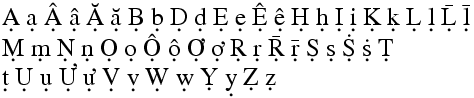
HTML characters: Ạ ạ Ậ ậ Ặ ặ Ḅ ḅ Ḍ ḍ Ẹ ẹ Ệ ệ Ḥ ḥ Ị ị Ḳ ḳ Ḷ ḷ Ḹ ḹ Ṃ ṃ Ṇ ṇ Ọ ọ Ộ ộ Ợ ợ Ṛ ṛ Ṝ ṝ Ṣ ṣ Ṩ ṩ Ṭ ṭ Ụ ụ Ự ự Ṿ ṿ Ẉ ẉ Ỵ ỵ Ẓ ẓ
\D
The \D command generates a ring-under accent. The translation of
\D A \D a is Ḁ ḁ or Ḁ ḁ.
\dag (Constant)
Same as \dagger, in text mode.
\dagger (math symbol)
The \dagger command is valid only in math mode. It generates a
binary operator: <mo>†</mo> (Unicode U+2020 †). See
description of the `\pm <doc-p.html#cmd-pm>`__ command.
\daleth (math symbol)
The \daleth command is valid only in math mode. It generates
<mi>ℸ</mi> (Unicode U+2138, ℸ)
\dasharrow (math symbol)
The \dasharrow command is valid only in math mode. It generates
<mi>⤏</mi> (Unicode U+290F, ⤏)
\dashbox
You can say \dashbox{dim}(xd,yd)[pos]{text} inside a picture. See
description of the picture environment for
the syntax of the (xd,yd) part (the size of the box), and some
examples. It is like `\framebox <doc-f.html#cmd-framebox>`__
command, in that it produces a rectangular box whose lower-left edge is
at the current position, with dimension (xd,yd), that contains text
that is justified according to [pos], which can be one of l, r, t,
b, (left, right, top, bottom) or a combination of the two. The
difference is that the frame is dashed, the length of the dashes being
{dim}.
\dashleftarrow (math symbol)
The \dashleftarrow command is valid only in math mode. It generates
<mi>⤎</mi> (Unicode U+290E, ⤎)
\dashline
The \dashline command takes as argument an optional [stretch]
parameter (an integer between -100 and infinity), if omitted the value
of a global variable will be used. It takes an argument {dashlength}
that is the length of the dash to be used, and an optional
[dashdotgap] parameter; these two parameters are used by
\dottedline to construct the dash. After that, the command takes N
(at least two) pairs of coordinates (x,y) these define line segments
for which a dashline should be drawn.
Example
\begin{picture}(70,22)(0,-2)
\dashline{3}[0.7](0,18)(63,18)
\thicklines
\dashline{3}(0,13)(63,13)
\dashline[-30]{3}(0,8)(63,8)
\dashline[+15]{3}(0,4)(63,4)
\dashline[+30]{3}(0,0)(63,0)
\end{picture}
Translation: not available. Can be used only in a picture environment.
\dashrightarrow (math symbol)
The \dashrightarrow command is valid only in math mode. It generates
<mi>⤏</mi> (Unicode U+290F, ⤏)
\dashv (math symbol)
The \dashv command is valid only in math mode. It generates a
relation symbol (reversed \vdash): <mo>⊣</mo> (Unicode
U+22A3, ⊣). See description of the `\le <doc-l.html#cmd-le>`__
command.
\date
The translation of \date{today} is <date>today</date>. In fact,
the command is defined by \def\date#1{\xmlelt{date}{#1}}
\day (Internal integer)
When you say \day=904, you put 904 in the \day counter, but
nothing special happens. This counter is initially set to the numbers of
days elapsed in the current month. So that \the\day may be
translated as 7 on the seventh of April 2004. (See
scanint for details of argument scanning).
(See `\time <doc-t.html#cmd-time>`__ for an example.)
\dbinom
The \dbinom command is valid only in math mode. It could be defined
as \def\dbinom{\genfrac(){0pt}0}. Said otherwise, it takes two
arguments, puts them one over the other, in display style, and puts
parentheses around. See `\binom <doc-b.html#cmd-binom>`__.
\@dblarg
Consider the following example
\def\auxfoo[#1]#2{Opt=#1 Req=#2}
\def\fooA{\ifnextchar[{\auxfoo}{\auxfoo[xx]}}
\newcommand\fooB[2][xx]{Opt=#1 Req=#2}
\def\fooC{\@dblarg\auxfoo}
\let\@nx\noexpand
\edef\fooD{\@nx\@dblarg\expandafter\@nx\csname\string\fooB\endcsname}
\newcommand\fooE[2][\@dblarg]{Opt=#1 Req=#2}
Here \fooA is a macro that takes an optional argument and a required
one. If the optional argument is omitted, the value xx will be used
instead. Command \fooB does the same. Command \fooC is like
\foo but the default value of the optional argument is the required
one. Another use of \@dblarg can be found in \fooD. Note how
this calls the auxiliary function associated to \fooB. This
construction does not work in Tralics because there is no auxiliary
function. On the other hand, Tralics version 2.13.1 understands the
definition of \fooE as to be the same as \fooD.
\dblfigrule
The command \dblfigrule behaves like \relax, in LaTeX it can be
redefine to produce a rule between a float and text in two columns.
\dbltopfraction, \dblfloatpagefraction
Parameters that control position of floats in double column mode. Unused
by Tralics. See `\intextsep <doc-i.html#cmd-intextsep>`__.
\dblfloatsep, \dbltextfloatsep (rubber length)
Parameters defined by Tralics but not used, see
`\intextsep <doc-i.html#cmd-intextsep>`__.
\ddag (Constant)
Same as \ddagger, in text mode. The translation of
$\dagger$ -- $\ddagger$ -- \dag{} -- \ddag is
<formula type='inline'>
<math xmlns='http://www.w3.org/1998/Math/MathML'>
<mo>†</mo>
</math>
</formula>
–
<formula type='inline'>
<math xmlns='http://www.w3.org/1998/Math/MathML'>
<mo>‡</mo>
</math>
</formula>
– † – ‡
Preview:  (see also here).
\ddagger (math symbol)
The \ddagger command is valid only in math mode. It generates a
binary operator (double dagger): <mo>&ddager;</mo> (Unicode U+2021,
‡). See description of the `\pm <doc-p.html#cmd-pm>`__ command.
dbltopnumber (counter)
Maximum number of multicolumn floats on top of a page. Not used by
Tralics. See `\intextsep <doc-i.html#cmd-intextsep>`__.
\ddddot
The \ddddot command puts a 4-dot accent over a kernel. See the
`\acute <doc-a.html#cmd-acute>`__ command.
\dddot
The \ddddot command puts a 3-dot accent over a kernel. See the
`\acute <doc-a.html#cmd-acute>`__ command.
\ddot
The \ddot command puts a double dot accent over a kernel. It works
only in math mode. Do not confuse with \" (see
\”). See also the
`\acute <doc-a.html#cmd-acute>`__ command.
\ddots (math symbol)
The \ddots command is valid only in math mode. It generates a
miscellaneous symbol (diagonal dots): <mo>⋱</mo> (Unicode
U+22F1, ⋱). See description of the `\ldots <doc-l.html#cmd-ldots>`__
command.
\deadcycles
The integer variable \deadcycles is set to zero after \shipout,
incremented just before \output. When TeX evaluates the \end
command and the values of \deadcycles is not zero, it exercises the
page builder, hoping \shipout being called; the \end token is
evaluated again (note that LateX redefines the \end token). Whenever
\deadcycles becomes more than \maxdeadcycles, an error is
signaled, and the call to the user \output routine is replaced by a
call to the default \output routine (that will call \shipout).
In Tralics, you can assign any value to \deadcycles, nothing
happens. You can consult the value, you will always see zero.
\DeclareMathOperator
You can say \DeclareMathOperator\foo{bar} or
\DeclareMathOperator*{\xfoo}{bar}. This is the same as
\newcommand*\foo{\operatorname{bar}} or
\newcommand*{\xfoo}{\operatorname*{bar}}. This command can be used
everywhere (LaTeX requires it to be placed in the preamble). See
description of the `\operatorname <doc-o.html#cmd-operatorname>`__
command.
\DeclareOption, \DeclareOptionX
Inside a class or package file, you can say
\DeclareOption{foo}{bar}. This remembers that the value of foo is
bar. Instead of `bar’, there should be a sequence of commands that
modify the environment (typesetting is forbidden, because the command is
executed in the preamble). The command could set a boolean value, set a
dimension register, load auxiliary files, etc. It can also add tokens to
the document class hook (in other words, the action may depends on
subsequently loaded packages). No error is signaled if the command is
used out of context, or if the option is already defined. If you say
\ExecuteOptions{x,y}, the code associated to options x and y is
executed. Typically, each package contains such a line, given a default
values for all the booleans, registers, etc. The package contains also
\ProcessOptions. The effect is to execute the code of the
user-declared options. The order of evaluation is (by default), the
order in which options are declared in the package. If options foo and
bar set the same boolean to different values, then the user should
specify only one of them. In some cases, the code of an option sets a
boolean, and after \ProcessOptions there is some code that uses the
boolean value (the idea being that the boolean is not modified any
more).
\DeclareOption*{bar}. This means that the package
recognises any option, and applies `bar’ to it; instead of these
three characters, you should use something more sensible, for instance
\inputencoding{\CurrentOption}. Here \CurrentOption contains
the name of the current options, and the other command is defined by
the package (of the form: input a file whose name depends on the
option). See also
`\ExecuteOptions <doc-e.html#cmd-ExecuteOptions>`__.The xkeyval package provides an extension,
of the form \DeclareOptionX{foo}{bar=#1}. Normally #1 is empty, but
is gee, if the package is loaded with foo=gee.
\declaretopic (Raweb command)
Translation of \declaretopic{A}{B} is
<topic num='A'><t_titre>B</t_titre></topic>. In old version of
Tralics you could put the following lines in the configuration file
att_topic_num = "Num"
xml_topic_name = "Topic"
xml_topic_title = "Title"
This changed the translation. In the current version, the
\declaretopic command (as well as the names of the XML elements and
attributes) is defined in the package file for the raweb.
\DeclareRobustCommand
The \DeclareRobustCommand behaves like
`\newcommand <doc-n.html#cmd-newcommand>`__. However, if the command
is already defined, nothing happens. In LaTeX, the result is a robust
command (something that is not implemented in Tralics), and redefining
the command prints a warning in the log file.
\def
When you say \def\foo{bar}, you construct a command whose expansion
is bar (three tokens, of \catcode letter). When you say
\def\xfoo#1#2{#2+#1} you construct a command \xfoo whose
expansion reads two tokens lists (say argument1 and argument2), and
produces a token list formed by argument2, a plus sign (a character of
\catcode12) and argument1. When you say
\def\zfoo#1\bar#2#{#2+#1} the \zfoo command expands as
\xfoo, but it reads its arguments differently: the first argument is
everything before the token \bar and the #{ after #2 means
that the second argument is delimited by an opening brace.
In the case of \zfoo both arguments are delimited. They are defined
as the shortest token lists (properly nested with respect to braces)
that match the specification. In the case \zfoo 1\bar2\bar3{4}, the
first argument is 1, the second argument is 2\bar3, and the tokens
{4} are interpreted later. In the case of an undelimited argument,
the value is the first non-blank token, unless this token is an opening
brace, case where the argument is the token list that starts with this
brace. In both cases, if the argument constructed in this way is a token
list that starts with an open brace, and ends with a closing brace, and
remains nested if we remove the braces, they are removed. For instance,
\xfoo12, \xfoo1 {2}, \xfoo{1} 2, \xfoo{1} {2} are all
equivalent. Note that \zfoo 1\bar2{3} and \zfoo{1}\bar {2}{3}
are not equivalent, the first argument is 1 in each case, but the second
argument is 2 (first case) or empty (second case).
In the case \def\foo#1{\def\bar##1{#1##1}}, a macro \foo is
defined, it takes one argument, and its expansion is
\def\bar#1{foo-arg#1}, where foo-arg is the argument of
\foo. In the body of \foo, the sequence ## is replaced by
#.
Instead of # you can use anything equivalent to it. For instance
\let\foo# \def\A\foo1\foo2{\foo1}. In the case of
\let\foo# \def\B{#\foo}\def\C{\foo#}, the \B macro takes no
argument, its body contains a single token, whose value is equivalent to
“macro parameter character #”. In fact, the token in \B is \foo,
and it has nothing to do with a sharp sign, it is just a command whose
current meaning is the same as that of a character of catcode 6, and, in
general, only the sharp sign matches this definition. On the other hand,
the token in \C is a sharp sign token. The previous code is
completely equivalent to \def\B{\foo}\def\C{##}\let\foo#.
\default@ds
This is the command that handles unknown class or package options. The
default value is \OptionNotUsed.
\defaulthyphenchar (Internal integer)
When you say \defaulthyphenchar=74, then TeX will use 74 for the
\hyphenchar of every new font it loads. This is not used in
Tralics. (See scanint for details of
argument scanning).
\defaultskewchar (Internal integer)
When you say \defaultskewchar=73, then TeX will use 73 for the
\skewchar of every new font it loads. This is not used in Tralics.
(See scanint for details of argument
scanning).
\define@key, \define@cmdkey, \define@cmdkeys, \define@choicekey, \define@choicekeys, \define@boolkey, \define@boolkeys
These commands are provided by the keyval package.
\DefineShortVerb
This command defines a short-hand character for verbatim code. The
command takes one argument that is one-character command, for instance
\DefineShortVerb{\+}. After that, +foo+ is the same as
\verb+foo+. For more details, see catcode
16.
\DefineVerbatimEnvironment
You can say\DefineVerbatimEnvironment{myname}{tname}{list} This is
equivalent to
\let\myname = \tname
\let\endmynane = \endtname
\def\myname@hook{list}
If the second argument is one of verbatim, Verbatim or
lst@verbatim, then this defines a verbatim environment. In the first
case, you have a simple verbartim environment, and the value of the last
argument is ignored. Moreover, all characters that are on the same line
as the \begin{myname} are ignored. In the other case, an optional
argument is read (when \begin{myname} is followed, on the same line,
by an open bracket that may be preceded by blank space). All characters
following the optional argument are lost.
In the second case, Tralics merges the value of the hook, (i.e., of
\myname@hook) and the optional argument, and interprets this as an
association list (see description of the Verbatim command). The
recognized keys are: number (in this case, all lines of the verbatim
environment are numbered), firstnumber (this allows to specify the
number associated to the first line), pre=xx (in this case, the
command \FV@pre@xx is executed before the verbatim material, and
\FV@post@xx is excluded just after); you can also say style=yy,
case where \FV@style@yy is executed just after \FV@pre@xx).
In the case where the name is lst@verbatim, then Tralics does not
parse the optional arguments (as a side effect, lines will not be
numbered); it uses lst for xx and yy.
\deg (math symbol)
The \deg command is valid only in math mode. Its translation is a
math operator of the same name: <mo form='prefix'>deg</mo>. For an
example see the `\log <doc-l.html#cmd-log>`__ command.
\delcode
When you say \delcode13 12, you change the delimiter code of the
character number 13 to the value 12. See
scanint for details of how numbers are
read. The first integer must be a valid character code (between 0 and
255, in TeX, 216-1 in Tralics), and the second must be less
than 2 power 24. See `\spacefactor <doc-s.html#cmd-spacefactor>`__.
If you say \delcode`x="123456 then x can be used as
delimiter in math mode. The small variant is defined by 123, the large
variant by 456. (here 123 means: family one, position hex23). A negative
value is allowed, and the character cannot be used as a delimiter. If
one part is zero, it is omitted. If the \delcode is zero, neither
variant will be used: this produces an empty delimiter. In TeX, most
\delcode values are -1, but \delcode.=0`. In Tralics,
the \delcode table is initialized to zero, and unused.
\delimiter
The \delimiter command reads a 27-bit integer (see
scanint for details). If you say
\def\langle{\delimiter"426830A }, then the following happens. In
case where \langle is preceded by \left or \right, the
result is as if you had enter a character whose \delcode were
"26830A (split as 268 and 30A), otherwise as if you hand entered a
character whose \mathcode were "4268, i.e. class 4, family 2,
position 68. This is unused in Tralics.
\delimiterfactor (Internal integer)
When you say \delimiterfactor=902, then TeX will use this value
(divided by 1000) as factor for computing the size of a delimiter: if we
have a formula of height plus depth 30pt, applying this factor gives
27pt, so that delimiters will be at least 27pt tall. This parameter is
set to 901 in LaTeX, it is ignored by Tralics. (See
scanint for details of argument scanning).
\delimitershortfall (rigid length)
When you say \delimitershortfall=5pt, then TeX will use delimiters
whose size are at least the size if we have a formula of height plus
depth 100pt, delimiters will be at least 95pt tall (see also
\delimiterfactor above) This parameter is set to 5pt in LaTeX, it is
ignored by Tralics. (See scandimen for
details of argument scanning).
\delsavekeys, \delpresetkeys
These commands are provided by the keyval package.
\delta (math symbol)
The \delta command is valid only in math mode. It generates a Greek
letter: <mi>δ</mi> (Unicode U+3B4, δ). See description of the
`\alpha <doc-a.html#cmd-alpha>`__ command.
\Delta (math symbol)
The \Delta command is valid only in math mode. It generates an
uppercase Greek letter: <mi>Δ</mi> (Unicode U+394, Δ). See
description of the `\alpha <doc-a.html#cmd-alpha>`__ command.
\@depth
This command expands to depth. Do not modify it.
\depthof
This command is defined by the calc package but not implemented in Tralics.
description (environment)
This is an environment in which you can puts items. See description of
the `\item <doc-i.html#cmd-item>`__ command.
\det (math symbol)
The \det command is valid only in math mode. Its translation is a
math operator of the same name:
<mo form='prefix' movablelimits='true'>det</mo>. For an example see
the `\log <doc-l.html#cmd-log>`__ command.
\detokenize
\detokenize reads a token list and detokenizes it;
said otherwise the token list is converted into a character list, of
category code 12 (except for space). This command behaves like
\the, in that the resulting token list is not expanded, even in a
\edef or \write.`\glueshrink <doc-g.html#cmd-glueshrink>`__, where we
explain how to use this command in order to compare the result of
\the and a constant character string. In the example that follows,
the command \addid takes an argument of the form
cite:foo_bar^gee and adds an attribute pair to the current
element, with value foo_bar^gee. The \detokenize command
replaces the funny math-only characters (hat and underscore) by normal
characters. The \getid command strips the prefix; you cannot say
\def\getit cite:#1\\{#1}, because the category codes are wrong;
changing category code of the letters c, i, t and e is possible, but
tricky since some of them appear in the command name (see for instance
\strip@pt). We use here \detokenize.\expandafter\def\expandafter\getid \detokenize{cite}:#1\\{#1}
\def\expandid#1{\expandafter\getid \detokenize{#1}\\}
\def\addid#1{\XMLaddatt{user-id}{\expanduserid{#1}}}
\dfrac
The \dfrac command is display style fraction. It is like \frac,
but the result has a scriptlevel='0' attribute. See the
`\frac <doc-f.html#cmd-frac>`__ command.
\dh, \DH (constant)
This translates to ð or ð for \dh and Ð or Ð for
\DH. For more info see the latin supplement
characters.
\diagdown (math symbol)
The \diagdown command is valid only in math mode. It generates
<mi>∖</mi> (Unicode U+2216, ∖).
\diagup (math symbol)
The \diagup command is valid only in math mode. It generates
<mi>&∕</mi> (Unicode U+2215, ∕).
\diamond (math symbol)
The \diamond command is valid only in math mode. It generates a
binary operator: <mo>⋄</mo> (Unicode U+22C4, ⋄). See
description of the `\pm <doc-p.html#cmd-pm>`__ command.
\Diamond (math symbol)
The \Diamond command is valid only in math mode. It generates a
miscellaneous symbol: <mo>⋄</mo> (Unicode U+22C4, ⋄). See
description of the `\ldots <doc-l.html#cmd-ldots>`__ command. In
Tralics, there is no difference between \diamond and \Diamond.
\diamondsuit (math symbol)
The \diamondsuit command is valid only in math mode. It generates a
miscellaneous symbol (diamond suit, a bit larger than the \diamond
operator): <mo>♦</mo> (Unicode U+2666, ♦). See
description of the `\ldots <doc-l.html#cmd-ldots>`__ command.
\DifferentialD (math symbol)
The \DifferentialD command is valid only in math mode. It generates
the differential d operator <mo>ⅆ</mo> (Unicode
U+2146, ⅆ).
\digamma (math symbol)
The \digamma command is valid only in math mode. It generates
<mo>ϝ</mo> (Unicode U+3DD, ϝ).
\dim (math symbol)
The \dim command is valid only in math mode. Its translation is a
math operator of the same name: <mo form='prefix'>dim</mo>. For an
example see the `\log <doc-l.html#cmd-log>`__ command.
\dimen
When you say \dimen13 12pt, you change the value of the dimension
register number 13 to the value 12pt. See
scanint for details of how integers are
read, and scandimen for dimensions. The
integer must be a valid register number (between 0 and 255 in TeX, 1023
in Tralics). The previous example can also be written as
\dimen^^M=4parindent`, in case \parindent is 3pt.
\dimen@, \dimen@i, \dimen@ii
The\dimen@, \dimen@i \dimen@ii commands are scratch
dimensions; they are aliases (defined via \dimendef) to \dimen0,
\dimen1 and \dimen2. In order to save stack space, assignment to
odd registers should be global, assignments to even registers should be
local.
\dimendef
When you say \dimendef\foo=13, you make \foo an alias for
\dimen13. See scanint for details of
how the number 13 is read; it has to be a valid register number (between
0 and 255, 1023 in Tralics). The command
`\newdimen <doc-n.html#cmd-newdimen>`__ uses \dimendef for
defining the command associated to the dimension.
You can put the prefix \global before \dimendef.
\ding
The \ding command is explained in the page concerning Dingbats
characters.
\discretionary
If you say \discretionary{f-}{fi}{ffi}, then TeX will translate this
as `ffi’, except when it has to hyphenate the word. In the case, the
first line will contains `f-’ on the right and the second line will
contain `fi’ on the left. Since Tralics does no hyphenation, the
translation is always `ffi’. Thus the \discretionary command is
ignored, as well as its first two arguments. On the other hand, in a
case like \discretionary{}{}{\huge foo}, the font change is local.
displaymath (environment)
The content of a displaymath environment is translated in display
math mode. The result is a <formula> element. It behaves much like
the equation environment except that the equation counter is
unchanged. See also the `split <doc-s.html#env-split>`__
environment. See also the `equation <doc-e.html#env-equation>`__
environment.
\displayindent
Whenever TeX is about to typeset a display formula, it puts in
\displayindent the desired indentation (depending on \parshape
or hanging indentation). You may say \displayindent=5pt, or
whatever. When the display is finished, the value is read. (See
`\predisplaysize <doc-p.html#cmd-predisplaysize>`__ for further
details). This parameter is ignored by Tralics. (See
scandimen for details of argument
scanning).
\displaylimits
The \displaylimits command is valid only in math mode. It describes
how indices should be positioned. See
`\nolimits <doc-n.html#cmd-nolimits>`__ for details.
\displaystyle
The \displaystyle command is valid only in math mode. It changes the
current style to display. The result is something like
<mstyle displaystyle="true" scriptlevel="0">...</mstyle> and one
problem is to find the argument of the MathML element. In fact,
Tralics understands the declaration only at the beginning of a group,
as in the example that follows.
In Version 2.0, the style can appear anywhere, but an attribute is added the current block, so that, as the example shows, the letter x uses the same style as what follows.
${\frac12}{x\displaystyle\frac 12}
{x\textstyle\frac 12}{x\scriptstyle\frac 12}{x\scriptscriptstyle\frac 12} \qquad
{x\displaystyle a}+{x\textstyle a}+{x\scriptstyle a}+{x\scriptscriptstyle a}\qquad
\frac{x\displaystyle a}{x\textstyle b}+\frac{x\scriptstyle a}{x\scriptscriptstyle b}$
Translation
<formula type='inline'>
 <math xmlns='http://www.w3.org/1998/Math/MathML'>
  <mrow>
   <!-- no style -->
   <mfrac><mn>1</mn> <mn>2</mn></mfrac>
   <!-- {x\displaystyle \frac 12} -->
   <mstyle scriptlevel='0' displaystyle='true'>
    <mrow><mi>x</mi><mfrac><mn>1</mn> <mn>2</mn></mfrac></mrow></mstyle>
   <!-- {x\textstyle \frac 12} -->
   <mstyle scriptlevel='0' displaystyle='false'>
     <mrow><mi>x</mi><mfrac><mn>1</mn> <mn>2</mn></mfrac></mrow></mstyle>
   <!-- {x\scriptstyle \frac 12} -->
   <mstyle scriptlevel='1' displaystyle='false'>
    <mrow><mi>x</mi><mfrac><mn>1</mn> <mn>2</mn></mfrac></mrow></mstyle>
   <!-- {x\scriptscriptstyle \frac 12} -->
   <mstyle scriptlevel='2' displaystyle='false'>
    <mrow><mi>x</mi><mfrac><mn>1</mn> <mn>2</mn></mfrac></mrow></mstyle>
   <mspace width='2.em'/>
   <!-- {x\displaystyle a} -->
   <mstyle scriptlevel='0' displaystyle='true'>
    <mrow><mi>x</mi><mi>a</mi></mrow></mstyle>
   <mo>+</mo>
   <!-- {x\textstyle a} -->
   <mstyle scriptlevel='0' displaystyle='false'>
    <mrow><mi>x</mi><mi>a</mi></mrow></mstyle>
   <mo>+</mo>
   <!-- {x\scriptstyle a} -->
   <mstyle scriptlevel='1' displaystyle='false'>
    <mrow><mi>x</mi><mi>a</mi></mrow></mstyle>
   <mo>+</mo>
   <!-- {x\scriptscriptstyle a} -->
   <mstyle scriptlevel='2' displaystyle='false'>
    <mrow><mi>x</mi><mi>a</mi></mrow></mstyle>
   <mspace width='2.em'/>
   <!-- \frac{x\displaystyle a}{x\textstyle b} -->
   <mfrac>
    <mstyle scriptlevel='0' displaystyle='true'>
     <mrow><mi>x</mi><mi>a</mi></mrow></mstyle>
    <mstyle scriptlevel='0' displaystyle='false'>
     <mrow><mi>x</mi><mi>b</mi></mrow></mstyle>
   </mfrac>
   <mo>+</mo>
   <!-- \frac{x\scriptstyle a}{x\scriptscriptstyle b} -->
   <mfrac>
    <mstyle scriptlevel='1' displaystyle='false'>
      <mrow><mi>x</mi><mi>a</mi></mrow></mstyle>
    <mstyle scriptlevel='2' displaystyle='false'>
      <mrow><mi>x</mi><mi>b</mi></mrow></mstyle>
   </mfrac>
  </mrow>
 </math>
</formula>
 (see also here).
\displaywidth (rigid length)
Whenever TeX is about to typeset a display formula, it puts in
\displaywidth the current line width. You may say
\displayindent=5pt, or whatever. When the display is finished, the
value is read. (See
`\predisplaysize <doc-p.html#cmd-predisplaysize>`__ for further
details). This parameter is ignored by Tralics. (See
scandimen for details of argument
scanning).
\displaywidowpenalties (internal integer)
This is an extension defined by ε-TeX. See
`\widowpenalties <doc-w.html#cmd-widowpenalties>`__ for syntax and
usage.
\displaywidowpenalty (internal integer)
When you say \displaywidowpenalty=99, then TeX will use 99 as
penalty for a line that starts a page and is followed by a display
equation, when it computes optimal page breaks. Unused by Tralics.
(See scanint for details of argument
scanning).
\div (math symbol)
The \div command is valid only in math mode. It generates a binary
operator (division symbol, horizontal rule with two dots):
<mo>÷</mo> (Unicode U+F7, ÷). See description of the
`\pm <doc-p.html#cmd-pm>`__ command. Outside math mode, you should
say ÷ or \textdiv.
\divide
If you say \global\divide\count0 by 2, the value of \count0 is
globally divided by 2. The keyword by is optional. Instead of
\count0 you can put any variable that remembers an integer, a
dimension, a glue, or a muglue (in reality, the same quantity that can
be put after \advance); after the optional by a number is
required (and an number is an integer in this context). You should not
divide by zero.
\divideontimes (math symbol)
The \divideontimes command is valid only in math mode. It generates
<mo>⋇</mo> (Unicode U+22C7, ⋇).
\dj, \DJ(constant)
This is the Unicode character U+111, đ for \dj and U+110, Đ for
\DJ. For more info see the extended latin
characters.
\do, \dospecials, \@sanitize
The \do command is used by \dospecials whose definition is given
below, and maybe other commands for loops. It is set to \noexpand by
\begin{document}. It is used as delimiter by
`\@whilenum <doc-w.html#cmd-whilenum>`__,
`\@whiledim <doc-w.html#cmd-whiledim>`__, \@for and \@tfor.
In a certain number of cases, \do is the same as \@makeother and
the effect of \dospecials is to change the category codes of most
special characters to non-special (before using this command, please
check that it can be reverted; a typical use is inside a verbatim
environment, and a special code is used to test the end of the
environment). The \@sanitize command make all these characters
non-special, it is used for instance by the \index command (in
LaTeX, if you say \index{\foo}, the \foo command is not
evaluated, but written on the file; it will be evaluated later when
LaTeX reads the sorted index; in Tralics nothing is written on a
file). As you can notice, braces are in one list, but not the other,
this has as effect that when \index reads its argument the braces
are still argument delimiters!
\def\dospecials{\do\ \`do\\\do\{\do\}\do\$\do\&\do\#\do\^\do\_\do\%\do\~}
\def\@sanitize{\@makeother\ \@makeother\\\@makeother\$\@makeother\&%
   \@makeother\#\@makeother\^\@makeother\_\@makeother\%\@makeother\~}
document (environment)
The document environment is special. It can be used only once (since
the end of the environment indicates the end of the job). It should only
be used at level zero (outside any group), because definitions inside
the document environment are considered to be outside a group (there
is no need to save old definitions, because restoring them at the end of
the job is useless).
After that, the command \AtBeginDocument is made equivalent to
\@firstofone, and scheduled to be equivalent to \@notprerr
(which provokes an error), and the tokens saved by \AtBeginDocument
are inserted (redefinition of \AtBeginDocument takes place after
these tokens have been evaluated). An example is given in the
description of
`\AtBeginDocument <doc-a.html#cmd-atbegindocument>`__.
When \end{document} is sensed, all files are closed, including the
current file. A special \end{document} command is inserted; all
tokens inserted by \AtEndDocument are inserted, and this command is
made equivalent to \@firstofone.
The purpose of the special \end{document} is to keep everything in
sync. It is not really needed (nothing catastrophic happens if you
forget the \end{document} declaration; you might see a line of the
form: Save stack +14 -11 indicating that some closing braces or
\end commands are missing.)
\documentclass
The \documentclass command can be used only once before the
\begin{document}. It takes one argument, say cls preceded by an
optional argument (say opts), followed by an optional argument
(ignored). The parameter cls defines the class used by Tralics,
(except that DTD is defined by the first \documentclass seen in the
file, and it can be hidden in a comment).
In the case where the optional argument opts contains useallsizes
then Tralics uses a lot of font sizes in the output, otherwise, it
uses only three of them, see `\rm <doc-r.html#cmd-rm>`__. If it
contains french, then French will be the default language. If it
contains english, then English will be the default language. Note
that the default language is English (except for the RA2002). If it
contains leadingpart or leadingchapter then the toplevel section
is assumed to be \part or \chapter.
In the case where the required argument cls contains book, then
\part is assumed to be the leading section, and if its contains
report, then \chapter is assumed to be the leading section. In
all other cases, \section is the leading section.
\dot
The \dot command puts a dot accent over a kernel. It works only in
math mode. Do not confuse with \. (see
\.). See also the
`\acute <doc-a.html#cmd-acute>`__ command.
\doteq (math symbol)
The \doteq command is valid only in math mode. It generates a
relation symbol (equals sign with a dot above): <mo>≐</mo>
(Unicode U+2250, ≐). See description of the
`\le <doc-l.html#cmd-le>`__ command.
\Doteq (math symbol)
The \Doteq command is valid only in math mode. It generates
<mo>≑</mo> (Unicode U+2251, ≑).
\doteqdot (math symbol)
The \doteqdot command is valid only in math mode. It generates
<mo>≑</mo> (Unicode U+2251, ≑).
\dotfill
Translation of \dotfill is <dotfill>.
\dotplus (math symbol)
The \dotplus command is valid only in math mode. It generates
<mo>∔</mo> (Unicode U+2214, ∔).
\dots, \dotsc, \dotsb, \dotsi, \dotsm
The \dots command is valid in math mode and text mode. It generates
three dots or <mo>⋯</mo>. (Unicode U+22EF, ⋯) See description
of the `\qquad <doc-q.html#cmd-qquad>`__ command. The four commands
\dotsc, \dotsb \dotsi and \dotsm are defined by
ams-math. In Tralics, they are all equal to \cdots. The
translation is the same as that of \dots.
\dottedline
The \dottedline takes a dot specification [dotchar]{dotgap} and
a list of N (at least two) points (x,y). A dotted line is drawn
between each pair of coordinates, using an inter-dot gap as specified,
and a little square, unless the optional parameter is given, case where
it indicates the character to use. Example:
\begin{picture}(150,15)(0,0)
\thicklines
\dottedline{2}(0,10)(70,10)
\dottedline[$\bullet$]{3}(0,5)(70,5)
\dottedline[$\diamond$]{4}(0,0)(70,0)
\end{picture}
Translation is not available. There is a bug somewhere; moreover, math formulas are not allowed by Tralics in this context. Can be used only in a picture environment.
\doublecap (math symbol)
The \doublecap command is valid only in math mode. It it is an alias
for \Cap, translates to <mo>⋒</mo>. (Unicode U+22D2, ⋒).
\doublecup (math symbol)
The \doublecup command is valid only in math mode. It it is an alias
for \Cup, translates to <mo>⋓</mo>. (Unicode U+22D3, ⋓).
\doublehyphendemerits (internal integer)
When you say \doublehyphendemerits=92, then TeX will use 92 as
additional demerits for a line that ends with a discretionary break and
is preceded by an another line with a discretionary break. Unused by
Tralics. (See scanint for details of
argument scanning).
\doublerulesep (rigid length)
Distance between two vertical rules in a table; unused by Tralics.
\downarrow (math symbol)
The \downarrow command is valid only in math mode. It generates an
arrow that goes down: <mo>↓</mo> (Unicode U+2193, ↓) See
description of the `\leftarrow <doc-l.html#cmd-leftarrow>`__
command.
\Downarrow (math symbol)
The \Downarrow command is valid only in math mode. It generates a
double stroke arrow that goes down: <mo>⇓</mo> (Unicode
U+21D3, ⇓). See description of the
`\leftarrow <doc-l.html#cmd-leftarrow>`__ command.
\downdownarrows (math symbol)
The \downdownarrows command is valid only in math mode. It generates
<mo>⇊</mo> (Unicode U+21CA, ⇊)
\downharpoonleft (math symbol)
The \downharpoonleft command is valid only in math mode. It
generates <mo>⇃</mo> (Unicode U+21C3, ⇃)
\downharpoonright (math symbol)
The \downharpoonright command is valid only in math mode. It
generates <mo>⇂</mo> (Unicode U+21C2, ⇂)
\dp
A command like \dp0=2\dp1 says to replace the depth of the box
number zero by twice the depth of box number one. See
scanint for how integers are read (here the
integer is zero, it should be a number between 0 and 255). See
scandimen for how dimensions are read
(here 2\dp1 is the dimension).
Tralics does not use nor remember box dimensions. In the example above
2\dp1 evaluates to 0pt, and modifying \dp0 does not modify the
box.
\drawline
The \drawline takes an optional argument [stretch] and N (at
least two) coordinates of the form (dx,dy). It connects the given
points by drawing a line between each pair of coordinates using line
segments of whatever is best in the fount.
No example available. No translation available. Can be used only in a picture environment.
\dump
The \dump command outputs a format file that can be loaded at
comparatively high speed to restore the current status. Not yet
implemented in Tralics.