Tralics and the Raweb
Warning
The contents of this page describe the use of Tralics to generate the activity report of INRIA. As far as I am aware, it is not used for that anymore, and the specific functionality involved should be considered to be deprecated; it is likely to disappear in a future version of the program. The page will remain here for historical reasons.
Introduction
1.1 A short history
This file explains the link between Tralics and the Raweb.
A short history of the Raweb may be found on the Inria internal web site Inria internal website. The question concerns Inria’s Annual Activity Report, also known as “Rapport d’activité”, or “Annexe technique” to the RA or “annexes scientifiques” to the RA. This is a document, written by the research teams, at the end of the year N (October, November), and published in March of year N+1.
Until the 1993 edition (published in 1994), only a paper version existed. A LaTeX model was used since 1987, designed by Jacques André then Martin Jourdan. See the following paper, Une expérience d’utilisation de LaTeX : le Rapport d’activité de l’INRIA by Louarn in the first Cahiers Gutenberg.
In 1993, contacts were made with the Grif S.A. society, for the design of a SGML DTD and a LaTeX-to-SGML converter. As a result, Philippe Louarn was able to put on the web the RA (year 1994) in its HTML version. But this was judged too complicated, and for several years, the HTML was directly produced from the LaTeX source, using latex2html (example: miaou95).
In 1996, a working group (conducted by Albert Benveniste) gave new specifications: independent modules, grouped into ten sections, etc. A technical group was created, whose objective was to find a company that could sell a software (maybe using XML as intermediate language). None was found, but the design of modules (in LaTeX syntax) was well-defined by Laurent Pierron and José Grimm. For the Ra98, a Perl script did some preprocessing, splitting the LaTeX source into modules (one module per HTML page) (example: miaou98).
In 1999, the Scientific Annexes to Inria’s Annual Report were renamed RAWEB, to emphasize the role played by the Web (it is available as a CD-Rom, but no more printed by Inria).
In 2001, the Perl scripts mentioned above evolved into a LaTeX-to-XML converter (some ideas were borrowed from latex2html, which is also a Perl script). The main trouble was conversion from XML to Pdf, and we used tools from the TeX community (by S. Rahtz and D. Carlisle) and PdfLaTeX. On the other hand, the images in the HTML files were converted by LaTeX. Additional software (indexes, etc.) was written/used by Marie-Pierre Durollet.
This gave a complicated object: a Perl script, that converts a LaTeX file into XML (using Omega as a subprocess for the math) followed by another Perl script that extracts the math, calls latex, then dvips, then pstoimg (a Perl script that calls ppmquant, pncrop, and so forth, whose job is to produce a png image for the math formula), and finally an XSLT processor for the effective conversion. (example: miaou2001).
1.2 Birth of Tralics
The big Perl script was rewritten as a C++ translator, renamed Tralics, and got (for version 1.6) a first IDDN number in Dec. 2002. This software was still able to produce a LaTeX preview of the Raweb: The source is read, the syntax is tested, a LaTeX file is written for each module, latex and bibtex are called, the resulting dvi is converted to PostScript. But the same Tralics can be used in a different way: the source is read, the syntax is tested, an XML file is created, an XSLT processor is called to generate the XSL/FO, and PdfLaTeX generates the Pdf (you can also generate an HTML version). (example: miaou2003).
Note that in 2003, there were a few people writing their RA directly in XML. As a consequence, the new Tralics, to be be used in 2004, does only the bare minimum: it converts the LaTeX into XML. There is a Perl script that does everything else (calling external programs like latex, xsltproc, etc). A non-obvious point concerns conversion of math and images into HTML. Currently, a Perl script extracts the math, uses LaTex to produce a dvi file, which in converted to PostScript then png format.
Since 2005, the XML version of the Raweb is available on the web; its DTD is different from what Tralics produces; the research report inria-0000077 describes both DTDs and the XSL style sheet that does the conversion.
Since 2008, a raweb file is like another file. The pre-processor (with
all its fatal errors) has been removed, as well as the postprocessor.
All commands, specific to the raweb like \project are now defined in
a style file (to be used via a class file), they may use some primitives
that extract data from a configuration file.
2. Overview of the system
2.1 Requirements of the Raweb
We give here an example of a real file. It is an abridged version of the Report of the MIAOU project. The input to Tralics is: one TeX file (that can input other TeX files), one, two or three bibliography files, and some image files. These three bibliography files can be merged into a single one; and the filecontents environment might be used to insert the bibliography in the TeX source.
In the example, we have three bibliography files: miaou2003.bib, miaou_foot2003.bib, and miaou_refer2003.bib and one image (The image is extracted from a power-point presentation, converted to PostScript, then Pdf; the image shown here is the png version of the PostScript file obtained via convert; you can see this on the web, and notice a loss of quality.) The image explains how Tralics is connected to the other processes.


When translating a file, Tralics can be in Raweb mode or not. Differences between Raweb and non-raweb modes are tiny: they concern essentially the bibliography (there are some tests that check if an item is in the correct bibliography file). In Raweb mode, the input file should be foo2004.tex, where foo matches the name of team, and the document class should be ra2004 (replace 2004 by the current year). Non-ascii characters, as well as uppercase letters are forbidden.
2.2 Trivial examples
Example 1. An important point is that Tralics compiles only TeX files, i.e. whose names end with .tex. If no extension is given, one is added. The .xml extension is replaced by .tex.
grimm@medee$ tralics my_file.xml
This is tralics 2.13.0, a LaTeX to XML translator, running on medee
Copyright INRIA/MIAOU/APICS 2002-2008, Jos\'e Grimm
Licensed under the CeCILL Free Software Licensing Agreement
Fatal error: Cannot open input file my_file.tex
Example 2. Earlier versions of Tralics refused to translate files that are not in the current directory.
grimm@medee$ tralics /floppy/foo etc
This is tralics 2.8, a LaTeX to XML translator
Copyright INRIA/MIAOU/APICS 2002-2006, Jos\'e Grimm
Licensed under the CeCILL Free Software Licensing Agreement
Fatal error
Absolute or relative pathnames not allowed: /floppy/foo
Example 2bis. Since version 2.10.7 Tralics accepts to translate files that are not in the current directory. By default, the XML result and transcript files are put in the same directory as the input, but this can be changed.
maclaurin@grimm$  tralics ../Test/hello -outputdir=/tmp -logfile=x -silent
This is tralics 2.15.4, a LaTeX to XML translator, running on maclaurin
Copyright INRIA/MIAOU/APICS/MARELLE 2002-2015, Jos\'e Grimm
Licensed under the CeCILL Free Software Licensing Agreement
Starting translation of file ../Test/hello.tex.
Output written on /tmp/hello.xml (187 bytes).
No error found.
(For more information, see transcript file /tmp/x.log)
Example 3. In the examples 3 to 6, we use the -silent switch to reduce verbosity, and we translate a trivial TeX file. Here we demontrate the -dir switch. This option has currrently no effect anymore.
maclaurin@grimm$ tralics hello -dir none -silent
This is tralics 2.15.4, a LaTeX to XML translator, running on maclaurin
Copyright INRIA/MIAOU/APICS/MARELLE 2002-2015, Jos\'e Grimm
Licensed under the CeCILL Free Software Licensing Agreement
Starting translation of file hello.tex.
Output written on hello.xml (187 bytes).
No error found.
(For more information, see transcript file hello.log)
Example 4. Here we say that we do not want a configuration file.
grimm@medee$ tralics -noconfig hello -silent
This is tralics 2.8, a LaTeX to XML translator
Copyright INRIA/MIAOU/APICS 2002-2006, Jos\'e Grimm
Licensed under the CeCILL Free Software Licensing Agreement
Starting xml processing for hello.
No configuration file.
Output written on hello.xml (171 bytes).
No error found.
(For more information, see transcript file hello.log)
Example 5. In version 2.8, you could set the shell variable
TRALICSDIR to a directory containing the configuration file. This
has no effect any more, and the translation is the same as in example 3.
grimm@medee$ TRALICSDIR=.. tralics hello -silent
This is tralics 2.13.0, a LaTeX to XML translator, running on medee
...
(For more information, see transcript file hello.log)
Example 6. Here the configuration file is found via default rules. Translation is the same as in example 3.
grimm@medee$ tralics hello -silent
...
(For more information, see transcript file hello.log)
In all these examples, the TeX file contains a single line
Hello, world!. The translation is
<?xml version='1.0' encoding='iso-8859-1'?>
<!DOCTYPE unknown SYSTEM 'unknown.dtd'>
<!-- translated from latex by tralics 2.8-->
<unknown>
<p>Hello, world!
</p></unknown>
There are some differences between version 2.8 and the current version. For instance the compilation date has been added in the XML, thus making it a bit larger (192 bytes instead of 171). The default encoding is now UTF-8, this makes the file smaller; finally, the length of the version number impacts the length of the XML result. The sentence “starting xml processing for hello” has been replaced by “Starting translation of file hello.tex”. If the -silent option is given, information about configuration file is not printed on the terminal.
Raweb mode is entered if the type is ra. The type can be
specified in the configuration file (the .tralics_rc file; we assume
that either no configurationn file, or the standard configuration one
will be used). If you call Tralics with option type=foo, then the
type will be foo. Otherwise, if you call Tralics with option
config=bar2005, and if bar2005.tcf exists, the type will be bar.
Otherwise, if the file has \documentclass{gee2003}, and gee2003.tcf
or gee.tcf exists, then the type will be gee; otherwise some
default type will be used. The tcf file will be loaded, if given or
deduced.
Let’s assume that we have a file containing two lines, the first one is
\documentclass{ra2003}, the second one is Hello, world! as
above. Assume that the file has three names xhello.tex, hello2003.tex
and hello2006.tex. All these files will be translated in Raweb mode. No
XML file will be produced unless the four digits that appear in the
document class are also in the file name, this is the case only for
hello2003.
Example 7. We translate here file xhello.tex. Since the file name has no digits in it, you will get an error of the form Input file name must be team name followed by 2008. With version 2.8, the -verbose switch produces a great number of lines, explaining what happens (current version is less verbose).
grimm@medee$ tralics xhello -verbose
This is tralics 2.8, a LaTeX to XML translator
Copyright INRIA/MIAOU/APICS 2002-2006, Jos\'e Grimm
Licensed under the CeCILL Free Software Licensing Agreement
Starting xml processing for xhello.
Configuration file identification: standard $ Revision: 2.24 $
Read configuration file /user/grimm/home/cvs/tralics/.tralics_rc.
Configuration file has type \documentclass
Seen \documentclass ra2003
Potential type is ra2003
...
Configuration file identification: standard-ra $ Revision: 2.1 $
Read tcf file for type: ../confdir/ra.tcf
Using type ra
...
dtd is raweb from raweb3.dtd (mode RAWEB2006)
Fatal error: Please add 2006 in the name of the input file
Fatal_error for xhello
Say tralics --help to get some help
Example 8. You can use the option -year=2008; this sets a variable to be 2008; in Raweb mode, this can produce an error of the form Option -year=2008 incompatible with year in source file, is ignored otherwise. Even without this switch, the file will not compile, because of a mismatch between the year of the file, and that of the document class.
grimm@medee$ tralics hello2006
This is tralics 2.13.0, a LaTeX to XML translator, running on medee
Copyright INRIA/MIAOU/APICS 2002-2008, Jos\'e Grimm
Licensed under the CeCILL Free Software Licensing Agreement
Starting translation of file hello2006.tex.
Configuration file identification: standard $ Revision: 2.24 $
Read configuration file ../confdir/.tralics_rc.
Configuration file identification: standard-ra $ Revision: 2.4 $
Read tcf file ../confdir/ra.tcf
Illegal document class ra2003 should be ra2006
Example 9. Final test: we translate the file hello2003. Tralics version 2.8 uses a preprocessor that complains in case of unbalanced environments.
[2]grimm@medee$ tralics hello2003
This is tralics 2.8, a LaTeX to XML translator
Copyright INRIA/MIAOU/APICS 2002-2006, Jos\'e Grimm
Licensed under the CeCILL Free Software Licensing Agreement
Starting xml processing for hello2003.
Configuration file identification: standard $ Revision: 2.24 $
Read configuration file /user/grimm/home/cvs/tralics/.tralics_rc.
Configuration file identification: standard-ra $ Revision: 2.1 $
Read tcf file for type: ../confdir/ra.tcf
Error signaled at line 3:
Missing \end{document}.
Fatal_error for hello2003
Example 10. In version 2.10.7, the preprocessor is not called if the year is 2007 or greater (this is indicated by the line Simplified RA). Thus, we can copy hello2003 into hello2007, replacing 2003 by 2007 is the document class. Compilation succeeds.
grimm@macarthur$ tralics hello2007 -silent
This is tralics 2.10.7, a LaTeX to XML translator, running on macarthur
Copyright INRIA/MIAOU/APICS 2002-2007, Jos\'e Grimm
Licensed under the CeCILL Free Software Licensing Agreement
Starting translation of file hello2007.tex.
Read tcf file ../confdir/ra2007.tcf
Simplified RA
Translation done
Output written on hello.xml (249 bytes).
No error found.
(For more information, see transcript file hello2007.log)
rahandler.pl v2.15, (C) 2004 2006 INRIA, Jos\'e Grimm, Team Apics
Postprocessor did nothing
Example 11. In version 2.13, both the preprocessor and postprocessors are removed. Note the following differences between examples 10 and 11. The line Simplified RA has been removed, as well as the two lines dealing with the postprocessor. There is a file ra2007.tcf but no file ra2003.tcf (because ra.tcf can be used instead). Finally, the class file ra2007.clt was added to the system after example 10 was run.
grimm@medee$ tralics hello2003
This is tralics 2.13.0, a LaTeX to XML translator, running on medee
Copyright INRIA/MIAOU/APICS 2002-2008, Jos\'e Grimm
Licensed under the CeCILL Free Software Licensing Agreement
Starting translation of file hello2003.tex.
Read tcf file ../confdir/ra.tcf
Document class: ra2003 2008/07/12 v1.0 Activity Report, Inria 2003
Output written on hello.xml (249 bytes).
No error found.
(For more information, see transcript file hello2003.log)
In Raweb mode, the magic line \AtBeginDocument{\rawebstartdocument}
is executed. The effect of this command is to translate the metadata
(name of the team, etc); it is defined by the class file. Our little
file compiles because there is no \begin{document}. Translation is
<?xml version='1.0' encoding='iso-8859-1'?>
<!DOCTYPE raweb SYSTEM 'raweb7.dtd'>
<!-- Translated from latex by tralics 2.10.7, date: 2007/11/03-->
<raweb language='english' creator='Tralics version 2.10.7' year='2007'>
<p>Hello, world!</p>
</raweb>
Tralics version 2.15.4 however complains with No module in section
composition and four other errors; this is because the configuration
file imposes these sections to be non-empty (they are marked “special”
in the configuration file). On the other hand, there is no problem with
hello2007. Note: the year field in raweb element is the same as the
document class, and not the compilation date.
2.3 Main document
We make here the following assumption: the document is named foo2003.tex, the document class is ra2003 (same year), and a configuration file specifying type RA is seen. In this case, RA mode is entered. Before 2007, there was a preprocessor, that did some checks, rearranged the code, etc. In what follows, we explain what happens with the example of 2003 and what is new in 2007 or 2008.
A first difference in 2007 is that you will not see fatal error, missing \project anymore (a normal error will be signaled instead when translating the start of the document). A well-formed configuration file is required. If you get a message like the following, please contact the raweb team.
Read tcf file ra2007.tcf
The configuration file for the RA is ra2007.tcf or ra.tcf
It must define a value for the parameter ur_vals
See transcript file apics2007.log for details
No xml file generated
Fatal_error for apics2007
2.3.1 The Configuration File
The configuration file for the raweb is named ra.tcf (generic code) or
ra2008.tcf (this one is specific to the year 2008). Its content is
similar to what is described here. The
generic ra.tcf configuration file has a block of commands, the specific
files have none (all commands specific to the raweb are now in the
ra.plt file, included by the \documentclass command). The file
starts with
DocType = raweb raweb7.dtd
DocAttrib = year \specialyear
DocAttrib = creator \tralics
This has as effect to define the preamble of the XML result file (see translation of example 10 above). There are lines of the following form:
bibtex_fields = "x-editorial-board"
bibtex_fields = "+x-international-audience"
bibtex_fields = "+x-proceedings"
bibtex_fields = "+x-invited-conference"
bibtex_fields = "+x-scientific-popularization"
bibtex_fields = "+x-pays"
bibtex_fields = "+url-hal"
bibtex_extensions = "patent standard"
bibtex_extensions = "+hdrthesis"
The left hand side may be bibtex_extensions or bibtex_fields, the right hand side is a space-separated list of items (you can insert line breaks as in the case of fullsection_vals below). The list may start with a plus sign; this means append to the previous value (default is overwrite it). The meaning of these lines is the following: when Tralics interprets the bibliography, it recognizes (for every entry type) the fields x-editorial-board, x-international-audience, etc, including url-hal; it also recognizes the entry types patent, standard and hdrthesis. An element in the list may be preceded by a minus sign; in which case, it will be ignored (ignoring entry types may provoke undefined references). Assume for instance that the bibliography contains
@phdthesis{TEILR09,
title = {TEI},
author = {Laurent Romary},
school = {Humboldt-Universitat zu Berlin},
url =  "http://www.hu-berlin.de/",
year = 2015,
x-editorial-board = "yes",
x-international-audience = "yes",
x-proceedings = "no",
x-invited-conference = "yes",
x-scientific-popularization = "yes",
x-pays = {xx,yy}  ,
x-other = "ignored" ,
url-hal ="http://hal.inria.fr/",
}
@patent{Algo09,
author = {Gaëtan Bisson and Răzvan Bărbulescu},
Title = {Algorithmes unicode pour les lettres Ààéçœ et Ñ},
year = 2015,
x-pays= {CH,HK}
}
Assume moreover that the school field has to be omitted. The translation is now
<citation from='year' key='7' id='bid15' userid='cite:TEILR09' type='phdthesis'>
<bauteurs><bpers prenom='L.' nom='Romary' prenomcomplet='Laurent'/></bauteurs>
<btitle>TEI</btitle>
<btype>Ph. D. Thesis</btype>
<xref url='http://www.hu-berlin.de/'>http://<allowbreak/>www.<allowbreak/>hu-berlin.
  <allowbreak/>de/</xref><x-editorial-board>yes</x-editorial-board>
<x-international-audience>yes</x-international-audience>
<x-proceedings>no</x-proceedings>
<x-invited-conference>yes</x-invited-conference>
<x-scientific-popularization>yes</x-scientific-popularization>
<x-pays>xx,yy</x-pays>
<url-hal>http://hal.inria.fr/</url-hal>
</citation>
<citation from='year' key='15' id='bid2' userid='cite:Algo09' type='patent'>
<bauteurs><bpers prenom='G.' nom='Bisson' prenomcomplet='Gaëtan'/>
  <bpers prenom='R.' nom='Bărbulescu' prenomcomplet='Răzvan'/></bauteurs>
<btitle>Algorithmes unicode pour les lettres Ààéçœ et Ñ</btitle>
<x-pays>CH,HK</x-pays>
</citation>
Finally, the ra2008.tcf file contains also the following lines that defines five lists.
section_vals = "composition*/presentation*/fondements/domaine/logiciels/"
section_vals = "+resultats/contrats*/international*/diffusion*/"
theme_vals = "Com Cog Num Sym Bio"
ur_vals = "Rocquencourt//Sophia/Sophia Antipolis/Rennes//Lorraine//";
ur_vals = "+RhoneAlpes/Rh\^one-Alpes/Futurs//"
affiliation_vals ="Inria//Cnrs//University//ForeignUniversity//"
affiliation_vals ="+Public//Other//"
profession_vals = "Scientist//Assistant//Technical//PHD//"
profession_vals = "+PostDoc//StudentIntern//Other//"
The quantity theme_vals is a list of words, separated by spaces, converted to lower case. The quantity section_vals is a list of words, separated by slash characters (with possibly a star at the end; these are called “special”). For all other variables of the form something_vals, it is a list of pairs, name and value, separated by slashes. If the value is empty, the name is used instead. An initial plus sign means continuation. The final slash can be omitted; an initial slash is ignored.
Since 2007, the English title associated to a (French) section name has been moved to the configuration file; it is given by fullsection_vals (that should be used instead of section_vals; with this syntax, there are no “special” sections anymore). As the following demonstrates, you can put a string on more than one line, provided that the last character on the line is a backslash.
fullsection_vals = "/composition/Team/presentation/Overall Objectives/\
   fondements/Scientific Foundations/domaine/Application Domains/\
   logiciels/Software/resultats/New Results/\
   contrats/Contracts and Grants with Industry/\
   international/Other Grants and Activities/diffusion/Dissemination"
xml_rasection = "section"
The translation of a section, for instance composition, is
<composition>. If the configuration file defines xml_rasection, this
will be the name of the element; the value extracted from
fullsection_vals becomes an attribute; example
<section titre='Team'>. Note that the start and end of a section is
determined by the modules it contains.
The transcript file contains some lines, showing how Tralics interprets the configuration file. You might see the following lines.
theme_vals=Com Cog Num Sym Bio
Section: composition -> Team
Section: presentation -> Overall Objectives
Section: fondements -> Scientific Foundations
Section: domaine -> Application Domains
Section: logiciels -> Software
Section: resultats -> New Results
Section: contrats -> Contracts and Grants with Industry
Section: international -> Other Grants and Activities
Section: diffusion -> Dissemination
UR: Rocquencourt -> Rocquencourt
UR: Sophia -> Sophia Antipolis
UR: Rennes -> Rennes
UR: Lorraine -> Lorraine
+UR: RhoneAlpes -> Rh\^one-Alpes
UR: Futurs -> Futurs
2.3.2 Interpreting the Configuration File
Tralics has a command
`\tralics@get@config{X}{Y} <doc-t.html#cmd-tralicsfindconfig>`__
that returns a value Z, according to the following rules.
It is an error if X is
foo, and if the configuration file does not specifies foo_vals, or if Y is not in the list.The value associated to Y in the list is returned.
If X is
theme, then Y is converted to lower case; this will be Z.If you say
`\tralics@interpret@rc{foo,bar}<doc-t.html#cmd-tralicsinterpretrc>`__, this checks that all arguments are in the list ur_vals and marks them as possible locations. If a single item is given, it will be the default location.If X is
ur, then Z is Y, if Y is a possible location. An initial plus sign is discarded: if Y is correct, it becomes the default location. If Y is empty, the default location will be used. An error is signaled otherwise.If X is
fullsection, let k be the current section number, and K the position of Y in the section list (this could be section_vals or fullsection_vals). If Y is empty, an error is signaled if there is no current section, otherwise K is k. An error is signaled if Y is not in the list; an error is signaled if K is less than k ; an error also is signaled if K=k and Y iscomposition(details are given later). After that, K becomes the current section number. The value Z is empty if K=k, the value associated to Y otherwise.If X is
section, then if the section number k (defined as above) is “special”, then Z is empty. Otherwise Z is Y (ordefaultif Y is empty).
2.3.3 The main document
The main Raweb document has the following structure
\documentclass{ra2003}         %001
<Header>
\begin{document}               %016
\maketitle                     %019
<Modules>
\loadbiblio                    %488
\end{document}                 %489
Here, and in the examples that follow, blue numbers are the line numbers
of the corresponding lines in the example file. Things like <Modules>
are explained below. The \documentclass should be ra2006 for the
year 2006.
Note. The two commands \maketitle and \loadbiblio are now
obsolete.
2.3.4 The header
The header of the file is everything before \begin{document}. It
should not produce any text. There is a free part and a required one,
they can be intermixed. The free part contains definitions and
\usepackage commands. We recommend to always use \newcommand
instead of \def (do not follow the example). You should not load
packages like french or babel, because the current language of
the Raweb is English. For instance:
\usepackage{amsfonts}          %002
\usepackage{amsmath}
\def\CC{{\mathbb C}}           %009
\newcommand{\etc}{etc}
\def\corresp{manager}
The required part of the header contains lines like the following
\projet{MIAOU}{Miaou}{Mathématiques et
     Informatique de l'Automatique et de l'Optimisation pour
  l'Utilisateur}               %006
\theme{4a}                     %004
\isproject{YES} % \isproject{OUI} works also %005
\UR{\URSophia}                 %007
See Changes in 2007 and Changes in 2008 for some changes introduced for the RA2007 or RA2008. There are no fatal errors any more.
2.3.5 The Team Name and Properties
The \isproject command take one argument that should be true if the
team is a Project-Team (according to local terminology). The current
version of the ra.plt package uses the xkeyval mechanism in order to
allow variants (équipes, actions transversales, whatever, see
instructions).
The \project command (it can be spelled as \projet) takes three
arguments Uname, Sname and Lname. Here Sname is the short name of the
Team, and Lname its long name. The short name could be as complicated as
πr2. The long name is a bit more explicit and should be in
English.
The first argument Uname should match the file name, miaou2003.tex. The
code that follows uses `\ra@jobname <doc-r.html#cmd-rajobname>`__,
this holds miaou. It is like jobname, except that the directory
part, and the year has been stripped; in particular, all characters have
category code 12 (except for space), so detokenize has to be used.
In earlier versions, Uname had to be all uppercase.
\edef\tmpB{\ra@jobname}
\def\tmpA##1{\lowercase{\xdef\tmpA{\detokenize{##1}}}}
\expandafter\tmpA\expandafter{\ra@proj@a}
\ifx\tmpA\tmpB \else\PackageError{Raweb}{Invalid Team name \ra@proj@a}{}\fi
2.3.6 The Theme
The \theme command takes as argument a Theme (Research Teams are
grouped into domains, split into themes). Between 1996 and 2003,
research themes were identified by a digit, between 1 and 4, followed by
a letter; giving 4a as argument has as effect to insert in the HTML
a link to the theme
4
(this link is probably broken now). In 2004, the list of domains/themes
changed, and checking become more complex. You can see errors of the
form Invalid theme 4a, Valid themes are com cog num sym bio, where the
list comes from the configuration file (converted to lower case). Here
COM stands for “Communicating systems”, one of its themes being
“Distributed systems and software architecture”). In 2009, the list
changed again: apics (successor of miaou) is in domain
“Mathématiques appliquées, calcul et simulation” (in English “Applied
Mathematics, Computation and Simulation”), and theme “Modeling,
Optimization, and Control of Dynamic Systems”. This information, as well
as a link to the correct URL, is now inserted into the HTML or Pdf
version of the RA by an xsl stylesheet, according to the value of the
team name. As a consequence, the argument of the \theme command is
now ignored.
2.3.7 The Localisation
The \UR command takes as argument a list of Research Units. The
default configuration file shown above gives the list of valid names. In
2007 they are Rocquencourt, Sophia, Rennes, Lorraine,
RhoneAlpes and Futurs. Since then Futurs has been replaced
by Bordeaux, Lille and Saclay. Before 2007, you had to say
\UR{\URSophia} (for a team in a single UR) or
\UR{\URFuturs\URSophia} for a team in two URs. This is still
accepted, but the recommended syntax is now \UR{Sophia} (for a team
in a single UR) or \UR{Futurs,Sophia} where the comma could be
replaced by a space. The list is interpreted by
`\tralics@interpret@rc <doc-t.html#cmd-tralicsinterpretrc>`__ that
can signal an error of the form:
Error signaled at line 22 of file exemple2006.tex:
Illegal localisation value: Saclay
Use one or more of: Rocquencourt Sophia Rennes Lorraine RhoneAlpes Futurs.
2.3.8 The Topics
The last part of the header is the Topic declaration. Example
\declaretopic{abc}{Topic abc}  %013
\declaretopic{def}{Topic def}
Topics are defined if the ra.plt package is called with option
topic. Otherwise the two lines above are ignored as well as the
optional argument of the module environment. Topics have been declared
obsolete in 2007, so they exist only for compatibility reason, and no
error is signaled anymore. Each topic has a name and a title. The name
can be an optional argument of module (see the example, lines
79, 207
212 and 322.) Topics are
handled via a call to \tralics@get@config{section}{XX}. See for
instance the reports of isa
2003,
isa
2004
or odyssee
2005.
2.3.9 Preprocessor Limitations
We list here some errors signaled by the preprocessor; this concerns only the RA2006 and before.
Lines containing \theme etc, should not contain anything else after
the arguments. Replacing the % line 5 by a _ will give this message
Error signaled at line 5:
Characters ignored at end of line
current line is  _ \isproject{OUI} works also
error is at position 1 at character _ (ascii 95).
Fatal_error for miaou2003
You cannot say \def\foo{YES}\isproject\foo, because the program
looks for explicit braces. Example:
Error signaled at line 5:
Characters ignored before open brace
error signaled while scanning isproject
current line is \foo % \isproject{OUI} works also
error is at position 0 at character \ (ascii 92).
Fatal_error for miaou2003
Before 2006, Tralics created file, named _hyperref.cfg, containing all the keywords in alphabetic order. You could see errors of the form
Error at line 107
Strange keywords

meromorphic approximation, frequency-domain identification,
extremal problems {$(\max,+)$}
The participants environment should contain only \pers{}{}[]
commands, separated by commas.
Error signaled at line 253:
Syntax error near `and \pers{xx}{yy}'

\pers{Jean-Paul}{Marmorat} and \pers{xx}{yy}.
Fatal_error for miaou2003
or
Error signaled at line 253:
Superfluous comma

\pers{Jean-Paul}{Marmorat},, \pers{xx}{yy}
\pers{Martine}{Olivi}[\corresp]
.
Fatal_error for miaou2003
The \pers command can be used in a participants or catperso
environment. In one case, you must use commas as separators, in the
other case, you cannot. In the current version, the comma after
\pers is optional, so that you won’t see
Error signaled at line 253:
There must be a comma between two \pers

\pers{Jean-Paul}{Marmorat}\pers{xx}{yy}
\pers{Martine}{Olivi}[\corresp]
.
Fatal_error for miaou2003
nor
Error signaled at line 44:
Syntax error near `, \pers{x}{y}'
{Ph. D. Students}
\pers{David}{Avanessoff}[Fellow, INRIA], \pers{x}{y}.
Fatal_error for miaou2003
The distiction between environments participants and participants has been removed, there is no more
For the environment ending near line 191
please use `participant' or `participante' for the name,
as there is only one \pers in the list.
For the environment ending near line 253:
please use `participants' or `participantes' for the name,
as there are 2 \pers in the list.
The following error message was introduced in 2007, after removal of the preprocessor. You will not see anymore in 2008.
Error signaled at line 3095 of file apics2007.tex:
Text found in a mode where no text is allowed.
Only \pers commands should appear in a participants environment
2.4 Modules
A module is an environment, with some arguments: an optional topic
reference (see above), and three required arguments (section, name,
title). It is followed by an optional interface (formed of contributors,
keywords, glossary, and moreinfo) and text. Since a module is
essentially a \subsection, the text should contain only
\subsubsection and \paragraph commands. Modules cannot be
nested. The first module is special, we shall explain it later. The
second module looks like this
\begin{module}{presentation}{presentation}{} %047
\begin{moreinfo}                             %048
The project was terminated June the 30th, 2003.
A proposal for a new project named APICS has been submitted to the steering
committee of Inria Sophia Antipolis.
\end{moreinfo}
...
\end{module}                                 %076
It should be a small description of the main research objectives of the
Team. You can use the moreinfo environment for emphasizes (in this
example, to indicate that this is the last RA for the miaou Team).
Historical note: Miaou has been effectively dissolved on 2003-31-12, was
replaced by Apics on 2004-01-01, which became a Project on 2005-01-01.
The standard configuration file (see above) defines nine sections. The Raweb DTD associates to each section an English name, shown in parenthesis here. Since 2007, the names have been moved to the configuration file (see above)
composition (Team) example line 22 This section gives the list of the members of the Team; see below.
presentation (Overall Objectives), example line 47 General presentation of the team, and overall objectives.
fondements (Scientific Foundations), example line 79. This should explain the (scientific) tools and methodology used by the Team.
domaine (Application Domains), example line 183, line 187, line 201, line 207, line 212, line 217. This is a very important section. You should use the following official keywords: telecommunications, multimedia, biology, health, process engineering, transportation systems, environment.
logiciels (Software), example line 231, line 241, line 249, line 262, line 273 Each piece of software should be described here. You should use
[correspondant]as moreinfo field for one of the team members.resultats (New Results), example line 286, line 314, line 318, line 359. This section explains the new results found by the Team.
contrats (Contracts and Grants with Industry), example line 322, line 338, line 346. You should explain here the work funded by Industry.
international (Other Grants and Activities), example line 366, line 380, line 401, line 407. In this section, you describe contacts with other Teams (in France, Europe, and rest of the Word).
diffusion (Dissemination), example line 433, line 468, line 474. Here you describe Teaching activities, etc.
The first argument of a module, the section, is handled by calling
\tralics@get@config{fullsection}{#1} whose behavior is described
above. If this defines a new section, the previous
section (if any) is popped via
`\tralics@pop@section <doc-t.html#cmd-tralicspopsection>`__ and a
new section is created via
`\tralics@push@section{#1} <doc-t.html#cmd-tralicspushsection>`__.
The section may be empty, case where no new section is created. If there is no current section, you will see an error of the form No default section. Normally, “composition” is the first module (see below) and the first section. So, if the first module has an empty section and is followed by the composition, you will see a second error Composition must be before first module and a third Only one module accepted in composition. If a module with empty section follows the composition, you will only see the last of these three message.
If the section is not in the list of valid sections defined by the configuration file, you will get an error of the form Invalid section Domaine followed by Valid sections are composition presentation fondements domaine logiciels resultats contrats international diffusion (it could be followed by the errors listed above).
Note You can notice that the module starting at line 359 is in the section “resultats”, but it comes after the modules of the section “contrats”. This is allowed by the preprocessor : modules are re-ordered. This feature is removed in 2007. You will see the error Bad section fondements after diffusion followed by Order of sections is composition presentation fondements domaine logiciels resultats contrats partenariat diffusion (it could be followed by a second error).
The second item in a module, name, is a symbolic name, that uniquely
defines the module; it must be unique, or else an error of the form
Class Raweb Error: Duplicate module: dif-anim is signaled. Since a
label (for instance mod:presentation, is created and anchored to the
module, there will be another error Label ‘mod:dif-anim’ multiply
defined (first use line 667 file exemple2006.tex). Trying to use
special commands (for instance math formulas) can produce errors of the
form unexpected element formula.
Finally a module has a title. In the example, three modules have an
empty title: line 22, line
47, and line 183. This is
somehow weird, so, unless ra.plt is loaded with option emptymodule,
an empty title is replaced by (Sans Titre). Before 2008, a
complicated algorithm was used by the post-processor to deal with the
case of empty modules titles. In the current version, an error is
signaled and a default title is used.
2.5 Module Interface
A typical module should contain an interface and a body. The interface
is formed of contributors, keywords, glossary, and moreinfo. The
original idea was that body is defined by a body environment. This
has been simplified: it can be any text, including subsections with
their own interface. In a section like “Overall objectives”, you do not
cite contributors (because you talk about the whole Team), and in a
section like “Dissemination”, you do not cite them either (in fact,
names appear in the body of the module, for instance line
436 and line 470). Example
\begin{module}{}{calcul formel}{Software aspects of computer algebra}
  \begin{participants}
    \pers{Jean}[de]{La Fontaine}[1621-1695]
    \pers{Cecil Blount}{De Mille}
  \end{participants}
  \begin{motscle}
    mot1, mot2, mot3
  \end{motscle}
  \begin{glossaire}
    \glo{trick}{the thing which makes go the thingummy}
    \glo{BabelFish}{the translator of the previous sentence}
  \end{glossaire}
  \begin{moreinfo}
    This work was sponsored by all the sponsors
  \end{moreinfo}
  This is the body of the module.
\end{module}
The moreinfo is technically a moreinfo environment. It is formed of
a short paragraph (of the form: “this work done in collaboration with
X”).
The keywords are indicated by the motscle environment; examples are
given at line 104, line 136,
line 193, line 202, and
line 225. The environment contains a comma
separated list of keywords. The last example shows how to put commas
into a keyword. Keywords have become obsolete. Later on, the powers that
be have reintroduced a global list of keywords, with a different syntax.
A glossary is a glossaire environment in which you can put \glo
commands; they take two arguments: a word and its description. There is
a dummy example line 475. In the current version,
there is no possibility to make a reference to the items of the
glossary.
A contributors list is given by a participants environment. Since
2008, this produces a <participants> element. For compatibility
reasons with the initial (French) version, you can use participant,
participante or participantes. If the ra package is called with
option participant, then the name of the element is the name of the
environment. Inside the environment, empty lines are ignored and
\pers is defined to be \persA. Examples are line
094, line 126, line
189, line 219, line
233, line 243, line
250, line 265, and line
274.
2.6 First Module
2.6.1 Original syntax
The first section contains a single module, for instance, the one
starting at line 22. Its name is useless. It
should contain only catperso environments (but this is not checked).
Examples are line 24, line
28, line 32, line
36, and line 40. Each such
environment has a title, and contains a list of names, like the
participants environment, without commas.
The syntax of the \pers command is the following: first name,
particle, last name and moreinfo. An example is the following:
\pers{Jean}[de]{La Fontaine}[1621-1695]. Arguments in braces an
mandatory, arguments in brackets are optional. We recommend the syntax
\pers{Jean}{de la Fontaine}, since Tralics does nothing with the
particle apart prefixing it to the last name. In the first module, the
moreinfo may indicate that some contributor has a grant from Inria, or
whatever, and for non permanent people, their arrival, and departure
date (as in line 43); this could also indicate a
collaboration of another organism, for instance like in line
97;
2.6.2 The 2006 semantics
In 2006, the syntax of \pers changed. The \persA command is the
one described above, the syntax of \persB is first name, particle,
last name (same meaning as above), CR, profession, affiliation,
moreinfo, HDR. The last two arguments are optional; a non-empty value of
HDR means that the person has a “Thèse d’état” or a “Habilitation à
diriger les Recherches”. The CR argument was introduced in 2007, and is
described in section 2.6.3.
The profession and affiliation arguments must be used after the last name. The value is restricted to what is defined by the configuration file. Example
\begin{catperso}{Ph. D. Students}
\pers{Jean}{Dupond}{Scientist}{Inria}
\pers{Jean}{Dupont}{Assistant}{Cnrs}[][yes]
\pers{Jean}{Durand}{Technical}{University}[][]
\pers{Jean}{Dumat}{StudentIntern}{Other}[bla bla ][no]
\pers{Jean}{Durant}{PHD}{ForeignUniversity}[with a T]
\pers{Jean}{Dumas}{PostDoc}{Public}[with a S][scheduled november 2007]
\pers{Jean}{Dumont}{ Other }{Other}[bla bla ][no]
\end{catperso}
2.6.3 The 2007 changes
Topics have become obsolescent. This means that Tralics recognises the
syntax, but ignores all values. A new feature has been added: the start
of the document optionally contains a line of the form
\TeamHasHdr{yes}. A true value means: at least one staff member has
a Hdr (see discussion about the \pers command). This feature has
been removed in 2008.
The following three lines are equivalent; they say that the team is located in both Rocquencourt and Sophia. Recall that “UR” stands for Unité de Recherche (Research Unit), and this is nowadays called Research Center.
\UR{\URRocquencourt\URSophia }
\UR{Rocquencourt,Sophia }
\ResearchCentreList{Rocquencourt,Sophia}
Since 2007 you must indicate, for every staff member, its localisation
(Rocquencourt or Sophia, in the example above). This is done by adding
an optional argument to the \pers command. Of course, the optional
argument is required only if the RC list has more than one element.
Example
\begin{catperso}{Team Leader}
\pers{Laurent}{Baratchart}[Sophia]{Chercheur}{INRIA}[DR Inria][Habilite]
\end{catperso}
In the example that follows, the equals sign says that Sophia becomes the default value (so that there is no need to repeat it).
\begin{catperso}{Reserch scientists (external)}
  \pers{Jean}{Louchet}[=Sophia]{Chercheur}{INRIA}[CR]
  \pers{Jean-Marie}{Rocchisani}{Chercheur}{UnivFr}[Université Paris XIII]
\end{catperso}
2.6.4 The 2008 changes
Before 2008, the first section consisted in a module consisting of a
sequence of catperso environments. Such an environment takes one
argument, a category of people. As the examples show, the values are
very diverse (compare Head of project team with Team leader), so
there was an attempt to limit the values to those defined in the
configuration file, before the replacement by a unique environment
composition, outside any module.
Remember that the \pers command comes in two versions \persA
(simple) and \persB (complicated). These are commands are defined in
the ra.plt package file, included from the class file (for instance
ra2009.clt) with some options. You should use the \pers command only
in two cases: inside a participant environment (and then it is
\persA), or in the first module. If this one is defined by
composition (2008 and later), then \pers is made undefined
outside participant and composition. It is \persA if the
package is loaded with option old (2005 and before) and \persB
otherwise (2006 and later). Example for 2008:
\begin{composition}
  \pers{Christine}{Eisenbeis}{Chercheur}{INRIA}[Team Leader (CR) Inria][Habilite]
  \pers{Nathalie}{Gaudechoux}{Assistant}{INRIA}[Secretary (SAR) Inria]
  \pers{François}{Thomasset}{Chercheur}{INRIA}[Research Director (DR) Inria]
  \pers{Jean}{Louchet}{Chercheur}{AutreEtablissementPublic}[Ing. en chef Armement (CR)]
  \pers{Jean-Marie}{Rocchisani}{Chercheur}{UnivFr}[Université Paris XIII]
  \pers{Moussa}{Lo}{Visiteur}{UnivEtrangere}[AUF Grant/ Gaston Berger University,
    Saint-Louis, Senegal, from March 1st till August 31 2008]
\end{composition}
2.6.5 The 2013 changes
The affiliation part of the \pers command has been removed (and the
command is defined as \persC). Example (with a CR part).
\begin{composition}
  \pers{Tim}{Berners-Lee}[=Grenoble]{Chercheur}[Team leader, Senior Researcher Inria][Habilite]
  \pers{Ada}{Lovelace}{Assistant}[shared with another team]
  \pers{Richard}{Stallman}[Saclay]{Chercheur}[Senior Researcher Inria]
  \pers{Linus}{Torvalds}{Chercheur}[Ing. en chef Armement]
  \pers{Marc}{Andreessen}{Enseignant}[Professor, Université Paris 13]
  \pers{Donald E.}{Knuth}{Visiteur}[AUF Grant/ Gaston Berger University, Saint-Louis, Senegal, from March 1st till August 31]
  \pers{François}{Gernelle}{Technique}[IGHCA, Unicode team]
\end{composition}
2.7 References
Our example contains line 92 a \label that is
referenced at line 329. This label is associated
to a section (starting at line line 90). You can
also associate a label with an equation (line 141)
or a figure (line 304) (note that the label has
nothing to do with the \caption that follows; references to the
figure will be correct after translation, but incorrect if LaTeX is
called directly).
You can reference a module via the \moduleref[y]{p}{s}{name}. Since
2006, the optional argument has been removed, and the command is
equivalent to \ref{mod:name} (if the last argument is non-empty, to
\ref{section:s} otherwise). The original idea was to refer to the
module “name” in section “s” of the activity report of team “p” for year
“y” (this worked in principle for the HTML version of the RA as the name
of the HTML page depended only on this quantities; it never worked in
the PDF version). So the year has to be the current year, the team has
to be the current team and the section could be deduced from the module
name, whence the current implementation. There is an example line
330 and some more at line 410
(if the module name is empty, the link points to the section).
You can use the \href command for external references, like in line
258, line 280, line
384, line 394, line
398, line 481.
In the bibliography, you can add a url field, like this
one. We provide the \rrrt
command: its argument is the number of a Inria Research report. Example
here.
It is also possible to give the doi: in this
example, indicating the doi= is the
same as the xxurl, without the xx.
2.8 Bibliography
2.8.1 Bibliography: the raweb case
There are three bibliography files for the raweb: miaou2003.bib,
miaou_foot2003.bib, and miaou_refer2003.bib.
A reference from the main file miaou2003.bib appears in the bibliography
if it is cited via \cite (there is an example line
122) or via \nocite (example line
246) or if the \nocite{*} has been issued
(example line 20). The example file contains an
instance of each of the standard bibtex entries, with all the required
and optional fields, named std1 to std13, with two famous authors. The
main bibliography should contain only references of the Team in the
current year. Since 2013, this file is automatically generated.
Entries from miaou_refer2003.bib can be referred to via \cite or
\refercite, there is an implicit \nocite{*}, so that the whole
database is included. The miaou_refer2003.bib should contain the ten
most important published papers (or books) of the team.
Reference to other bibliography entries (not from the team, not from the
current year, or not one of the most important publications of the team)
can be made, provided that the entry is in miaou_foot2003.bib, and you
use the command \footcite (there is an example line
122).
2.8.2 Bibliography: the general case
Normally, you say \cite{foo,bar}, and this makes two references to
some bibliographic entries, defined by \bibitem{foo} and
\bibitem{bar}. Very often, an external program, bibtex, is used to
compute the list of these \bibitem and their content, using the
argument of the \bibliography command as the list of the database
files to look at. The output of bibtex is put in the file miaou2003.bbl,
it contains essentially one thebibliography environment (more than
one in the raweb case), and lots of \bibitem{foo} commands. The
content of these is defined by the current bibliography style, the value
of the argument of the \bibliographystyle command.
The default behavior of Tralics is not to call bibtex, but to compute
and translate an intermediate file, say miaou2003_.bbl (note the
underscore), that is equivalent to the miaou2003.bbl file produced by
bibtex. It contains no thebibliography environment, but a lot of
\citation commands (that are in reality environments, since they are
explicitly terminated by an \endcitation command). This file is
translated (in case of errors while translating the bibliography, line
numbers refer to this file). An example is given under
`\citation <doc-c.html#cmd-citation>`__.
The result is independent of any bibliographystyle. It contains commands
of the form \cititem{btitle}{title of the book}. If the command
\cititem-btitle is defined, it will be called with
title of the book as argument. It can also contain commands as
\bauteurs and \beditors, that take as argument a list of
\bpers commands. All these commands can be redefined, they are
independent of commands used elsewhere.
The bibliography is translated at the end of the run, when the list of
all citations is found. The result is a <biblio> element (the name
can be changed, via the configuration file, using something like
xml_biblio = “Biblio”). This element is inserted in the XML tree at the
end. If you use the \bibliography command, the first occurrence of
it defines the location (bibtex complains if more than one
\bibliography is issued, but Tralics is happy with more than one).
You can also use \insertbibliohere, this command has precedence over
everything else.
Assume that the configuration file contains a line with bibtex_fields =
“firstpage lastpage”. The effect of this line is to tell Tralics to
read also the fields firstpage and lastpage and to include them
in the bbl file as \cititem{firstpage}{50}. If the configuration
file contains also bibtex_extension = “foo bar” then entry types foo
and bar are recognised, together with the standard types.
2.8.3 Bibliography: extended syntax
The mechanism explained in §2.8.1 above works by extending the syntax of
the \cite command. It takes three arguments type (optional), prenote
(optional) and keys (a comma separated list of keys) for instance
\cite[foo][bar]{gee1, gee2}. If only one optional argument is given,
it is prenote. The translation is a sequence of
<cit><ref> </ref></cit> elements, one for each key.
The three commands \footcite, \yearcite and \refercite do
not read a type but assume it is, respectively, foot, year and
refer. In the case of \footcite, the first <cite> is
preceded by the value of \footcitepre (that does nothing by
default). See also \yearcite,
\refercite and
\footcite. The commands \yearcite and
\refercite were introduced in version 2.8 of Tralics, while
\footcite is inspired from the footcite package by Eric Domenjoud.
The command \nocite is similar, but it takes no prenote. Its
translation is empty. A special key is *; in this case a global
variable is set (meaning that the whole bibliography data base should be
included). The command \natcite command takes three optional
arguments nat-type, prenote, postnote. Translation is one <Cit>
element, containing one <ref> per key.
If type is year, it will be replaced by an empty value; if type is
refer and DRY (see below) is false, it will be replaced as well. An
auxiliary command is then applied to each key. For instance
\cite[year][aa]{r1,r2} is converted into
\cite@one {}{r1}{aa}\citepunct \cite@one {}{r2}{} (the first empty
argument is the converted type type), and \footcite[bar]{gee1, gee2}
is converted into
\footcitepre \cite@one {foot}{gee1}{bar}\footcitesep \cite@one {foot}{gee2}{}
(the first command, by default does nothing). Finally,
\natcite[aa][bb][cc]{r1,r2} is converted to
\NAT@open bb \cite@simple {r1}\NAT@sep \cite@simple {r2}\NAT@cmt cc\NAT@close \endnatcite;
this uses some commands defined by the natbib.plt package. Translation
is
<Cit type='aa'>(bb <ref target='bid0'/>;<ref target='bid1'/>, cc)</Cit>.
The purpose of the \endnat token is to finish the <Cit> element.
Translation of \cite{xx} is <cit><ref target='bid8'/></cit>.
Let’s explain the commands \cite@simp{key} and
\cite@one{type}{val}{key}. They first generate a cite key, formed of
the type, the string “cite:” and the key, for instance
footcite:gee2. A unique identifier (for instance bid1) is
associated to the key. If the identifier does not exists, the reference
is marked to be solved; it is an error if \cite is called after
Tralics has started translating the bibliography (for instance, you
cannot use the command in a bibliography file). In the case of
\nocite no further action is taken; otherwise a reference is
created, of the form <ref target='bid1'/>. In the case of
\cite@simp, this element is inserted in the XML tree, and no further
action is taken. Otherwise, the translation of the second argument
becomes the content of the element. A new paragraph is started if
necessary, and a <cit> element is inserted in the current XMl tree;
its value is the <ref> element. It may have three attribute:
rend='type' (where the value of the attribute is the type),
type='w' (in case \def\cite@@type{w} has been executed), and
prenote='xx' (in case \def\cite@prenote{xx} has been executed).
One task of Tralics is to solve the citations, this means, for every
cite key, for instance footcite:gee2 with unique id bid1, there
is a unique element whose id attribute is bid1. There are different
ways, see below. After the whole document is translated, Tralics
checks if there are unsolved citations. If so, it translates the
bibliography. After that, for unsolved citations, an error is signaled
of the form Error signaled while handling entry footcite:gee2 undefined
reference. The \bibliography command specifies the list of data
files to consider. In the case of torture+foot (assuming there is no
file torture+foo.bib) the file torture.bib is read, and
footcite:gee2 is solved by a reference whose key is gee2. In the
case of the raweb, for instance for miaou2006, there are three
bibliography files miaou2006.bib (should contain all references of the
year 2006 of the team), miaou_refer2006.bib (contains major publications
of the team in recent years) and miaou_foot2006.bib (for everything
else). These file solve entries of type year, refer and foot
respectively. It may happen that Tralics moves an entry from one
category to the other, withe a message of the type entry moved from
refer to year for different reasons.
There is a special hack, DRY (for distinguish-refer-year) introduced in version 2.8. If Tralics is called with the switch -distinguish_refer_in_rabib=false, then DRY mode is set to false (see details in Options of the program). It is true by default. If DRY is true, you can put the same entry (with the same key, and the same value) in both files miaou2006.bib and miaou_refer2006.bib. This is however not recommended.
2.8.4 Bibliography: more hacks
There are different ways to put solve an entry. For instance
\xbox {foo} {\XMLsolvecite [] [foot] {toto} {text}} (see
\XMLsolvecite) solves the entry
associated to \footcite{toto}. You can also use
\bibitem[xx]{toto] (see \bibitem),
that solves the entry with a <citation> element. You can ask
Tralics to generate the bibliography, or use an external program that
get all data from one or more bibliography databases. Note: you must use
the -shell-escape argument of Tralics in order to execute an external
program.
Tralics interprets the argument of the \bibliographystyle command
as follows. If it is bibtex:foo, this means that bibtex testb is
executed; if it is program:cat, this means that the program
cat testb.aux will be executed. In all other cases, it defines the
style to be used (default is plain). This command can be used more then
once: first to define the style, second to define the command; note that
bibtex:foo sets the style to foo, and bibtex: uses the defined
style. We assume here that testb is the name of the document to
translate. Example
\documentclass{article}
\begin{document}
\AtEndDocument{\bibitem{unused}Hey}
\bibliography{torture}
\bibliographystyle{bibtex:}
\cite{poussin,cruz,many,strange,unused}
\end{document}
If an external program is given, a minimal auxiliary file is created, named, testb.aux, containing
\citation{poussin}
\citation{cruz}
\citation{many}
\citation{strange}
\bibstyle{plain}
\bibdata{torture}
It is assumed that the external program generates a file named
testb.bbl; this is obviously not the case for cat testb.aux. This
file is loaded (if possible) and executed. It is assumed that
translating this file will solve all entries, but no further checks are
done.
If no external program is given, Tralics will read the database files, and
construct a bbl file (named testb_.bbl) and executes it. Given the following
command \newcommand \usebib[2] {\bibliography{#1#2, #1_foot#2+foot,
#1_refer#2+refer}}, you can say \usebib{miaou}{2003}, if you want to mimic
what Tralics does for the RA2003. (note: only suffixes year, foot and refer
are considered; this could be generalized).
2.8.5 Bibliography: reducing entropy
A new feature was introduced in 2006, it allows the use of a single data
base instead of three different ones. This means that you can provide
miaou_all2006.bib instead of three files. This feature is incompatible
with the idea that one of the three files is automatically generated. An
entry in the file has type year, foot or refer, if it is cited by
\yearcite, \footcite or \refercite or \nocite with the
corresponding flag.
When Tralics reads the file miaou_all2006.bib, and sees an entry, say
`Knuth’, it considers it as solving \cite{Knuth},
\refercite{Knuth} or \footcite{Knuth}. In general, a single
alternative is chosen, but as explained above, it is allowed to use both
\cite{Knuth} and \refercite{Knuth}.
What happens if you say \nocite{*}? One possibility would be to
insert the whole data base thrice (as foot, refer and year), a second
possibility would be to insert it once, but not as year, neither as
refer. Hence, the only logical solution: the behavior is the same as
before version 2.9.3. If you say \nocite{*}, all entries from
miaou2006.bib are included, by defaut all entries from
miaou_refer2006.bib are included. As a consequence, an entry from
miaou_foot2006.bib or miaou_all2006.bib is included only if explicitly
cited. This can be done via \nocite[foot]{Knuth} or
\nocite[refer]{Knuth} if the reference should have type `foot’ or
`refer’.
Important note. Assume that you say \cite{Knuth} and
\footcite{knuth}, but no other variants like KNUTH of KNuth, etc. It
is possible to have two files miaou2006.bib and miaou_foot2006.bib with
the entry `Knuth’. When the second data base is read, then `Knuth’
will solve `knuth’ (assuming that the data base does not contain any
variants like KNUTH, etc.) However, if you merge these two files in a
single one, you will be in trouble: `Knuth’ will solve
\cite{Knuth}, and no tentative is made for variants; in this case
the data base must contain `knuth’ that solves \footcite{knuth}.
3. Running the programs
Options to the Tralics program can be found on a separate page. Some of them have been removed in 2008, there description can be found here, where we explain the different strategies that could be used to produce the Raweb before 2008.
You have the following choices:
You are not interested in the raweb, and you just say tralics myfile. This produces a beautiful XML document.
You do not have tralics on your machine: you run latex (bibtex, dvips, etc) on your TeX document. The gives a dvi or PS version of your document (with `draft’ on each page in the case of the Raweb).
You can say tralics -check. This will check the syntax, and produce a transcript file, and nothing more.
You can say tralics myfile -ps. This is more or less the combination of the two previous options. However, the order of the modules might be changed. This generates a PostScript file with the Inria Logo on it.
You can say tralics myfile -myoptions. This produces a beautiful XML document, and more. For instance, if you tralics -xmltex, you will get a pdf file, provided that all files and scripts are available on your machine (normally, everything should be included in the raweb package, contact maintainers of this package in case of problem).
Since 2008, all these funny options have been removed, and Tralics just produces the XML file.
3.1 Options of the program
Options of the program are available on a separate page.
3.2 Running latex
You can run latex on the file. This works provided that the raweb class file is available (until 2006). This is the first run
grimm@medee$ latex miaou2003
This is TeX, Version 3.14159 (Web2C 7.3.1)
(miaou2003.tex
LaTeX2e <2003/12/01>
Babel <v3.8c> and hyphenation patterns for english, UKenglish, french, german,
ngerman, italian, spanish, dumylang, nohyphenation, loaded.
(/usr/local/lib/texmf.local/tex/generic/inria/inputs/ra2003.cls
Document Class: ra2003 2003/06/12 v3,1 Copyright INRIA/MIAOU 2003 (E version)
(/usr/local/lib/texmf/tex/latex/base/article.cls
Document Class: article 2004/02/16 v1.4f Standard LaTeX document class
%%Stuff about packages omitted
No file miaou2003.aux.
No file miaou2003.fb.bbl.
No file miaou2003.fb.aux.
No file miaou2003.toc.
No file miaou2003.refer.bbl.
No file miaou2003.bbl.
%% Lots of warnings omitted
LaTeX Warning: There were undefined references.
LaTeX Warning: Label(s) may have changed. Rerun to get cross-references right.)
(see the transcript file for additional information)
Output written on miaou2003.dvi (11 pages, 22628 bytes).
Transcript written on miaou2003.log.
The start of the run could also be, in 2006, something like
grimm@medee$ latex apics2006
This is pdfeTeX, Version 3.141592-1.30.3-2.2 (Web2C 7.5.5)
entering extended mode
(./apics2006.tex
LaTeX2e <2003/12/01>
Babel <v3.8d< and hyphenation patterns for american, french, german, ngerman,
bahasa, basque, bulgarian, catalan, croatian, czech, danish, dutch, esperanto,
estonian, finnish, greek, icelandic, irish, italian, latin, magyar, norsk,
polish, portuges, romanian, russian, serbian, slovak, slovene, spanish,
swedish, turkish, ukrainian, nohyphenation, loaded.
(./ra2006.cls
Document Class: ra2006 2006/07/25 v3,2
   Copyright INRIA/MIAOU/APICS 2006 Raweb in DRAFT mode
(/usr/local/teTeX/share/texmf-dist/tex/latex/base/article.cls
Run bibtex on each of the three files. Note: the arguments of bibtex
are not completely obvious. The file miaou2003.fb.aux is created by the
footbib package, and the use of the \footcite command, the file
miaou2003.refer.aux is created by the \loadbiblio command.
grimm@medee$ bibtex miaou2003
This is BibTeX, Version 0.99c (Web2C 7.3.1)
The top-level auxiliary file: miaou2003.aux
The style file: raweb.bst
Database file #1: miaou2003.bib
Warning--empty booktitle in seyfertIMS2003
(There was 1 warning)
grimm@medee$ bibtex miaou2003.fb
This is BibTeX, Version 0.99c (Web2C 7.3.1)
The top-level auxiliary file: miaou2003.fb.aux
The style file: rawebalpha.bst
Database file #1: miaou_foot2003.bib
grimm@medee$ bibtex miaou2003.refer
This is BibTeX, Version 0.99c (Web2C 7.3.1)
The top-level auxiliary file: miaou2003.refer.aux
The style file: rawebnum.bst
Database file #1: miaou_refer2003.bib
Run latex a second time
grimm@medee$ latex miaou2003
This is TeX, Version 3.14159 (Web2C 7.3.1)
(miaou2003.tex
%% Lots of warnings/messages omitted
LaTeX Warning: There were undefined references.
LaTeX Warning: There were multiply-defined labels.)
(see the transcript file for additional information)
Output written on miaou2003.dvi (15 pages, 42256 bytes).
Transcript written on miaou2003.log.
Run latex a third time. This will suppress the `undefined references’ message.
grimm@medee$ latex miaou2003
This is TeX, Version 3.14159 (Web2C 7.3.1)
(miaou2003.tex
%% Lots of messages omitted
LaTeX Warning: Label `MIAOU@resultats@' multiply defined.
%% Lots of messages omitted
LaTeX Warning: There were multiply-defined labels. )
(see the transcript file for additional information)
Output written on miaou2003.dvi (15 pages, 42264 bytes).
Transcript written on miaou2003.log.
grimm@medee$ dvips  miaou2003 -o
This is dvips(k) 5.94a Copyright 2003 Radical Eye Software (www.radicaleye.com)
' TeX output 2004.07.29:1056' -> miaou2003.ps
<tex.pro><special.pro>. [1] [2] [3] [4] [5] [6] [7] [8] [9<xml-route.ps>]
[10] [11] [12] [13] [14] [15]
The result is the following miaou2003.ps. There
are two sections `New results’ (section 6 and 8), because there is a module in
section `new results’ after a module in section `Contracts’. This explains why
LaTeX sees multiply-defined labels. There is an: Overfull \hbox (22.7474pt too
wide) in paragraph at lines 19–19. Line 19 contains the \maketitle command.
The overfull box contains the long name of the Team. It is hard to remove it.
Note: this is a draft version. You should not try to add commands that remove
overfull and underfull boxes, this is completely useless.
3.3 Running Tralics
When you run Tralics, whatever the arguments, it will print the
following lines. The third line (Starting XX processing for YYY may
change).
This is tralics 2.2, a LaTeX to XML translator
Copyright INRIA/MIAOU/APICS 2002-2004, Jos\'e Grimm
Starting latex processing for miaou2003.
Configuration file identification: standard $Revision: 2.3 $
Read configuration file /net/home/grimm/cvs/tralics/.tralics_rc.
For the environment ending near line 191
please use `participant' or `participante' for the name,
as there is only one \pers in the list.
For the environment ending near line 253:
please use `participants' or `participantes' for the name,
as there are 2 \pers in the list.
There are 63 environments
Checked 5 keyword env with 19 keywords
Checked 5 catperso and 9 participant(es) envs with 34 \pers
There were 2 topics
Sections (and # of modules): 1(1) 2(1) 3(1) 4(6) 5(5) 6(4) 7(3) 8(4) 9(3).
We already explained the messages about singular/plural in the
participant environment. The preprocessor has seen 63 environments
(5 motscle, 5 catperso, 9 participant, 28 module, and
some others, namely one moreinfo, one glossaire, one array,
one figure, two description, two equation, and 8
itemize). The total number of keywords is 19, the number of
\pers commands is 34. They were two declared topics, and the last
line indicates the number of modules per section.
You can run tralics with option -check. In this case, the program checks the syntax, prints some information, and that’s all.
grimm@medee$ tralics miaou2003 -check
This is tralics 2.2, a LaTeX to XML translator
Copyright INRIA/MIAOU/APICS 2002-2004, Jos\'e Grimm
Starting check for miaou2003.
%% Common output as above omitted
For the 2006 version, this changes a little bit. Note that there are no artificial topics in the Apics RA.
This is tralics 2.8, a LaTeX to XML translator
Copyright INRIA/MIAOU/APICS 2002-2006, Jos\'e Grimm
Licensed under the CeCILL Free Software Licensing Agreement
Starting xml processing for apics2006.
Configuration file identification: standard $ Revision: 2.18 $
Read configuration file .tralics_rc.
Configuration file identification: standard-ra $ Revision: 2.2 $
Read tcf file for type: ../confdir/ra.tcf
There are 157 environments
You did not use any topic
Sections (and # of modules): 1(1) 2(1) 3(2) 4(6) 5(5) 6(15) 7(2) 8(6) 9(3).
3.4 Running Tralics -ps
Let’s try tralics -ps miaou2003. The effect of this command is to check the source file, re-arrange the modules in the right order, and call LaTeX. The ps option is not supported anymore in the 2008 version.
From the input file miaou2003.tex another source file miaou.tex (whose
content is given here) is created. Essentially, it is
the initial file, with the modules in the right order; commands like
\begin{module} are replaced by
\RAstartmodule{1} {MIAOU} {6} {tralics}{...} (the first number is
the topics, the second number is the section). The document class is
raweb.
This file is compiled by an external program, launched directly by Tralics some years ago, a Perl script later on. On some systems the latex command does not recognize the -interaction switch, and you have to say something like /mypath/mylatex \nonstopmodeinput{thefile}. For these reasons, the names of the command to execute is not built-in, but in the configuration file. We assume that the relevant lines are:
makefo="xsltproc --catalogs -o %A.fo %B %C";
makehtml = "xsltproc --catalogs  %B %C";
call_lint = "xmllint --catalogs --valid  --noout %C"
makepdf = "pdflatex -interaction=nonstopmode %w"
generatedvi = "latex -interaction=nonstopmode %t"
generateps = "dvips %t.dvi -o %t.ps"
These lines are copied in the file user_param.pl and the Perl script rahandler.pl is called on it (there is a command line option that allows the use of another program). In the example that follows, there are lines of the form todo_something=x. They correspond to the options of tralics. Here ps is set to true, this explains that the script must call latex on the file apics.tex. Here html is set to false, true would mean that conversion from apics.xml to apics.html is required.
$::makefo='xsltproc --catalogs -o %A.fo %B %C';
$::makehtml='xsltproc --catalogs  %B %C';
$::checkxml='xmllint --catalogs --valid  --noout %C';
$::makepdf='pdflatex -interaction=nonstopmode %w';
$::makedvi='';
$::dvitops='';
$::generate_dvi='latex -interaction=nonstopmode %t';
$::generate_ps='dvips %t.dvi -o %t.ps';
$::tralics_dir='/user/grimm/home/cvs/tralics';
$::ra_year='2006';
$::no_year='apics';
$::tex_file='apics';
$::todo_fo=0;
$::todo_html=0;
$::todo_tex=0;
$::todo_lint=0;
$::todo_ps=1;
$::todo_xml=0;
1;
This is now what you see on the screen.
grimm@medee$ tralics miaou2003 -ps
This is tralics 2.2, a LaTeX to XML translator
Copyright INRIA/MIAOU/APICS 2002-2004, Jos\'e Grimm
Starting latex processing for miaou2003.
%% Common output as above omitted
/user/grimm/home/bin/rahandler.pl v2.5, (C) 2004 INRIA, José Grimm, projet APICS
copy-and-exec for miaou
latex -interaction=nonstopmode miaou
This is TeX, Version 3.14159 (Web2C 7.3.1)
(miaou.tex
LaTeX2e <2003/12/01>
Babel <v3.8c> and hyphenation patterns for english, UKenglish, french, german,
ngerman, italian, spanish, dumylang, nohyphenation, loaded.
(raweb.cls
Document Class: raweb 2001/06/14 v2,2 Copyright INRIA/MIAOU 2001
(/usr/local/lib/texmf/tex/latex/base/article.cls
Document Class: article 2004/02/16 v1.4f Standard LaTeX document class
%%more latex trace
No file miaou.aux.
No file miaou.fb.bbl.
No file miaou.fb.aux.
No file miaou.toc.
%%more latex trace
No file miaou.refer.bbl.
No file miaou.bbl.
[10] (miaou.fb.aux) (miaou.aux)

LaTeX Warning: There were undefined references.
LaTeX Warning: Label(s) may have changed. Rerun to get cross-references right.)
(see the transcript file for additional information)
Output written on miaou.dvi (11 pages, 19004 bytes).
Transcript written on miaou.log.
exit status of latex is 0
bibtex -min-crossrefs=1000 miaou
bibtex exit status 0
bibtex -min-crossrefs=1000 miaou.refer
bibtex exit status 0
bibtex -min-crossrefs=1000 miaou.fb
bibtex exit status 0
latex -interaction=nonstopmode miaou
This is TeX, Version 3.14159 (Web2C 7.3.1)
(miaou.tex
%%more latex trace
LaTeX Warning: Label(s) may have changed. Rerun to get cross-references right.
(see the transcript file for additional information)
Output written on miaou.dvi (15 pages, 38616 bytes).
Transcript written on miaou.log.
exit status of latex is 0
latex -interaction=nonstopmode miaou
This is TeX, Version 3.14159 (Web2C 7.3.1)
(miaou.tex
%%more latex trace
(miaou.aux) )
(see the transcript file for additional information)
Output written on miaou.dvi (15 pages, 38624 bytes).
Transcript written on miaou.log.
exit status of latex is 0
dvips miaou.dvi -o miaou.ps
This is dvips(k) 5.94a Copyright 2003 Radical Eye Software (www.radicaleye.com)
' TeX output 2004.07.29:1125' -> miaou.ps
<tex.pro><8r.enc><texps.pro><special.pro>. [1<LogoRA2003.eps>
<Logo-INRIA-couleur.ps>] [2] [1] [2] [3] [4] [5] [6] [7<xml-route.ps>] [8]
[9] [10] [11] [12] [13]
exit status of dvips is 0
(Transcript written on miaou.rh.log)
done
The result is the following miaou.ps.
There is one warning: Underfull \vbox (badness 10000) has occurred
while \output is active. Tracing TeX shows the following. The selected
breakpoint at end of page 7 has: t=151.71101 plus 4.88531, g=200.427
(here g is the size of the page, minus the size of the image, and t the
size of the text, the big difference between t and g explains the
underfull box). There is no page break between the title of module 6.2
and the first line of the text. There is possible page break between
this line and the start of 6.3. Parameters are t=201.6997 plus 12.54138
minus 0.94266 and g=200.427. This pagebreak is not chosen because it
would overflow by 0.33pt! Adding a bit of shrinkability to the parskip,
for instance \parskip =0pt plus 1pt minus 1pt, is enough in this
case. But, remember: this is not the final document.
In case of errors, latex may complain, for instance as “Undefined
control sequence”. In this case, you will see something like “exit
status of latex is 256”. A zero status is OK, a non-zero one means an
error. If your code contains \def\foobar{0\foobar}\foobar, you will
overflow TeX’s memory. However, if you remove the 0, you will go in an
endless loop. If you kill the process, normally, this will kill the Perl
script, and the latex process. After that, you will have to debug (add
\tracingall somewhere, and look at the transcript file, its name is
miaou.log)
3.5 Running Tralics -xml
Let’s start with a call of Tralics without options. This is what you will see (you may notice that module statistics are no longer computed)
This is tralics 2.13.0, a LaTeX to XML translator, running on medee
Copyright INRIA/MIAOU/APICS 2002-2008, Jos\'e Grimm
Licensed under the CeCILL Free Software Licensing Agreement
Starting translation of file apics2007.tex.
Configuration file identification: standard $ Revision: 2.24 $
Read configuration file /user/grimm/home/cvs/tralics/confdir/.tralics_rc.
Configuration file identification: standard-ra $ Revision: 2.3 $
Read tcf file /user/grimm/home/cvs/tralics/confdir/ra2007.tcf
Document class: ra2007 2008/07/16 v1.1 Activity Report, Inria 2007
Translating section composition
Translating section presentation
Translating section fondements
Translating section domaine
Translating section logiciels
Translating section resultats
Translating section contrats
Translating section international
Translating section diffusion
Bib stats: seen 91 entries.
Seen 91 bibliographic entries.
Math stats: formulas 612, kernels 212, trivial 3, \mbox 6, large 0, small 65.
Buffer realloc 40, string 18431, size 669087, merge 13
Macros created 2013, deleted 1766; hash size 2493; foonotes 1.
Save stack +2635 -2635.
Attribute list search 11990(1484) found 3831 in 6638 elements (1117 at boot).
Number of ref 105, of used labels 47, of defined labels 109, of ext. ref. 24.
Input conversion: 137 lines converted.
There were 20 images.
Output written on apics.xml (289437 bytes).
No error found.
(For more information, see transcript file apics2007.log)
Let’s try apics2006 with version 2.8. We get
grimm@medee$ tralics apics2006
This is tralics 2.8, a LaTeX to XML translator
Copyright INRIA/MIAOU/APICS 2002-2006, Jos\'e Grimm
Licensed under the CeCILL Free Software Licensing Agreement
Starting xml processing for apics2006.
%% Common output as above omitted
Translating section composition
Translating section presentation
Translating section fondements
Translating section domaine
Translating section logiciels
Translating section resultats
Translating section contrats
Translating section international
Translating section diffusion
Bib stats: seen 71 entries
Seen 75 bibliographic entries
%% Memory usage
Used 1784 commands
Math stats: formulas 607, non trivial kernels 321,
   special 7, trivial 141, \mbox 6, large 0, small 142.
Buffer realloc 32, string 18447, size 704375, merge 13
Macros created 85, deleted 0.
Save stack +1828 -1828.
Attribute list search 8640(1549) found 3514 in 6351 elements (1450 after boot).
Number of ref 96, of used labels 46, of defined labels 90, of ext. ref. 26.
Modules with 26, without 15, sections with 9, without 19
There were 16 images.
Output written on apics.xml (284415 bytes).
No error found. %% Very important information here
(For more information, see transcript file apics2006.log)
%% Raweb specific commands, via the Perl script
rahandler.pl v2.12, (C) 2004 2006 INRIA, Jos\'e Grimm, Team Apics
Postprocessor did nothing
You can see that the Perl script has been called. It is configurated to call a XSLT processor twice (producing a file miaou.fo, or a bunch of HTML files), then calling pdflatex twice, then xmllint. In fact nothing is done.
You could try tralics apics2006 -xmllint. No error is signaled: the file apics2006.tex that we use to check the tools produces correct output! You could try tralics miaou2003 -xmllint. The answer is that the document produced by Tralics does not conform the DTD, because the module starting at line 201 contains no text; in reality, xmllint says the following:
miaou.xml:152: element module: validity error : Element module content does
not follow the DTD, expecting (head , (moreinfo | keywords | participant |
participants | participante | participantes | anchor)* , ((div2 | div3 |
div4)+ | ((cit | p | list | note | formula | table | figure)+ , (div2 |
div3 | div4)*))), got (head keywords)
</keywords></module>
                    ^
If you say tralics miaou2003 -xmltex, you will see the following. Note: you ask TeX to interpret the XML code, this is much slower anything else. Timings for apics 2006: Tralics 0.1 s, Latex 0.5s, Pdf via XML 24s.
[2]grimm@medee$ tralics miaou2003 -xmltex
This is tralics 2.2, a LaTeX to XML translator
Copyright INRIA/MIAOU/APICS 2002-2004, Jos\'e Grimm
Starting xml processing for miaou2003.
%% as above
Output written on miaou.xml (38393 bytes).
No error found.
(For more information, see transcript file miaou2003.log)
/user/grimm/home/bin/rahandler.pl v2.4, (C) 2004 INRIA, José Grimm, projet APICS
exec-xml for miaou
%% This converts miaou.xml into miaou.fo
xsltproc --catalogs -o miaou.fo /net/home/grimm/cvs/raweb/src/rawebfo.xsl miaou.xml
exit status of makefo is 0
(not done) xsltproc --catalogs  /net/home/grimm/cvs/raweb/src/rawebhtml.xsl miaou.xml
%% Call pdflatex on wmiaou
pdflatex -interaction=nonstopmode wmiaou
This is pdfTeXk, Version 3.14159-1.10b (Web2C 7.4.5)
 %&-line parsing enabled.
(./wmiaou.tex{/usr/local/lib/texmf/pdftex/config/pdftex.cfg}
LaTeX2e <2003/12/01>
Babel <v3.8c>  and hyphenation patterns for english, UKenglish, french, german,
ngerman, italian, spanish, dumylang, nohyphenation, loaded.
(/usr/local/lib/texmf/tex/xmltex/base/xmltex.tex
xmltex version: 2002/06/25 v1.9 (Exp)

Encoding = utf-8 (/usr/local/lib/texmf/tex/xmltex/base/xmltex.cfg)
(./wmiaou.cfg
Loading mathml support and raweb extensions
) (./miaou.fo (/usr/local/lib/texmf/tex/xmltex/passivetex/fotex.xmt)
(/usr/local/lib/texmf/tex/latex/base/article.cls
Document Class: article 2004/02/16 v1.4f Standard LaTeX document class
%% More latex packages
(/usr/local/lib/texmf/tex/latex/hyperref/pd1enc.def) (./hyperref.cfg)
(/usr/local/lib/texmf/tex/latex/hyperref/hpdftex.def) (./fotex.cfg))
No file wmiaou.aux.
No file wmiaou.out.
No file wmiaou.out.
<Logo-INRIA-couleur.pdf, id=7, 411.5375pt x 106.3975pt>
<use Logo-INRIA-couleur.pdf> <LogoRA2003.pdf, id=8, 299.1175pt x 341.275pt>
<use LogoRA2003.pdf>
LaTeX Warning: Reference `uid1' on page 1 undefined on input line 3.
%% More latex warnings

LaTeX Warning: There were undefined references.
LaTeX Warning: Label(s) may have changed.Rerun to get cross-references right.
 ) ) )
(see the transcript file for additional information)
Output written on wmiaou.pdf (14 pages, 137378 bytes).
Transcript written on wmiaou.log.

exit status of pdflatex is 0
%% Second run
pdflatex -interaction=nonstopmode wmiaou
This is pdfTeXk, Version 3.14159-1.10b (Web2C 7.4.5)
 %&-line parsing enabled.
(./wmiaou.tex{/usr/local/lib/texmf/pdftex/config/pdftex.cfg}
%% some messages omitted
[2] [1] [2] [3]
[4 <./xml-route.pdf>] [5] [6] [7] [8] [9] (./wmiaou.aux) ) ) )
(see the transcript file for additional information)</usr/local/lib/texmf/fonts
/type1/bluesky/cm/cmtt10.pfb></usr/local/lib/texmf/fonts/type1/bluesky/cm/cmbx1
0.pfb></usr/local/lib/texmf/fonts/type1/bluesky/cm/cmsy7.pfb></usr/local/lib/te
xmf/fonts/type1/bluesky/cm/cmr5.pfb></usr/local/lib/texmf/fonts/type1/bluesky/c
m/cmex10.pfb></usr/local/lib/texmf/fonts/type1/bluesky/symbols/msbm7.pfb></usr/
local/lib/texmf/fonts/type1/bluesky/cm/cmr7.pfb></usr/local/lib/texmf/fonts/typ
e1/bluesky/cm/cmmi5.pfb></usr/local/lib/texmf/fonts/type1/bluesky/symbols/msbm1
0.pfb></usr/local/lib/texmf/fonts/type1/bluesky/cm/cmmi7.pfb></usr/local/lib/te
xmf/fonts/type1/bluesky/cm/cmr10.pfb></usr/local/lib/texmf/fonts/type1/bluesky/
cm/cmmi10.pfb></usr/local/lib/texmf/fonts/type1/bluesky/cm/cmsy10.pfb>{/usr/loc
al/lib/texmf/dvips/base/8r.enc}
Output written on wmiaou.pdf (14 pages, 152502 bytes).
Transcript written on wmiaou.log.
exit status of pdflatex is 0
(not done) xmllint --catalogs --valid  --noout miaou.xml
(Transcript written on miaou.rh.log)
done
The pdf is here. It is named wmiaou.pdf, a name
that does not conflict with the names miaou2003.ps and miaou.ps. Running
Tralics ten times in a row give the following size for the Pdf file: 152499
152499 152500 152500 152500 152500 152497 152497 152497 152497. Strange, isn’t
it?
4. The auxiliary perl script
Before 2008, an auxiliary Perl script was used for the Raweb.The behavior of
Tralics is not the same in Raweb mode or in normal mode. Raweb mode if entered
if the document type (deduced from the options, the configuration file, and the
document) is RA (or ra). In the case, the file name should be
apics2006.tex, and the document class should be ra2006 (the year can be
replaced by 2004, etc, provided that it is the same). If an XML file is created,
it will be apics.xml and the year will be an attribute of the document element.
If a TeX file is created, it will be named apics.tex, and it will use the
raweb documentclass.
If you say tralics apics2006 -check, the software will read your file, analyze it and, that’s all (the transcript file is apics2006.log).
If you say tralics apics2006 -ps, the software will read your file, analyze it, create a new TeX file, and use an external program to compile it; communication is via a file named user_param.pl. The file apics.rh.log will hold the logs of all the external programs (apics2006.log is the transcript file of Tralics, apics.log the transcript file of LaTeX).
If you say tralics apics2006, the software will read your file, analyze it, and translate it. It will call the external program, but nothing will happen.
If you say tralics apics2006 -xmlall (or some other options) the software will read your file, analyze it, and translate it. It will call the external program, that will convert the XML file. As above, communication is via user_param.pl, transcript in apics.rh.log.
The auxiliary script starts like this
#!/usr/bin/perl
# additional header info here
print "(C) 2004 2006 INRIA, Jos\\'e Grimm, Team Apics\n";
All variables used by the program can be redefined by the `require’ at
the end of the file. If todo_ps is true (non-zero), then you want a
preview (conversion from latex to dvi and Postscript). Otherwise, if
todo_xml is true, you want conversion from latex to XML; this is
done by Tralics. The post-processor allows you to check the XML (if
todo_lint is true), convert it to HTML (if todo_html is true),
to XMLFO (if todo_fo is true), and to Pdf or Postscript (if
todo_tex is true). The variables are initialized like this.
$::todo_fo = 1;
$::todo_html = 1;
$::todo_tex = 1;
$::todo_lint = 1;
$::todo_ps = 0;
$::todo_xml = 1;
If you run Tralics on the file apics2006.tex, the preview will be in
the file apics.tex (from the variable tex_file), while the XML file
will be apics.xml (from the variable no_year). And the year is 2006.
Other variable contain a percent sign. Make sure that Perl does not
interpret them as a hash reference, since we will modify them later.
(explanations here).
# Predeclare all variables here.
$::tralics_dir= "/user/grimm/home/cvs/tralics";
$::ra_year = "2006";
$::tex_file = "miaou";
$::no_year = "miaou";
$::generate_dvi = q/latex -interaction=nonstopmode %t/;
$::generate_ps = q/dvips %t.dvi -o %t.ps/;
$::makefo = 'xsltproc --catalogs -o %A.fo %B %C';
$::makehtml ='xsltproc --catalogs  %B %C';
$::makepdf = 'pdflatex -interaction=nonstopmode %w';
$::makedvi = 'latex -interaction=nonstopmode %w';
$::dvitops = 'dvips %w.dvi -o %w.ps';
$::checkxml = 'xmllint --catalogs --valid  --noout %C';

$::dtd_file = "raweb3.dtd"; # New in 2004.
The variables shown above are overwritten by the content of the
user_param.pl, an example is given here. In
particuler, the user-param file must give the name of the TeX file, and
tralics_dir, the location where additional files are located.
4.1 Postscript mode
The objective is easy to understand: we have to call latex three times, then dvips; after the first call, we execute bibtex. Three auxiliary file are needed for bibtex: one is created by the footbib package, and one by the script. The last one is standard.
sub copy_and_exec {
  print "copy-and-exec for $::tex_file\n";
  link_some_files();
  open OUTFILE, ">$::no_year.refer.aux";
  print OUTFILE "\\bibstyle{rawebnum}\n";
  print OUTFILE "\\citation{*}\n";
  print OUTFILE "\\bibdata{$::no_year" . "_refer" . $::ra_year . "}\n";
  close OUTFILE;
  open LOGFILE, ">$::no_year.rh.log";
  call_latex();
  call_bibtex ("","");
  call_bibtex (".refer","_refer");
  call_bibtex (".fb","_foot");
  call_latex();
  call_latex();
  interpret_and_launch($::generate_ps,"junk",1,"dvips","");
  close LOGFILE;
  print "(Transcript written on $::no_year.rh.log)\n";
  print "done\n";
}
This is an auxiliary routine that takes 5 arguments. The first one is a string to be evaluated (as explained below), it comes from the configuration file; the second argument is either `junk’, or the name of a xslt file, it can be used by the evaluator of the argument. Then comes a boolean, if false nothing is done. Argument number four is a symbolic name of the command, and if the last argument is true, the command is executed twice.
If you do not want to generate PS, just put the empty string in
$::generate_ps, because here, nothing is done if $template is
empty.
sub interpret_and_launch {
  my ($template,$aux,$tr,$name,$twice) = @_;
  $_ = $template;
  return unless $_;
  interpret_str($aux);
  launch_cmd($_,$tr,$name);
  launch_cmd($_,$tr,$name) if $twice;
}
This launches latex.
sub call_latex {
  interpret_and_launch($::generate_dvi,"junk",1,"latex",0);
  copy_to_log("$::no_year.log");
}
This launches bibtex. We do not use the interpret_str subroutine (if
your executable is called BibTex, just edit the Perl script). There are
three bibtex files, apics2006.bib, apics_foot2006.bib and
apics_refer2006.bib. The procedure gets `apics’ from $::no_year,
the `2006’ from $::ra_year, and what is between as second argument.
The bibliography files are optional, so nothing is done in case the
files do not exist. On the other hand, the auxiliary files have the same
name as in section 3.1, without the year. For instance, it would be
apics.fb.aux. The quantity between `apics’ and `aux’ is the first
argument.
sub call_bibtex {
  my ($exta, $extb) = @_;
  my ($bib);
  $bib = "$::no_year$extb$::ra_year.bib";
  return unless -f $bib;
  $_ = $::no_year . $exta;
  print "bibtex -min-crossrefs=1000 $_\n";
  print LOGFILE "result of bibtex $_\n";
  `bibtex -min-crossrefs=1000 $_`;
  print "bibtex exit status $?\n";
  print LOGFILE "bibtex exit status $?\n";
  copy_to_log("$_.blg");
}
This allows us to merge the transcript files of the different processes.
sub copy_to_log  {
  my($file) = @_;
  open(INPUT,"<$file");
  while (<INPUT>) {
    print LOGFILE;
  };
  close INPUT;
}
This executes the first argument if the second is true. Everything printed on the screen is also copied in the transcript file. Note: this means that all messages of LaTeX are stored in a buffer and printed at end of job. Said otherwise, in case of trouble, you will see the error messages only after you abort the job.
sub launch_cmd {
  my ($cmd,$test,$name) = @_;
  if(! $test) {
    print LOGFILE "(not done) $cmd\n";
    print  "(not done) $cmd\n";
    return;
  }
  print LOGFILE "$cmd\n";
  print "$cmd\n";
  print LOGFILE "-------------------------\nStart trace of $name\n";
  my $value;
  $value = `$cmd`;
  print LOGFILE $value;
  print $value;
  print LOGFILE "End trace of $name\n-------------------------\n";
  print LOGFILE "exit status of $name is $?\n";
  print "exit status of $name is $?\n";
}
The raweb directory of Tralics contains a lot of useful files. What we do here is to put a symbolic link for the following files: the three bst files, the class file, and the two logos (in PostScript and Pdf form).
Todo. Some files depend on the year, and other do not. In particular, raweb.cls and raweb.bst depend on the year. The class file contains the current year for headings, name of logo, name of foot bibliography, the bst file output warnings in case of a bad year. The name `raweb.bst’ comes from the class file, this is easy to change, but the name of the document class is generated by Tralics.
sub link_some_files {
  link_src ("rawebalpha.bst");
  link_src ("raweb.bst");
  link_src ("rawebnum.bst");
  link_src ("raweb.cls");
  link_src ("Logo-INRIA-couleur.pdf");
  link_src ("Logo-INRIA-couleur.ps");
  link_src ("LogoRA" . $::ra_year . ".eps");
  link_src ("LogoRA" . $::ra_year . ".pdf");
}
This takes three arguments, A, B and C. The effect is to make a symbolic link from file A in the source directory, in the directory B, to file C. Nothing is done if the target exists, or if the source does not exists.
sub link_file {
   my($in,$out,$short_in);
   $in = @_[0]; $out = @_[1]; $short_in = @_[2];
   $in = "$::raweb_dir/$in";
   `ln -s $in $out` if (-f $in && !-f "$out/$short_in");
}
Same as above, but B (the directory in which is put the link) is the current directory.
sub link_src {
   my($in,$out,$short_in);
   $short_in =@_[0];
    $in = "$::tralics_dir/raweb/$short_in";
   `ln -s $in` if (-f $in && !-f "$short_in");
}
Some other files come from the xml directory of Tralics, and neeed a different function.
sub link_xml {
   my($in,$out,$short_in);
   $short_in =@_[0];
   $in = "$::tralics_dir/xml/$short_in";
   `ln -s $in` if (-f $in && !-f "$short_in");
}
4.2 XML mode
This is done in XML mode. Note that Tralics creates a file named _hyperref.cfg that contains useful information. On the other hand, the hyperref.cfg file is used by the hyperref package. For this reason, we are a bit careful, when copying.
The script constructs also a TeX file, that reads the XML file (value of
\xmlfile). This file loads the xmltex.tex package (by Carlisle)
explicitly, and the fotex.xmt (by Rahtz) implicitly, according to some
obscure rules. There are some scheduling problems; as a consequence, the
file wapics.cfg loads the MathML stuff. The fotex.cfg file is loaded
much too late (it is needed however, since it explains how to insert the
Logo on the front page).
After these files are created, all the shell scripts are run.
sub exec_xml {
  if(!($::todo_html || $::todo_fo || $::todo_tex || $::todo_lint) ) {
    print "Postprocessor did nothing\n";
    return;
  }
  print "exec-xml for $::tex_file\n";
  link_xml_files();# links files, for instance fotex.cfg
  make_icons();# for HTML
  if(-f "_hyperref.cfg") { # keywords and such
    `rm hyperref.cfg`  if(-f "hyperref.cfg");
    `mv _hyperref.cfg hyperref.cfg`;
  }
  my $name1 = "w" . $::no_year . ".cfg";
  my $name2 = $::tralics_dir . "raweb-cfg.sty";
  `rm $name1` if -f $name1;
  `ln -s $name2 $name1` if -f $name2;
  make_catalog();
  open OUTFILE, ">w$::no_year.tex";
  print OUTFILE "\\def\\xmlfile{$::no_year.fo}\n";
  print OUTFILE "\\def\\LastDeclaredEncoding{T1}\n";
  print OUTFILE "\\input{xmltex.tex}\n";
  print OUTFILE "\\end{document}\n";
  close OUTFILE;

  open LOGFILE, ">$::no_year.rh.log";
  if($::todo_html) {
    `rm -rf $::no_year$::ra_year`;   # a bit aggressive? ;
    `mkdir $::no_year$::ra_year`;
  }
  interpret_and_launch($::makefo,"raweb3fo", $::todo_fo,"makefo",0);
  interpret_and_launch($::makehtml,"rawebhtml", $::todo_html,"makehtml",0);
  interpret_and_launch($::makepdf,"junk", $::todo_tex,"pdflatex",1);
  interpret_and_launch($::makedvi,"junk", $::todo_tex,"latex",1);
  interpret_and_launch($::dvitops,"junk", $::todo_tex,"dvips",0);
  interpret_and_launch($::checkxml,"junk", $::todo_lint,"lint",0);
  close LOGFILE;
  print "(Transcript written on $::no_year.rh.log)\n";
  print "done\n";
}
Obtaining the Pdf from the XML requires the same logos. It also needs a hook: this is fotex.cfg. We also make sure that the DTD is visible. Maybe, we should have a raweb2004.dtd ?
sub link_xml_files {
  link_xml ($::dtd_file);
  link_xml ("fotex.cfg");
  link_xml ("fotex.sty");
  link_xml ("fotex.sty");
  link_xml ("raweb-uni.sty");
  link_xml ("fotex-add.sty");
  link_src ("Logo-INRIA-couleur.pdf");
  link_src ("Logo-INRIA-couleur.ps");
  link_src ("LogoRA" . $::ra_year . ".eps");
  link_src ("LogoRA" . $::ra_year . ".pdf");
}
This routine creates a icons directory and links some files. The names of the icons that are needed can be found in the different styles sheets. Note that the HTML files are put in a directory below the current directory, so that it accesses them via ../icons/xx.png. As a result, if you call the script with different teams, the icons directory will be shared. This is only useful if you generate HTML.
sub make_icons {
  `mkdir icons` unless -d "icons";
  link_file ("icons/contents_motif.png", "icons", "contents_motif.png");
  # more lines omitted
}
The make_catalog routine copies the file catalog.src (found in the
source directory) into the file named catalog. However, it does not
overwrite it. The string source_directory is replaced by the source
directory (check for $ENV at the end of the script).
sub make_catalog {
  return if -f "catalog";
  my $src_name = $::tralics_dir . "catalog.src";
  open(INPUT,"<$src_name");
  my(@file_string);
  while (<INPUT>) {
    push(@file_string, $_ );
  };
  $_ = join('',@file_string);
  return unless $_;
  s!source_directory/dtd/!$::tralics_dir/xml/!g;
  s!source_directory/xml/!$::tralics_dir/xml/!g;
  open OUTFILE, ">catalog";
  print OUTFILE;
  close OUTFILE;
}
This is a very complicated procedure, whose purpose is to produce a file with the following two lines
PUBLIC "mathml" /user/grimm/home/cvs/tralics/xml/mathml2/mathml2.dtd
PUBLIC "teixlite" "/user/grimm/home/cvs/tralics/xml/teixlite.dtd"
4.3 Evaluation of parameters
We have seen that the configuration file of Tralics contains lines
like: makefo="xsltproc --catalogs -o %A.fo %B %C";. These lines are
copied verbatim in the user_param.pl file (with single quotes instead of
double quotes). The lines are evaluated according to the following rules
%A and %a are replaced by `apics’ (the name of the team),
%B and %b are replaced by the value of the argument (in the source directory), with, or without the
.xslextension.%C and %c are replaced by `apics’ (the name of the team), with and without the
.xmlsuffix,%W and %w are replaced by `wapics’ (team name, with an initial w), with and without the
.texsuffix,%T and %t are replaced by `apics’ (alternate team name) with and without the
.texsuffix.
sub interpret_str {
  my $B = @_[0];
  my ($Y,$S,$P) = ($::no_year,$::raweb_dir_src,$::tex_file);
  # hack here in case replacement contains %
  s/%A/$Y/g;
  s/%a/$Y/g;
  s/%B/$S$B.xsl/g;
  s/%b/$S$B/g;
  s/%C/$Y.xml/g;
  s/%c/$Y/g;
  s/%W/w$Y.tex/g;
  s/%w/w$Y/g;
  s/%T/$P.tex/g;
  s/%t/$P/g;
}
4.4 End of rahandler.pl
The rahandler.pl file contains all variables and procedures shown above, maybe in a different order. The action of the script is given here. This read the user parameters (created by Tralics, possibly modified by the user). Since the file is read by `require’ it should terminate with something that does not evaluate to zero.
require "user_param.pl";
It is important to export the catalog. It is also important to export
the TEXMFCNF variable. For security reasons, it is better not to put
this in the current directory. On the other hand, you need a huge
pdflatex when reading XML.
$ENV{SGML_CATALOG_FILES}= "./catalog";
$ENV{TEXMFCNF} = "$::tralics_dir" . "/xml:"
   . ( defined($ENV{TEXMFCNF}) ? "$ENV{TEXMFCNF}" : "");
Action.
if($::todo_ps) { copy_and_exec(); }
elsif ($::todo_xml) { exec_xml(); }
5. The raweb-cfg.sty file
The pdf files of the activity report are produced via a Makefile as follows. The TeX source is converted by Tralics into some XML file; an XML processor converts this into another XML file, conforming to the new DTD (whatever this means). Another XML processor converts the result into XSL/FO format, which is interpreted by TeX via the tools of S. Rahtz and D. Carlisle.
5.1 Details
Some patches to these files are required. We explain here the content of the file raweb-cfg.sty. It starts like this.
\makeatletter
\immediate\write20{Loading mathml support and raweb extensions}
% patch of xmltex.tex
There are some lines that try to solve the problem: how to put an & character in an URL, i.e. in an attribute. See here.
The command \utfeight@protect@internal redefines, among other, the
command \utfeightaz as
\def\utfeightaz {\noexpand \utfeightaz \noexpand}. A more efficient
code would be: \let \utfeightaz \utfeightaz@jg@int. See
here the definition of
\utfeightaz@jg@int and the like.
We redefine \utfeight@protect@internal and
\utfeight@protect@chars. Code is given
here.
\def\utfeight@protect@chars{ source code shown here }
\begingroup
\catcode`<\active
\catcode`&\active
\gdef\utfeight@protect@internal{ source code shown here}
5.2 Ampersands in URL
The problem is that the fotex.fmt file has a declaration like this
\XMLnamespaceattributeX {fo} {external-destination} {\FOexternaldestination} {}.
As a result, the property list of the `fo’ namespace will contain
(among others) the following tokens
\XML@attrib 0:external-destination\relax \FOexternaldestination {}\utfeight@chardef \FOexternaldestination.
In some places, \XMLattributeX is called: this defines an attribute
for a single element. In both cases, the X means: call
\utfeight@chardef, and these are the only cases where the macro is
used. The X is for `expand’; the trouble is that entities cannot be
expanded, and we need a way to inhibit this expansion.
We redefine \utfeight@chardef with a little hack for the &
character, as follows. Normally, ampersand is the same as
\XML@amp@markup. We change its value locally. Thus, we change the
behavior only inside some attributes.
\gdef\utfeight@chardef#1{%
  \begingroup
  \utfeight@protect@chars
  \let&\XML@amp@markup@jg  % line added
  \xdef\x@temp{#1}%
  \endgroup
  \let#1\x@temp}
Original code was complicated. What we do here is just test if the argument is `amp;’ and replace it with an ampersand. We test the value of the argument by adding `amp;’ and we look for the string.
\def\XML@amp@markup@jg#1;{%
  \XML@amp@markup@jgw#1;amp;\@nil}
\def\XML@amp@markup@jgw#1amp;#2\@nil{%
  \ifx b#2b \XML@amp@markup#1;\else\string&\fi}
5.3 MathML
Here we redefine a lot of MathML functions from mathml2.xmt, and add a great number of other procedures.
% Is this needed ? we redefine everything here
%\inputonce{mathml2.xmt}
% We do not want mathml to be loaded after this file
\global\expandafter\let\csname xmt:mathml2.xmt\endcsname\@ne
This declares the three namespaces that will be used later in this file.
\DeclareNamespace{m}{http://www.w3.org/1998/Math/MathML}
\DeclareNamespace{fotex}{http://www.tug.org/fotex}
\DeclareNamespace{fo}{http://www.w3.org/1999/XSL/Format}
We declare here and
here some strings via commands of the
form \XMLstring\att@true<>true</>. After that, we can test that an
attribute is true with a test like \ifx\foo\att@true. Some strings
are prefixed by `jg’ others by `att’.
\global\delcode`{"66308
\global\delcode`}"67309

% We have to redefine some operators...
\def\jg@tilde@acc{\mathaccent"707E }
\def\jg@check@acc{\mathaccent"7014 }
\def\jg@breve@acc{\mathaccent"7015 }
\def\jg@hat@acc{\mathaccent"705E }
\def\jg@dot@acc{\mathaccent"705F }
\def\jg@ddot@acc{\mathaccent"707F }
\def\jg@grave@acc{\mathaccent"7012 }
\def\jg@ring@acc{\protect \mathaccentV {mathring}017 }
\def\jg@overRarrow@acc{\let\rightarrow\JGG@orig@rarrow\mathpalette{\overarrow@\rightarrowfill@}}
\def\jg@overLarrow@acc{\let\leftarrow\JGG@orig@larrow\mathpalette{\overarrow@\leftarrowfill@}}
\def\jg@underRarrow@acc{\let\rightarrow\JGG@orig@rarrow\mathpalette{\underarrow@\rightarrowfill@}}
\def\jg@underLarrow@acc{\let\leftarrow\JGG@orig@larrow\mathpalette{\underarrow@\leftarrowfill@}}
This makes the underscore character produce an underscore.
\expandafter\def\csname 8:_\endcsname{%
 \relax\ifmmode\hbox{\textunderscore}\else \textunderscore\fi}
This defines the behavior of the <math> element. Note. Our style
sheet puts display math elements into <fotex:displaymath> elements,
whose translation is a displaymath environment. As a result,
\GATHER could be undefined…
\XMLelement{m:math}
  {\XMLattribute{display}{\XML@mathmlmode}{foo}}
  {\def\GATHER{1}%
     \ifx\XML@mathmlmode\att@BLOCK\[\else\(\fi
   }
  {
     \ifx\XML@mathmlmode\att@BLOCK\]\else\)\fi
  }
This implements <mover>, <munder>, <munderover> and
<mfrac>. Actual code is elsewhere. Tralics does not use
<munderover>.
\XMLelement{m:mover}
  {\XMLattribute{accent}{\XML@overaccent}{none}}
  {\xmlgrab}
  {\xmltextwochildren\xml@implement@over{}#1}

\XMLelement{m:munder}
  {\XMLattribute{accentunder}{\XML@underaccent}{none}}
  {\xmlgrab}
  {\xmltextwochildren\xml@implement@under{}#1}

\XMLelement{m:munderover}
  { }
  {\xmlgrab}
  {\xmltexthreechildren\@firstofone\sb\sp#1}

\XMLelement{m:mfrac}
  {\XMLattribute{linethickness}{\XML@linethickness}{true}%
   \XMLattribute{numalign}{\XML@numalign}{center}%
   \XMLattribute{denomalign}{\XML@denomalign}{center}%
  }
  {\xmlgrab}
  {\xmltextwochildren\xml@implement@frac{}#1}
This implements the <mo> element. In the special case of
<mo form="prefix">ln</mo> or
<mo movablelimits="true" form="prefix">lim</mo> we use an upright
font, and \limits or \nolimits. General case is handled below.
\XMLelement{m:mo}
  {\XMLattribute{form}{\XML@mathmlform}{inline}%
   \XMLattribute{movablelimits}{\XML@movablelimits}{false}}
  {\xmlgrab}
  {\ifx\XML@mathmlform\att@PREFIX
     \ifx\XML@movablelimits\att@true
       \mathop{\operator@font #1}\limits
     \else
       \mathop{\operator@font #1}\nolimits
     \fi
   \else\special@mo{#1}\fi
   }
When you say $\bar x$, the MathML equivalent is
<mover accent="true"><mi>x</mi> <mo>¯</mo></mover>. When we
see the <mo> element, we know that it is an accent because
\notinover is no \relax. In this case, we have to do something
special with the content. In some cases, we put the content in
\cur@mo@content, in other cases, we set \jg@cur@acc. For some
strange reasons < translates like \lbra, we change this.
\let\notinover\relax
\def\cur@mo@content{TOTO}

\def\special@mo#1{%
     \def\jg@tck{#1} % save the argument
     \ifx\notinover\over% we cannot typeset here
        \ifx\jg@tck\jg@accgrave % strange
          \global\let\jg@cur@acc\jg@grave@acc
          \global\let\cur@mo@content\relax
        \else \ifx\jg@tck\jg@accdddot % strange
          \global\let\jg@cur@acc\dddot
          \global\let\cur@mo@content\relax
        \else \ifx\jg@tck\jg@accddddot % strange
          \global\let\jg@cur@acc\ddddot
          \global\let\cur@mo@content\relax
        \else\gdef\cur@mo@content{#1}\fi\fi\fi
     \else % typeset the argument, handle < and > in the correct way
     \ifx\jg@tck\jg@gt\string>\else
     \ifx\jg@tck\jg@lt\string<\else
     #1\fi\fi\fi
}
We can avoid testing against every accent in the following way: If you
want to put a tilde, the XML will contain <mo>˜</mo>. This is
defined as \texttildelow in the file ucharacters.sty. We redefine
this command, so as to define \jg@cur@acc. We use two functions, one
for over accents, another one for underaccents.
\let\XXacute\acute
\def\jg@bindings{%
  \def\texttildelow {\global\let\jg@cur@acc\jg@tilde@acc}%
  (complete code here)
  \def\ring{\global\let\jg@cur@acc\mathring}
}
\def\jg@ubindings{%
   \let\JGG@orig@rarrow\rightarrow
   \let\JGG@orig@larrow\leftarrow
   \def\texttildelow {\global\let\jg@cur@acc\jg@tilde@acc}%
    (complete code here)
   \def\jgunderline{\global\let\jg@cur@acc\underline}
}
Translation of <mover>xy</mover> uses \stackrel, unless it is an
accent. Otherwise, we call \jg@bindings, evaluate the second
argument in a context where \notinover is \over. We assume that
\cur@mo@content\jg@cur@acc will typeset what is needed.
\def\xml@implement@over#1#2{%
 \ifx\XML@overaccent\att@true {%
   \jg@bindings
   \let\notinover\over #2\let\notinover\relax \cur@mo@content\jg@cur@acc{#1}%
 }\else\stackrel{#2}{#1}\fi
}

\def\xml@implement@under#1#2{%
 \ifx\XML@underaccent\att@true {%
   \jg@ubindings
   \let\notinover\over #2\let\notinover\relax \cur@mo@content\jg@cur@acc{#1}%
 }\else \underset{#2}{#1}\fi%
}
The code of a fraction is trivial. However, there is an alternate
version that honors the scriptlevel
attribute (Tralics uses a <mstyle> element for \frac and
such).
\def\xml@implement@frac#1#2{%
  \ifx\XML@linethickness\att@true\frac{#1}{#2}%
  \else \genfrac{}{}\XML@linethickness{}{#1}{#2}\fi
}
The \defaultunits command calls \afterassignment in order to
skip all tokens up to \@nnil. As a result, \XML@mspacewidth can
contain a dimension (for instance 33mm) or a number (like 2.3) case
where a `pt’ unit is inserted.
\XMLelement{m:mspace}
  {\XMLattribute{width}{\XML@mspacewidth}{0}}
  {}
  {\@defaultunits\dimen@\XML@mspacewidth pt\relax\@nnil
   \ifnum\dimen@=\z@\else\kern\dimen@\fi}
This implements the <mstyle> element.
\XMLelement{m:mstyle}
 {\XMLattribute{displaystyle}{\XML@att@displaystyle}{foo} %
   \XMLattribute{scriptlevel}{\XML@scriptlevel}{none}%
 }
 {\xmlgrab}
 {{\ifx\XML@att@displaystyle\att@true\displaystyle
   \else\ifx\XML@att@displaystyle\att@false
    \ifx\XML@scriptlevel\att@dzero\textstyle
     \else\ifx\XML@scriptlevel\att@done\scriptstyle
      \else \scriptscriptstyle\fi\fi
   \fi %do nothing if neither true nor false
   \fi#1}}
We give here the code of some trivial functions.
\XMLelement{m:mrow}
  {}
  {}
  {}

\XMLelement{m:msub}
  {}
  {\xmlgrab}
  {\xmltextwochildren\@firstofone\sb#1}

\XMLelement{m:msup}
  {}
  {\xmlgrab}
  {\xmltextwochildren\@firstofone\sp#1}

\XMLelement{m:msubsup}
  {}
  {\xmlgrab}
  {\xmltexthreechildren\@firstofone\sb\sp#1}

\XMLelement{m:mroot}
  {}
  {\xmlgrab}
  {\xmltextwochildren\mathmlroot{}#1}
\def\mathmlroot#1#2{\root#2\of{#1}}

\XMLelement{m:msqrt}
  {}
  {\xmlgrab}
  {\sqrt{#1}}

\XMLelement{m:mtext}
  {}
  {\xmlgrab}
  {\hbox{#1}}
This implements the <mn> element. Is \mathrm a good choice? We
implement also the <mi> element. You can specify a font in the
attribute. There is also the infamous test on the length. This means
that you should not insert spaces. This means also that you cannot use
entities.
\XMLelement{m:mi}
  {\XMLattribute{mathvariant}{\XML@mathmlvariant}{normal}}
  {\xmlgrab}
  {\mi@test#1\relax}

\gdef\mi@test#1#2\relax{
 \ifx\XML@mathmlvariant\att@mathml@bold
  \mathbf{#1#2}\else
 \ifx\XML@mathmlvariant\att@mathml@sansserif
  \mathsf{#1#2}\else
 \ifx\XML@mathmlvariant\att@mathml@tt
  \texttt{#1#2}\else
  \ifx\mi@test#2\mi@test
   \expandafter#1
  \else
   \mathrm{#1#2}
  \fi\fi\fi\fi}

\XMLelement{m:mn}
  {}
  {\xmlgrab}
  {\mathrm{#1}}
This implements the <mfence> element. The trouble is that the
\left and \right commands expect (after expansion) a delimiter.
What we have is a character string, that we must convert into a token.
The code is trivial, but a bit longish.
\XMLelement{m:mfenced}
  { \XMLattribute{open}{\XML@fenceopen}{(}
    \XMLattribute{close}{\XML@fenceclose}{)}  }
  {\jg@hacko\left\XML@fenceopen}
  {\jg@hackc\right\XML@fenceclose}

\def\jg@hacko{%
  \ifx\XML@fenceopen\jg@lt\let\XML@fenceopen\langle\fi
  (complete code shown here)
}

\def\jg@hackc{%
  \ifx\XML@fenceclose\jg@gt\let\XML@fenceclose\rangle\fi}
  (complete code shown here)
}
5.4 Tables in MathML
Original code tested attribute class=equation. Called `gathered’ in
this case. This uses three global variables: \GATHER,
\StartTable and \StartRow
\XMLelement{m:mtable}
  {}
  {
  \def\StartTable{1}%
  \def\GATHER{0}%
     \begin{array}{*{99}{c}}
  }
  {
    \end{array}
  }
A non trivial question: where the does group start of finish? We
globally define a command \temp that is executed just after the
current group. This command defines \StartRow to 1 (true), then
executes the argument. Moreover, if \StartTable is 0 (first row of
the table) it toggles it to 1; otherwise, it inserts a \\, this
creates a new row.
\XMLelement{m:mtr}
 {}
 {\xmlgrab}
 {\ifnum\StartTable=1
    \gdef\temp{ \gdef\StartTable{0}\def\StartRow{1}#1}%
  \else
    \gdef\temp{\\\def\StartRow{1}#1}%
  \fi
  \aftergroup\temp}
This piece of code is not complete. It does not handle the multicolumn
case. We construct a \temp command as above. If StartRow is one,
we toggle to 0, otherwise insert a ampersand (here \tabcellsep). We
test also alignments (left, right, center). What is the purpose of the
space after \hfill?
\XMLelement{m:mtd}
 {\XMLattribute{columnalign}{\XML@mtdalign}{center}
  \XMLattribute{columnspan}{\XML@mtdspan}{1}}
 {\xmlgrab}
 {
   %  \ifnum\XML@mtdspan=1
   \ifnum\StartRow=1
     \ifx\XML@mtdalign\att@mtd@left
        \gdef\temp{\gdef\StartRow{0}#1\hfill{ }}%
        \else \ifx\XML@mtdalign\att@mtd@right
          \gdef\temp{\gdef\StartRow{0}\hfill#1}%
          \else \gdef\temp{\gdef\StartRow{0}#1}\fi\fi%
   \else%
     \ifx\XML@mtdalign\att@mtd@left
        \gdef\temp{\tabcellsep#1\hfill{ }}%
        \else \ifx\XML@mtdalign\att@mtd@right
          \gdef\temp{\tabcellsep\hfill #1}%
          \else \gdef\temp{\tabcellsep#1}\fi\fi%
    \fi
  \aftergroup\temp
 }
5.5 Pictures
We show there the TeX command used to implement the picture environment.
The translation of
<picture width='A' height='B' xpos='C' ypos='D'> etc </picture> is
\begin{picture}(A,B)(C,D) etc \end{picture}.
\XMLelement{picture}
  {\XMLattribute{width}{\XML@width}{1}
   \XMLattribute{height}{\XML@height}{1}
   \XMLattribute{xpos}{\XML@xpos}{0}
   \XMLattribute{ypos}{\XML@ypos}{0}
  }
  {\begin{picture}(\XML@width,\XML@height)(\XML@xpos,\XML@ypos)}
  {\end{picture}}
The translation of <pic-put xpos='A' ypos='B'> object </pic-put> is
\put(A,B){object}.
\XMLelement{pic-put}
  {\XMLattribute{xpos}{\XML@xpos}{0}
   \XMLattribute{ypos}{\XML@ypos}{0}}
  {\xmlgrab}
  {\put(\XML@xpos,\XML@ypos){#1}}
The translation of <pic-arc xpos='A' ypos='B' angle='C'/> is
\arc(A,B){C}.
\XMLelement{pic-arc}
  {\XMLattribute{xpos}{\XML@xpos}{0}
   \XMLattribute{angle}{\XML@angle}{0}
   \XMLattribute{ypos}{\XML@ypos}{0}}
  {\xmlgrab}
  {\arc(\XML@xpos,\XML@ypos){\XML@angle}}
The translation of
<pic-scaleput xscale='A' yscale='B' xscaley='C' yscalex='D' xpos='E' ypos='F'> argument </pic-scaleput>
is
\def\xscale{A} \def\yscale{B} \def\xscaley{C} \def\yscalex{D} \scaleput(E,F){argument}.
The \defs are automatic.
\XMLelement{pic-scaleput}
  {\XMLattribute{xscale}{\xscale}{1.0}
   \XMLattribute{yscale}{\yscale}{1.0}
   \XMLattribute{xscaley}{\xscaley}{0.0}
   \XMLattribute{yscalex}{\yscalex}{0.0}
   \XMLattribute{xpos}{\XML@xpos}{0}
   \XMLattribute{ypos}{\XML@ypos}{0}}
  {\xmlgrab}
  {\scaleput(\XML@xpos,\XML@ypos){#1}}
The translation of <pic-thicklines/> is \thicklines; that of
<pic-thinlines/> is \thinlines; and that of
<pic-linethickness size='A'> is \linethickness{A}.
\XMLelement{pic-thicklines}
  {}{\xmlgrab}{\thicklines}

\XMLelement{pic-thinlines}
  {}{}{\thinlines}

\XMLelement{pic-linethickness}
  {\XMLattribute{size}{\XML@size}{1pt}}
  {}
  {\linethickness{\XML@size}}
The previous code works only if the commands modify global variables. Thus we redefine these.
\gdef\thinlines{\global\let\@linefnt\tenln \global\let\@circlefnt\tencirc
  \global\@wholewidth\fontdimen8\tenln \global\@halfwidth .5\@wholewidth}

\gdef\thicklines{\global\let\@linefnt\tenlnw \global\let\@circlefnt\tencircw
  \global\@wholewidth\fontdimen8\tenlnw \global\@halfwidth .5\@wholewidth}

\gdef\linethickness#1{%
   \global\@wholewidth #1\relax \global\@halfwidth .5\@wholewidth}
The translation of
<pic-multiput xpos='A' ypos='B' repeat='C' dx='D' dy='E'> argument </pic-multiput>
is \multiput(A,B)(D,E){C}{argument}.
\XMLelement{pic-multiput}
  {\XMLattribute{xpos}{\XML@xpos}{0}
   \XMLattribute{ypos}{\XML@ypos}{0}
   \XMLattribute{repeat}{\XML@repeat}{1}
   \XMLattribute{dx}{\XML@dx}{1}
   \XMLattribute{dy}{\XML@dy}{1}}
  {\xmlgrab}
  {\multiput(\XML@xpos,\XML@ypos)(\XML@dx,\XML@dy){\XML@repeat}{#1}}
The translation of
<pic-bezier a1='A' a2='B' b1='C' b2='D' c1='E' d1='F' repeat ='G'/>
is \qbezier[G](A,B)(C,D)(E,F). The value of the optional argument
`repeat’ is zero.
\XMLelement{pic-bezier}
  {\XMLattribute{a1}{\XML@ai}{0}
   \XMLattribute{a2}{\XML@aii}{0}
   \XMLattribute{b1}{\XML@bi}{0}
   \XMLattribute{b2}{\XML@bii}{0}
   \XMLattribute{c1}{\XML@ci}{0}
   \XMLattribute{c2}{\XML@cii}{0}
   \XMLattribute{repeat}{\XML@repeat}{0}}
  {\xmlgrab}
  {\qbezier[\XML@repeat](\XML@ai,\XML@aii)(\XML@bi,\XML@bii)(\XML@ci,\XML@cii)}
Lines and vectors are handled in the same way. The translation of
<pic-line xdir='A' ydir='B' width='C'/> or
<pic-vector xdir='A' ydir='B' width='C'/> is \line(A,B){C} and
\vector[G](A,B){C}.
\XMLelement{pic-line}
  {\XMLattribute{xdir}{\XML@xdir}{0}
   \XMLattribute{ydir}{\XML@ydir}{0}
   \XMLattribute{width}{\XML@width}{0}}
  {\xmlgrab}
  {\line(\XML@xdir,\XML@ydir){\XML@width}}

\XMLelement{pic-vector}
  {\XMLattribute{xdir}{\XML@xdir}{0}
   \XMLattribute{ydir}{\XML@ydir}{0}
   \XMLattribute{width}{\XML@width}{0}}
  {\xmlgrab}
  {\vector(\XML@xdir,\XML@ydir){\XML@width}}
Three similar routines. The translation of
<pic-curve unit-length=unit-length="0.4">300,0, 340,100, 380,0</pic-curve>
is {\setlength\unitlength{0.4pt}\curve(300,0, 340,100, 380,0)}.
There is a big hack here. Spaces are defined to be space plus
\ignorespaces by xmltex.tex. When the package tries to convert the
340 into a dimension, via \mylength=argument\unitlength, the
\ignorespaces gives a Missing number, treated as zero error. For
this reason, we redefine \ignorespaces.
\XMLelement{pic-curve}
  {\XMLattribute{unit-length}{\XML@ulength}{1}}
  {\xmlgrab}
  {{\def\ignorespaces{}\setlength\unitlength{\XML@ulength pt}\curve(#1)\global\unitlength=1pt }}

\XMLelement{pic-closecurve}
  {\XMLattribute{unit-length}{\XML@ulength}{1}}
  {\xmlgrab}
  {{\def\ignorespaces{}\setlength\unitlength{\XML@ulength pt}\closecurve(#1)\global\unitlength=1pt}}

\XMLelement{pic-tagcurve}
  {\XMLattribute{unit-length}{\XML@ulength}{1}}
  {\xmlgrab}
  {{\def\ignorespaces{}\setlength\unitlength{\XML@ulength pt}\tagcurve(#1)\global\unitlength=1pt }}
The translation of <pic-frame> argument </pic-frame> is
\frame{argument}
\XMLelement{pic-frame}
 {}
 {\xmlgrab}
 {\frame{#1}}
The translation of <pic-circle size='A' full='false'/> or
<pic-circle size='A' full='notfalse'/> is \circle{A} or
\circle*{A}. Tralics uses nothing or true as value of the
full attribute.
\XMLelement{pic-circle}
  {\XMLattribute{size}{\XML@size}{1}
   \XMLattribute{full}{\XML@full}{false}}
  {\xmlgrab}
  {\ifx\XML@full\att@false\circle{\XML@size}\else \circle*{\XML@size}\fi}
The translation of <pic-bigcircle size='A' unitlength='B'/> should
be {\unitlength=Bpt \bigcircle{A}}. For some reasons, the
\bigcircle command modifies globally \unitlength, so that the
piece of code given above modifies \unitlength. For this reason, we
use another variable, and use a global assignment.
\newdimen\jgunitlength
\XMLelement{pic-bigcircle}
  {\XMLattribute{size}{\XML@size}{1}
   \XMLattribute{unit-length}{\XML@ulength}{1}}
  {\xmlgrab}
  {\jgunitlength=\unitlength\setlength\unitlength{\XML@ulength pt}
    \bigcircle{\XML@size}
    \global\unitlength=\jgunitlength}
This should be changed. This evaluates the command (first argument),
with an argument (second argument), using an optional argument which is
one of L, R, and one of T, B, computed from the global variable
\XML@pos.
\def\@att@to@rtb#1#2{%
  \ifx\XML@pos\att@l \def\foo{#1[l]{#2}}
  \else\ifx\XML@pos\att@r \def\foo{#1[r]{#2}}%
  \else\ifx\XML@pos\att@t \def\foo{#1[t]{#2}}%
  \else\ifx\XML@pos\att@b \def\foo{#1[b]{#2}}%
  \else\ifx\XML@pos\att@lt \def\foo{#1[lt]{#2}}%
  \else\ifx\XML@pos\att@lb \def\foo{#1[lb]{#2}}%
  \else\ifx\XML@pos\att@rt \def\foo{#1[rt]{#2}}%
  \else\ifx\XML@pos\att@rb \def\foo{#1[rb]{#2}}%
  \else\ifx\XML@pos\att@tl \def\foo{#1[lt]{#2}}%
  \else\ifx\XML@pos\att@bl \def\foo{#1[lb]{#2}}%
  \else\ifx\XML@pos\att@tr \def\foo{#1[rt]{#2}}%
  \else\ifx\XML@pos\att@br \def\foo{#1[rb]{#2}}%
  \else \def\foo{#1{#2}}
 \fi\fi\fi\fi\fi\fi\fi\fi\fi\fi\fi\fi
\foo
}
The translation of
<pic-framebox width='A' height='B' position='xx'> argument </pic-framebox>
is \makebox(A,B)[opt]{argument}, where the optional argument is
given by the procedure above. In case an non-false framed attribute
is given, the \framebox command is used instead of \makebox.
\XMLelement{pic-framebox}
  {\XMLattribute{width}{\XML@width}{0}
   \XMLattribute{height}{\XML@height}{0}
   \XMLattribute{position}{\XML@pos}{}
   \XMLattribute{framed}{\XML@framed}{false}
  }
 {\xmlgrab}
 {\let\cmd\framebox\ifx\XML@framed\att@false\let\cmd\makebox\fi
  \@att@to@rtb{\cmd(\XML@width,\XML@height)}{#1}}
The translation of
<pic-dashbox width='A' height='B' dashdim='C' position='xx'> argument </pic-dashbox>
is \dashbox{C}(A,B)[opt]{argument}, where the optional argument is
given by the procedure above.
\XMLelement{pic-dashbox}
  {\XMLattribute{width}{\XML@width}{0}
   \XMLattribute{height}{\XML@height}{0}
   \XMLattribute{position}{\XML@pos}{w}
   \XMLattribute{dashdim}{\XML@dashdim}{1pt}
  }
 {\xmlgrab}
 {\@att@to@rtb{\dashbox{\XML@dashdim}(\XML@width,\XML@height)}{#1}}
The translation of
<pic-oval xpos='A' ypos='B' specs='xx'> argument </pic-oval> is
\oval(A,B)[opt]{argument}, where the optional argument is given by
the procedure above.
\XMLelement{pic-oval}
  {\XMLattribute{xpos}{\XML@xpos}{0}
   \XMLattribute{specs}{\XML@pos}{}
   \XMLattribute{ypos}{\XML@ypos}{0}}
  {\xmlgrab}
  {\@att@to@rtb{\oval(\XML@xpos,\XML@ypos)}{#1}}
Useful for typesetting TeX and LaTeX logos.
\XMLelement{TeX}
  {}{\TeX{}}{}
\XMLelement{LaTeX}
  {}{\LaTeX{}}{}
All images in examples of Tralics are obtained by putting the
expression into <preview> element, whose translation is given here.
\XMLelement{preview}
  {}
  {\begin{preview}}
  {\end{preview}}
5.6 Tables
In the file fotex.sty, tables are implemented via the `NoTable’ mechanism. We modify this a bit.
In this piece of code, we do not set \TableWidth if the width is
declared auto.
\newif\ifnoheightcheck
\catcode`\:\active

\def\myNoTableSetup{%
  \ifx\FOwidth\att@auto\else
   \TableWidth\FOwidth
   \advance\TableWidth by -\tabcolsep
   \advance\TableWidth by -\FOmarginleft
   \advance\TableWidth by -\FOmarginright
 \fi
  \global\advance\AbsoluteTableCount by 1 %
  \DeclareArray{fotable\the\AbsoluteTableCount:}%
  \global\CellCount0 %
}
\catcode`\:12
5.7 Getting labels right
The fotex.xmt file defines the behaviour of <fo:block>. The action
depends on the context. The action, when entering the block can be
\FOListBlock inside a list, \FOOutputBlock (inside output) or
\FOBoxedBlock in a table, or \FONormalBlock. We modified the
code of this command (complete source
here).
The essential modification is to move the \FOlabel after
\FOvspacebefore. Thus, in case of page break, the label is near the
text.
\AtBeginDocument{%
\def\FONormalBlock{%
  \let\@x\relax
  \ifnum\FOTableNesting>0
    ...
  \else
    \ifnum\FOinList>0
      \FOlabel
      ...
    \else
      ...
      \par
       %\FOlabel (deleted here)
      \Quadding
      \ifFOBlockGrab
        \FOBoxedBlock{\linewidth}%
      \else
        \FOBorderTop
        \ifdim\FOpaddingbefore>\z@
         \vskip\FOpaddingbefore
        \fi
        \FOvspacebefore
        ...
      \fi
      ...
    \fi
    \FOlabel % added here
    \FOSetFont{normal}%
  \fi
\@x
}
}
The argument of \FOgeneratePage is the expansion of \FOformat.
If it is, say A., an A followed by a dot, the result will be
\@Alph{\c@page}., with a dot after the page number.
The \thepage command is defined as
\csname @arabic\endcsname \c@page, and this looks like the
\yFOlabel command.
%\def\FOgeneratePage#1#2\@null{\csname Format-#1\endcsname{\c@page}#2}
\def\xFOgeneratePage#1#2\@null{\yFOlabel#1#2}
\def\yFOlabel#1{\csname Format-#1\endcsname{\c@page}}
The macro \xFOlabel is the same as the original \FOlabel except
that \yFOlabel is not expanded: The purpose of \protected@write
is to inhibit premature expansion of \thepage. Since the code does
not use \thepage, lots of reference in the table of contents are
wrong.
\def\xFOlabel{%
 \ifx\@empty\FOid\else
  \@bsphack
  \protected@write\@mainaux{\let\yFOlabel\relax}%
    {\string\newlabel{\FOid}{{}{\expandafter\xFOgeneratePage
            \FOformat\@null}{}{\FOid}{}}}%
  \@esphack
  \hyper@@anchor{\FOid}{\relax}%
  \global\let\FOid\@empty
 \fi
}
5.8 The title page
If you say \ra@atxy(70mm,174mm){xx}, then xx is typeset in a box,
shifted by 70mm horizontally and 174mm vertically, and added to the box
\ra@atxybox.
\newbox\ra@atxybox
\def\ra@atxy(#1,#2)#3{\global\setbox\ra@atxybox=\hbox
 {\unhbox\ra@atxybox
  \vtop to 0pt{\kern #2\hbox to 0pt{\kern #1\relax #3\hss}\vss}}}
The idea is to put the content of the \ra@atxybox box at the origin.
We have to modify the \output routine, and the easiest way is to
change \@texttop, which does nothing (it could be used to implement
\raggedtop). The expansion is some material that is put at upper
left corner of the page, before headings are added. This means that we
have to shift the material, inserting some kerns. Note that
\@themargin is correct only if the page is odd, or if left and right
margins are the same. The logo appears on only one page, because we kill
\@texttop. Note: The raweb.cls file inserts a logo on a given page
by adding \setbox255=\vbox{\@usemyatxy \unvbox255} in front of the
\output routine. The \@usemyatxy command is similar to the
command given here.
\def\ra@useatxy{{%
  \let\@themargin\oddsidemargin
  \vtop to 0pt{\kern-\headsep \kern-\topmargin \kern-\headheight
               \kern-1in \kern-\voffset
    \hbox to 0pt{\kern-\@themargin \kern-1in \kern-\hoffset
    \unhbox\ra@atxybox \hss}\vss}}%
    \global\let\@texttop\relax}
\vfil is for
vertical centering of the title. The 8cm is obtained by trial and
error. The \firstchar command is now useless. We show show here
the two versions of the Logo: French and English. As you can see, they
are not exactly the same. —

\def\foratheme#1{\vskip8cm \vfil
  \ra@atxy(74mm,175mm) {\hbox to 70mm{%
       \hrulefill\hspace{8mm}
         \def\firstchar##1##2\relax{##1##2} % ducon
           \href{http://www.inria.fr/recherche/equipes/listes/%
      theme_\firstchar#1\relax.en.html}{THEME \uppercase{#1}}%
             \hspace{8mm}\hrulefill}}}
\def\forrtheme#1{...}
This puts the logo at the right place in case of a Inria Research or Technical Report. Digits seem randomly chosen: you would expect both logos to be of the same size, inserted at the origin, with a width of 210mm.
\def\forrinria{%
 {\def\tmp{RR}%
   \ifx\tmp\ra@type\ra@atxy(1.05cm,1.625cm){\includegraphics[width=23.1cm]%
        {rap-rech}}%
              \else\ra@atxy(0.5cm,1.325cm){\includegraphics[width=19.2cm]%
        {rap-tech}\fi}}}
This command is used to put the Raweb logo (depending on the year) and
the Inria logo on the front page. This code is awful: the text INRIA
etc. has a width of 128mm, and is at 39mm from one border and 43 from
the other one. The \vfil is for vertical alignment of the text that
follows (name of the team etc).
\def\foinria{%
  \ra@atxy(7.8cm,2.5cm){\includegraphics[width=5.7cm]{Logo-INRIA-couleur}}%
  \ra@atxy(55mm,173mm){\includegraphics{LogoRA\ra@year}}%
 \setbox0\hbox to 14cm{%
     \noindent\hskip3cm\hfill
     {\fontencoding{T1}\fontfamily{ptm}\fontseries{m}%
   \fontshape{n}\fontsize{10pt}{12pt}\selectfont
     \href{http://www.inria.fr}{INSTITUT NATIONAL DE RECHERCHE EN INFORMATIQUE %
        ET EN AUTOMATIQUE}}%
      \hskip-5cm\hfill}%
  \null\vskip0.7cm \leavevmode\hskip-3.5cm\box0\null\vskip2cm\vfil}
We invented <cleardoublepage/>. Its effect is to make the first page
of text appear on a right page (the text starts on a odd page; in fact
it starts on page one, because we use the adequate
<fo:page-sequence> element. Of course, the problem could be solved
by putting the table of contents at the end of the document.
\XMLelement{cleardoublepage}
 {} {\cleardoublepage} {}
This is another element we have to add, because we do not know how to express this in xslt-fo: We want a rule just below the page headings. This produces a box of width zero, with a rule of the width of the page that will be below the text that follows.
\XMLelement{pagestylehrule}
 {} {\hbox to0pt{\rule[-1ex]{\textwidth}{.03cm}\hss}} {}
5.9 Math and images
There is a PerlScript names extract-math.pl, that tries to convert
MathML into images. The document to be converted is
here. This converts to 5 images: image
one=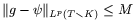 , image two=
 , image three=
 , image four=
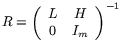 , and image five=
 .
The idea is to use some code from latex2html.
\XMLelement{formula}
 {\XMLattribute{id}{\XML@formid}{none}}
 {\@inlinemathA{\XML@formid}}
 {\@inlinemathZ}
There is no need to redefine brackets, because in the current version, nothing is in display. The argument of this procedure is the number of the image (the `id’ attribute of the XML element). We open a box, containing a rule, and the content of the element.
\newbox\sizebox
\def\@inlinemathA#1{%
  \gdef\[{$\displaystyle}\gdef\]{$} % hack...
  \xdef\@mathenv{#1}%
  \adjustnormalsize \newpage\clearpage
  \setbox\sizebox=\hbox\bgroup\kern.05em
  \vrule height1.5ex width0pt }
This is a hack defined by latex2html. Is everything needed?
\AtBeginDocument{
\let\realnormalsize=\relax
\def\adjustnormalsize{%
  \def\normalsize{\mathsurround=0pt \realnormalsize
   \parindent=0pt\abovedisplayskip=0pt\belowdisplayskip=0pt}%
  \def\phantompar{\csname par\endcsname}%
  \normalsize}
}
Vertical alignment is done as follows: the baseline is either the bottom or the center. That is, if the depth of the box is not zero, we add a vrule with the same height and depth.
\def\@centerinlinemath{%
  \dimen1=\ifdim\ht\sizebox<\dp\sizebox \dp\sizebox\else\ht\sizebox\fi
  \advance\dimen1by.5pt \vrule width0pt height\dimen1 depth\dimen1
 \dp\sizebox=\dimen1\ht\sizebox=\dimen1\relax}
This is done at the end of the math formula. The log file will contain lines of the form l2hSize :1:8.0pt::8.0pt::94.54239pt. The Perl script reads these data from the log file, and calls another Perl script: /usr/bin/perl /usr/local/latex2html/bin/pstoimg -type png -tmp tmpdir -discard -interlace -antialias -depth 1 -scale 1.4 -geometry 94x16 -margins 62,41 -crop abls -transparent -out math_image_1.png tmpdir/images001
\def\@inlinemathZ{%
  \egroup\expandafter\ifdim\dp\sizebox>0pt %
  \expandafter\@centerinlinemath\fi
  \typeout{l2hSize %
   :\@mathenv:\the\ht\sizebox::\the\dp\sizebox::\the\wd\sizebox.}
  \hbox{\vrule width.1em\kern-.05em\vtop{\vbox{%
  \kern.1em\kern0.6 pt\hbox{\hglue.17em\copy\sizebox\hglue0.6 pt}}\kern.3pt%
  \ifdim\dp\sizebox>0pt\kern.1em\fi \kern0.6 pt%
  \ifdim\hsize>\wd\sizebox \hrule depth1pt\fi}}%
  \ifdim\ht\sizebox<\vsize
      \ifdim\wd\sizebox<\hsize\expandafter\hfill\fi \expandafter\vfill
      \else\expandafter\vss\fi
  \clearpage
}
Now, sixty lines of hack. Complete code
here. Translation of fo:list-item-label
calls \savebox{\ItemBox}{#1} just before \item[#1]. This code is
executed again here. I don’t remember why (the \ItemBox is only used
here).
\def\jg@item[#1]{%
  \if@noparitem
    \@donoparitem
  \else
    \if@inlabel ...  \fi
    \ifhmode ...     \fi
    \if@newlist ...    \fi
    \global\@inlabeltrue
  \fi
  \global\everypar{ ... }
  \if@noitemarg ... \fi
  \savebox{\ItemBox}{#1}% Added JG
  \sbox\@tempboxa{\makelabel{#1}}%
  \global\setbox\@labels\hbox{ use \@tempboxa here... }
  \ignorespaces}
Last minutes hacks. Some actions must be done after all packages have been loaded. Some other symbols are defined, or redefined.
define characters
\AtBeginDocument{
  \@namedef{Gin@rule@.eps}#1{{eps}{.eps}{#1}}
  \global\let\FOlabel\xFOlabel
  \let\NoTableSetup\myNoTableSetup

  \let\downslopeellipsis\ddots
  \mathchardef\Rightarrow="3229
   more characters here

  \def\truestate{\models}
  \let\@texttop\ra@useatxy
  \let\XURL\relax
  \errorcontextlines=1000
  \selectlanguage{english}
  \let\@item\jg@item
  \expandafter\let\csname E/:\XMLNS@fo:basic-link\endcsname\patched@basiclink
}

\def\L@fr{\selectlanguage{french}}
\def\L@FR{\selectlanguage{french}}
5.10 The fotex.cfg file
The file looks like this. Some lines are commented: they define
quantities unused by the Raweb. Elements hrule and vfill are obsolete?
useless? (I don’t remember). Switching to french is valid only for a
French document. The two commands \foratheme and \foinria are
defined in the file raweb-cfg.sty.
\frenchspacing
\selectlanguage{french}

\DeclareNamespace{fo}{http://www.w3.org/1999/XSL/Format}

\XMLelement{fo:RATHEME}
  {}
  {\xmlgrab}
  {\foratheme{#1}}

% \XMLelement{fo:RRTHEME} ...

\XMLelement{fo:INRIA}
  {\XMLattribute{year}{\ra@@year}{2001}}
  {}{\xdef\ra@year{\ra@@year}\foinria}

% \XMLelement{fo:RRINRIA} ...

\XMLelement{hrule} {} {\par\hrule\par} {}
\XMLelement{vfill} {} {\vfill} {}